1. Introducció
The LAFVIN LA058 4WD Smart Robot Car Kit is designed as a comprehensive learning platform for robotics and programming enthusiasts. Utilizing a Raspberry Pi (not included) as its central controller, this kit integrates various sensors and functional modules to provide an interactive experience. It supports multiple Raspberry Pi models, including 5, 4 B, 3 B+, B, and A+.
This manual provides essential information for assembling, operating, and maintaining your robot car kit. For detailed assembly instructions and programming tutorials, please refer to the online resources provided by LAFVIN.
2. Continguts del producte
Before beginning assembly, verify that all components listed below are present in your kit. Refer to the image below for a visual representation of the included parts.

Imatge 2.1: Acabatview of all components included in the LAFVIN LA058 4WD Smart Robot Car Kit. This includes the main chassis, wheels, motors, sensors, camera module, and various electronic parts and tools.
El kit normalment inclou:
- Main Robot Car Chassis (PCB Board)
- 4 x motors de corrent continu
- 4 x rodes
- Junta de Conductors de Motor
- Mòdul de sensor d'ultrasons
- Line Tracking Module
- Camera Module with Servo
- Data Cables and Connectors
- Screws, Nuts, and Spacers
- Petit tornavís
- IIC OLED Display
- Battery Holder (18650 batteries not included)
Nota: A Raspberry Pi board and 18650 batteries are no included in this kit and must be purchased separately.
3. Muntatge i muntatge
Assembly of the LAFVIN LA058 robot car involves connecting various electronic components to the main chassis and integrating the Raspberry Pi. Detailed step-by-step assembly instructions, including videos and diagrams, are available through LAFVIN's online documentation and tutorials.
3.1 Main Components Overview
Familiarize yourself with the primary components of the robot car before assembly.
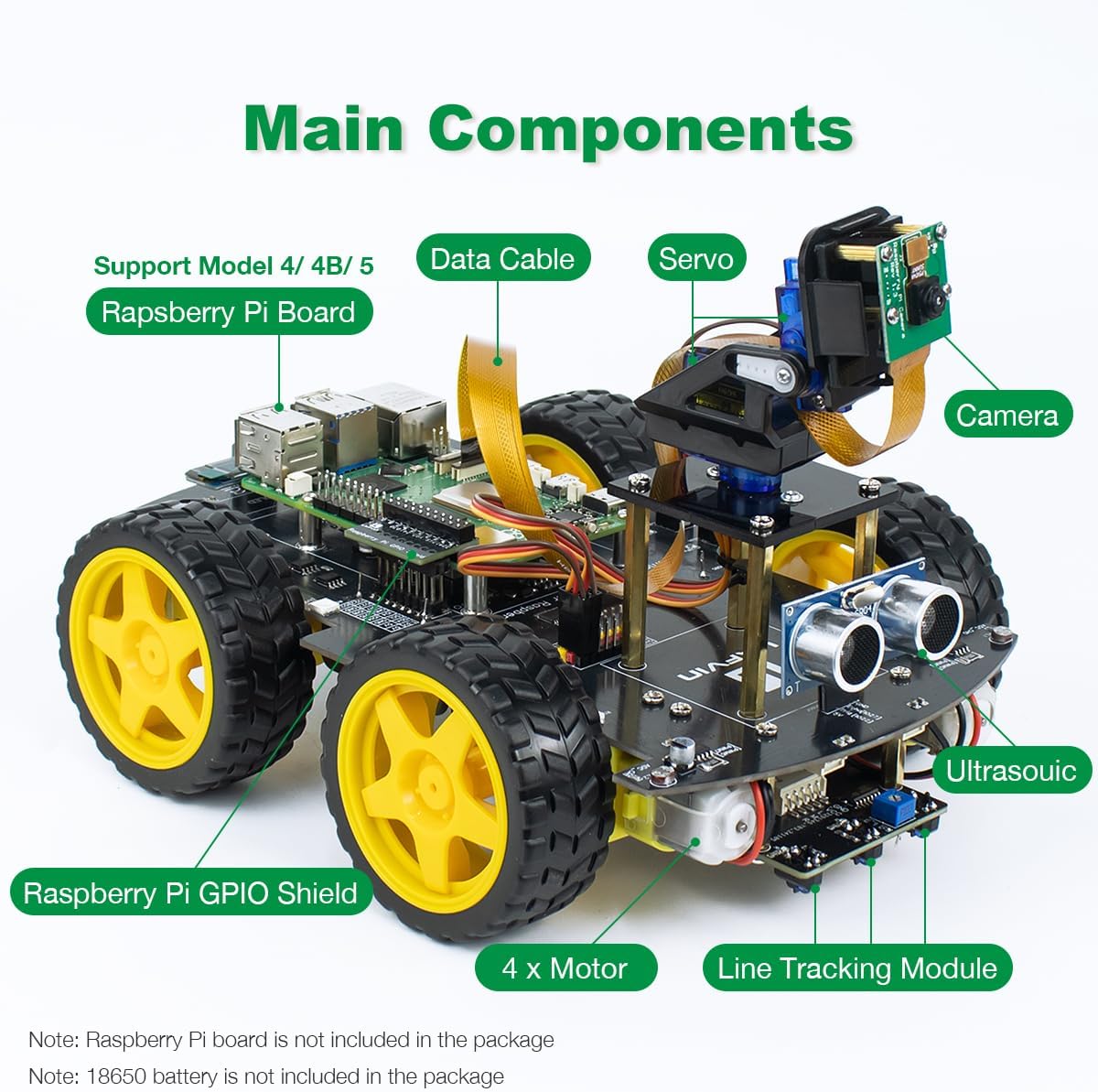
Imatge 3.1: Labeled diagram showing the main components of the assembled LAFVIN LA058 robot car, including the Raspberry Pi board, camera, servo, ultrasonic sensor, motors, and line tracking module.
Els components clau inclouen:
- Raspberry Pi Board: The central processing unit (not included).
- Raspberry Pi GPIO Shield: Connects the Raspberry Pi to the car's various modules.
- 4 x Motors: Provide propulsion for the 4WD system.
- Sensor d'ultrasons: Used for obstacle detection and avoidance.
- Line Tracking Module: Enables the car to follow lines on the ground.
- Càmera: Provides real-time video feed and supports advanced features like face recognition.
- Servos: Controls the pan/tilt movement of the camera.
- Data Cables: Connect various modules to the Raspberry Pi.
3.2 General Assembly Steps (Refer to Online Tutorials for Details)
- Attach the motors to the chassis.
- Mount the wheels onto the motor shafts.
- Install the Raspberry Pi GPIO shield onto your Raspberry Pi board.
- Secure the Raspberry Pi assembly to the main chassis.
- Connect the motor driver board and wire the motors.
- Mount the ultrasonic sensor, line tracking module, and camera module.
- Connect all sensors and modules to the Raspberry Pi GPIO shield using the provided data cables.
- Install the 18650 batteries (not included) into the battery holder and connect it to the power input.
It is highly recommended to follow the official LAFVIN online assembly videos and documentation for precise and correct installation.
4. Instruccions de funcionament
The LAFVIN LA058 robot car is controlled via a multi-platform client application. This application allows you to manage various functions of the car, including movement, sensor modes, and accessory controls.
4.1 Instal·lació del programari
Before operating the car, you must install the necessary software on your Raspberry Pi and the control application on your chosen device (Windows, macOS, iOS, or Android). Refer to the LAFVIN online tutorials for detailed instructions on software setup and configuration.
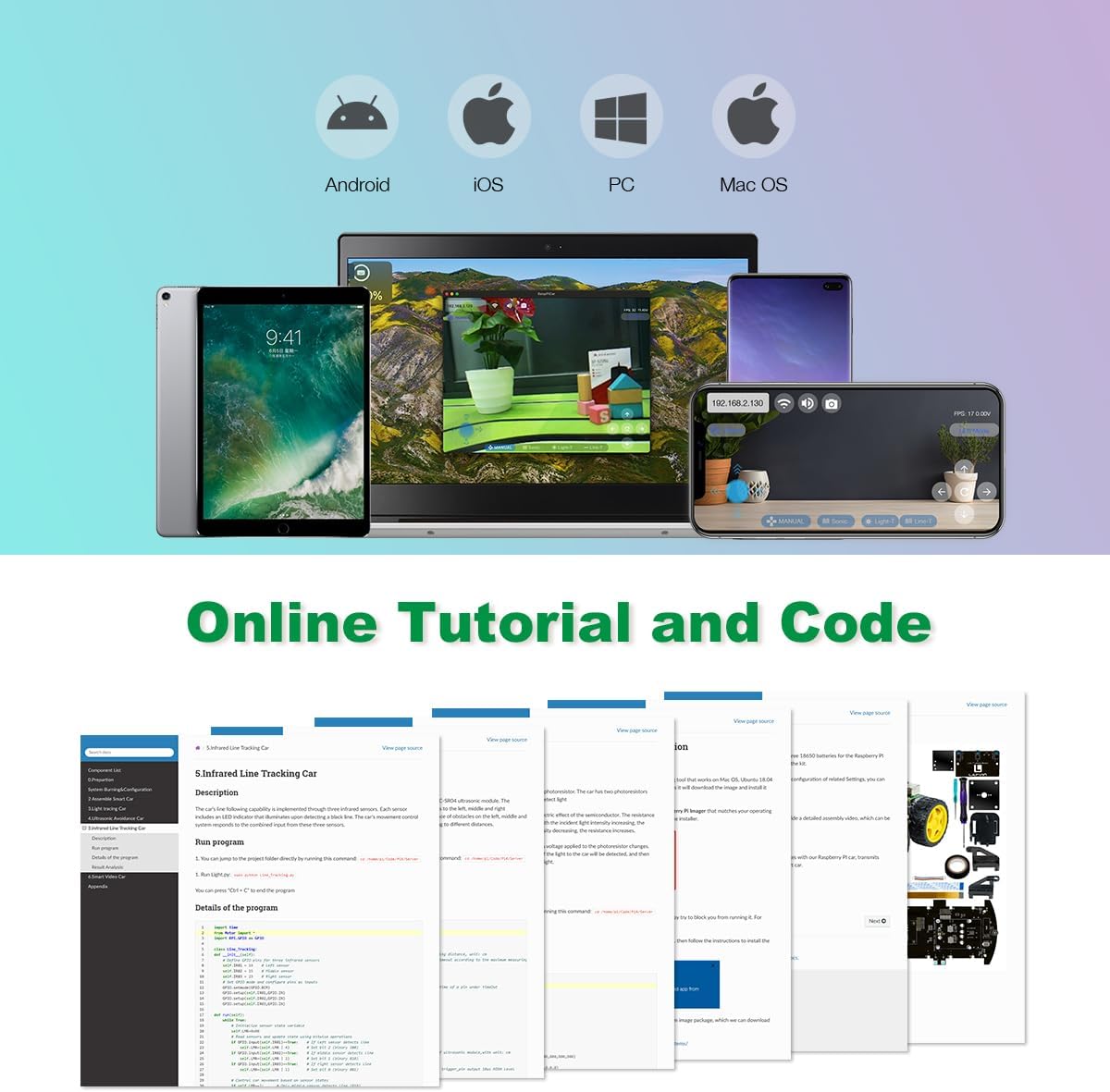
Imatge 4.1: Screenshot examples of the online tutorials and code resources available for the LAFVIN LA058 robot car kit, demonstrating comprehensive learning support.
4.2 Control bàsic
Once the software is configured and the car is powered on, connect your control device to the robot car's Wi-Fi network (or via other specified connection methods). The client application will provide a user interface for control.
- Control de moviment: Use the on-screen joystick or directional buttons to control the car's forward, backward, left, and right movements.
- Ajust de velocitat: The application typically includes a slider or buttons to adjust the car's speed.
- Ajust de la llum RGB: Control the color and intensity of the onboard RGB lights.
- Horn Sound Output: Activate the car's horn function through the app.
5. Característiques
The LAFVIN LA058 robot car kit offers a range of intelligent features, enhancing its functionality and educational value.
5.1 modes intel·ligents
The integrated sensor system enables the car to perform various autonomous functions:
- Line Following: Utilizes the line-following module to detect and follow black lines on a light surface.
- Light Tracking: Employs the photoresistor to track light sources.
- Ultrasonic Obstacle Avoidance: The ultrasonic module detects obstacles in the car's path, allowing it to navigate around them autonomously.
5.2 Real-Time Video and Face Recognition
The onboard camera module provides a real-time video feed to your control device, allowing for remote viewing and enhanced control precision.

Imatge 5.1: A smartphone displaying the real-time video feed from the LAFVIN LA058 robot car's camera, showing a cat. The interface also indicates control options and the ability to save screenshots.
Additionally, the Windows client application supports advanced face recognition and tracking features, adding a layer of interactive capability to your projects.
5.3 Customizable RGB Lights
The robot car is equipped with RGB lights that can be customized through the control application. Users can select various colors to change the car's lighting, adding a visual element to its operation.

Imatge 5.2: The LAFVIN LA058 robot car shown with its RGB lights illuminated in different colors, demonstrating the customizable lighting feature controlled via a smartphone app.
6. Manteniment
Proper maintenance ensures the longevity and optimal performance of your LAFVIN LA058 robot car kit.
- Neteja: Regularly clean the chassis and wheels to remove dust and debris. Use a soft, dry cloth. Avoid using liquids directly on electronic components.
- Connexions: Periodically check all wire connections to ensure they are secure. Loose connections can lead to erratic behavior or component failure.
- Cura de la bateria: If using rechargeable 18650 batteries, follow the manufacturer's guidelines for charging and storage. Remove batteries if the car will not be used for an extended period.
- Actualitzacions de programari: Keep the Raspberry Pi operating system and the robot car's control software updated to benefit from performance improvements and new features.
- Emmagatzematge: Store the robot car in a cool, dry place away from direct sunlight and extreme temperatures.
7. Solució De Problemes
This section addresses common issues you might encounter with your LAFVIN LA058 robot car. For more in-depth troubleshooting, consult the LAFVIN online documentation.
7.1 Problemes comuns i solucions
- Car Not Powering On:
- Assegureu-vos que les bateries estiguin instal·lades i carregades correctament.
- Check all power connections from the battery holder to the main board.
- Verify the Raspberry Pi is properly seated and powered.
- No Response from Control App:
- Confirm your control device is connected to the robot car's Wi-Fi network.
- Ensure the robot car's software is running correctly on the Raspberry Pi.
- Restart both the robot car and the control application.
- Sensors Not Functioning (e.g., Obstacle Avoidance):
- Check the physical connections of the sensor modules to the Raspberry Pi.
- Verify that the sensor-related code is correctly loaded and running on the Raspberry Pi.
- Assegureu-vos que els sensors estiguin nets i sense obstruccions.
- Motors Not Moving:
- Check motor wiring to the motor driver board.
- Ensure the motor driver board is correctly connected and receiving power.
- Verify that motor control commands are being sent from the app and processed by the Raspberry Pi.
If issues persist, refer to the comprehensive online tutorials and community forums for further assistance.
8. Especificacions
Below are the technical specifications for the LAFVIN LA058 4WD Smart Robot Car Kit.
| Característica | Especificació |
|---|---|
| Marca | LAFVIN |
| Número de model | LA058 |
| Models compatibles amb Raspberry Pi | Raspberry Pi 5, 4 B, 3 B+, B, A+ |
| Pes de l'article | 1.75 lliures (aprox. 0.79 kg) |
| Dimensions del paquet | 9.4 x 7 x 2.5 polzades (aprox. 23.9 x 17.8 x 6.4 cm) |
| Mètode de control | Multi-platform client app (Windows, macOS, iOS, Android) |
| Key Sensors/Modules | Ultrasonic, Photoresistor, Line-following, Camera, RGB Lights |
| Modes intel·ligents | Line Following, Light Tracking, Ultrasonic Obstacle Avoidance, Face Recognition (Windows client) |
9. Garantia i Suport
For information regarding product warranty, technical support, and additional resources, please refer to the official LAFVIN website or contact LAFVIN customer service directly. Comprehensive online documentation, tutorials, and community support are available to assist you with assembly, programming, and troubleshooting.
Recursos en línia: LAFVIN provides extensive online documentation and video tutorials to guide users through every step of the process, from basic setup to advanced programming techniques. These resources are regularly updated.
Contacte amb l'assistència: If you encounter issues not covered in this manual or the online resources, please reach out to LAFVIN customer support through their official channels.
