1. Introducció
This manual provides detailed instructions for the setup, operation, and maintenance of your Bextgoo SW06-01-US 4K Spy Camera. Please read this manual thoroughly before using the device to ensure proper functionality and to maximize its capabilities. Keep this manual for future reference.

Image 1.1: The Bextgoo 4K Mini Camera highlighting its multiple connection modes and features.
2. Contingut del paquet
Verifiqueu que tots els elements que s'enumeren a continuació siguin presents al vostre paquet:
- 1 x Bextgoo Mini Security Camera
- 1 x 64GB TF Memory Card (pre-installed)
- 1 x Suport ajustable
- 1 x cable de càrrega USB
- 1 x Manual d'usuari (aquest document)

Image 2.1: The Bextgoo mini camera with its pre-installed 64GB TF card, ready for use.
3. Producte acabatview
Familiarize yourself with the camera's components and dimensions.
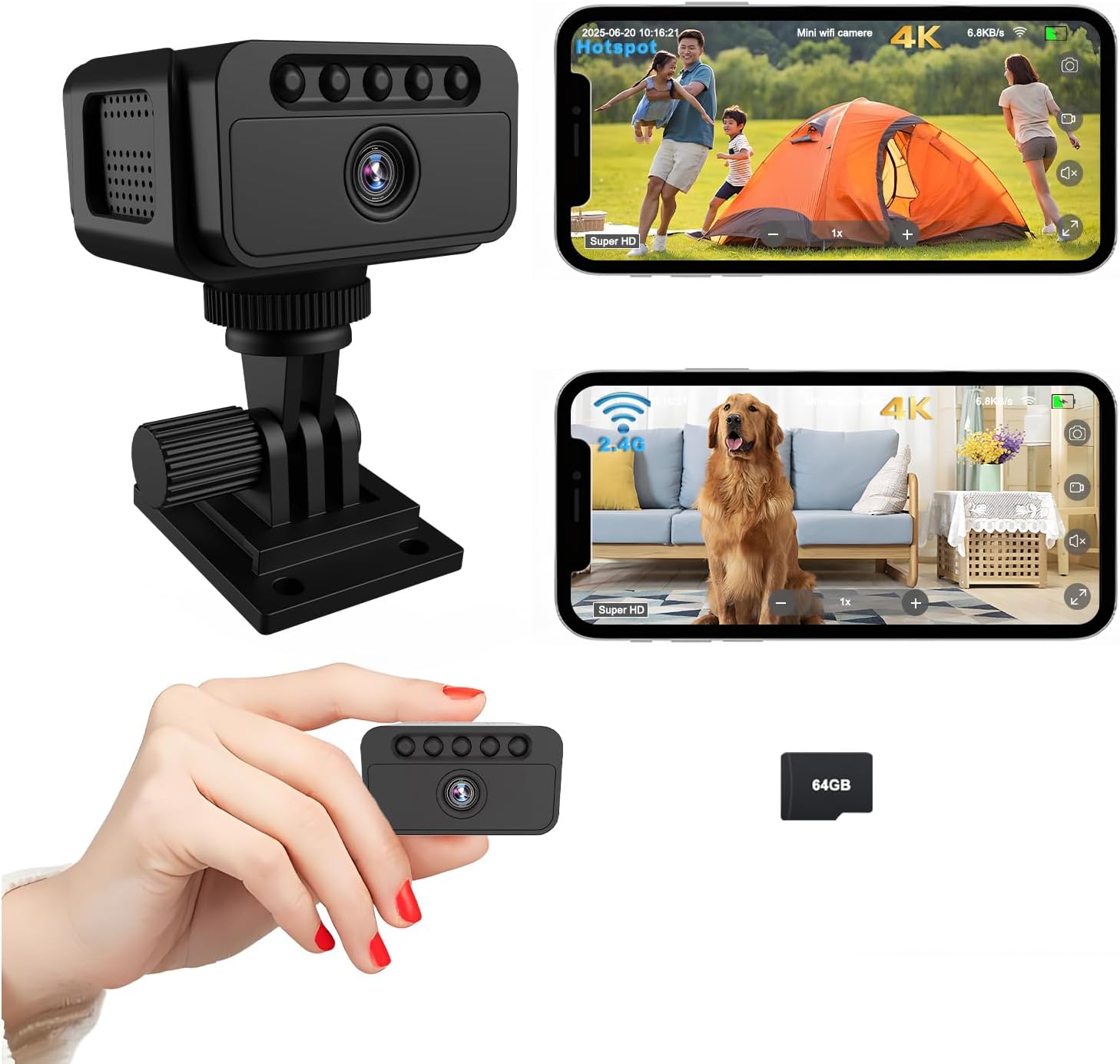
Imatge 3.1: acabatview of the Bextgoo mini camera, including its adjustable bracket and examples of live feed on a smartphone.

Image 3.2: Diagram showing the compact dimensions of the Bextgoo mini camera: Length 1.97in, Width 1.97in, Height 1.18in.
4. Característiques
- Vídeo 4K Ultra HD: Captures video in 4K resolution with a 150° wide-angle lens for comprehensive coverage.
- Three Connection Modes: Supports WiFi, AP Hotspot, and direct use without internet connectivity.
- Visió nocturna superior: Equipped with 5 powerful 940nm infrared lights for clear vision up to 10 meters in total darkness, without visible red glow.
- Bateria de llarga durada: Built-in 1500mAh rechargeable battery provides up to 8 hours of use and supports recording while charging.
- Emmagatzematge integrat: Comes with a pre-installed 64GB TF card, expandable up to 128GB, with optional cloud storage.
- Detecció de moviment: Automatically detects movement and sends instant notifications to your phone (in WiFi mode).
- Muntatge versàtil: Includes an adjustable bracket and adhesive pads for various mounting options (desk, wall, ceiling, flat surfaces).

Image 4.1: Visual comparison demonstrating the enhanced detail of 4K Ultra HD video compared to 2K resolution.

Image 4.2: Illustration comparing the clarity and invisibility of 940nm IR night vision with standard IR night vision.

Image 4.3: Depiction of the camera's 1500mAh battery capacity, indicating its suitability for extended operation and charging while in use.
5. Configuració
5.1 Càrrega de la càmera
Before first use, fully charge the camera. Connect the camera to a USB power adapter (not included) or a computer USB port using the provided USB cable. The charging indicator light will show the charging status.
5.2 Inserting/Removing the TF Card
The camera comes with a 64GB TF card pre-installed. If you need to replace or upgrade the card (up to 128GB), gently push the card into the slot until it clicks. To remove, push the card again until it ejects.
5.3 Modes de connexió
The Bextgoo SW06-01-US offers three distinct connection modes:
- Mode WiFi: Per a comandament a distància viewing and control via the mobile application. Requires an active 2.4GHz WiFi network.
- Mode de punt d'accés AP: Connects directly to your smartphone via the camera's built-in hotspot. Ideal for local viewing without an internet connection.
- Mode fora de línia: Records directly to the TF card without any network connection. Suitable for remote areas or situations where network access is unavailable.

Image 5.1: Visual guide to the camera's three connection modes, explaining their uses and requirements.
6. Funcionament
6.1 Instal·lació i emparellament de l'aplicació
- Download the designated mobile application from your smartphone's app store.
- Follow the in-app instructions to register an account and add your camera.
- Select your preferred connection mode (WiFi or AP Hotspot) and complete the pairing process.
6.2 Enregistrament de vídeo
Once connected, you can initiate video recording through the mobile application. In Offline Mode, recording starts automatically when the camera is powered on, or can be manually controlled via physical buttons (refer to specific button functions in the app or quick start guide).
6.3 Detecció de moviment
Enable motion detection in the app settings. When motion is detected, the camera will begin recording and send a notification to your smartphone (WiFi mode only).
6.4 Activació de la visió nocturna
Night vision activates automatically in low-light conditions. You can also manually toggle it on/off via the mobile application.
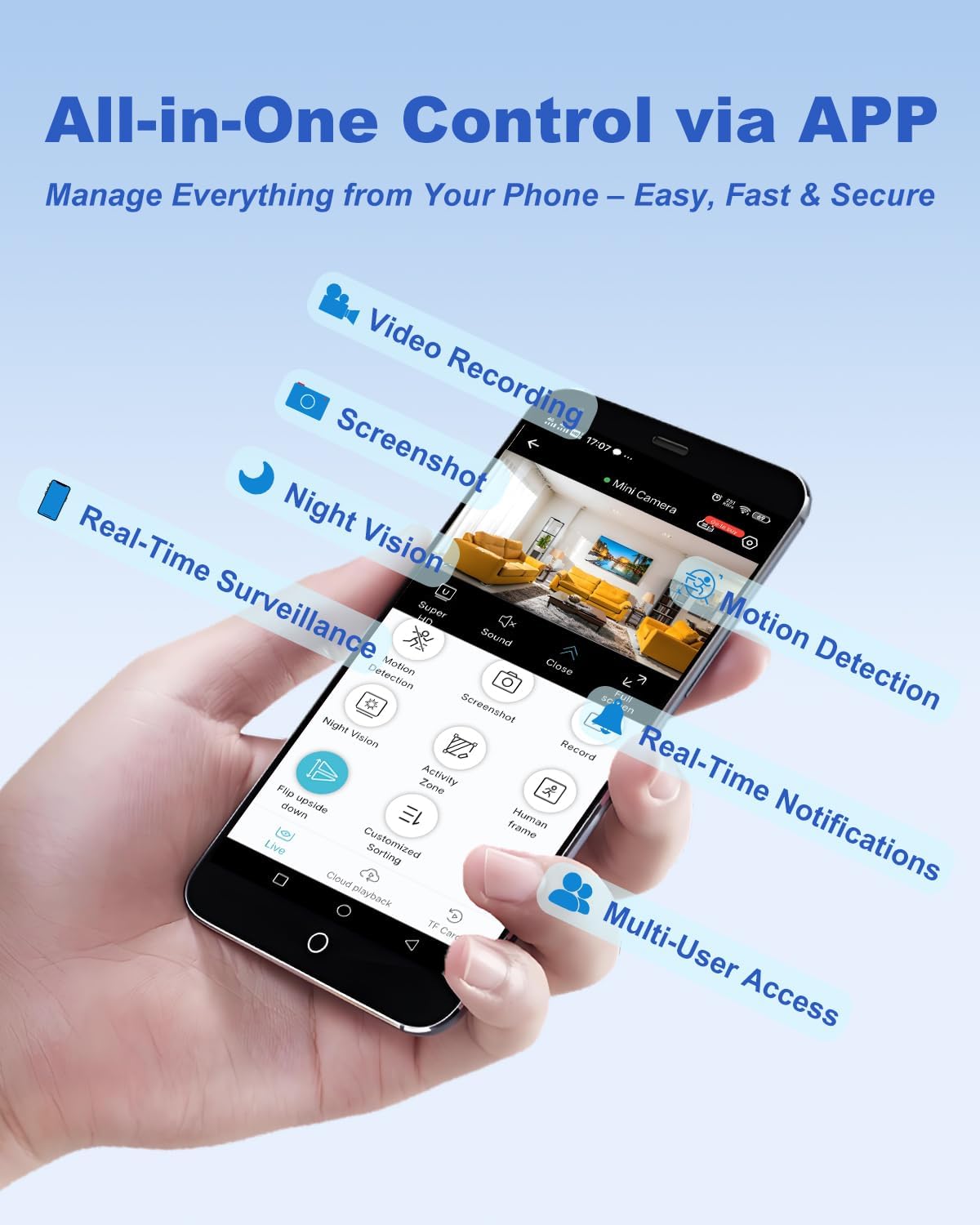
Image 6.1: The mobile application interface, demonstrating various control options such as video recording, screenshots, night vision, motion detection, and real-time notifications.
7. Opcions de muntatge
The camera offers flexible mounting solutions to suit various environments:
- Col·locació d'escriptori: Simplement col·loqueu la càmera sobre qualsevol superfície plana.
- Muntatge en paret: Use the adjustable bracket and adhesive pads or screws to secure it to a wall.
- Muntatge al sostre: Attach the bracket to the ceiling for an overhead view.
- Altres superfícies: The compact design and included accessories allow for discreet placement on shelves, under cabinets, or other suitable locations.

Imatge 7.1: Ex.amples of the camera mounted in different locations, including on a desk, wall, and ceiling, demonstrating its versatility.
8. Manteniment
- Neteja: Use a soft, dry cloth to clean the camera lens and body. Avoid liquid cleaners.
- Emmagatzematge: Store the camera in a cool, dry place away from direct sunlight when not in use for extended periods.
- Cura de la bateria: Per allargar la durada de la bateria, eviteu descarregar-la completament amb freqüència. Carregueu-la regularment, fins i tot si no l'utilitzeu constantment.
- Actualitzacions de firmware: Check the mobile application periodically for available firmware updates to ensure optimal performance and security.
9. Solució De Problemes
- La càmera no s'encén: Assegureu-vos que la bateria estigui carregada. Connecteu-la a una font d'alimentació i torneu-ho a provar.
- No es pot connectar a WiFi: Verify your WiFi network is 2.4GHz. Ensure the camera is within range of the router. Restart both the camera and router.
- Poca qualitat de vídeo: Check for obstructions on the lens. Ensure sufficient lighting. In WiFi mode, check your network speed.
- La detecció de moviment no funciona: Ensure motion detection is enabled in the app settings. Adjust sensitivity if necessary.
- TF card not recording: Ensure the TF card is correctly inserted and not full. Format the card via the app if issues persist.
- AP Hotspot range limited: AP Hotspot mode is designed for short-range direct connection. For wider range, use WiFi mode.
10. Especificacions
| Nom del model | SW06-01-US |
| Resolució de captura de vídeo | 4K |
| Viewangle ing | 150 graus |
| Tecnologia de connectivitat | WiFi, AP Hotspot, Direct Use Without Internet |
| Font d'alimentació | Alimentat per bateria (1500 mAh) |
| Gamma de visió nocturna | 10 Meters (940nm IR) |
| Emmagatzematge | Built-in 64GB TF Card (Supports up to 128GB, Cloud Optional) |
| Ús interior/exterior | Interior, Exterior |
| Dimensions (L x A x A) | 3.8 x 2.5 x 2.2 polzades |
| Pes de l'article | 6.4 unces |
| Tipus d'alerta | Només moviment |
| Tipus de controlador | APP |
11. Garantia i Suport
For warranty information and technical support, please refer to the official Bextgoo website or contact customer service through the details provided on your product packaging or purchase platform. Keep your proof of purchase for warranty claims.


