1. Introducció
Thank you for choosing the Portronics Power Shutter 20000mAh Magnetic Wireless Powerbank. This device is designed to provide convenient and efficient charging for your mobile devices, featuring both wired and wireless fast charging capabilities, along with built-in cables for enhanced portability. Please read this manual carefully before use to ensure optimal performance and safety.
2. Què hi ha a la caixa
- Powerbank (1N)
- Documentation (1N)
- Charging Cable (1N)
3. Producte acabatview
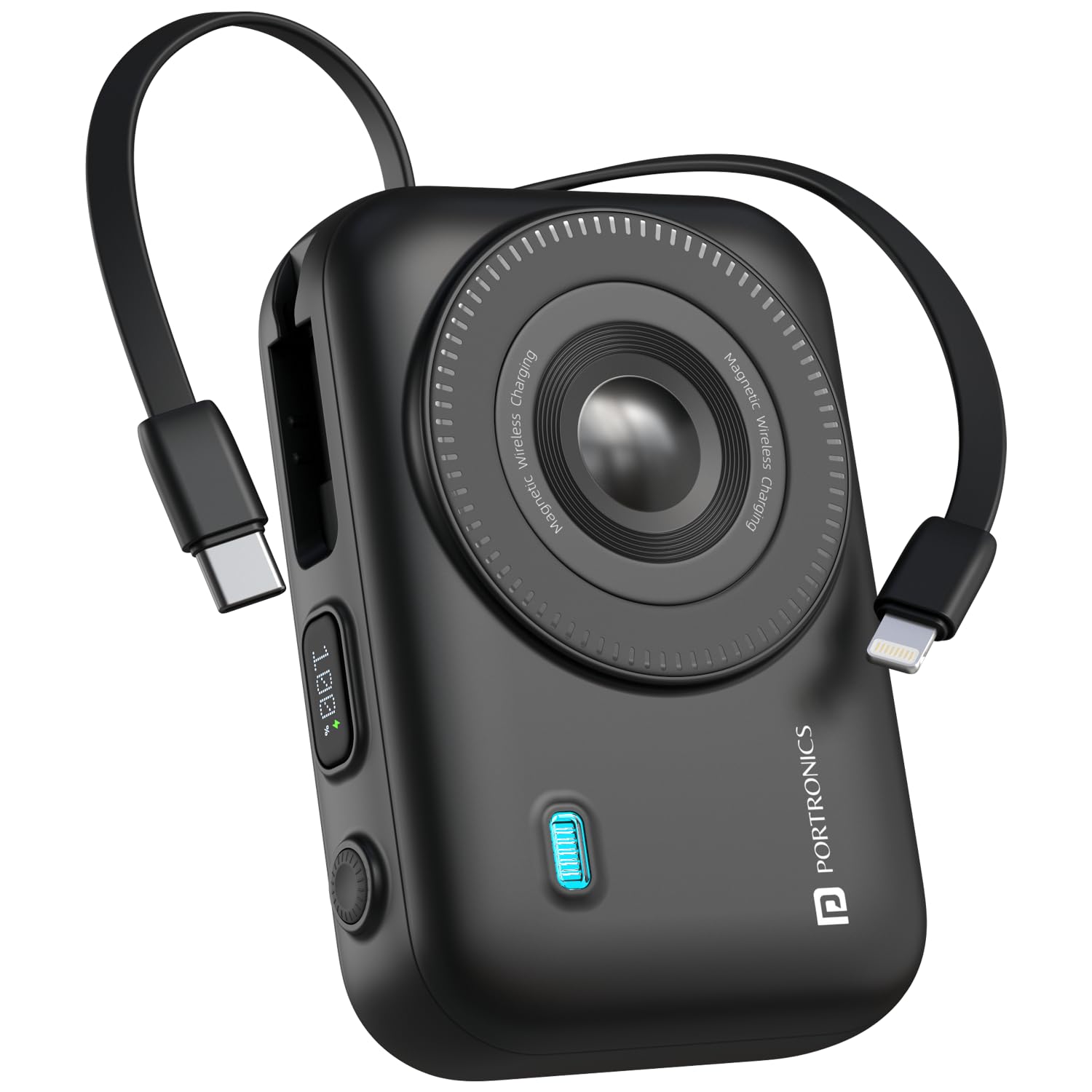
The Portronics Power Shutter 20000mAh is a high-capacity power bank with a unique design and multiple charging options. It features a 15W magnetic wireless charging surface, 22.5W wired fast charging via dual output ports (USB and Type-C), and convenient in-built Type-C and 8-Pin cables. A digital LED display provides real-time battery status.
Característiques principals:
- Capacitat de 20000 mAh: Provides multiple charges for smartphones, tablets, and earbuds.
- 15W Magnetic Wireless Charging: Effortlessly charge Qi-enabled devices by simply placing them on the power bank.
- Càrrega ràpida amb cable de 22.5 W: Dual output ports (USB and Type-C) for rapid charging of various devices.
- In-Built Cables: Includes integrated Type-C and 8-Pin cables for convenience.
- Pantalla LED digital: Shows exact battery percentage i estat de càrrega.
- Bidirectional Type-C Port: Functions as both input and output.
- Multi-layer Circuit Protection: Ensures safe charging against overcurrent, overheating, and overcharging.
Components del producte:
The Power Shutter 20000mAh power bank with a phone attached, demonstrating 15W magnetic wireless charging. Features like strong magnetic suction and auto-hibernation are highlighted.

Two Portronics Power Shutter 20000mAh power banks, one with a phone magnetically attached, illustrating its compact, pocket-sized design.

Un primer pla view of the power bank's side, highlighting the LED digital display showing battery percentage and the bidirectional Type-C port for input/output.
Vídeos del producte:
This video demonstrates the unboxing and various charging functionalities of the Portronics Power Shutter Pro, including the use of built-in cables and the digital display. While a 'Pro' model, the core features are similar.
This video showcases the 15W Magsafe wireless charging feature of the Portronics Revvo power bank, demonstrating how devices magnetically attach and charge. This feature is also present in your Power Shutter model.
4. Configuració
4.1 Initial Charging of the Powerbank
- Before first use, fully charge your Portronics Power Shutter power bank.
- Connect the provided USB Type-C charging cable to the bidirectional Type-C port on the power bank.
- Connecteu l'altre extrem del cable a un adaptador de paret USB compatible (no inclòs) o al port USB d'un ordinador.
- La pantalla digital LED mostrarà el progrés de la càrrega. El banc d'energia està completament carregat quan la pantalla mostra el 100%.
5. Instruccions de funcionament
5.1 Charging Devices Wirelessly (15W Magnetic)
- Ensure your device is Qi-enabled and supports magnetic wireless charging.
- Align your device with the magnetic charging surface on the power bank. The magnets will help snap your device into place.
- The power bank will automatically begin wireless charging. The LED display may indicate wireless charging activity.
5.2 Charging Devices with Built-in Cables (22.5W)
- Identify the appropriate built-in cable for your device: Type-C or 8-Pin.
- Gently pull out the required cable from its storage slot on the power bank.
- Connect the cable to your device's charging port.
- The power bank will automatically detect your device and begin charging. The LED display will show the power bank's remaining charge.
5.3 Charging Devices with External Cables (22.5W)
- Use your own USB-A to Type-C/Lightning cable or a Type-C to Type-C cable.
- Connect one end of your cable to the USB-A output port or the bidirectional Type-C port on the power bank.
- Connecteu l'altre extrem del cable al port de càrrega del dispositiu.
- El banc d'energia detectarà automàticament el dispositiu i començarà a carregar-se.
6. Informació de seguretat
- No exposeu el banc d'energia a temperatures extremes, a la llum solar directa ni al foc.
- Eviteu deixar caure, desmuntar o modificar el dispositiu.
- Mantenir allunyat de l'aigua i altres líquids.
- No l'utilitzeu si el banc d'energia està danyat o inflat.
- Mantenir fora de l'abast dels nens.
- Utilitzeu només cables de càrrega i adaptadors compatibles.
- Do not place metal objects on the wireless charging surface.
7. Manteniment
- Netegeu el banc d'energia amb un drap suau i sec. No utilitzeu productes químics agressius ni materials abrasius.
- Guardeu el banc d'energia en un lloc fresc i sec quan no l'utilitzeu.
- Si l'emmagatzemeu durant un període prolongat, carregueu el banc d'energia al 50% aproximadament cada tres mesos per mantenir la bateria en bon estat.
8. Solució De Problemes
8.1 Power bank not charging:
- Assegureu-vos que el cable de càrrega estigui connectat correctament tant al banc d'alimentació com a la font d'alimentació.
- Prova un cable de càrrega o un adaptador de paret diferent.
- Verifiqueu que la font d'alimentació estigui activa.
8.2 Device not charging from power bank:
- Comproveu si el banc d'energia té prou càrrega (consulteu la pantalla LED).
- Ensure the device is properly connected via wired or wirelessly.
- For wireless charging, ensure your device is Qi-enabled and correctly aligned on the magnetic surface.
- Prova un cable o port diferent al banc d'alimentació.
- Some phone cases may interfere with wireless charging; try removing the case.
8.3 Slow charging:
- Ensure you are using a fast-charging compatible cable and adapter for the power bank itself.
- For device charging, ensure your device supports fast charging and the cable used is appropriate.
- High temperatures can affect charging speed; ensure the device is in a well-ventilated area.
9. Especificacions
| Característica | Detall |
|---|---|
| Número de model | POR-3016 |
| Capacitat de la bateria | 20000 mAh |
| Sortida de càrrega sense fils | 15W magnètic |
| Wired Output (Type-C PD) | 22.5W |
| Wired Output (USB) | 22.5W |
| In-Built Cables | Type-C & 8-Pin |
| Bidirectional Port | Type-C (Input & Output) |
| Mostra | Pantalla digital LED |
| Dimensions | 16.2 x 10.9 x 3.9 cm |
| Pes de l'article | 370 g |
| Característiques de seguretat | Overcurrent, Overheating, Overcharging Protection |
10. Garantia i Suport
This Portronics Power Shutter 20000mAh Magnetic Wireless Powerbank comes with a standard brand warranty. For any support, queries, or warranty claims, please contact Portronics Digital Pvt. Ltd. at:
- Correu electrònic: help@portronics.com
- Telèfon: +91 9555-245-245
- Address: First Floor Property No D 8 Upper Basement Sector 8 Noida Uttar Pradesh 201301, India


