1. Introducció
Thank you for choosing the Masajoy Spark 06 Wireless Headset. This manual provides detailed instructions for setting up, operating, and maintaining your headset to ensure optimal performance. The Spark 06 offers versatile connectivity, advanced audio features, and comfortable design for various communication needs.
2. Què hi ha a la caixa
- Masajoy Spark 06 Wireless Headset
- USB A / C Dongle
- USB C to 3.5MM Audio Cable
- Cable de càrrega tipus C.
- Manual d'usuari (aquest document)

The Masajoy Spark 06 Wireless Headset, shown with its included USB A/C dongle and 3.5mm audio cable, offering versatile connectivity options.
3. Producte acabatview
The Masajoy Spark 06 headset is designed for comfort and functionality. Familiarize yourself with its key components:

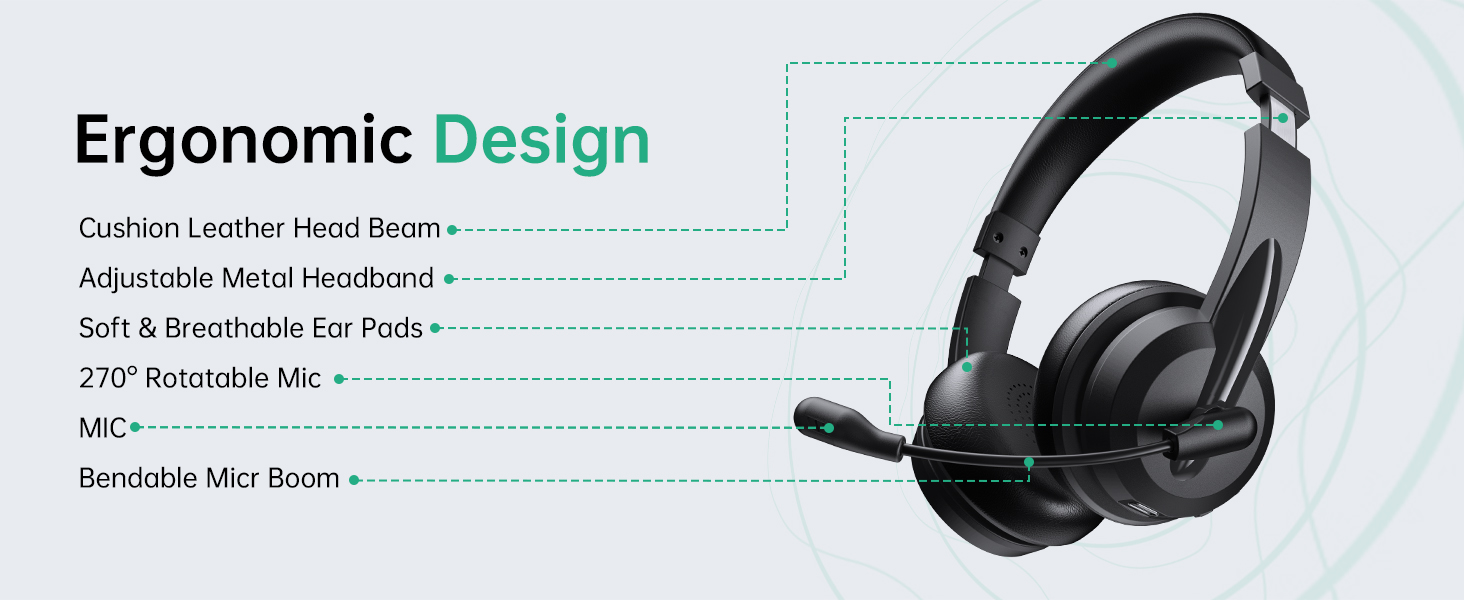
This diagram illustrates the ergonomic design of the Masajoy Spark 06 headset, highlighting features such as the cushion leather head beam, adjustable metal headband, soft and breathable ear pads, 270° rotatable microphone, and bendable mic boom.
Característiques principals:
- Cushion Leather Head Beam: Proporciona comoditat durant un ús prolongat.
- Adjustable Metal Headband: Ensures a secure and personalized fit.
- Soft & Breathable Ear Pads: Made from protein memory foam for comfort and to prevent overheating.
- 270° Rotatable Mic: Allows for flexible positioning and mute function activation.
- Bendable Mic Boom: For precise microphone placement.
4. Càrrega dels auriculars
Before first use, fully charge your headset. Use the provided Type C charging cable to connect the headset to a USB power source.
- Temps de càrrega: Aproximadament 2.5 hores per a una càrrega completa.
- Durada de la bateria: Up to 30 hours of talk time or 25 hours of music playback. Standby time is approximately 400 hours.

A user wearing the Masajoy Spark 06 headset while working on a laptop, with icons detailing its battery performance: approximately 30 hours of talk time, 25 hours of music playback, and 400 hours of standby time on a single charge.
5. Configuració i connexió
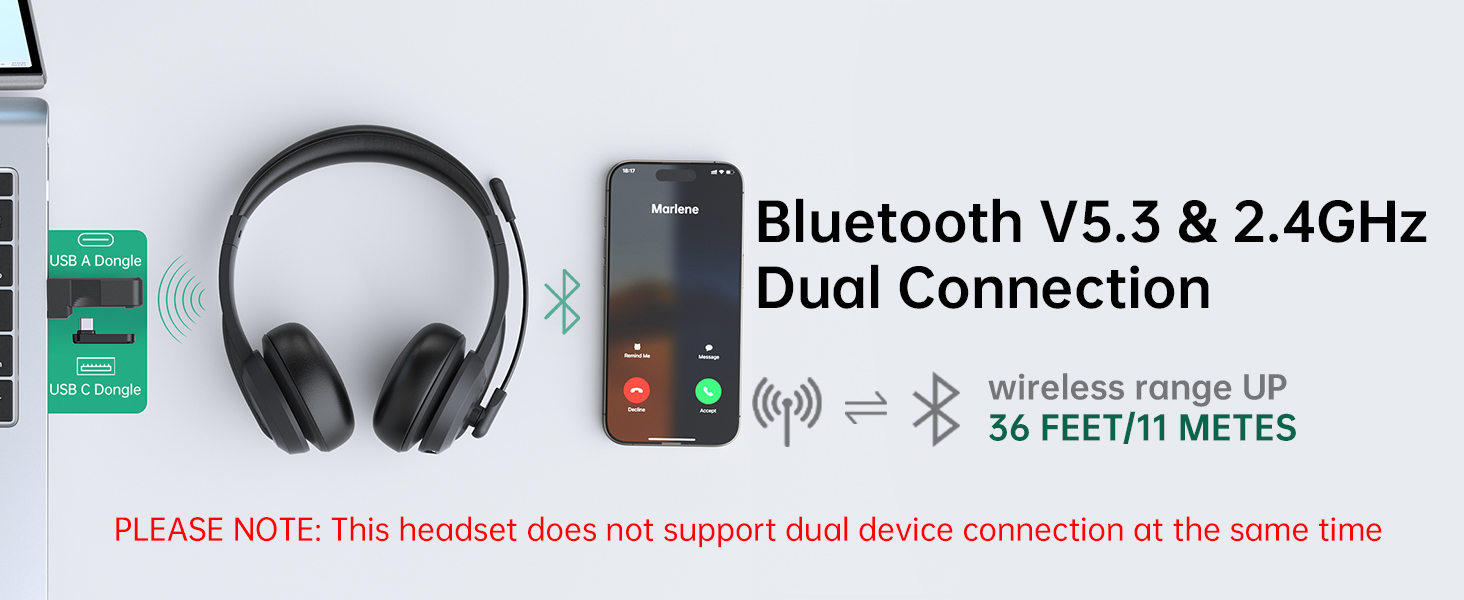
The Masajoy Spark 06 offers three connection modes: Bluetooth V5.3, 2.4G wireless via USB dongle, and wired via 3.5mm audio cable.
This image illustrates the dual connectivity options of the Masajoy Spark 06 headset, allowing connection via Bluetooth V5.3 to a smartphone and via a 2.4GHz USB A or USB C dongle to a laptop. The wireless range is up to 36 feet (11 meters). Note: Simultaneous dual device connection is not supported.
5.1. Bluetooth V5.3 Connection
- Assegureu-vos que els auriculars estiguin carregats i apagats.
- Premeu i manteniu premut el botó d'engegada fins que l'indicador LED parpellegi en blau i vermell, cosa que indica el mode d'emparellament.
- On your device (smartphone, laptop, etc.), enable Bluetooth and search for "Spark 06".
- Select "Spark 06" from the list of available devices to connect. The LED will turn solid blue when connected.
5.2. 2.4G Wireless Connection (USB Dongle)
- Assegureu-vos que els auriculars estiguin carregats i encesos.
- Plug the appropriate USB A or USB C dongle into your computer's USB port.
- The headset will automatically connect to the dongle. The LED indicator on the headset will turn solid blue.
- On your computer, select "Spark 06" as the audio input and output device in your sound settings.
5.3. Wired 3.5mm Audio Connection
- Connect one end of the USB C to 3.5mm audio cable to the headset's USB-C port.
- Connect the other end of the 3.5mm audio cable to your device's 3.5mm audio jack.
- The headset will function as a wired headset. No power is required for wired mode.
6. Instruccions de funcionament
6.1. Encendre/apagar
- Encès: Manteniu premut el botó d'engegada durant 3 segons.
- Apagar: Manteniu premut el botó d'engegada durant 5 segons.
6.2. Control de volum
- Pujar el volum: Premeu el botó '+'.
- Baixar el volum: Premeu el botó '-'.
6.3. Gestió de trucades
- Respondre/Finalitzar la trucada: Premeu el botó multifunció una vegada.
- Rebutja la trucada: Manteniu premut el botó multifunció durant 2 segons.
6.4. Microphone Mute Function
The headset features a convenient mute function by rotating the microphone boom.
A diagram illustrating the microphone mute function of the Masajoy Spark 06 headset. Rotating the microphone boom to the upright position (270 degrees) activates the mute feature, indicated by a voice prompt 'MIC mute' (available only during calls).
- A mut the microphone, rotate the microphone boom to the upright (vertical) position. You will hear a voice prompt: "MIC mute".
- A silenciar the microphone, rotate the microphone boom back down to the speaking position.
7. Cancel·lació de soroll per IA
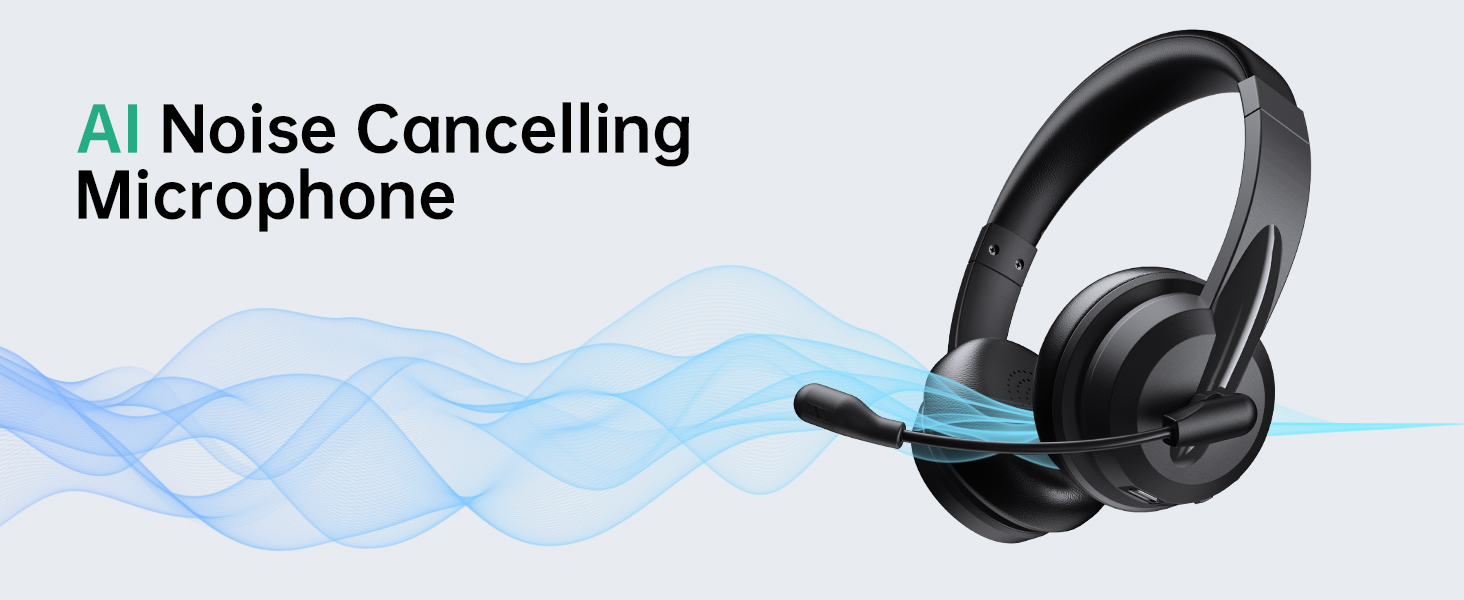
The Masajoy Spark 06 headset incorporates advanced AI noise cancellation technology to minimize background noise during calls, ensuring your voice is heard clearly.
The Masajoy Spark 06 headset features an AI Noise Cancelling Microphone, designed to reduce background noise for clearer communication. This feature is active only when connected via Bluetooth. The image shows users experiencing clear calls despite ambient office sounds.
NOTE: The AI Noise Cancellation feature is only available when the headset is connected via Bluetooth.
8. Manteniment i cura
- Netegeu els auriculars regularment amb un drap suau i sec. No utilitzeu productes químics agressius ni materials abrasius.
- Eviteu exposar els auriculars a temperatures extremes, humitat o llum solar directa.
- Guardeu els auriculars en un lloc fresc i sec quan no els feu servir.
- No intenteu desmuntar ni reparar els auriculars vosaltres mateixos, ja que això anul·larà la garantia.
9. Solució De Problemes
If you encounter issues with your Masajoy Spark 06 headset, refer to the table below for common problems and solutions.
| Problema | Causa possible | Solució |
|---|---|---|
| Els auriculars no s'encenen | Bateria baixa | Carregueu els auriculars durant almenys 30 minuts. |
| No es pot connectar mitjançant Bluetooth | Headset not in pairing mode; Bluetooth disabled on device; Device too far | Ensure headset is in pairing mode (flashing blue/red). Enable Bluetooth on your device. Move device closer to headset (within 36 feet/11 meters). |
| Sense so ni amb una mala qualitat de so | Incorrect audio output selected; Volume too low; Loose connection | Check your device's audio settings and select "Spark 06" as output. Increase volume. Ensure cables/dongle are securely connected. |
| El micròfon no funciona | Microphone muted; Incorrect audio input selected | Rotate the microphone boom down to unmute. Check your device's audio settings and select "Spark 06" as input. |
| AI Noise Cancellation not working | Headset not connected via Bluetooth | Ensure the headset is connected to your device using Bluetooth, as this feature is only available in Bluetooth mode. |
10. Especificacions
| Característica | Detall |
|---|---|
| Nom del model | Spark 06 |
| Marca | Masajoy |
| Tecnologia de connectivitat | Wireless (Bluetooth V5.3, 2.4G via USB Dongle), Wired (3.5mm Jack) |
| Versió Bluetooth | 5.3 |
| Interval Bluetooth | Fins a 11 metres (36 peus) |
| Control de soroll | AI Noise Cancellation (Mic, Bluetooth mode only), Passive Noise Cancellation (Earcups) |
| Tipus de controlador d'àudio | Controlador dinàmic (40 mm) |
| Interval de freqüència | 20 Hz - 20,000 Hz |
| Impedància | 40 ohms |
| Durada de la bateria | Approx. 30 hours talk time, 25 hours music time |
| Temps de càrrega | Aprox. 2.5 hores |
| Pes de l'article | 10.5 unces (aproximadament 0.3 kg) |
| Col·locació de l'orella | A l'orella |
| Dispositius compatibles | Computers, Smartphones, USB Devices (PC, Laptop, iPhone, Mac) |
11. Garantia i Suport
Masajoy products are designed for reliability and performance. For specific warranty information, please refer to the warranty card included with your purchase or contact Masajoy customer support.
If you require further assistance or have questions not covered in this manual, please visit the official Masajoy store or contact their customer service department.


