1. Introducció
This manual provides essential information for the safe and efficient operation, maintenance, and troubleshooting of your EUREKA E20 EVO PLUS Robot Vacuum Cleaner. Please read this manual thoroughly before using the product and retain it for future reference.
2. Informació de seguretat
Seguiu sempre les precaucions de seguretat bàsiques quan utilitzeu aparells elèctrics per reduir el risc d'incendi, descàrrega elèctrica o lesions.
- Do not operate the robot vacuum near water or wet surfaces.
- Mantingueu els cabells, la roba solta, els dits i totes les parts del cos lluny de les obertures i les parts mòbils.
- No agafeu res que estigui cremant o fumant, com ara cigarrets, llumins o cendres calentes.
- No l'utilitzeu sense un contenidor de pols i filtres al seu lloc.
- Store the robot vacuum indoors in a cool, dry place.
- Només feu servir la base de càrrega proporcionada pel fabricant.
- Assegureu-vos que la potència voltage coincideix amb el voltage specified on the charging dock.
- Supervise children when the robot vacuum is in operation.
3. Contingut del paquet
Verifiqueu que tots els components siguin presents al paquet:
- EUREKA E20 EVO PLUS Robot Vacuum Cleaner
- Estació base de càrrega
- Raspalls laterals (2)
- Mop Pad (1)
- Roller Brush (1)
- Adaptador d'alimentació
- Manual d'instruccions
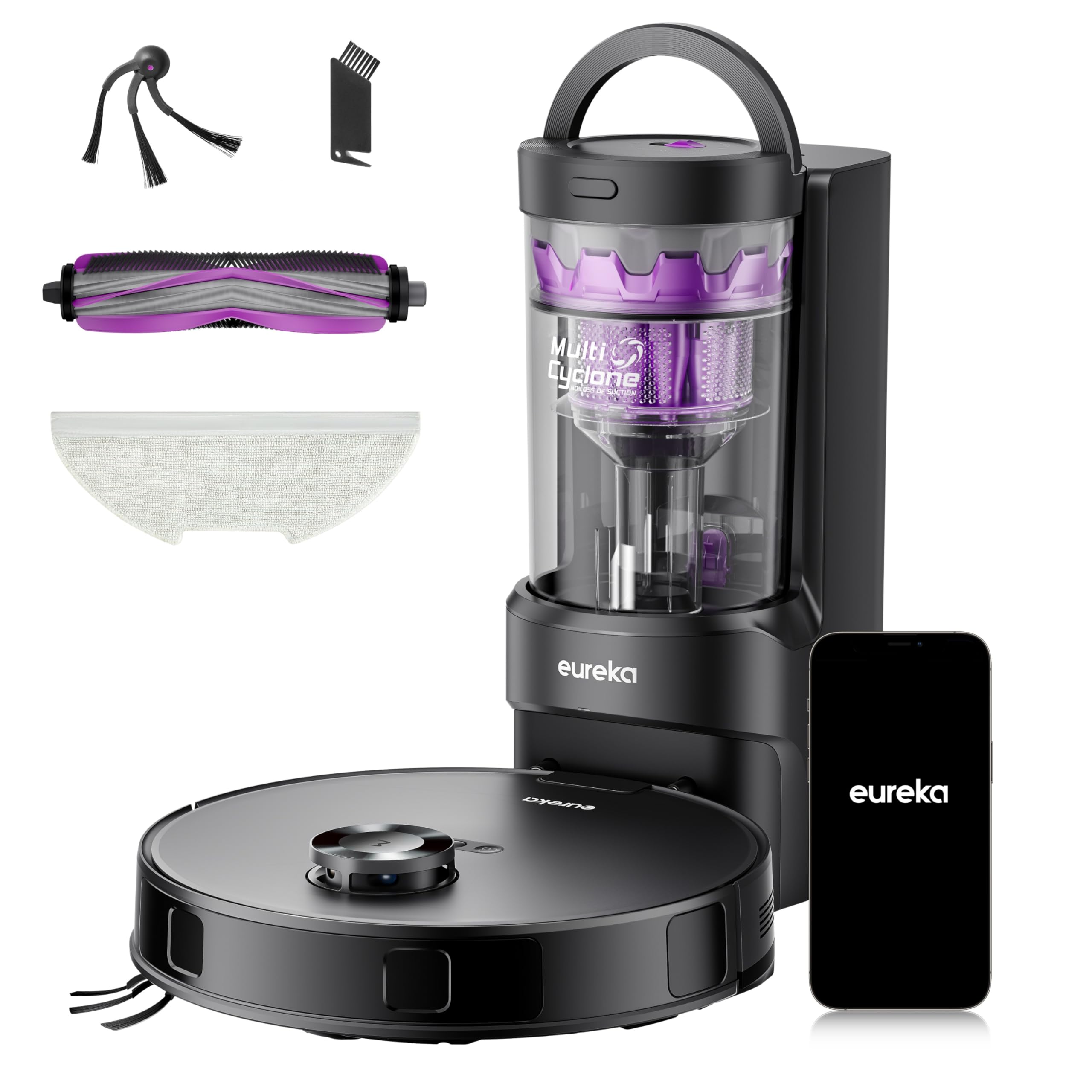
Image: EUREKA E20 EVO PLUS Robot Vacuum Cleaner and its charging base station.
4. Característiques del producte
- Succió forta de 10000 Pa: Equipped with a powerful motor, the E20 EVO PLUS delivers up to 10000 Pa suction for effective removal of dirt, dust, and pet hair.
- Cyclonic Dust Separation: Features a 13-cone multi-cyclone separation technology that separates 98% of dust and debris before it reaches the filter, extending filter life and maintaining consistent suction power. This design eliminates the need for disposable paper bags.
- Raspall lateral antiembolics: The unique V-shaped side brush design prevents hair from tangling during rotation, ensuring continuous and efficient cleaning.
- Enhanced Anti-Tangle Roller Brush: An innovative V-shaped roller brush with a dedicated comb effectively untangles hair from both ends, ensuring smooth operation and making it ideal for pet owners.
- Recollida automàtica de pols: The paper bag-free base station allows for one-button dust disposal, eliminating the need for frequent manual emptying and reducing running costs.
- Mop Lifting Function: Advanced mop lifting technology detects carpets and automatically lifts the mop by 10mm, keeping carpets dry during cleaning. Suction power is also automatically increased on carpets for thorough cleaning.
- Obstacle Avoidance and Climbing: Capable of overcoming obstacles up to 20mm high and features advanced PSD sensors for dynamic edge and corner detection, ensuring thorough cleaning without collisions.
- Simultaneous Suction and Mopping: Combines powerful suction with a wide-area mopping function to remove dirt and stubborn stains from hard floors, saving time and effort.
- Temps llarg: A 5200mAh large-capacity battery provides up to 310 minutes of cleaning time, covering an area of up to 560 square meters on a single charge.
- App Control and Smart Features: Customize cleaning preferences, create efficient maps, set up to 4 maps, define no-go zones, receive water tank refill reminders, and schedule cleaning via the Eureka app.
- Control de veu: Compatible with Alexa, Google Assistant, and Siri for convenient voice commands, allowing you to manage cleaning without opening the app.

Image: The robot vacuum effectively cleaning various debris like pet food, pet hair, and small particles with 10000Pa suction.

Image: Illustration of the cyclonic dust separation system and the large, bagless dustbin.

Image: Visual comparison demonstrating the effectiveness of the anti-tangle side brush against hair entanglement.

Image: The robot vacuum operating on a wooden floor, highlighting the anti-tangle roller brush feature, with a dog observing.

Image: The robot vacuum automatically lifting its mop when transitioning from hard floor to carpet, and increasing de succió.

Image: The robot vacuum demonstrating its ability to climb over a 20mm obstacle and clean along wall edges.

Image: A user relaxing while the robot vacuum simultaneously vacuums and mops the floor.

Image: The robot vacuum cleaning a spacious home, demonstrating its extended operating time and coverage.

Image: Various app interface screenshots showing mapping, scheduling, and smart control options for the robot vacuum.

Image: A user activating the robot vacuum using voice commands through a smart assistant.
5. Configuració
- Desembalatge: Carefully remove all components from the packaging. Remove any protective films or packing materials from the robot and charging base.
- Charging Base Placement: Place the charging base against a wall in an open area, ensuring there are no obstacles within 1 meter to either side and 1.5 meters in front. Connect the power adapter to the charging base and plug it into a power outlet.
- Instal·leu els raspalls laterals: Premeu els raspalls laterals contra els pals de la part inferior del robot fins que encaixin al seu lloc.
- Càrrec inicial: Place the robot vacuum on the charging base. Ensure the charging contacts on the robot align with those on the base. The robot will automatically begin charging. Fully charge the robot before first use (approximately 4-6 hours).
- Download the Eureka App: Scan the QR code in the quick start guide or search for "Eureka robot" in your app store (iOS/Android). Follow the in-app instructions to connect your robot vacuum to your home Wi-Fi network (2.4GHz only).
- Creació de mapes: During its first cleaning cycle, the robot will create a map of your home. Ensure all doors are open and clear the floor of any small obstacles to allow for accurate mapping.
6. Instruccions de funcionament
6.1 Inici/Pausa/Aturada de la neteja
- Comença a netejar: Press the power button on the robot or tap "Start Cleaning" in the Eureka app.
- Pausa la neteja: Press the power button on the robot or tap "Pause" in the app.
- Atura la neteja: Press and hold the power button for 3 seconds or tap "Stop" in the app. The robot will return to its charging base.
6.2 modes de neteja
Select various cleaning modes via the Eureka app:
- Neteja automàtica: The robot intelligently cleans your entire home.
- Neteja de punts: Neteja una zona específica amb més intensitat.
- Neteja de la zona: Neteja les zones definides per l'usuari al mapa.
- Neteja programada: Estableix hores específiques perquè el robot netegi automàticament.
6.3 Funció de fregar
Per utilitzar la funció de fregar:
- Ompliu el dipòsit d'aigua amb aigua neta.
- Attach the mop pad to the water tank.
- Install the water tank assembly into the robot.
- Select the mopping mode in the Eureka app.
The robot will automatically lift the mop when it detects carpets.
6.4 Control de veu
Connect your robot vacuum to Alexa, Google Assistant, or Siri through the Eureka app settings. Use simple voice commands like "Alexa, start cleaning" or "Hey Google, tell Eureka to go home."
7. Manteniment
Un manteniment regular garanteix un rendiment òptim i allarga la vida útil del teu robot aspirador.
7.1 Buidar el contenidor d'escombraries
- The robot automatically empties its dustbin into the base station.
- To manually empty the base station's dust cup: Press the release button on the base station and remove the dust cup. Dispose of collected debris.
- Clean the dust cup with a dry cloth. Do not wash the dust cup with water.
7.2 Neteja de filtres
- The cyclonic system significantly reduces filter clogging.
- Periodically check and clean the sponge filter in the robot's dustbin. Tap off loose dirt or use a cleaning brush. Do not wash with water.
7.3 raspalls de neteja
- Raspall de rodets: Remove the roller brush cover and lift out the roller brush. Use the cleaning tool to remove any tangled hair or debris. Reinstall the roller brush.
- Raspalls laterals: Pull the side brushes upwards to remove them. Clean any hair or debris. If brushes are worn, replace them. Reinstall by pressing them firmly onto the posts.
7.4 Neteja dels sensors i els contactes de càrrega
- Wipe all sensors (cliff sensors, wall sensors) and charging contacts on both the robot and the charging base with a clean, dry cloth.
7.5 Cleaning Mop Pad
- Remove the mop pad after each use. Wash it with water and let it air dry completely before reattaching.
8. Solució De Problemes
| Problema | Causa possible | Solució |
|---|---|---|
| El robot no s'engega ni respon. | Bateria baixa; interruptor apagat; robot encallat. | Charge the robot; Turn on the power switch; Clear obstacles. |
| Mal rendiment de neteja. | Cubell de pols ple; raspalls/filtres obstruïts; raspalls gastats. | Empty dustbin; Clean brushes/filters; Replace worn brushes. |
| El robot no pot tornar a la base de càrrega. | Charging base obstructed; Robot too far from base. | Clear area around base; Manually place robot near base. |
| Problemes de connexió de l'aplicació. | Contrasenya Wi-Fi incorrecta; encaminador massa lluny; xarxa Wi-Fi de 5 GHz. | Verifica la contrasenya; Acosta el robot al router; Assegura't que s'utilitza Wi-Fi de 2.4 GHz. |
| "Laser sensor cleaning" error. | Laser sensor obstructed or dirty. | Clean the laser sensor window with a soft, dry cloth. If the error persists, restart the robot. |
9. Especificacions
| Característica | Detall |
|---|---|
| Marca | EUREKA |
| Nom del model | E20 EVO PLUS |
| Potència d'aspiració | 10000 Pa |
| Dust Collection Type | Cyclonic, Bagless (2L capacity) |
| Tipus de bateria | Ió de liti |
| Capacitat de la bateria | 5200 mAh |
| Temps d'execució màxim | Fins a 310 minuts |
| Àrea màxima de neteja | Fins a 560 metres quadrats |
| Alçada d'elevació de la fregona | 10 mm (automatic on carpet) |
| Capacitat d'escalada d'obstacles | Fins a 20 mm |
| Tipus de controlador | App Control, Voice Control (Alexa, Google Assistant, Siri) |
| Tipus de filtre | Esponja |
| Dimensions de l'article (L x A x A) | 35 x 35 x 9.7 cm |
| Pes de l'article | 8 quilos |
| País d'origen | Xina |
10. Garantia i Suport
EUREKA provides a 1-year warranty for this product. During the warranty period, free repair and replacement services are available for manufacturing defects.
For technical support, warranty claims, or any product-related inquiries, please contact EUREKA customer service. Refer to the contact information provided in your product packaging or on the official EUREKA weblloc.
Additionally, EUREKA offers a 30-day return or new product exchange policy. Genuine accessories are also available for purchase.


Image: EUREKA's commitment to customer service, including warranty, support, and accessory availability.


