Introducció
This manual provides essential instructions for setting up, operating, and maintaining your TCL FLIP GO 4058W 4G LTE Flip Phone. Learn about its dual displays, tactile keypad, 4G LTE connectivity, and HD Voice features for clear communication. This device is designed for ease of use, offering reliable communication without the complexities of advanced smartphones.
Què hi ha a la caixa
Assegureu-vos que tots els elements estiguin presents al vostre paquet:
- TCL FLIP GO 4058W Phone
- Bateria
- Cable USB
Producte acabatview
The TCL FLIP GO 4058W is designed for straightforward communication with essential features:
- Unlocked (original carrier is T-Mobile)
- Reliable 4G LTE connectivity
- Convenient 2.8” internal and 1.44” external color displays
- Large, easy-to-read buttons
- Interfície fàcil d'utilitzar
- Dedicated shortcut keys to your Favorite Contacts and Messages
- Clear calls with powerful speaker, noise cancelation and HD Voice
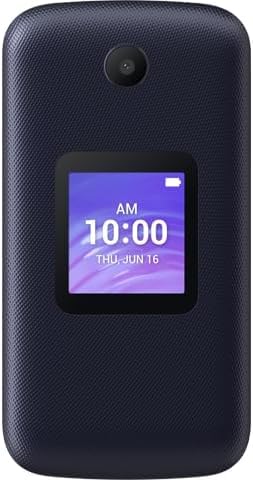
Figure 1: TCL FLIP GO 4058W with internal display and keypad visible.
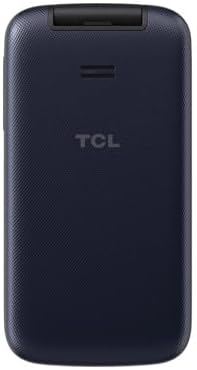
Figura 2: posterior view of the TCL FLIP GO 4058W, showing the external display and camera.
Configuració
1. Instal·leu la bateria
- Traieu la coberta posterior del telèfon.
- Alineeu els contactes de la bateria amb els terminals de l'interior del telèfon.
- Premeu suaument la bateria al seu lloc.
- Torneu a col·locar la coberta posterior, assegurant-vos que faci clic correctament.
2. Insert SIM Card (and Micro SD Card)
- With the back cover removed and battery installed, locate the SIM card slot(s).
- Insert your Nano SIM card into the designated slot, ensuring the gold contacts face down and the notched corner aligns correctly.
- If using a Micro SD card for additional storage, insert it into the Micro SD card slot.
- Close any retaining clips or covers for the SIM/SD card slots if present.
3. Encès
Press and hold the Power/End Call button until the screen illuminates and the phone vibrates.
Instruccions de funcionament
Realització de trucades
- Marcació: Open the phone, enter the number using the keypad, and press the Green Call button.
- Responent: When the phone rings, open it (if closed) and press the Green Call button.
- Finalització: Press the Red End Call button or close the phone.
- Contactes preferits: Use dedicated shortcut keys for quick access to pre-saved favorite contacts.
Enviament de missatges
- Navegueu fins a l'aplicació "Missatges" des del menú principal.
- Select 'New Message' and enter the recipient's number or select from contacts.
- Type your message using the tactile keypad.
- Premeu "Envia".
Ús de la càmera
- Access the 'Camera' application from the main menu.
- Enquadra la teva foto amb la pantalla interna.
- Press the 'OK' button to capture a photo.
Pantalla externa
The 1.44” external display shows incoming calls, messages, time, and date without needing to open the phone.
Manteniment
Cura de la bateria
- Carregueu la bateria completament abans del primer ús.
- Eviteu les temperatures extremes, que poden afectar la durada de la bateria.
- Feu servir només els accessoris de càrrega proporcionats o aprovats.
Neteja
Wipe the phone with a soft, dry cloth. Avoid using harsh chemicals or abrasive materials.
Resolució de problemes
El telèfon no s'encén
- Assegureu-vos que la bateria estigui instal·lada i carregada correctament.
- Press and hold the Power/End Call button for several seconds.
Sense senyal de xarxa
- Check that the SIM card is correctly inserted.
- Traslladeu-vos a una zona amb millor cobertura de xarxa.
- Reinicieu el telèfon.
Problemes de so
- Ajusteu el volum amb els botons laterals.
- Assegureu-vos que l'altaveu no estigui obstruït.
Especificacions
| Marca | TCL |
| Nom del model | TCL Flip Go |
| Operador sense fil | Desbloquejat |
| Tecnologia cel·lular | 4G LTE |
| Sistema operatiu | AOSP |
| Capacitat d'emmagatzematge de memòria | 8 GB |
| Mida de la pantalla | 2.8 Inches (Internal), 1.44 Inches (External) |
| Resolució | 320 x 240 |
| Capacitat de la bateria | 1850 milionsamp Hores (ions de liti) |
| Pes de l'article | 8 unces |
| Característiques especials | Dual Display, Flip, HD Voice, Mobile Hotspot Capability |
Garantia i Suport
As an Amazon Renewed product, this device is backed by the Amazon Renewed Guarantee. This typically includes a 90-day refund or replacement policy if the product does not work as expected. For specific details regarding your purchase, please refer to the Amazon Renewed terms and conditions or contact Amazon customer support directly.


