1. Acabatview
The Srhythm NiceComfort 35 (2nd Gen) headphones offer an immersive audio experience with advanced features designed for comfort and superior sound quality. These headphones integrate hybrid active noise cancellation, Bluetooth 6.0 connectivity, and spatial audio technology to deliver clear sound and effective noise reduction.

Image: The Srhythm NiceComfort 35 (2nd Gen) headphones in black, showcasing el seu disseny elegant.
2. Què hi ha a la caixa
Your Srhythm NiceComfort 35 package includes the following items:
- 1 x Gift Box Packing
- 1 x NC35 Headphone
- 1 x Guia d'inici ràpid
- 1 x Quick Start Guide with Srhythm APP information
- 1 x 1m Type-C Charging Cable with Audio Function
- 1 cable d'àudio de 3.5 mm d'1.2 m
- 1 x Airplane Adaptor (for airplane use only)

Image: All items included in the Srhythm NiceComfort 35 headphone package, neatly arranged.
3. Configuració
3.1. Encès / apagat
- Per encendre: Press and hold the Power button located on the right earcup until the indicator light illuminates.
- Per apagar: Premeu i manteniu premut el botó d'engegada fins que l'indicador lluminós s'apagui.
3.2. Emparellament Bluetooth
- Assegureu-vos que els auriculars estiguin apagats.
- Premeu i manteniu premut el botó d'engegada durant aproximadament 5 segons fins que el llum indicador parpellegi en blau i vermell, cosa que indica el mode d'emparellament.
- Al dispositiu (telèfon intel·ligent, tauleta, ordinador), activeu el Bluetooth i cerqueu els dispositius disponibles.
- Select "Srhythm NC35" from the list of available devices to connect.
- Un cop connectat, l'indicador lluminós es tornarà blau fix.
3.3. Connexió per cable
For a wired connection, use the provided 1.2m 3.5mm audio cable or the 1m Type-C charging cable with audio function. Plug one end into the headphone's audio port and the other into your audio source. The headphones can be used in wired mode even if the battery is depleted or powered off.
3.4. Srhythm App Installation
To unlock full customization features, download the official Srhythm App from your device's app store (App Store for iOS or Google Play Store for Android). Follow the in-app instructions to connect your headphones and access custom EQ settings, ambient sound modes, and more.
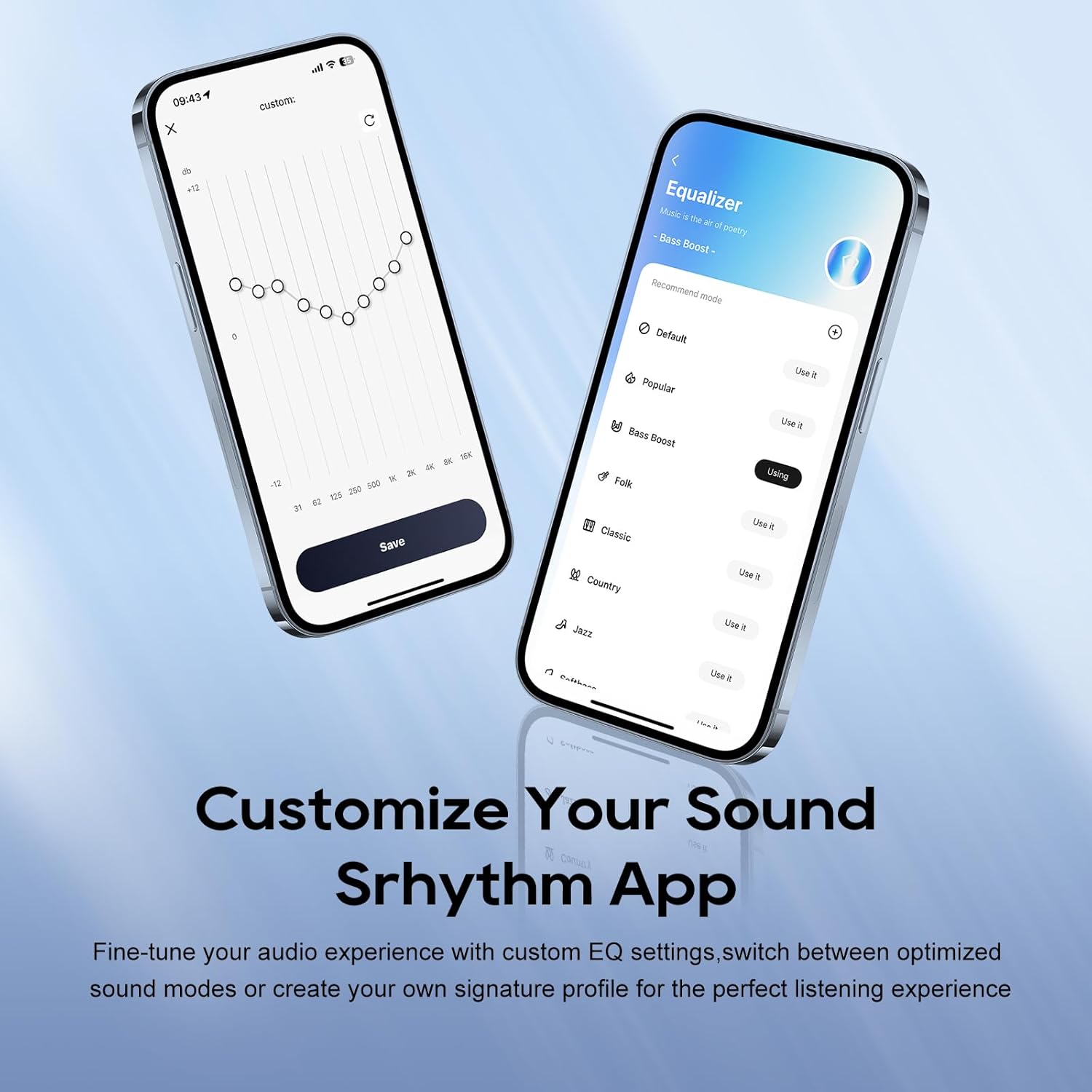
Image: A smartphone screen displaying the Srhythm App interface, highlighting equalizer and ambient sound customization options.
4. Funcionament dels auriculars
4.1. Controls bàsics
- Pujar/baixar el volum: Use the dedicated volume buttons on the earcup.
- Reproduir/pausa: Premeu el botó multifunció una vegada.
- Pista següent: Premeu dues vegades el botó multifunció.
- Pista anterior: Premeu tres vegades el botó multifunció.
- Respondre/Finalitzar la trucada: Premeu el botó multifunció una vegada durant una trucada entrant o una trucada activa.
- Rebutja la trucada: Premeu i manteniu premut el botó multifunció durant 2 segons durant una trucada entrant.
4.2. Noise Cancellation and Ambient Sound Modes
The headphones feature Hybrid Active Noise Cancellation (ANC) and Transparency Mode. These modes can be toggled using the dedicated ANC button on the earcup or through the Srhythm App.
- Noise Cancellation (ANC): Blocks up to 98% of ambient noise, ideal for travel or focused work.
- Mode normal: ANC is inactive.
- Mode de transparència: Et permet escoltar el teu entorn mentre escoltes àudio, millorant la consciència situacional.
You can adjust the noise cancellation depth and select specific modes (Commuting, Indoor, Outdoor) via the Srhythm App for optimized performance.

Image: A man wearing the Srhythm NiceComfort 35 headphones, illustrating the 98% noise cancellation feature in a busy environment.
4.3. AI-Powered Call Clarity
Equipped with 5 advanced microphones and Environmental Noise Cancellation (ENC), the headphones ensure your voice is clear during calls, even in noisy environments. This technology reduces background distractions for flawless communication.

Image: A man smiling while using the Srhythm NiceComfort 35 headphones with a smartphone, highlighting the AI-Powered Call Clarity feature.
4.4. Àudio espacial
Experience immersive sound with 4-speaker spatial audio technology. This feature delivers precision-tuned sound with distinct highs, deep bass, and stunning clarity across an ultra-wide 40kHz frequency range, creating a 3D audio experience for music, movies, and games.

Imatge: Una explosió view diagram illustrating the 4-speaker spatial audio technology inside the Srhythm NiceComfort 35 headphones.
4.5. Custom EQ via App
The Srhythm App allows you to fine-tune your audio experience with custom Equalizer (EQ) settings. You can switch between optimized sound modes (e.g., Bass Boost, Folk, Classic, Country, Jazz, Softbass, Softpitch) or create your own signature profile for personalized listening.
5. Manteniment
5.1. Neteja
- Feu servir un drap suau i sec per netejar les superfícies exteriors dels auriculars.
- Per als auriculars, netegeu suaument amb un drap lleugerament damp un drap i sabó suau si cal, i després assequeu-ho bé. Eviteu l'excés d'humitat.
- No utilitzeu productes químics aggressivs, dissolvents de neteja o detergents forts.
5.2. Emmagatzematge
- Guardeu els auriculars en un lloc fresc i sec, allunyat de la llum solar directa i de temperatures extremes.
- The headphones feature a space-saving foldable design, allowing them to be folded for compact storage and transport.
- Eviteu col·locar objectes pesats a sobre dels auriculars.
5.3. Cura de la bateria
- Carregueu els auriculars regularment, fins i tot si no els feu servir amb freqüència, per mantenir la bateria en bon estat.
- Eviteu esgotar completament la bateria amb freqüència.
6. Solució De Problemes
- Sense energia: Ensure the headphones are fully charged. Connect the Type-C charging cable and allow sufficient time for charging.
- No es pot emparellar per Bluetooth: Ensure the headphones are in pairing mode (flashing blue and red light). Turn off and on your device's Bluetooth, then try re-pairing. Make sure the headphones are not connected to another device.
- Sense so: Check the volume levels on both the headphones and your connected device. Ensure the headphones are properly paired or the audio cable is securely connected.
- Qualitat de so baixa: Ensure the audio source is of good quality. If using Bluetooth, try moving closer to your device to avoid interference. Adjust EQ settings via the Srhythm App.
- Cancel·lació de soroll no efectiva: Ensure the earcups form a tight seal around your ears. Adjust ANC settings via the Srhythm App.
- Finding Lost Headphones: Use the "Find It" feature within the Srhythm App, which can play a loud sound to help locate your headphones if they are within Bluetooth range.
7. Especificacions
| Nom del model | NC35 |
| Control de soroll | Cancel·lació de soroll híbrida |
| Resposta de freqüència | 40 kHz |
| Sensibilitat | 97 dB |
| Conector d'auriculars | 3.5 mm Jack |
| Tecnologia de connectivitat | Amb cable, sense fil |
| Tecnologia de comunicació sense fils | Bluetooth |
| Versió Bluetooth | 6.0 |
| Interval Bluetooth | 10 metres |
| Durada de la bateria | 140 Hours (ANC OFF, 40% Volume), 70 Hours (ANC ON, 40% Volume) |
| Temps de càrrega | 2.5 hores |
| Tipus de controlador d'àudio | Conductor dinàmic |
| Mida del controlador d'àudio | 40 mil·límetres |
| Pes de l'article | 276 grams (9.7 unces) |
| Dimensions del producte | 5.91 x 3.94 x 2.36 polzades |
| Material | Acrylonitrile Butadiene Styrene (ABS), Faux Leather, Metal, Polycarbonate (PC) |
| Característiques especials | Adjustable Headband, Built-In Voice Assistant, Foldable, Microphone Included, Noise Cancellation |

Image: A woman running outdoors wearing the Srhythm NiceComfort 35 headphones, illustrating the long battery life.
8. Garantia i assistència
Each Srhythm product comes with an 18-month aftersales warranty. For any inquiries or assistance, our 7*24-hour online service is available to provide support and address any concerns you may have.
For further assistance, please refer to the contact information provided in your Quick Start Guide or visit the official Srhythm weblloc.


