1. Introducció
This manual provides essential information for the setup, operation, and maintenance of your LILYGO T-Deck ESP32-S3 Development Board. Designed for long-range communication and versatile development, this board integrates an ESP32-S3 microcontroller, LoRa, Bluetooth, Wi-Fi, and a 2.8-inch LCD display. Please read this manual thoroughly before using the device to ensure proper functionality and longevity.

Figure 1.1: LILYGO T-Deck ESP32-S3 Development Board, showcasing its integrated keyboard and display.
2. Producte acabatview
2.1 Característiques clau
- MCU: ESP32-S3FN16R8 Dual-core LX7 microprocessor for powerful processing.
- Connectivitat sense fils: Integrated 2.4 GHz Wi-Fi and Bluetooth 5 (LE) for versatile communication.
- LoRa Transceiver: SX1262 LoRa Transceiver (optional chip) supporting +22dBm transmit power and frequency options of 433/868/915MHz for long-range communication.
- Visualització: 2.8-inch ST7789 SPI Interface IPS LCD with 320x240 resolution and full viewangle de ing.
- Onboard Functions: Features a trackball for navigation, a microphone, and a speaker for audio capabilities.
- Memòria: 16MB PSRAM and 8MB Flash for ampel programa i l'emmagatzematge de dades.
2.2 Contingut del paquet
En desempaquetar, comproveu que hi hagi tots els components següents:
- 1 x LILYGO T-Deck Development Board
- 1 x 6-pin Header
- 1 x cable d'alimentació
- 1 x 868MHz FPC Antenna

Figure 2.1: Contents of the LILYGO T-Deck package.
3. Especificacions
| Característica | Especificació |
|---|---|
| Microcontrolador (MCU) | ESP32-S3FN16R8 Dual-core LX7 microprocessor |
| Connectivitat sense fil | 2.4 GHz Wi-Fi, Bluetooth 5 (LE) |
| LoRa Transceiver | SX1262 (Optional), +22dBm Tx Power, 433/868/915MHz Frequencies |
| Mostra | 2.8 inch ST7789 SPI Interface IPS LCD, 320x240 Resolution |
| Onboard Peripherals | Trackball, Microphone, Speaker |
| Memòria Flash | 8 MB |
| PSRAM | 16 MB |
| Battery ADC Pin | IO04 |
| Dimensions (L x A x A) | 100 mm x 67 mm x 14 mm (aprox.) |
| UPC | 717382831275 |
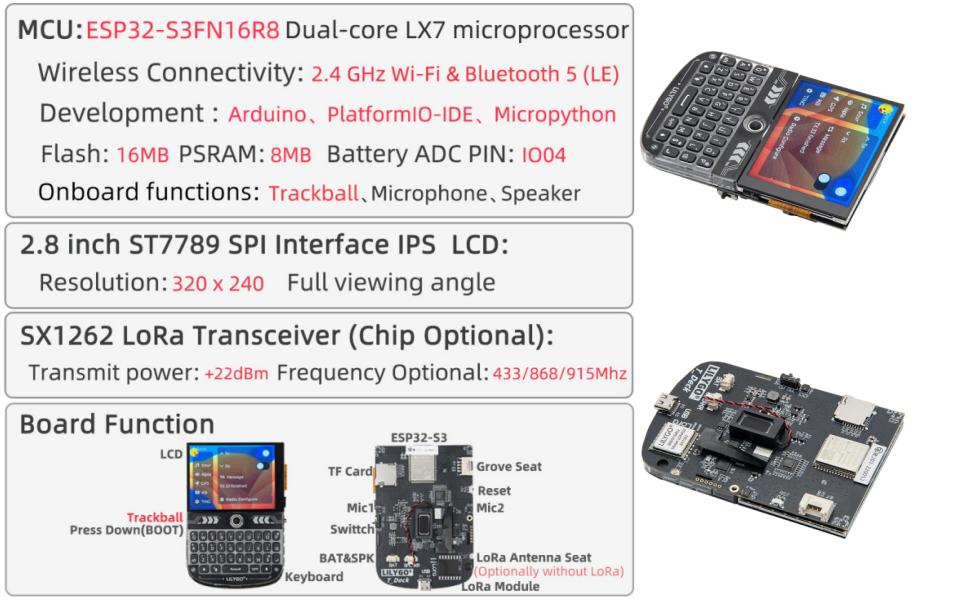
Figure 3.1: Technical specifications and features of the LILYGO T-Deck.
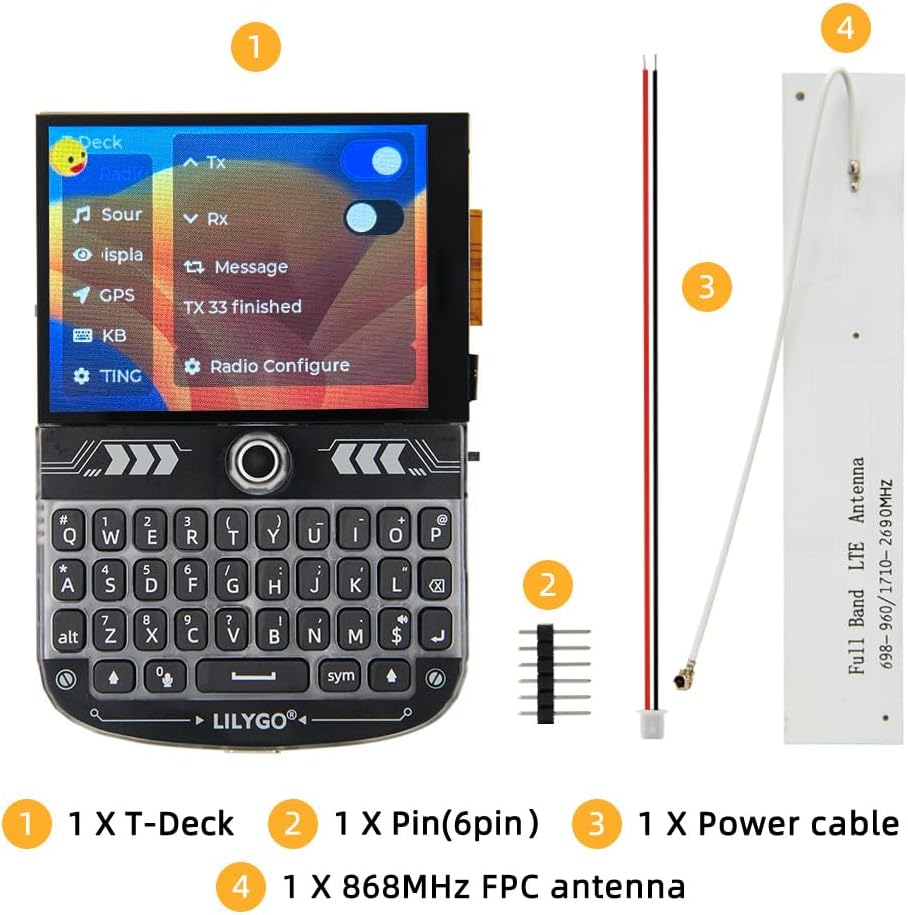
Figure 3.2: Approximate dimensions of the LILYGO T-Deck.
4. Guia de configuració
4.1 Connexió inicial del maquinari
- Connectar l'antena: Carefully connect the provided 868MHz FPC antenna to the LoRa antenna connector on the board. Ensure a secure connection.
- Font d'alimentació: The T-Deck can be powered via its USB-C port. For portable use, an external battery (not included) can be connected to the designated battery connector. Ensure the battery uses the correct connector type and voltage.
- Components opcionals: If using additional sensors or modules, connect them to the appropriate GPIO pins as per your project requirements. Refer to the pinout diagram for details.

Figura 4.1: posterior view of the LILYGO T-Deck board, highlighting connection points.
4.2 Firmware Installation
The LILYGO T-Deck is a development board that requires firmware to operate. You can choose between LILYGO's official LoRa firmware or community-supported firmware like Meshtastic.
- Official Firmware: For the latest official firmware and detailed flashing instructions, please visit the LILYGO GitHub repository: github.com/Xinyuan-LilyGO/T-Deck.
- Community Firmware (e.g., Meshtastic): If you plan to use Meshtastic firmware, ensure you follow their specific installation guides. Some versions may require holding the trackball down while powering on to enter flashing mode.
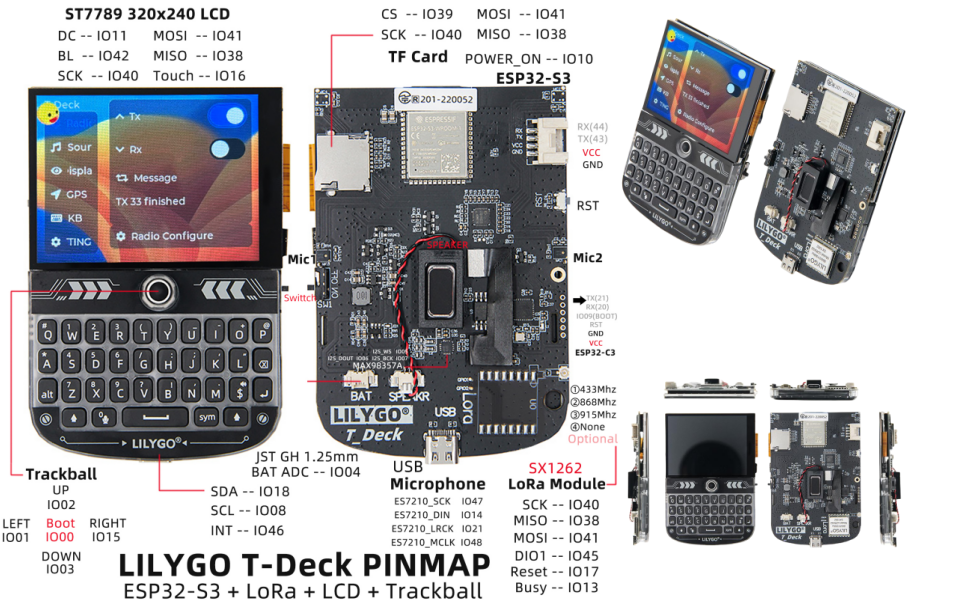
Figure 4.2: LILYGO T-Deck Pinmap and Board Functionality Diagram.
5. Instruccions de funcionament
Once the firmware is successfully installed, the T-Deck is ready for operation. The specific functionalities will depend on the firmware loaded.
5.1 Interacció bàsica
- Visualització: The 2.8-inch LCD will show the user interface of the loaded firmware.
- Teclat: Use the integrated QWERTY keyboard for text input, such as sending messages in communication applications.
- Trackball: The trackball acts as a navigation input, allowing you to move cursors or select options on the display.
- Altaveu/micròfon: These components enable audio output and input, depending on the firmware's capabilities (e.g., for audio alerts or voice communication).

Figura 5.1: Frontal view of the LILYGO T-Deck, highlighting the display and keyboard.
5.2 Software-Specific Operations
For detailed instructions on using specific features like LoRa communication, Wi-Fi connectivity, or Bluetooth functions, please refer to the documentation provided with your chosen firmware. The LILYGO GitHub repository often contains examples and guides for common use cases.
6. Manteniment
To ensure the longevity and optimal performance of your LILYGO T-Deck, follow these maintenance guidelines:
- Neteja: Use a soft, dry cloth to clean the device. Avoid using liquid cleaners or solvents, which can damage the electronic components.
- Emmagatzematge: Store the T-Deck in a cool, dry environment, away from direct sunlight, extreme temperatures, and high humidity.
- Manipulació: Handle the board with care to avoid bending or damaging the exposed components and connectors.
- Actualitzacions de firmware: Regularly check the official LILYGO GitHub repository for firmware updates. Updating your firmware can provide new features, performance improvements, and bug fixes.
7. Solució De Problemes
If you encounter issues with your LILYGO T-Deck, consider the following common troubleshooting steps:
- El dispositiu no s'encén:
- Ensure the USB-C cable is securely connected to a reliable power source.
- If using an external battery, verify that it is charged and properly connected to the correct JST connector. Some users have reported issues with battery connections, requiring proper JST connectors.
- Screen Remains Blank During Firmware Flash:
- For some firmware flashing procedures (e.g., Meshtastic), you may need to hold the trackball down while powering on the device to enter bootloader mode. The screen may remain black during this process, which is normal.
- Connectivity Issues (LoRa, Wi-Fi, Bluetooth):
- Verify that the antenna is securely attached to the LoRa connector.
- Check your firmware settings to ensure wireless modules are enabled and configured correctly.
- Sense sortida d'àudio:
- Ensure the speaker is properly connected to the board.
- Check firmware settings for audio output configuration.
- General Instability:
- Try reflashing the firmware to rule out software corruption.
- Ensure you are using a stable power supply.
If the issue persists, consult the LILYGO GitHub repository for community support and detailed documentation.
8. Suport
For further assistance, technical inquiries, or suggestions regarding your LILYGO T-Deck, please feel free to contact LILYGO customer service. We are committed to providing prompt support to address your questions.
Additionally, the LILYGO GitHub repository serves as a valuable resource for documentation, code examples, and community discussions:


