1. Introducció
This manual provides comprehensive instructions for the safe and effective use of your OLIGHT ArkPro Ultra EDC Flat Flashlight. Please read this manual thoroughly before operation and retain it for future reference. The ArkPro Ultra is a versatile everyday carry flashlight combining multiple light sources and robust construction for various applications.
2. Producte acabatview i Característiques
The OLIGHT ArkPro Ultra is an advanced EDC flashlight designed for durability and multi-functionality. It integrates four distinct light sources and offers seven configuration options.
- Fonts de llum: 1700 lumens Pure Flood, 800 lumens Spotlight, 365nm UV light, and Green Beam.
- Material: Constructed from OLIGHT's proprietary O-aluminum alloy, which is 1.73 times harder than standard 6061 aluminum alloy, providing enhanced scratch, break, and dent resistance.
- Tecnologia LED: Features a proprietary EIP 1 LED chip for an expansive, crystal-clear, and evenly distributed beam.
- Càrrega: Dual charging options via magnetic USB charging cable (MCC1 included) or USB-C cable (not included).
- Indicadors: Color-coded indicators for brightness levels (white) and battery levels (green).
- Bloqueig: New lockout feature provides a quiet cue when activated, preventing accidental activation.
- Disseny: Stylish, one-piece rectangular design with an ergonomic grip and rotatable switch. Includes a dual-way clip and magnetic base for versatile attachment.
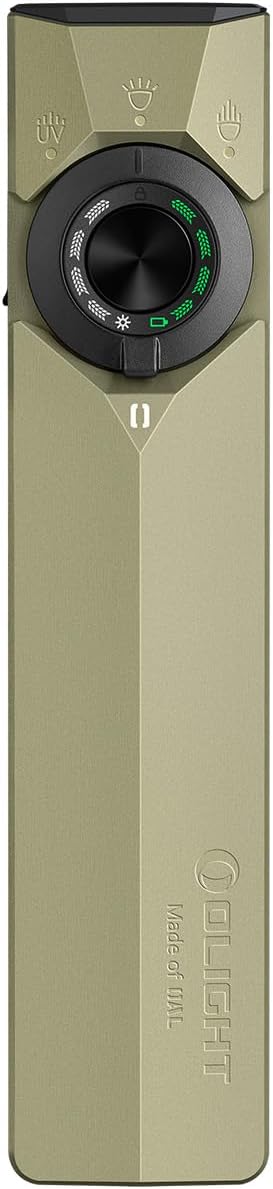
Image: The OLIGHT ArkPro Ultra EDC Flat Flashlight in Olive Green. This image displays the sleek, rectangular design of the flashlight, highlighting its compact form factor and the central rotary switch.

Image: Close-up of the Olight's Self-Developed LED: EIP 1. This image illustrates the proprietary LED chip responsible for the flashlight's clear and evenly distributed beam.

Image: Visual representation of the Pure Flood (1700 Lumens), Spotlight (205 Meters), and UV Light (1200 mW) modes of the ArkPro Ultra.

Image: Demonstrates the seven light configurations, including the individual Green Beam button and combinations with UV Light, Pure Flood, and Spotlight.

Image: Highlights the durability of Olight's O-aluminum, stating it is 1.73x harder than 6061 Aluminum and 1.44x the yield strength of TA2 Titanium.

Image: Shows the color-coded indicators for brightness and battery levels, along with instructions for activating and deactivating the lockout mode.

Image: Illustrates the dual charging options (magnetic USB and USB-C) and highlights the maximum runtime of 14 days on moonlight mode with a 2000 mAh battery capacity.

Image: Explains the ArkBeat feature, a glowing symbol that changes color based on the flashlight's usage duration, cycling through 7 colors over 254 hours.
3. Què hi ha a la caixa
- ArkPro Ultra x 1
- Cable de càrrega magnètica MCC1 x 1
- Manual d'usuari x 1
4. Configuració
4.1 Càrrega inicial
Before first use, fully charge your ArkPro Ultra flashlight. Connect the MCC1 Magnetic Charging Cable to the magnetic charging port at the base of the flashlight. Alternatively, use a USB-C cable with the side port. The battery indicator will show charging status.
4.2 Lockout/Unlock
To prevent accidental activation, the flashlight features a lockout mode. When the flashlight is off, long press the center button for 2 seconds to activate lockout. To unlock, long press the center button for 1 second.
5. Instruccions de funcionament
The ArkPro Ultra offers multiple lighting modes and brightness levels, controlled via its rotary switch and side buttons.
5.1 Switching Modes (Rotary Switch)
Rotate the central switch to select between Pure Flood, Spotlight, and UV Light modes. The Green Beam has a dedicated button.
5.2 Brightness Adjustment (Pure Flood & Spotlight)
In Pure Flood or Spotlight mode, single press the center button to turn on/off. When on, long press the center button to cycle through brightness levels (Moonlight, Low, Medium, High). Double press for Turbo mode. Triple press for Strobe mode.
5.3 UV Light Operation
In UV Light mode, single press the center button to turn on/off. Long press the center button to switch between low and high power UV modes.
5.4 Green Beam Operation
The Green Beam is activated via a dedicated side button. Single press for momentary-on. Long press to switch between low and high power. The Green Beam can be used independently or in combination with any of the other three light sources.
Video: Official OLIGHT video showcasing the ArkPro Ultra's features, including its various light modes, durability, and the ArkBeat indicator. This video provides a dynamic overview de les capacitats del producte.
Video: Official OLIGHT video demonstrating the ArkPro Ultra EDC Flashlight in various usage scenarios, highlighting its versatility and performance in different environments.
6. Especificacions
| Característica | Valor |
|---|---|
| Característica especial | Adjustable Light Modes, Magnetic Base, Portable, Rechargeable, Weatherproof |
| Color | Verd oliva |
| Font d'alimentació | Funciona amb bateria |
| Tipus de font de llum | White LED, Green Beam, UV |
| Material | Olight's Proprietary Aluminum Alloy |
| Brillantor blanc | 1700 lúmens |
| Dimensions del producte | 4.88 "P x 0.63" W x 1.06" H |
| Composició de les cèl·lules de la bateria | Polímer de liti |
| Pes de l'article | 0.26 lliures (4.16 unces) |
| Nombre de bateries | 1 bateria no estàndard (inclosa) |
| Nivell de resistència a l'aigua | Impermeable |
| Brillantor | 1700 lumens |
| Tipus de muntatge | Clip-on, Magnetic |
| Usos recomanats | Camping, Cycling, EDC, Emergency, Fishing, Hiking, Outdoor, Security |
| Número de model de l'article | ArkPro Ultra |
7. Manteniment
To ensure the longevity and optimal performance of your OLIGHT ArkPro Ultra, follow these maintenance guidelines:
- Neteja: Wipe the flashlight body with a clean, soft cloth. Avoid using harsh chemicals or abrasive materials.
- Port de càrrega: Keep the magnetic charging port and USB-C port clean and free of debris.
- Cura de la bateria: Recharge the flashlight regularly, especially if it has not been used for an extended period, to maintain battery health. Avoid fully depleting the battery frequently.
- Emmagatzematge: Guardeu la llanterna en un lloc fresc i sec, lluny de la llum solar directa i de temperatures extremes.
8. Solució De Problemes
If you encounter any issues with your ArkPro Ultra, please refer to the following common troubleshooting steps:
- La llanterna no s'encén: Ensure the battery is charged. Check if the flashlight is in lockout mode (long press center button for 1 second to unlock).
- Sortida de llum tènue: Recharge the battery. Ensure the correct brightness mode is selected.
- Problemes de càrrega: Verify that the charging cable is properly connected to both the flashlight and a power source. Clean the charging contacts if necessary.
- Green Beam Not Activating: Ensure the dedicated side button is pressed correctly. Check battery level.
If problems persist, please contact OLIGHT customer support for further assistance.
9. Garantia i Suport
The OLIGHT ArkPro Ultra EDC Flat Flashlight comes with a Garantia de per vida. For warranty claims, technical support, or any product-related inquiries, please visit the official OLIGHT website or contact their customer service department. Refer to the included user manual for specific contact details and warranty terms.


