1. Introducció
The FiiO QX13 is a high-performance portable Digital-to-Analog Converter (DAC) and headphone amplifier designed to deliver exceptional audio quality. Featuring a flagship ESS ES9027PRO 8-channel DAC, powerful TI op-amps, and a vibrant color display, the QX13 enhances your listening experience across various devices.
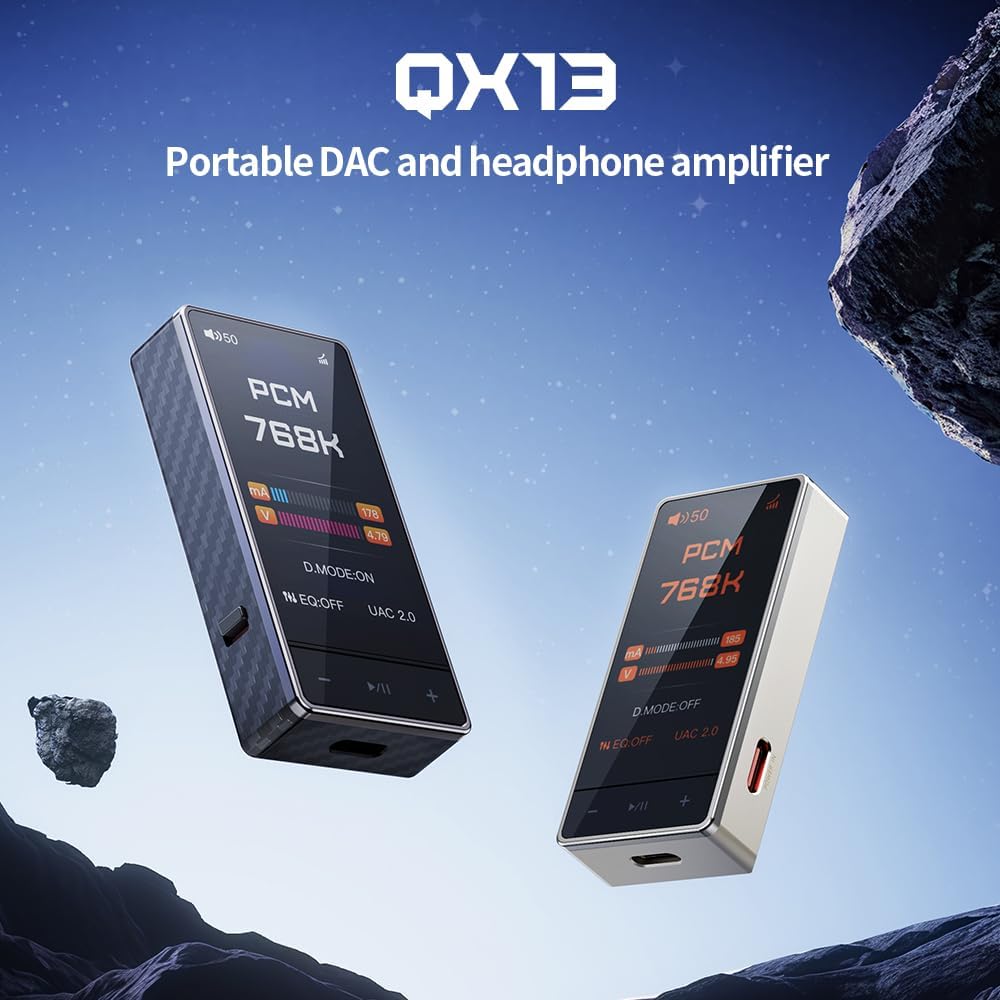
Figure 1: FiiO QX13 Portable DAC Amplifier in Titanium Gold and Black finishes. This image showcases the compact design of the device.
2. Contingut del paquet
Si us plau, assegureu-vos que tots els elements estiguin presents al paquet:
- DAC portàtil FiiO QX13 Ampmés viu
- Cable USB-C a USB-C
- Magnetic leather case
- 8-strand decoding cable
- Manual d'usuari (aquest document)
3. Dispositiu acabatview
Familiarize yourself with the main components and features of your FiiO QX13.

Figura 2: Frontal view of the FiiO QX13, highlighting its 1.99-inch color display. The display shows "PCM 768K" indicating high-resolution audio playback.
Característiques principals:
- Flagship ESS ES9027PRO 8-Channel DAC: Utilizes a fully differential 8-channel parallel design for ultra-low distortion and studio-level signal accuracy.
- 1.99-Inch Large Color Display: Full-color touchscreen with Corning Gorilla Glass 3 for scratch resistance, supporting dynamic UI themes.
- Sortida potent: 6x TI High-Performance Op-Amps delivering 900mW per channel, capable of driving high-impedance headphones.
- Magnetic Ecosystem: Compatible with magnetic leather case and E-Stick Power Bank (sold separately) for enhanced portability and desktop setup.
- XMOS 16-Core XU316: Supports up to 768kHz/32bit PCM and DSD512 native decoding, with 10-band high-precision PEQ.
4. Configuració
4.1 Connexió a un dispositiu font
The FiiO QX13 can be connected to various devices such as laptops, desktops, tablets, and smartphones.
- Connecteu el cable USB-C: Use the provided USB-C to USB-C cable to connect the QX13 to your source device's USB-C port.
- Connecteu els auriculars: Plug your headphones into the appropriate audio output port (3.5mm or 4.4mm balanced) on the QX13.
- Encès: The QX13 will typically power on automatically when connected to a powered source device.

Figure 3: The magnetic ecosystem allows for easy attachment to smartphones and compatibility with external power banks for extended use.
4.2 Driver Installation (Windows/Mac)
For optimal performance on Windows or Mac, it may be necessary to install specific drivers. Please visit the official FiiO website for the latest driver downloads and installation instructions for your operating system.
5. Instruccions de funcionament
5.1 Funcionament bàsic
- Encès/apagat: The device powers on automatically when connected. To power off, disconnect from the source or use the dedicated power button if available (refer to device specific controls).
- Control de volum: Adjust the volume using the physical buttons on the device or through the connected source device.
- Navegació de la pantalla: Use the touchscreen display to navigate through menus and settings.
5.2 Mode d'escriptori
The QX13 features a patented Desktop Mode for enhanced performance. When connected to an external dedicated power supply (e.g., E-Stick Power Bank), the device can deliver up to 900mW output power per channel.

Figure 4: Illustration of the Patented Desktop Mode, showing increased output power (900mW) compared to non-desktop mode (570mW) and power consumption reduction.
5.3 Configuració de l'equalitzador (EQ)
The QX13 supports a 10-band high-precision Parametric Equalizer (PEQ). EQ settings can be adjusted via the device's touchscreen or through the FiiO Control App (available for Android).
- Custom PEQ: Create and save personalized EQ profiles.
- Built-in Presets: Utilize pre-configured sound adjustments.
- Compartició en línia: Access and share EQ settings with the FiiO community.

Figura 5: Mésview of various features including 3.5mm output, UAC1.0 mode for gaming consoles, 60-step and 120-step volume adjustment, and support for the FiiO Control App.
6. Manteniment
- Neteja: Feu servir un drap suau i sec per netejar el dispositiu. Eviteu utilitzar productes químics agressius o materials abrasius.
- Emmagatzematge: Guardeu el dispositiu en un lloc fresc i sec, allunyat de la llum solar directa i de temperatures extremes.
- Font d'alimentació: The FiiO QX13 is powered by the connected source device or an external power bank (sold separately). It does not contain an internal battery.
- Actualitzacions de firmware: Periodically check the official FiiO weblloc web per a actualitzacions de firmware per garantir un rendiment òptim i l'accés a noves funcions.
7. Solució De Problemes
| Problema | Causa possible | Solució |
|---|---|---|
| Sense sortida de so |
|
|
| Àudio distorsionat |
|
|
| Dispositiu no reconegut per l'ordinador |
|
|
8. Especificacions
| Característica | Detall |
|---|---|
| Nom del model | QX13 |
| Tecnologia de connectivitat | Amb cable |
| Material | Fibra de carboni |
| Mètode de control | Toca |
| Característica especial | Flagship ESS ES9027PRO 8-Channel DAC, 1.99-inch Color Display, 6x TI High-Performance Op-Amps, Magnetic Ecosystem, Carbon Fiber Body, 10-Band High-Precision PEQ |
| Pes de l'article | 8.4 unces |
| Número de model de l'article | QX13 |
| Data de primera disponibilitat | 3 de juliol de 2025 |
| Color | Titanium Gold (variant) |
| Conector d'auriculars | 3.5 mm Jack |
| Dispositius compatibles | Laptops, Desktops, Tablets, Telephones, Smart Speakers, Televisions, Car Audio Systems, Cellphones |
9. Garantia i Suport
Per obtenir informació sobre la garantia i assistència tècnica, consulteu la pàgina oficial de FiiO. weblloc web o poseu-vos en contacte amb el vostre distribuïdor local. Conserveu el rebut de compra per a reclamacions de garantia.
Recursos en línia:
- FiiO oficial Weblloc: www.fiio.com
- Product Support Page: (Check FiiO website for specific QX13 support page)


