1. Introducció
Thank you for choosing the BIGASUO BGP14 Projector. This manual provides essential information for setting up, operating, and maintaining your projector. Please read it thoroughly before use to ensure optimal performance and safety.

Figure 1.1: The BIGASUO BGP14 projector, a compact white cylindrical device, alongside icons indicating its main features: 4K resolution support, WiFi 6 connectivity, Android 11.0 operating system, and automatic keystone correction.
2. Informació de seguretat
Observeu les següents precaucions de seguretat per evitar danys al projector i garantir la seguretat de l'usuari:
- No mireu directament a la lent del projector quan estigui encès.amp està activat.
- Assegureu-vos una ventilació adequada al voltant del projector per evitar el sobreescalfament.
- Keep the projector away from water, moisture, and flammable materials.
- Feu servir només l'adaptador de corrent que s'inclou amb el projector.
- Eviteu col·locar el projector sobre superfícies inestables.
- No intenteu obrir ni reparar el projector vosaltres mateixos. Poseu-vos en contacte amb personal de servei qualificat.
3. Contingut del paquet
Verifiqueu que tots els elements siguin presents al paquet:
- BIGASUO BGP14 Projector
- Adaptador d'alimentació
- Control remot
- Manual d'usuari
- Cable HDMI (pot variar segons la regió)
4. Producte acabatview
Familiarize yourself with the projector's components and interfaces.
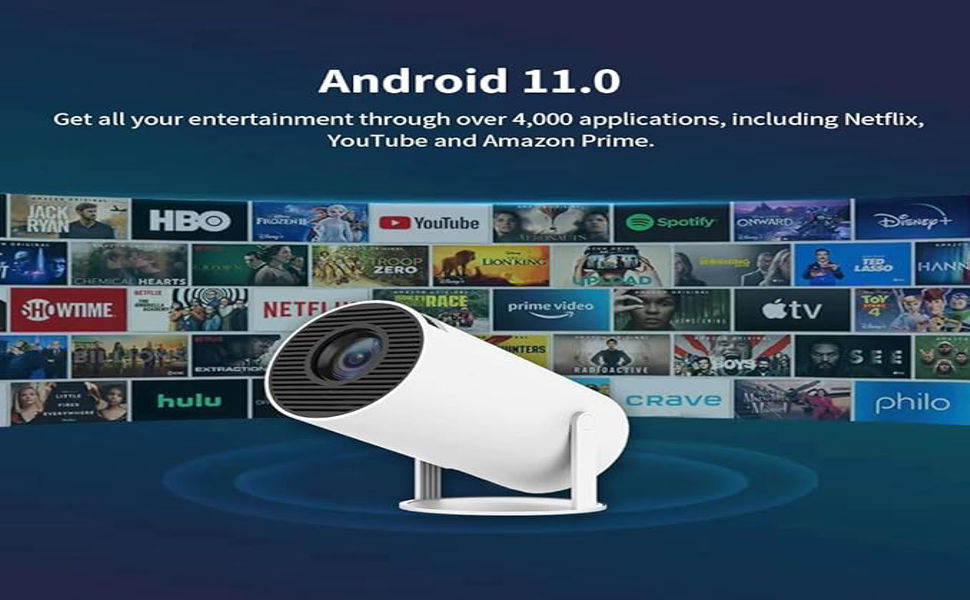
Figura 4.1: Un resum complet view of the BIGASUO BGP14 projector, highlighting its sleek, compact design and various advanced features for home entertainment.
4.1 Tauler frontal
- Lent de projecció: Emits the image.
4.2 Rear Panel / Side Panel
- Port d'alimentació: Es connecta a l'adaptador de corrent.
- Port HDMI: Connects to external devices like laptops, gaming consoles, or TV sticks.
- Port USB: Connects to USB drives for media playback.
- Sortida d'àudio: Es connecta a altaveus externs o auriculars.
- Reixes de ventilació: Per a la dissipació de calor.
5. Configuració
5.1 Col·locació
Position the projector on a stable, flat surface. Ensure there are no obstructions blocking the lens or ventilation grilles. The projector can be placed on a table, mounted on a tripod, or even project onto a ceiling.

Figure 5.1: This image showcases the versatility of the BIGASUO BGP14 projector, demonstrating its ability to project images onto both a wall from a table and onto a ceiling from a floor stand, highlighting flexible placement options.
5.2 Connexió d'alimentació
- Connecteu l'adaptador de corrent al port d'alimentació del projector.
- Connecteu l'adaptador de corrent a una presa de corrent.
- Premeu el botó d'engegada del projector o del comandament a distància per encendre'l.
5.3 Ajust del focus
Adjust the focus ring on the projector lens until the projected image appears clear and sharp.
5.4 Correcció Keystone
The BIGASUO BGP14 features automatic keystone correction. If the image appears trapezoidal, the projector will automatically adjust it to a rectangular shape. Manual adjustment options may also be available in the settings menu for fine-tuning.
6. Instruccions de funcionament
6.1 Navigating the Android OS
The projector runs on Android 11.0. Use the remote control to navigate the interface. The home screen provides access to various applications and settings.

Figure 6.1: This image shows the BIGASUO BGP14 projector displaying its Android 11 OS interface, featuring icons for 'Online video', 'My Apps', 'Projection', and 'Projection screen', emphasizing its capability to run over 4000 applications.
6.2 Connexió a Wi-Fi
- Des de la pantalla d'inici, navegueu fins a Configuració.
- Seleccioneu Xarxa i Internet.
- Enceneu Wi-Fi and select your desired network from the list.
- Enter the Wi-Fi password if prompted and connect. The projector supports 5G+2.4G Dual WiFi 6 for fast and stable connections.

Figure 6.2: The BIGASUO BGP14 projector is shown projecting a dynamic race car scene, with a visual representation of its 5G+2.4G Dual WiFi 6 connection capabilities. Icons for Airplay, Miracast, and DLNA indicate its screen mirroring functionalities.
6.3 Mirall de pantalla
The projector supports various screen mirroring protocols:
- Airplay: For Apple iOS devices.
- Miracast: Per a dispositius Android.
- DLNA: For media sharing across compatible devices.
To use screen mirroring, ensure your device and the projector are connected to the same Wi-Fi network. Select the appropriate mirroring option on the projector's interface and follow the on-screen instructions on your mobile device.

Figure 6.3: This image illustrates the BIGASUO BGP14 projector's WiFi 6 ultra-fast wireless connection, showing a smartphone mirroring a racing game onto the projected screen. Text highlights the built-in WiFiDisplay feature for mirroring content from Android and Apple devices.
6.4 Ús d'aplicacions integrades
The Android 11.0 OS allows access to over 4,000 applications, including popular streaming services like Netflix, YouTube, and Amazon Prime Video. Navigate to the 'Apps' section on the home screen to browse and launch applications.

Figure 6.4: This image illustrates the BIGASUO BGP14 projector's Android 11.0 operating system, showcasing a wide array of streaming application logos such as Netflix, YouTube, and Amazon Prime, indicating access to over 4,000 applications for entertainment.
6.5 Connecting External Devices (HDMI/USB)
- HDMI: Connect an HDMI cable from your external device (e.g., laptop, game console, TV stick) to the projector's HDMI port. The projector should automatically detect the input, or you may need to select the HDMI source from the input menu.
- USB: Insert a USB flash drive into the projector's USB port. The projector's media player will typically launch automatically, allowing you to browse and play supported media files.
6.6 Connexió Bluetooth
To connect Bluetooth audio devices (e.g., speakers, headphones):
- Vés a Configuració > Bluetooth.
- Turn on Bluetooth and put your audio device into pairing mode.
- Seleccioneu el dispositiu de la llista de dispositius disponibles per emparellar-lo.
7. Manteniment
7.1 Neteja de la lent
Use a soft, lint-free cloth specifically designed for optical lenses. Gently wipe the lens in a circular motion. Avoid using abrasive cleaners or excessive force.
7.2 Cleaning the Ventilation Grilles
Regularly clean the ventilation grilles with a soft brush or a vacuum cleaner with a brush attachment to prevent dust buildup, which can lead to overheating.
7.3 Emmagatzematge
When not in use, store the projector in a cool, dry place, away from direct sunlight and extreme temperatures. Use the original packaging or a protective case to prevent dust and damage.
8. Solució De Problemes
Si teniu problemes amb el projector, consulteu els problemes i solucions més comuns següents:
| Problema | Causa possible | Solució |
|---|---|---|
| Sense poder | Cable d'alimentació no connectat; presa de corrent defectuosa | Comproveu la connexió del cable d'alimentació; proveu una presa de corrent diferent. |
| Cap imatge | Input source incorrect; cable loose; lens cap on | Select correct input source; check cable connections; remove lens cap. |
| Imatge borrosa | Focus not adjusted; projection distance incorrect | Adjust the focus ring; ensure projector is within optimal projection distance. |
| Sense so | Volume too low; external audio device not connected; source device muted | Increase projector volume; check external audio connections; unmute source device. |
| Problemes de connexió Wi-Fi | Contrasenya incorrecta; encaminador massa lluny; interferències de xarxa | Verify password; move projector closer to router; restart router. |
9. Especificacions
Key technical specifications for the BIGASUO BGP14 Projector:
| Característica | Especificació |
|---|---|
| Marca | BIGASUO |
| Model | BGP14 |
| Sistema operatiu | Android 11.0 |
| Connectivitat | 5G+2.4G Dual WiFi 6, Bluetooth 5.0 |
| Descodificació de vídeo | 4K Support, 1080P Full HD |
| Mida de projecció | 40"-130" (optimal range) |
| Correcció de pedra clau | Auto Keystone |
| Dimensions del producte | 10 x 25 x 10 cm |
| Pes de l'article | 670 g |
| Font de llum Wattage | 280 watts |
| Distància mínima de llançament | 10 Mil·límetres |
| Distància màxima de llançament | 11 Mil·límetres |
10. Garantia i Suport
The BIGASUO BGP14 Projector comes with a standard manufacturer's warranty. Please refer to the warranty card included in your package for specific terms and conditions. For technical support, troubleshooting assistance, or warranty claims, please contact BIGASUO customer service through the contact information provided on the product packaging or the official BIGASUO weblloc.
Si us plau, conserveu el rebut de compra com a comprovant de compra a efectes de garantia.


