1. Introducció
Thank you for choosing the BIGASUO BGP23 Portable Projector. This device integrates an Android 9.0 operating system, offering a versatile entertainment and presentation solution. It supports HD resolution (1280x720P) and features multiple connectivity options including HDMI, USB, VGA, and AV. This manual provides essential information for setting up, operating, maintaining, and troubleshooting your projector to ensure optimal performance.
2. Informació de seguretat
- Font d'alimentació: Feu servir només l'adaptador de corrent especificat. Assegureu-vos que el volumtage matches your local power supply (220 Volts).
- Ventilació: No bloquegeu les obertures de ventilació. Assegureu-vos que hi hagi prou espai al voltant del projector per a un flux d'aire adequat per evitar el sobreescalfament.
- Col·locació: Place the projector on a stable, level surface. Avoid placing it in direct sunlight, near heat sources, or in environments with high humidity or dust.
- Protecció ocular: No mireu directament a la lent del projector quan estigui encès.amp està encès, ja que la llum brillant pot causar lesions oculars.
- Neteja: Disconnect the power before cleaning. Use a soft, dry cloth for the exterior and a lens cleaning kit for the lens.
- Desmuntatge: No intenteu desmuntar ni reparar el projector vosaltres mateixos. Encarregueu totes les tasques de manteniment a personal qualificat.
3. Contingut del paquet
Verifiqueu que tots els elements siguin presents al vostre paquet:
- BIGASUO BGP23 Projector
- Control remot
- Adaptador d'alimentació
- Cable HDMI
- Cable AV
- Manual d'usuari
- Tripod (may vary by package)
4. Producte acabatview
Familiarize yourself with the projector's components and interfaces.
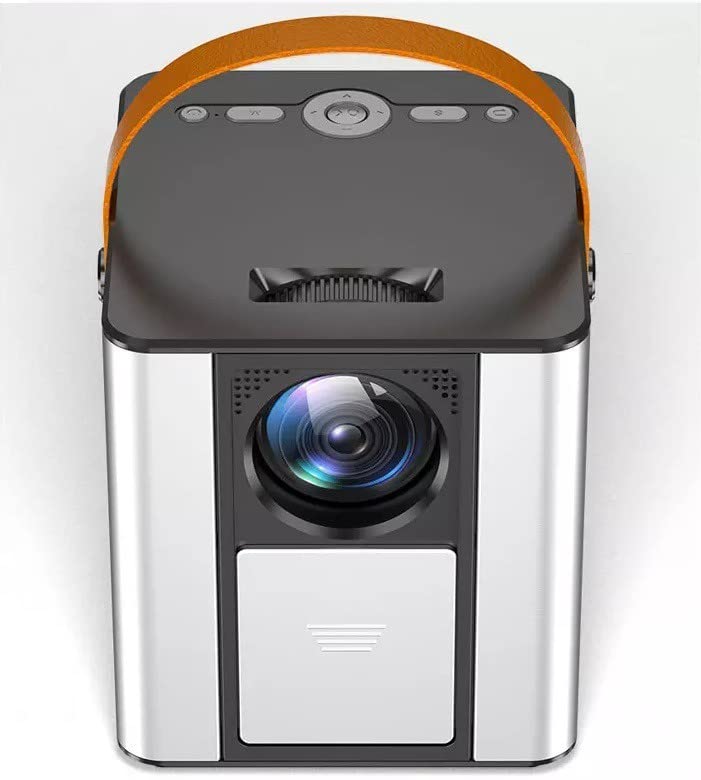
Figura 4.1: Frontal view of the BIGASUO BGP23 Portable Projector with its lens and carrying handle.
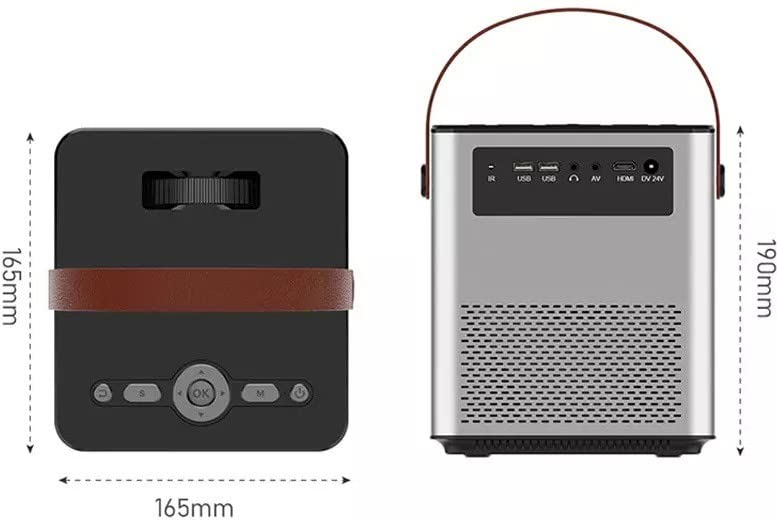
Figure 4.2: Dimensions of the BIGASUO BGP23 Projector and a view of its rear panel, showing various input/output ports.
4.1. Interfaces and Controls
- Lent: Projecta la imatge a la pantalla.
- Anell de focus: Ajusta la claredat de la imatge.
- Keystone Correction Knob: Corregeix la distorsió trapezoïdal de la imatge.
- Receptor IR: Per a senyals de comandament a distància.
- Ports USB: For connecting USB storage devices (e.g., flash drives) for media playback.
- Port HDMI: For connecting external devices like laptops, gaming consoles, or media players.
- Port VGA: Per connectar ordinadors o dispositius antics.
- Port AV: For connecting legacy audio/video devices.
- Sortida d'àudio (3.5 mm): Per connectar altaveus externs o auriculars.
- Entrada d'alimentació: Es connecta a l'adaptador de corrent.
- Tauler de control: On-device buttons for basic navigation and settings.
5. Configuració
5.1. Col·locació inicial
- Col·loqueu el projector sobre una superfície estable o munteu-lo de manera segura.
- Position the projector at an appropriate distance from the projection surface (wall or screen) to achieve the desired image size.
5.2. Connexió d'alimentació
- Connecteu l'adaptador de corrent al port d'entrada d'alimentació del projector.
- Connecteu l'adaptador d'alimentació a una presa de corrent adequada.
- Premeu el botó d'encesa del projector o del comandament a distància per encendre el dispositiu.
5.3. Ajust de la imatge
- Focus: Gireu l'anell d'enfocament de la lent del projector fins que la imatge projectada aparegui nítida i clara.
- Correcció Keystone: If the image appears trapezoidal (wider at the top or bottom), adjust the keystone correction knob until the image is rectangular.
6. Instruccions de funcionament
6.1. Control remot
The included remote control allows for convenient operation of the projector. Ensure AAA batteries are installed (not included).
6.2. Android Operating System
The projector runs on Android 9.0, providing access to various applications and features.
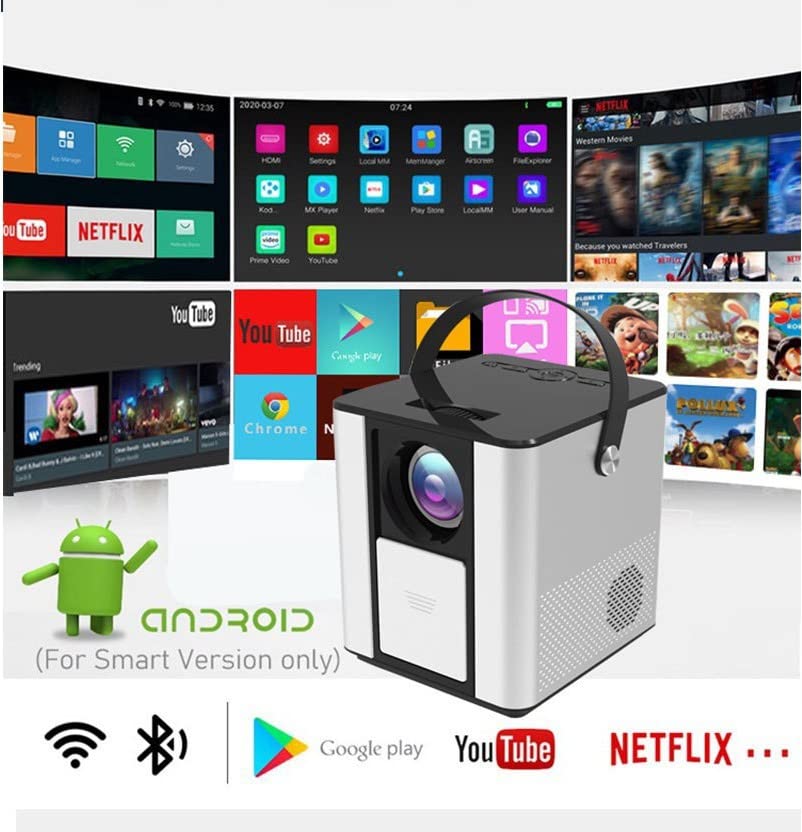
Figure 6.1: The Android interface of the BIGASUO BGP23 Projector, showing various pre-installed application icons.
- Navegació: Use the arrow keys on the remote to navigate through the Android interface. The 'OK' button selects items.
- Pantalla d'inici: Access pre-installed apps like YouTube, Netflix, and the Google Play Store.
- Configuració: Access system settings for Wi-Fi, Bluetooth, display, sound, and more.
- Instal·lació de l'aplicació: Baixeu i instal·leu aplicacions addicionals des de Google Play Store.
6.3. Actualitzacions del sistema
To ensure compatibility and optimal performance, regularly check for and install system updates. Navigate to the system settings to find the update option. If you encounter software incompatibility issues, updating the system is recommended.
7. Connectivitat
7.1. Connexió HDMI
Connect external devices such as laptops, Blu-ray players, or gaming consoles using an HDMI cable. Select the HDMI input source from the projector's input menu.
7.2. Reproducció multimèdia USB
Insert a USB flash drive into one of the USB ports. The projector's file manager will typically detect the drive, allowing you to browse and play supported media files (vídeos, fotos, música).
7.3. Projecció sense fil (reflexió de pantalla)
The projector supports wireless screen mirroring from compatible smartphones and tablets. Refer to the projector's on-screen instructions for specific steps to connect your device via Wi-Fi.
7.4. Àudio Bluetooth
Connect external Bluetooth speakers or headphones to the projector for enhanced audio. Navigate to the Bluetooth settings in the Android OS, enable Bluetooth, and pair with your desired audio device.
8. Manteniment
- Neteja de lents: Use a professional lens cleaning cloth and solution to gently clean the projector lens. Avoid touching the lens with bare hands.
- Neteja exterior: Netegeu l'exterior del projector amb un drap suau i sec. No utilitzeu productes de neteja abrasius ni dissolvents.
- Manteniment de la ventilació: Periodically check and clean the ventilation grilles to prevent dust buildup, which can impede airflow and cause overheating.
- Emmagatzematge: When not in use for extended periods, store the projector in a cool, dry, dust-free environment, preferably in its original packaging or a protective case.
9. Solució De Problemes
Si teniu problemes amb el projector, consulteu els problemes i solucions més comuns següents:
| Problema | Possible solució |
|---|---|
| Sense poder | Ensure the power adapter is securely connected to both the projector and a working power outlet. Check the power button. |
| No Image / No Signal | Verify the input source is correctly selected (e.g., HDMI 1, USB). Check cable connections (HDMI, VGA, AV) for looseness or damage. Try a different cable or device. |
| Imatge borrosa | Adjust the focus ring on the lens. Ensure the projection distance is within the recommended range. Clean the lens if it is dirty. |
| Imatge trapezoïdal | Adjust the keystone correction knob until the image is rectangular. Ensure the projector is placed perpendicular to the screen. |
| El control remot no respon | Check and replace the batteries in the remote control. Ensure there are no obstructions between the remote and the projector's IR receiver. |
| Applications Not Working / Software Issues | Check for and install any available system updates. Clear the cache of the problematic application. If the issue persists, consider a factory reset (backup data first) or contact customer support. |
| Sense àudio | Check the volume settings on both the projector and the connected source device. If using external speakers, ensure they are properly connected and powered on. Verify Bluetooth pairing if using wireless audio. |
10. Especificacions
The following are the technical specifications for the BIGASUO BGP23 Projector:
- Marca: BIGASUO
- Model: BGP23
- Sistema operatiu: Android 9.0
- Tipus de visualització: LCD
- Resolució nativa: 1280 x 720 píxels
- Resolució compatible: 1920 Pixels (Full HD)
- Relació d'aspecte: 16:9
- Tecnologia de connectivitat: Bluetooth, HDMI, USB, VGA, AV
- Versió Bluetooth: 5.0
- Voltage: 220 Volts
- Wattage: 50 watts
- Freqüència d'actualització: 60 Hz
- Dimensions del producte: 10 x 25 x 10 cm
- Pes de l'article: 2.5 kg
- Factor de forma: Portàtil
- Tipus de muntatge: Muntatge de taula
11. Garantia i Suport
For warranty information and technical support, please refer to the warranty card included with your product or visit the official BIGASUO support website. Contact information for Bigasuo Support Team is typically provided with the product documentation.


