1. Introducció
The OLIGHT ArkPro is an advanced EDC (Everyday Carry) flat flashlight designed for versatility and convenience. It features multiple light sources including a powerful white LED for both floodlight and spotlight, a green beam, and a UV light. Constructed from durable 6061 aluminum alloy, its slim profile and dual charging options make it an ideal companion for various activities.

Figure 1: OLIGHT ArkPro EDC Flat Flashlight highlighting key features.
2. Què hi ha a la caixa
- ArkPro Flashlight x 1
- Cable de càrrega x 1
- Manual d'usuari x 1
3. Característiques del producte
- Múltiples fonts de llum: Equipped with a 1,500-lumen floodlight, an 800-lumen long-range spotlight (205m reach), a powerful UV light, and a green beam.
- Independent Green Beam Control: The green beam can be used independently or combined with other light sources.
- Compacte i portàtil: Flat design for comfortable pocket carry, weighing 3.68 ounces.
- Disseny ergonòmic: Features a textured side surface for secure grip and concave buttons for ease of use.
- Versatile Clip and Magnetic Base: Dual-direction clip for attaching to shirts, pockets, or hats, and a built-in magnetic base for hands-free use.
- Opcions de càrrega dual: Supports both USB-C and Magnetic Dock charging.
- Funcionament intuïtiu: Circular selector for switching between lighting modes and a dedicated green beam button.
- Clear Status Indicators: White indicators for brightness levels, green for battery status, and a lockout indicator.

Figure 2: Rugged unibody construction for enhanced durability.
4. Configuració i ús inicial
4.1 Càrrega i activació
Before first use, the ArkPro flashlight must be charged to activate its full functionality. The device offers two convenient charging methods:
- Càrrega magnètica: Attach the included magnetic charging cable to the tail cap of the flashlight. The magnetic connection will secure the cable in place.
- Càrrega USB-C: Open the protective cover on the side of the flashlight to reveal the USB-C port. Connect a standard USB-C cable (not included) to charge.
The green indicator lights around the central button will show the battery status during charging. Once fully charged, the device is activated and ready for use.

Figure 3: Dual charging options for convenience.
5. Instruccions de funcionament
5.1 Main Light Operation (White LED)
The ArkPro features a central circular selector and a center button for controlling the white LED modes.
- Activar/Desactivar: Single press the center button to turn the light on or off.
- Change Modes (Floodlight/Spotlight/UV): Rotate the circular selector to choose between Floodlight, Spotlight, and UV modes.
- Canvia la brillantor: When the light is on, press and hold the center button to cycle through brightness levels (Moonlight, Low, Medium, High). Release the button at the desired brightness.
- Mode turbo: Double-press the center button quickly to activate Turbo mode (1500 lumens for floodlight, 800 lumens for spotlight).
- Mode estroboscòpic: Triple-press the center button quickly to activate Strobe mode.
- Mode de bloqueig: When the light is off, press and hold the center button for 2 seconds to enter lockout mode. The lockout indicator will illuminate. To unlock, press and hold the center button for 1 second.

Figure 4: Controls and indicators for the ArkPro flashlight.
5.2 Funcionament del feix verd
The green beam has a dedicated button for activation.
- Activate Green Beam: Press the dedicated green beam button on the side of the flashlight.
- Combine with White/UV Light: The green beam can be activated simultaneously with the white LED (floodlight or spotlight) or the UV light for enhanced functionality.
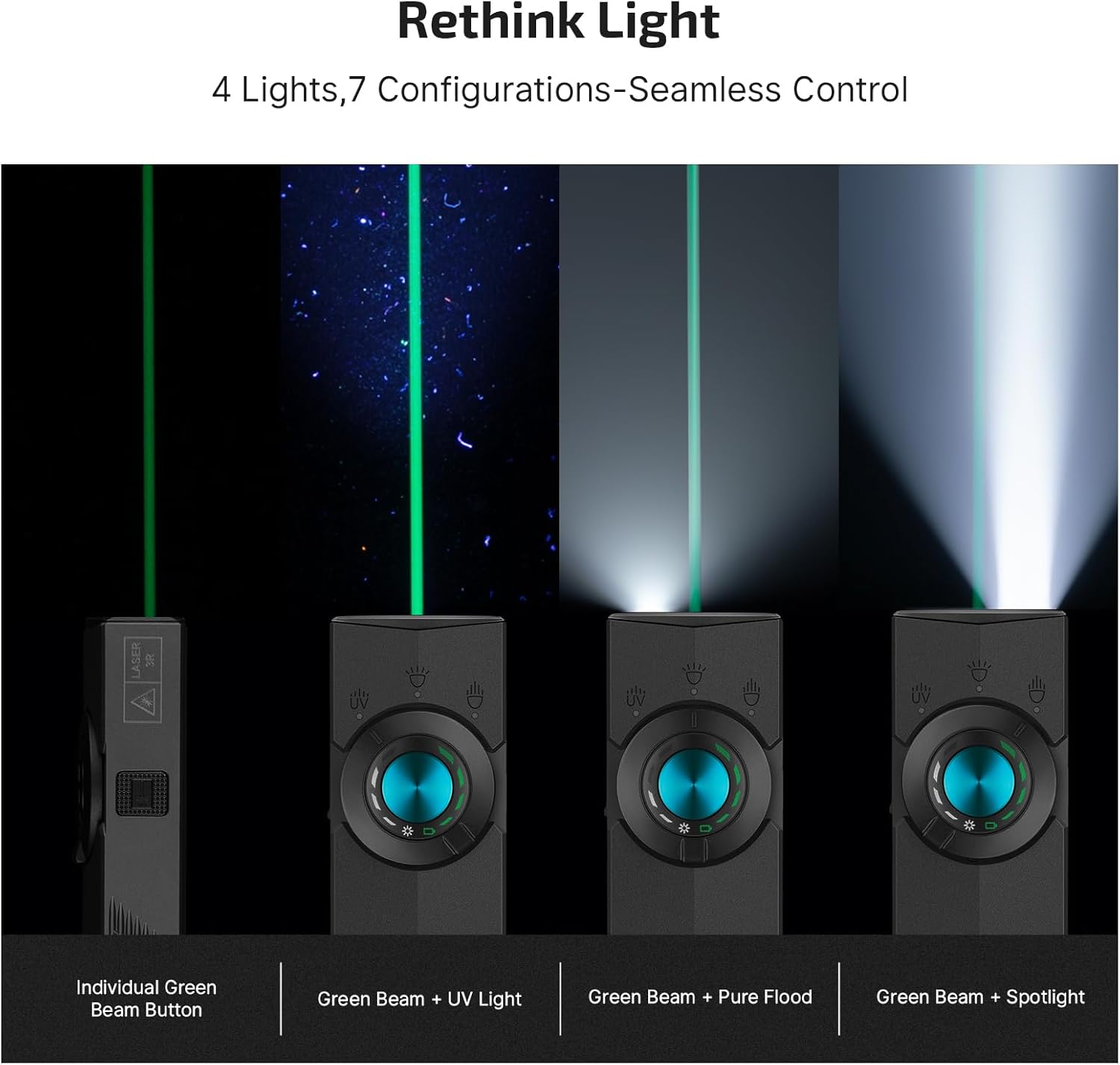
Figure 5: The ArkPro's versatile lighting configurations.
6. Manteniment
To ensure the longevity and optimal performance of your OLIGHT ArkPro flashlight, follow these maintenance guidelines:
- Neteja: Regularly clean the lens and body of the flashlight with a soft, clean cloth. Avoid using abrasive materials or harsh chemicals.
- Port de càrrega: Keep the USB-C charging port free from dust and debris. Ensure the protective cover is closed when not charging to maintain water resistance.
- Emmagatzematge: Guardeu la llanterna en un lloc fresc i sec, lluny de la llum solar directa i de temperatures extremes.
7. Solució De Problemes
- La llum no s'encén: Ensure the flashlight is not in lockout mode. If it is, unlock it by pressing and holding the center button for 1 second. Check battery level and charge if necessary.
- Problemes de càrrega: Verify that the charging cable is securely connected to both the flashlight and a power source. Try a different USB-C cable or power adapter if issues persist.
- Reduced Brightness/Runtime: This may indicate a low battery. Recharge the flashlight fully.
8. Especificacions
| Característica | Detall |
|---|---|
| White Brightness (Max) | 1500 lúmens |
| Tipus de font de llum | LED, Green Beam, UV |
| Material | Aliatge d'alumini 6061 |
| Font d'alimentació | Alimentat per bateria (polímer de liti) |
| Capacitat de la bateria | 2000 mAh |
| Dimensions del producte | 0.63 "P x 1.06" W x 4.88" H |
| Pes de l'article | 3.68 unces |
| Nivell de resistència a l'aigua | Impermeable (IPX7) |
| Característiques especials | Modes de llum ajustables, base magnètica, portàtil, recarregable, resistent a la intempèrie |
| Green Beam Output | ≤5mW (Class 3R) |

Figure 6: Detailed specifications of the ArkPro flashlight.
9. Garantia i Suport
The OLIGHT ArkPro EDC Flat Flashlight comes with a Garantia de per vida, reflecting our commitment to quality and durability. For any product inquiries, technical support, or warranty claims, please contact OLIGHT customer service through our official weblloc web o el venedor on es va comprar el producte.
Per obtenir més ajuda, visiteu: www.olightstore.com


