Introducció
The ATTACK SHARK R82HE is a high-performance 75% mechanical gaming keyboard designed for competitive gaming. It features Hall Effect Magnetic Switches, an 8KHz polling rate, and ultra-low latency for precise and responsive input. This manual provides comprehensive instructions for setting up, operating, maintaining, and troubleshooting your R82HE keyboard.

Image: The ATTACK SHARK R82HE keyboard, showcasing its compact 75% layout and branding.
Configuració
Contingut del paquet
Abans de començar, assegureu-vos que tots els components estiguin presents al paquet:
- ATTACK SHARK R82HE Keyboard
- C01 Ultra Coiled Keyboard Cable
- Extractor de tecles
- Tirador de commutació
- Manual d'usuari
- Other accessories (e.g., wrist strap, stickers)

Image: All items included in the ATTACK SHARK R82HE keyboard package, neatly laid out.
Connexió del teclat
- Locate the USB-C port on the back of the ATTACK SHARK R82HE keyboard.
- Connect the USB-C end of the C01 Ultra Coiled Keyboard Cable to the keyboard.
- Connecteu l'extrem USB-A del cable a un port USB disponible de l'ordinador.
- El sistema operatiu reconeixerà automàticament el teclat.

Image: The keyboard connected via its coiled USB-C cable, highlighting the 8K polling rate and colorful LED features of the cable.
Funcionament del teclat
S'han acabat les funcions clauview
The R82HE keyboard incorporates several advanced features for an enhanced gaming and typing experience:
- Hall Effect Magnetic Switches: Provide precise and adjustable actuation.
- 0.005mm Rapid Trigger Accuracy: Enables instant key response and reset.
- Taxa de sondeig de 8 kHz: Ensures ultra-low latency (0.08ms) for rapid input processing.
- 5-Layer Sound-Dampsistema d'elaboració: For improved acoustics and typing feel.
- 256K Scan SampTarifa de ling: High-frequency chip for faster input registration.
- Disseny intercanviable en calent: Permet una fàcil substitució i personalització de l'interruptor.

Image: A composite image illustrating the keyboard's core technologies, including rapid trigger accuracy, 8KHz polling rate, 5 layers of padding, 256K scanning rate, the C01 Ultra cable, and the esport chip.
Understanding Hall Effect Magnetic Switches and Rapid Trigger
Unlike traditional mechanical switches, Hall Effect switches use magnetic fields to detect key presses, allowing for adjustable actuation points and rapid trigger functionality. Rapid Trigger (RT) allows a key to register a press and reset instantly based on movement, rather than a fixed point, providing unparalleled responsiveness in fast-paced games.
Customization via Web Conductor
The ATTACK SHARK R82HE keyboard offers extensive customization through its web-based driver, eliminating the need for software installation. Access the driver at qmk.top to configure settings such as:
- Disparador ràpid (RT): Adjust the sensitivity for instant key activation and deactivation.
- Pulsacions de tecles dinàmiques (DKS): Assign different actions based on how far a key is pressed.
- Mod-Tap (MT): Perform one action when tapped and another when held.
- Tecla d'activació/desactivació (TGL): Toggle functions on/off with a single key press.
- Adjustable Actuation Range: Set the actuation point from 0.1mm to 3.0mm for each key.
- Key Bindings: Remap keys and create macros.

Imatge: El/La web-based driver interface for the R82HE, showing options for magnetic switch settings, advanced key settings, and support for various magnetic switch types.
Control d'il·luminació RGB
The keyboard features 16.8 million colors of RGB lighting with over 20 preset effects. Control the lighting directly from the keyboard using the following key combinations:
- FN + \|: Canvia el mode de llum
- FN + ←: Llum encès/apagat
- FN + Del: Switch Light Color
- FN + ↓: Backlit Speed ±
- FN + ↑: Backlit Brightness ±
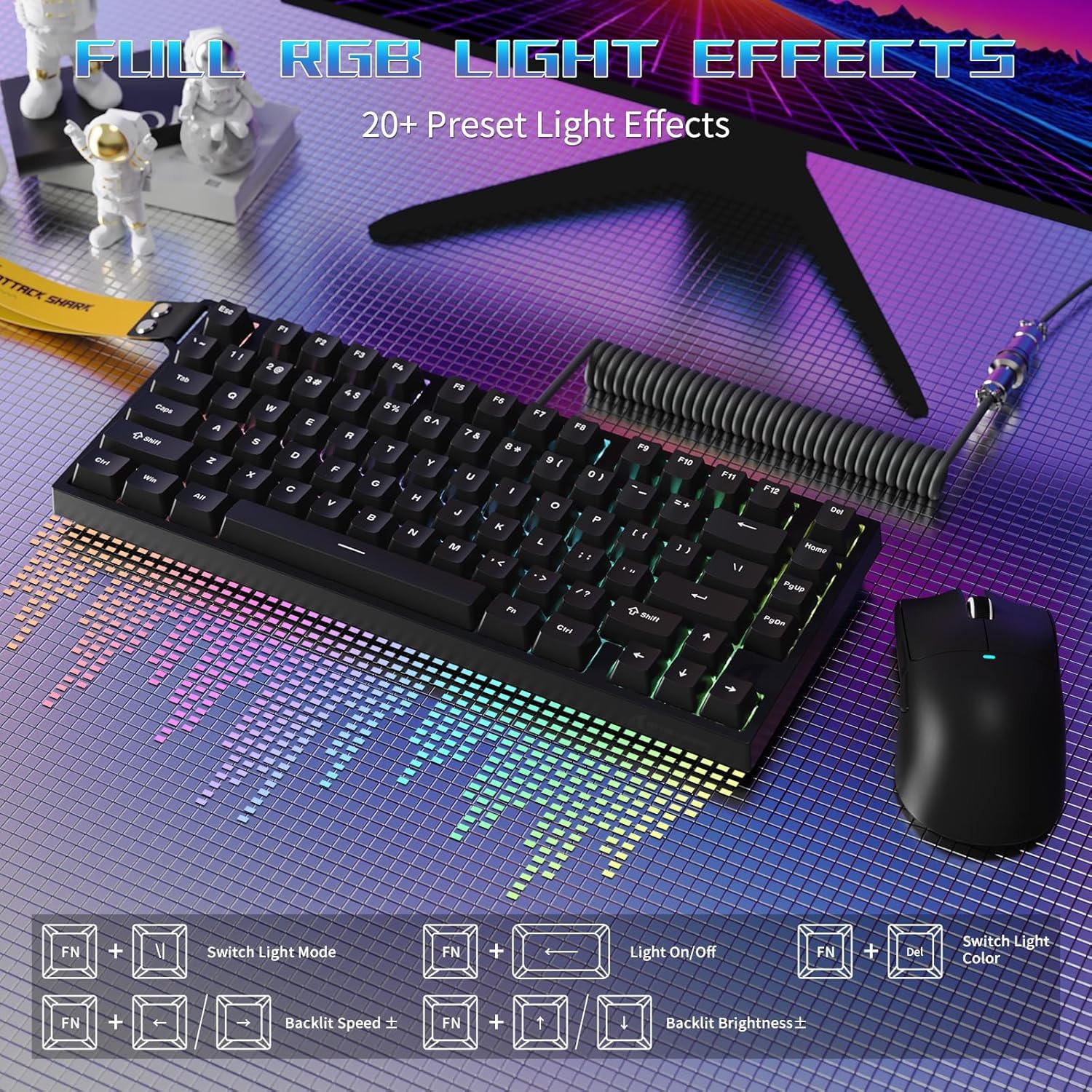
Image: The R82HE keyboard displaying its full RGB lighting effects, with a visual guide to the function key combinations for controlling lighting modes, on/off, color, speed, and brightness.
Interruptors intercanviables en calent
The R82HE supports hot-swapping, allowing you to easily replace switches without soldering. This feature enables you to customize the feel and sound of your keyboard by installing different compatible magnetic switches.

Image: The R82HE keyboard with several keycaps and switches removed, illustrating its full hot-swappable capability and the magnetic switches.
Vídeo de demostració del producte
Video: A short demonstration of the ATTACK SHARK R82HE gaming keyboard in use, highlighting its features and responsiveness.
Manteniment
Neteja del teu teclat
Per mantenir un rendiment i un aspecte òptims, netegeu el teclat regularment:
- Eliminació de pols: Feu servir aire comprimit per eliminar la pols i les restes que hi hagi entre les tecles.
- Neteja de les tecles: Gently pull off keycaps using the provided keycap puller. Clean them with a mild soap solution and a soft cloth, then dry thoroughly before reattaching.
- Neteja de superfícies: Wipe the keyboard surface with a slightly damp, drap sense borrissol. Eviteu la humitat excessiva.
Substitució de l'interruptor
If a switch needs replacement or you wish to change switch types:
- Apagueu el teclat o desconnecteu-lo de l'ordinador.
- Use the switch puller to carefully grip the switch and pull it straight up.
- Align the pins of the new switch with the holes on the PCB and press it firmly into place until it clicks.
- Reconnect the keyboard and test the new switch.
Resolució de problemes
If you encounter issues with your ATTACK SHARK R82HE keyboard, refer to the following common solutions:
- El teclat no respon:
- Assegureu-vos que el cable USB estigui connectat correctament tant al teclat com a l'ordinador.
- Prova de connectar el teclat a un port USB diferent.
- Reinicieu l'ordinador.
- La il·luminació RGB no funciona:
- Check if the lighting is turned off using the FN + ← key combination.
- Ensure the keyboard firmware is up to date via the web conductor.
- Claus que no es registren correctament:
- Clean under the affected keycap to remove any debris.
- If using custom actuation settings, reset them to default via the web driver and reconfigure.
- Consider hot-swapping the affected switch with a known working one to diagnose if the switch is faulty.
- Web Driver Not Accessible:
- Ensure your computer has an active internet connection.
- Verifiqueu que esteu utilitzant el correcte URL: qmk.top.
- Prova una altra web navegador.
Especificacions
| Característica | Detall |
|---|---|
| Marca | ATACA AL TAURON |
| Model | R82HE |
| Descripció del teclat | Teclat de joc mecànic |
| Tecnologia de connectivitat | Amb cable |
| Tipus de canvi | Hall Effect Magnetic Switches |
| Taxa de votació | 8000 Hz |
| Latència | 0.08 ms |
| Rang d'actuació | 0.1mm to 3.0mm (Adjustable) |
| Nombre de claus | 80 (75% Layout) |
| Il·luminació de fons | RGB (16.8 million colors, 20+ effects) |
| Característiques especials | Rapid Trigger, Dynamic Keystrokes, Mod-Tap, Toggle Key, Hot-Swappable, Web Driver Customization |
| Dispositius compatibles | PC |
| Color | Black (as per current model) |
| Pes de l'article | 9.9 lliures |
| Dimensions del paquet | 13.78 x 6.69 x 1.77 polzades |
| UPC | 752010613298 |
Garantia i Suport
The ATTACK SHARK R82HE keyboard comes with a manufacturer's warranty. For detailed warranty information, including terms and conditions, please refer to the warranty card included in your product packaging or visit the official ATTACK SHARK weblloc.
For technical support, troubleshooting assistance beyond this manual, or inquiries about replacement parts, please contact ATTACK SHARK customer service through their official channels. Keep your purchase receipt or order number handy for faster service.
També podeu visitar el Botiga ATTACK SHARK a Amazon per obtenir més informació sobre el producte i recursos d'assistència.


