
Introducció
This manual provides essential instructions for the safe and efficient operation of your Crayola Kids Bluetooth PA Stereo Speaker System. Please read this manual thoroughly before use and retain it for future reference.

Image: The Crayola Kids Bluetooth PA Stereo Speaker System in black, shown with its wired microphone.
Configuració
1. Unboxing i Inspecció Inicial
- Traieu amb cura tots els components de l'embalatge.
- Verify that the package contains the speaker unit, one wired microphone, and a USB-C charging cable.
- Inspect the unit for any signs of damage. If damage is present, do not use the product and contact customer support.
2. Carregant l’altaveu
- Abans del primer ús, carregueu completament l'altaveu.
- Connect the supplied USB-C charging cable to the USB-C charge port on the speaker.
- Connecteu l'altre extrem del cable a un adaptador de corrent USB compatible (no inclòs).
- El llum indicador de càrrega s'il·luminarà. Un cop completament carregat, el llum pot canviar de color o apagar-se.
- Una càrrega completa proporciona aproximadament 2 hores de reproducció.
3. Encès / apagat
- Locate the power button on the control panel.
- Press and hold the power button for a few seconds to turn the speaker ON or OFF.
Instruccions de funcionament
1. Emparellament Bluetooth

Image: The Crayola speaker shown with icons representing connectivity to a phone, MP3 player, iPad, and TV, illustrating its multifunctional Bluetooth capabilities.
- Ensure the speaker is powered ON and in Bluetooth mode. The speaker will typically enter Bluetooth pairing mode automatically upon power-on, indicated by a flashing LED.
- Al dispositiu (telèfon intel·ligent, tauleta, etc.), activeu el Bluetooth i cerqueu els dispositius disponibles.
- Select "Crayola Speaker" from the list of devices.
- Un cop emparellat, l'altaveu emetrà un so de confirmació i l'indicador LED deixarà de parpellejar.
2. Ús del micròfon
- Plug the wired microphone into the designated microphone input port on the speaker.
- Ensure the microphone's ON/OFF switch is in the ON position.
- Speak into the microphone. The sound will be ampexplicat a través de l'altaveu.
- Note: The microphone volume is fixed and cannot be adjusted independently from the main speaker volume.
3. Emparellatge estèreo sense fil veritable (TWS)
TWS allows two Crayola Bluetooth speakers to connect wirelessly for a stereo sound experience.
- Ensure both speakers are powered ON and in Bluetooth mode, but not yet paired with any device.
- On one speaker, press and hold the 'MODE' button until you hear a pairing tone. This speaker will become the primary unit.
- Els dos altaveus es connectaran automàticament entre si. Un cop connectats, sonarà un to de confirmació.
- Now, pair your device with the primary speaker via Bluetooth as described in the "Bluetooth Pairing" section.
4. Funció de ràdio FM
- Press the 'MODE' button to switch to FM Radio mode.
- Press the 'SCAN' button to automatically scan and save available FM radio stations.
- Use the 'V-/K' and 'V+/L' buttons to navigate between saved stations.
5. Controls i Funcions

Image: A hand pressing one of the control buttons on the top panel of the Crayola speaker, demonstrating user interaction.
| Botó | Funció |
|---|---|
| MODE | Switches between Bluetooth, FM Radio, and other input modes. Long press for TWS pairing. |
| V-/K | Short press: Volume Down. Long press (in FM mode): Previous Station. |
| ESCANEAR | Short press: Play/Pause (Bluetooth). Long press (in FM mode): Auto-scan FM stations. |
| V+/L | Short press: Volume Up. Long press (in FM mode): Next Station. |
Manteniment
- Neteja: Feu servir un drap suau i sec per netejar l'exterior de l'altaveu. No utilitzeu netejadors líquids ni materials abrasius.
- Emmagatzematge: Guardeu l'altaveu en un lloc fresc i sec, allunyat de la llum solar directa i de temperatures extremes.
- Cura de la bateria: Per allargar la durada de la bateria, eviteu descarregar-la completament amb freqüència. Torneu a carregar l'altaveu regularment, fins i tot si no l'utilitzeu durant períodes prolongats.
- Exposició a l'aigua: Aquest altaveu no és impermeable. Eviteu l'exposició a l'aigua o a una humitat excessiva.
Resolució de problemes
| Problema | Possible solució |
|---|---|
| L'altaveu no s'encén. | Ensure the battery is charged. Connect the USB-C cable and charge for at least 30 minutes before attempting to power on again. |
| No hi ha so de l'altaveu. | Check the volume level on both the speaker and your connected device. Ensure the speaker is correctly paired via Bluetooth or in the correct mode (e.g., FM radio). |
| L'aparellament de Bluetooth falla. | Ensure the speaker is in pairing mode. Turn off Bluetooth on your device and turn it back on. Move the speaker closer to your device. Disconnect any other Bluetooth devices from the speaker. |
| Microphone has excessive echo. | The microphone's volume is fixed. Ensure you are not too close to the speaker when using the microphone, as this can cause feedback or echo. |
| La recepció de ràdio FM és deficient. | Relocate the speaker to an area with better signal. Perform an auto-scan again to find stronger stations. |
Especificacions del producte
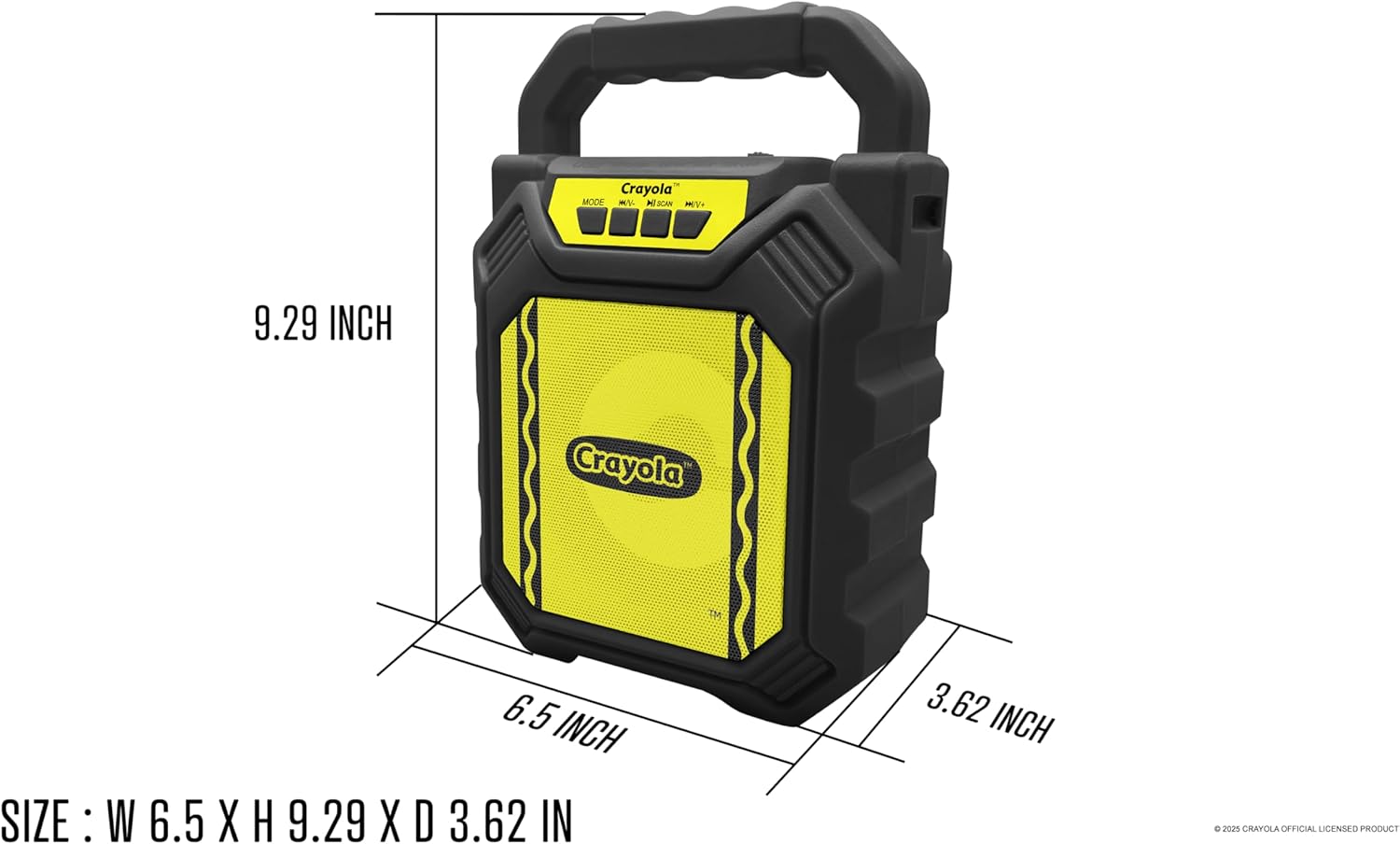
Image: Diagram illustrating the dimensions of the Crayola Kids Bluetooth PA Stereo Speaker System.
| Característica | Detall |
|---|---|
| Número de model | B0FGYDFH7M |
| Marca | Crayola |
| Tecnologia de connectivitat | Bluetooth 5.0 |
| Mida del controlador | 4 polzades |
| Potència màxima | 10W |
| Capacitat de la bateria | 1200 mAh |
| Temps de reproducció | Fins a 2 hores (amb una única càrrega) |
| Sensibilitat | > 85 dB |
| Port de càrrega | USB-C |
| Característiques | Bluetooth, TWS, FM Radio, Microphone Input, LED Lights |
| Dimensions (L x A x A) | 6.49 x 3.72 x 1.57 polzades |
| Pes de l'article | 1.58 lliures |
| Material | Plàstic |
| UPC | 605832373966 |
Garantia i Suport
For warranty information and customer support, please refer to the documentation included with your purchase or visit the official Crayola weblloc web. Conserveu el comprovant de compra per a reclamacions de garantia.


