1. Introducció
This manual provides essential information for the safe and effective operation of your Blackstar ID:X-50 High Power Digital Combo 50W Guitar Amplifier. Please read this manual thoroughly before using the amplifier to ensure proper setup, operation, and maintenance. Retain this manual for future reference.
2. Instruccions de seguretat importants
- Font d'alimentació: Connecteu el amplifier only to a power supply of the type described in this manual and marked on the unit. Ensure the power cord is properly grounded.
- Ventilació: No bloquegeu cap obertura de ventilació. Instal·leu-ho d'acord amb les instruccions del fabricant.
- Aigua i humitat: No utilitzeu aquest aparell a prop d'aigua o humitat.
- Calor: No instal·leu a prop de cap font de calor com ara radiadors, registres de calor, estufes o altres aparells (inclosos amplificadors) que produeixen calor.
- Neteja: Netegeu només amb un drap sec.
- Manteniment: Demaneu tot el servei a personal de servei qualificat. El manteniment és necessari quan l'aparell s'ha fet malbé d'alguna manera, com ara el cable d'alimentació o l'endoll està danyat, s'ha vessat líquid o han caigut objectes a l'aparell, l'aparell ha estat exposat a la pluja o la humitat, no funciona amb normalitat. , o s'ha deixat caure.
- Cable d'alimentació: Eviteu que el cable d'alimentació sigui trepitjat o pessigat, especialment als endolls, els endolls i el punt on surten de l'aparell.
3. Producte acabatview
The Blackstar ID:X-50 is a 50W digital combo guitar amplifier designed for versatile tone shaping and performance. It features multiple amp voices, built-in effects, and intuitive controls.

Figura 3.1: Front-angle view of the Blackstar ID:X-50 ampvidador, espectacleasinel seu disseny compacte i la reixeta de l'altaveu.
3.1 Controls del panell frontal
The front panel provides access to all primary sound shaping and effect parameters.
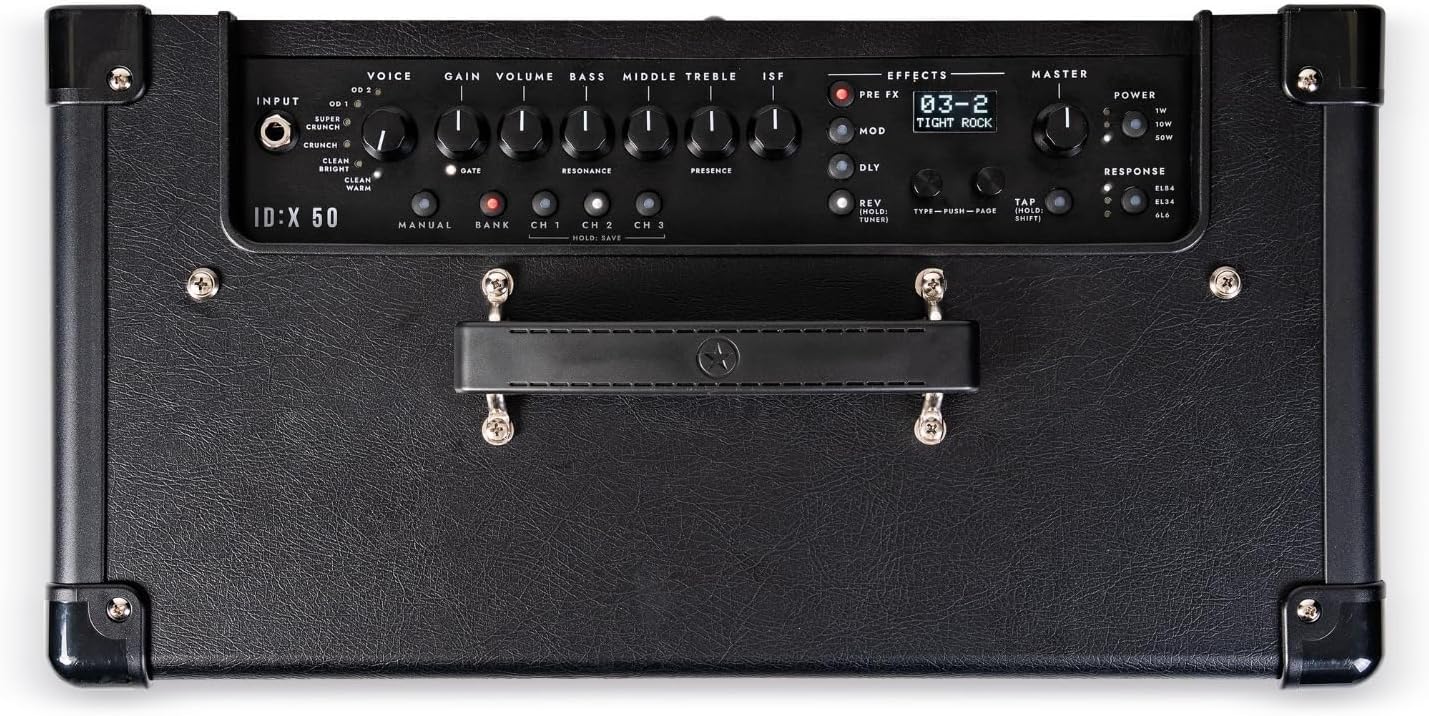
Figura 3.2: Detallada view of the ID:X-50 amplifier's top-mounted control panel, showing input, voice, gain, EQ, effects, and master sections.
- ENTRADA: Connecta la teva guitarra aquí.
- VEU: Selects one of six distinct amp voices (Clean Warm, Clean Bright, Crunch, Super Crunch, OD 1, OD 2).
- GUANY: Controls the amount of overdrive or distortion.
- VOLUM: Adjusts the overall output level of the selected voice.
- BAIX, MITJANS, AIGTS: Standard 3-band equalizer controls.
- ISF (Infinite Shape Feature): Blackstar's unique tone control, sweeping from a classic British sound to a modern American tone.
- EFFECTS Section: Includes controls for Pre-FX, Modulation, Delay, and Reverb effects.
- Volum PRINCIPAL: Controls the final output volume of the ampmés viu.
- POTÈNCIA: Selectable power levels (1W/10W/50W).
- RESPOSTA: Emulates different valve amplifier responses (EL84, EL34, 6L6).
- Pantalla de visualització: Shows patch names, effect selection, and parameter values.
3.2 Connexions del panell posterior
The rear panel provides connectivity for power, footswitch, audio output, and USB.
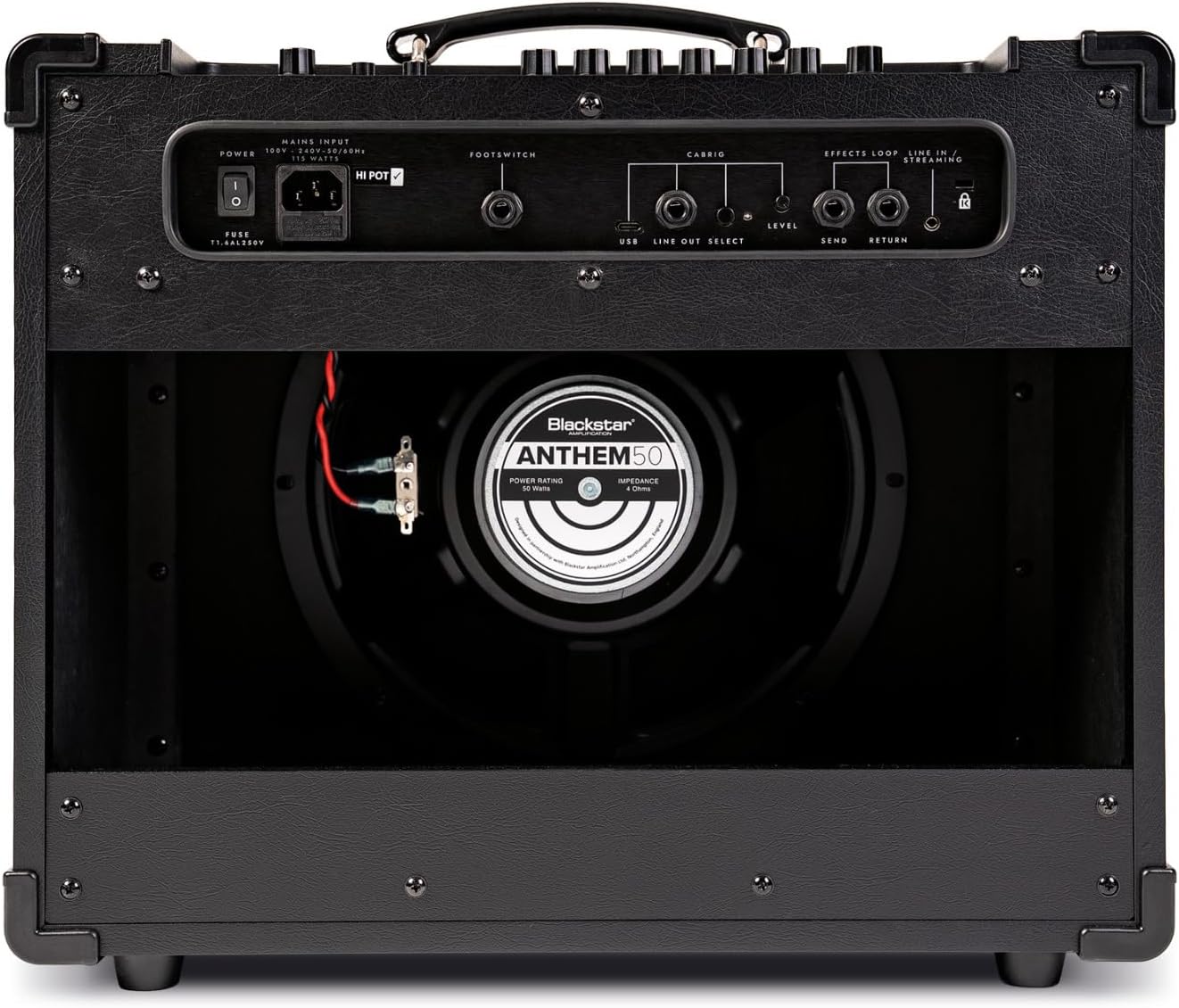
Figura 3.3: posterior view of the ID:X-50 amplifier, detailing the power input, footswitch, USB, line out, and effects loop connections.
- ENTRADA PRINCIPAL: Connecteu aquí el cable d'alimentació subministrat.
- INTERRUPTOR DE PEUT: Connect an optional Blackstar footswitch for remote control of functions.
- USB: For connecting to a computer for recording or software updates.
- LINE OUT / HEADPHONES: For connecting to headphones or an external mixing console/recording interface.
- EFFECTS LOOP (SEND/RETURN): For integrating external stompboxes or effects processors.
4. Configuració
- Desembalatge: Traieu amb cura amplifier from its packaging. Inspect for any signs of damage.
- Col·locació: Col·loca el amplifier on a stable, level surface. Ensure adequate ventilation around the unit.
- Connexió d'alimentació: Assegureu-vos el amplifier's power switch is in the OFF position. Connect the supplied power cord to the MAINS INPUT on the rear panel and then to a suitable grounded power outlet.
- Guitar Connection: Connect your guitar to the INPUT jack on the front panel using a high-quality instrument cable.
- Connexions opcionals:
- If using a footswitch, connect it to the FOOTSWITCH jack on the rear panel.
- For headphones or direct recording, connect to the LINE OUT / HEADPHONES jack.
- For external effects, connect your effects unit to the EFFECTS LOOP (SEND/RETURN) jacks.
5. Instruccions de funcionament
5.1 Powering On and Basic Sound
- Turn the MASTER volume control to its minimum setting.
- Flip the power switch to the ON position. The display will illuminate.
- Select a VOICE (e.g., Clean Warm).
- Adjust the GAIN and VOLUME controls to achieve your desired level of drive and output for the selected voice.
- Slowly increase the MASTER volume to a comfortable listening level.
5.2 Amp Veus
The ID:X-50 offers six distinct amp veus:
- Clean Warm: Smooth, dynamic clean tone.
- Clean Bright: Brighter clean tone with more sparkle.
- Cruixit: Classic rock crunch with good articulation.
- Super Crunch: Higher gain crunch for heavier rhythm.
- OD 1: Modern overdrive with tight bass and singing highs.
- OD 2: Aggressive, high-gain lead tone.
Rotate the VOICE knob to cycle through these options. The selected voice will be shown on the display.
5.3 Equalization (EQ) and ISF
Use the BASS, MIDDLE, and TREBLE knobs to fine-tune the tonal characteristics of your sound. The ISF control allows you to shift the amplifier's tonal response between a British-style (counter-clockwise) and American-style (clockwise) sound.
5.4 Built-in Effects
The ID:X-50 includes over 35 effects, categorized into Pre-FX, Modulations, Delays, and Reverbs. Use the dedicated EFFECT section controls and the display to select and adjust parameters.

Figura 5.1: A hand demonstrating adjustment of a control knob on the amplifier's front panel, highlighting user interaction with the effects section.
- Selecció d'efectes: Use the dedicated buttons or knobs within the EFFECTS section to navigate through effect types and select a specific effect.
- Paràmetres d'ajust: The display will show the selected effect and its parameters. Use the associated controls to modify these parameters. Up to 4 parameters per effect can be fine-tuned.
5.5 Valve Response Emulation
The RESPONSE control allows you to emulate the characteristics of different power amp vàlvules:
- EL84: Bright, chimey, and dynamic.
- EL34: Classic British rock tone, rich and powerful.
- 6L6: American-style tone, tight low-end and clear highs.
5.6 Patch Saving and Recall
The ID:X-50 allows you to save your custom amp and effect settings as patches for quick recall. Refer to the display and associated controls for specific instructions on saving and recalling patches.
5.7 Selecció del nivell de potència
The POWER switch allows you to select between 1W, 10W, and 50W output levels. This is useful for adapting the amplifier's volume and headroom to different environments, from bedroom practice to stage rendiment.
6. Manteniment
- Neteja: Desconnecteu el amplifier from the power supply before cleaning. Use a soft, dry cloth to wipe down the exterior. Do not use liquid cleaners or abrasive materials.
- Emmagatzematge: Quan no s'utilitzi durant períodes prolongats, guardeu-lo amplifier in a dry, dust-free environment.
- Transport: En transportar el amplifier, ensure it is securely packed to prevent physical damage.
7. Solució De Problemes
| Problema | Causa possible | Solució |
|---|---|---|
| Sense poder | Power cord not connected; Power outlet faulty; Amplifier power switch off. | Ensure power cord is securely connected. Test outlet with another device. Turn power switch ON. |
| Sense so | Guitar cable faulty; Volume controls too low; Incorrect input selected; Speaker disconnected (internal). | Check guitar cable. Increase GAIN, VOLUME, and MASTER controls. Ensure guitar is plugged into INPUT. Contact service if speaker is suspected. |
| So distorsionat | GAIN too high for clean voice; Faulty cable; Speaker damage. | Reduce GAIN. Test with a different cable. If distortion persists at low gain, contact service. |
| Els efectes no funcionen | Effect level set to zero; Effect bypassed; Incorrect effect selected. | Check effect parameters on the display. Ensure effect is active and not bypassed. |
If you encounter issues not listed here or if the suggested solutions do not resolve the problem, please contact Blackstar customer support or a qualified service technician.
8. Especificacions
- Model: Blackstar ID:X-50
- Potència de sortidatage: 50 Watts (selectable 1W/10W/50W)
- Amp Veus: 6 (Clean Warm, Clean Bright, Crunch, Super Crunch, OD 1, OD 2)
- EQ: 3-Band (Bass, Middle, Treble) + ISF (Infinite Shape Feature)
- Efectes: Over 35 built-in effects (Pre-FX, Modulation, Delay, Reverb)
- Valve Response Emulation: EL84, EL34, 6L6
- Connectivitat: Guitar Input, Footswitch, USB, Line Out/Headphones, Effects Loop (Send/Return)
- Dimensions: 18.23 x 12.68 x 21.73 polzades (dimensions del producte)
- Pes: 33 lliures
- Material: Metall
- Color: Negre
9. Garantia i Suport
For detailed warranty information, please refer to the warranty card included with your product or visit the official Blackstar Amplificació website. For technical support, service, or spare parts, please contact your authorized Blackstar dealer or Blackstar customer support directly.
Blackstar Amplification Official Weblloc: www.blackstaramps.com


