Introducció
This manual provides comprehensive instructions for the setup, operation, and maintenance of your Trevi PJ 3030 Digital Projection Clock. Please read this manual carefully before using the device to ensure proper function and longevity.
Producte acabatview
The Trevi PJ 3030 is a versatile digital clock designed to display time, date, and temperature, with the added feature of time projection. It includes a backlit display for clear readability and a programmable alarm function.
Components
- Pantalla digital
- Lent de projecció
- Control Buttons (AL, UP, DOWN, SET, MODE)
- Compartiment de la bateria
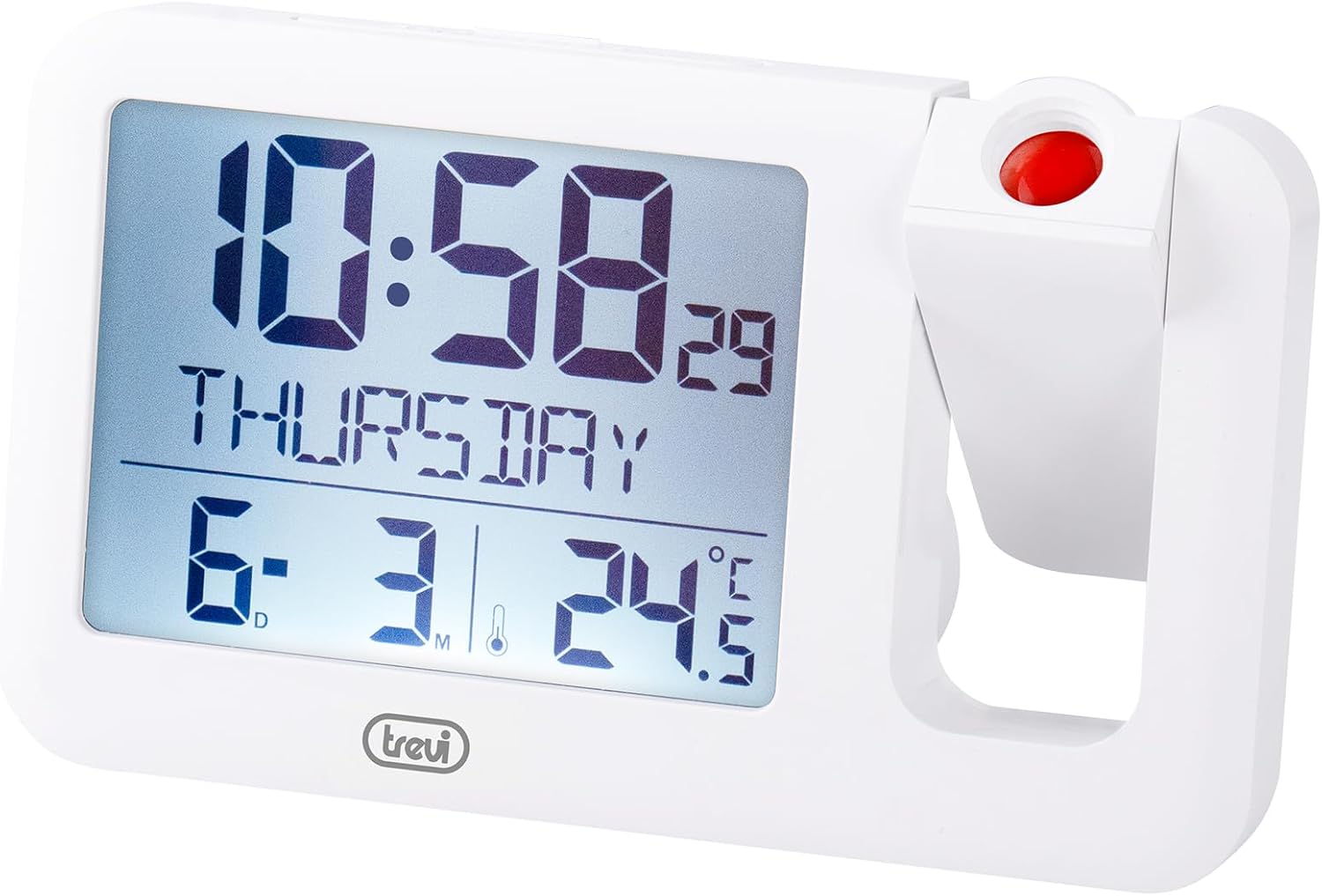
Figura 1: Davant view of the Trevi PJ 3030 Digital Projection Clock. The image shows the main digital display on the left, indicating time, day, date, and temperature. On the right, the adjustable projection lens is visible with a red button on top.
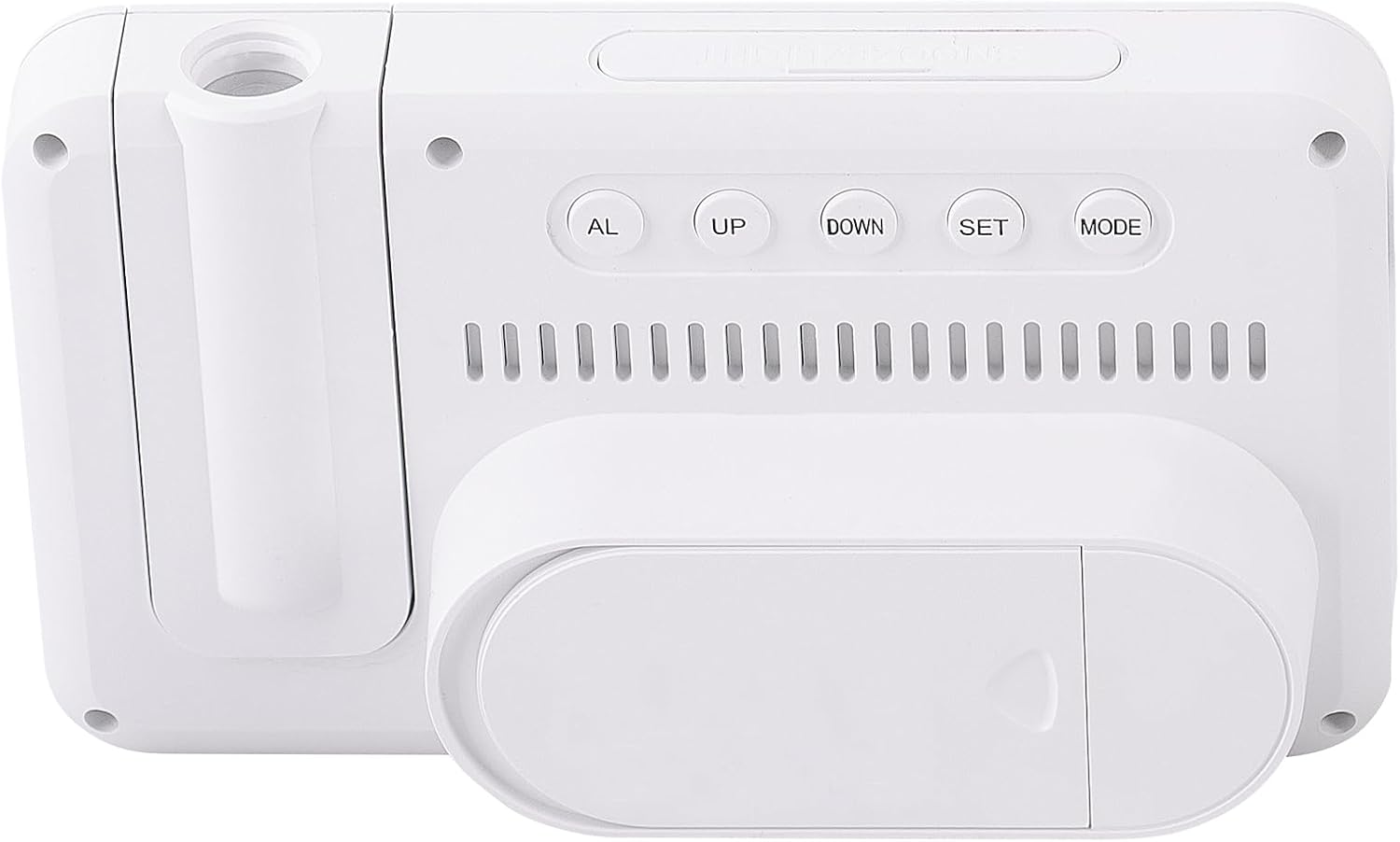
Figura 2: Enrere view of the Trevi PJ 3030 Digital Projection Clock. This view highlights the control buttons: AL, UP, DOWN, SET, and MODE, arranged horizontally. Below the buttons, ventilation slots are visible, and at the bottom, the battery compartment cover is shown.
Configuració
Instal·lació de la bateria
- Localitzeu el compartiment de la bateria a la part posterior del dispositiu (vegeu la Figura 2).
- Obriu la tapa del compartiment de la bateria.
- Introduïu 3 piles AAA (no incloses) seguint les marques de polaritat (+/-) que hi ha a l'interior del compartiment.
- Tanqueu bé la tapa del compartiment de la bateria.
Nota: The device requires 3 AAA batteries for operation. Batteries are not included with the product.
Instruccions de funcionament
Configuració de l'hora i la data
- Premeu el botó MODE button repeatedly until the time display starts flashing.
- Utilitza el UP or ABAIX botons per ajustar l'hora.
- Premeu SET to confirm the hour and move to minute adjustment.
- Utilitza el UP or ABAIX botons per ajustar els minuts.
- Premeu SET to confirm the minutes and move to year adjustment.
- Continueu aquest procés utilitzant UP/ABAIX per ajustar i SET to confirm, for setting the year, month, and day.
- Un cop finalitzada tota la configuració, premeu MODE per sortir del mode de configuració.
Configuració de l'Alarma
- Premeu el botó AL button to enter alarm setting mode. The alarm time will flash.
- Utilitza el UP or ABAIX botons per ajustar l'hora de l'alarma.
- Premeu SET to confirm the alarm hour and move to minute adjustment.
- Utilitza el UP or ABAIX botons per ajustar els minuts de l'alarma.
- Premeu SET to confirm the alarm minutes.
- Premeu AL again to activate or deactivate the alarm. An alarm icon will appear on the display when activated.
Utilització de la funció de projecció
The Trevi PJ 3030 can project the time onto a ceiling or wall.
- Locate the projection lens on the right side of the clock (refer to Figure 1).
- Press the red button located on top of the projection lens to activate the projection.
- Adjust the angle of the projection lens manually to direct the time display to your desired surface.
- The projection will remain active for a short period and then turn off automatically to conserve battery power.
Changing Temperature Unit (°C / °F)
The clock displays temperature in Celsius (°C) or Fahrenheit (°F).
- En el mode de visualització de l'hora normal, premeu el botó ABAIX button to toggle between Celsius and Fahrenheit.
Manteniment
- Clean the clock's surface with a soft, dry cloth. Do not use abrasive cleaners or solvents.
- Keep the device away from direct sunlight, extreme temperatures, and high humidity.
- If the clock will not be used for an extended period, remove the batteries to prevent leakage.
Resolució de problemes
| Problema | Causa possible | Solució |
|---|---|---|
| La pantalla està en blanc o tènue. | Bateries baixes o esgotades. | Replace with new AAA batteries. Ensure correct polarity. |
| La projecció no és visible o és tènue. | Projection feature not activated; insufficient ambient darkness; projection lens obstructed. | Press the red projection button. Ensure the room is dark enough. Clean the projection lens if necessary. |
| L'alarma no sona. | Alarm not activated; incorrect alarm time set. | Ensure the alarm icon is visible on the display. Re-check alarm time settings. |
| Hora/data incorrecta mostrada. | L'hora/data no s'han configurat correctament després del canvi de pila o de la configuració inicial. | Seguiu les instruccions de "Configuració de la data i l'hora" per reiniciar-lo. |
Especificacions
- Model: Trevi PJ 3030
- Tipus de visualització: Digital, retroil·luminat
- Funcions: Time, Date, Day, Temperature (°C/°F), Alarm, Projection
- Font d'alimentació: 3 piles AAA (no incloses)
- Dimensions: 14.9W x 9H centimetres
- Pes: 0.2 quilos
- Material: Plàstic
- Ús interior / exterior: Interior
Garantia i Suport
For warranty information and customer support, please refer to the documentation provided with your purchase or visit the official Trevi weblloc web. Conserveu el comprovant de compra per a reclamacions de garantia.


