1. Introducció
Welcome to the user manual for your new HP OMEN 16L TG03 Gaming Desktop. This powerful system is designed for high-performance gaming and demanding applications, featuring an Intel Core Ultra 7 265F processor, NVIDIA GeForce RTX 5060 graphics, 16GB DDR5 RAM, and a 1TB PCIe NVMe M.2 Solid State Drive. This manual provides essential information for setting up, operating, maintaining, and troubleshooting your desktop to ensure optimal performance and longevity.
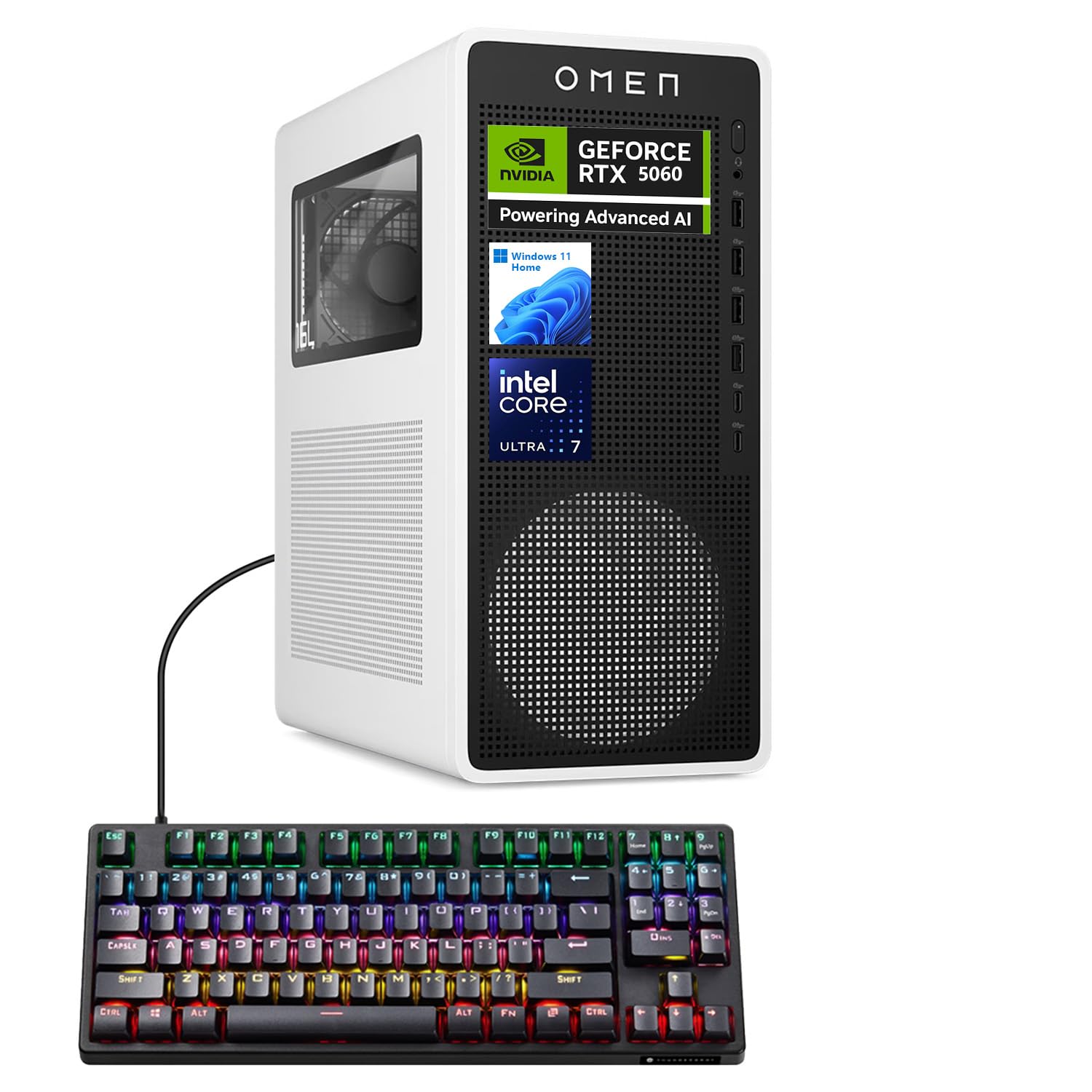
2. Què hi ha a la caixa
Upon unpacking your HP OMEN 16L TG03 Gaming Desktop, please ensure all the following items are present:
- HP Omen 16L Gaming Tower Desktop
- Thunderobot KG3089R Gaming Keyboard (bundled item)
- Cable d'alimentació
- Documentació (Guia d'inici ràpid, Informació de garantia)
Note: Additional accessories such as a monitor, mouse, and speakers are sold separately unless specified in your purchase bundle.
3. Guia de configuració
Follow these steps to set up your HP OMEN 16L TG03 Gaming Desktop:
- Desempaqueta l'escriptori: Carefully remove the desktop tower and all accessories from their packaging.
- Connecteu els perifèrics:
- Connect your monitor(s) to the graphics card ports (HDMI, DisplayPort) on the rear of the desktop.
- Connect the Thunderobot KG3089R Gaming Keyboard and your mouse to the available USB ports.
- Connect any other peripherals such as speakers, headphones, or external drives.
- Connectar l'alimentació: Plug the power cable into the desktop's power input and then into a grounded electrical outlet.
- Encès: Premeu el botó d'engegada a la part frontal de l'escriptori.
- Configuració inicial de Windows: Follow the on-screen instructions to complete the Windows 11 Home operating system setup, including language, region, network connection, and user account creation.

Port Overview:
- Davant: Headphone/MIC combo jack, 4 x Superspeed USB Type-A (5Gbps), 2 x Superspeed USB Type-C (10Gbps)
- posterior: 3 x Headphone/MIC combo jack, HDMI Out, 4 x USB Type-A 2.0, 1 x RJ-45 (Ethernet), Power input
4. Instruccions de funcionament
Your HP OMEN 16L TG03 Gaming Desktop comes pre-installed with Windows 11 Home, offering a user-friendly interface and enhanced performance features.
4.1 Funcionament bàsic
- Encès/apagat: Premeu el botó d'engegada per engegar. Per apagar, feu clic al botó Inici i, a continuació, a Engegada > Apaga.
- Connectivitat a Internet: Connect via Ethernet (RJ-45 port) or Wi-Fi 6 (802.11ax) for wireless internet access.
- Àudio: Connect headphones or speakers to the audio jacks.
4.2 Característiques del joc
The OMEN 16L TG03 is optimized for gaming with its powerful hardware and dedicated software.

- Centre de jocs OMEN: Utilize the pre-installed OMEN Gaming Hub for performance optimization, system monitoring, and customizing RGB lighting effects. This hub provides advanced controls to fine-tune your gaming experience.
- NVIDIA GeForce RTX 5060: Experience hyperrealistic graphics and high frame rates with the NVIDIA GeForce RTX 5060. Leverage features like NVIDIA DLSS 4 for enhanced performance and AI-powered creativity.
- AI-Ready Workstation: The Intel Core Ultra 7 265F processor and NVIDIA RTX 5060 make this desktop suitable for AI-driven tasks, including gaming and content creation.
4.3 Thunderobot KG3089R Keyboard Shortcuts
The bundled Thunderobot KG3089R Gaming Keyboard offers several shortcut key combinations for enhanced control:

- FN + F9: Canvia els efectes d'il·luminació.
- FN + Win: Lock the Windows key to prevent accidental presses during gaming.
5. Manteniment
Un manteniment regular ajuda a garantir la longevitat i el rendiment òptim del vostre escriptori.
- Mantingueu-lo net: Regularly clean the exterior of the desktop with a soft, dry cloth. Use compressed air to clear dust from vents and fans to prevent overheating.
- Actualitzacions de programari: Keep your Windows operating system, drivers (especially graphics drivers), and OMEN Gaming Hub software updated to the latest versions for security and performance improvements.
- Protecció antivirus: Instal·leu i actualitzeu regularment un programari antivirus per protegir-vos contra programari maliciós i virus.
- Còpia de seguretat de dades: Feu còpies de seguretat periòdiques de les dades importants en un disc dur extern o en un emmagatzematge al núvol per evitar la pèrdua de dades.
- Ventilació adequada: Ensure the desktop is placed in a well-ventilated area, away from direct sunlight and heat sources, to allow for proper airflow.
6. Solució De Problemes
If you encounter issues with your HP OMEN 16L TG03 Gaming Desktop, refer to the following common troubleshooting steps:
| Problema | Causa possible | Solució |
|---|---|---|
| L'escriptori no s'encén | Cable d'alimentació desconnectat, problema amb la presa de corrent | Check power cable connections to the desktop and wall outlet. Test the outlet with another device. |
| No es mostra al monitor | Monitor cable loose, incorrect input selected on monitor | Ensure monitor cables are securely connected to both the desktop's graphics card and the monitor. Select the correct input source on your monitor. |
| El sistema és lent o no respon | Too many applications running, outdated drivers, overheating | Close unnecessary applications. Update graphics and system drivers. Ensure proper ventilation and clean dust from vents. |
| Games crashing or freezing | Outdated graphics drivers, overheating, software conflicts | Update NVIDIA graphics drivers. Monitor system temperatures. Ensure OMEN Gaming Hub is optimized. |
| El teclat no respon | USB connection issue, driver problem | Try connecting the keyboard to a different USB port. Restart the desktop. Check for keyboard driver updates in Device Manager. |
For more complex issues, please refer to the HP support weblloc o contacteu amb el servei d'atenció al client.
7. Especificacions
Detailed technical specifications for the HP OMEN 16L TG03 Gaming Desktop (Model: HSC-F007MT):
| Característica | Detall |
|---|---|
| Número de model | HSC-F007MT |
| Processador | Intel Core Ultra 7 265F (20 Cores, 20 Threads, 30MB L3 Cache, 1.80GHz base, up to 5.30GHz max turbo) |
| Targeta gràfica | NVIDIA GeForce RTX 5060 (8 GB GDDR7 dedicat) |
| RAM | 16 GB de DDR5 (4800 MHz) |
| Emmagatzematge | Unitat d'estat sòlid M.2 PCIe NVMe d'1 TB |
| Sistema operatiu | Windows 11 Home |
| Connectivitat sense fil | Wi-Fi 6 (802.11ax) & Bluetooth |
| Ports davanters | 1x Headphone/MIC combo jack, 4x Superspeed USB Type-A (5Gbps), 2x Superspeed USB Type-C (10Gbps) |
| Ports posteriors | 3x Headphone/MIC combo jack, 1x HDMI, 3x DisplayPort, 4x USB Type-A 2.0, 1x RJ-45 (Ethernet) |
| Dimensions (LxWxH) | 13.26 x 12.12 x 6.1 polzades |
| Pes de l'article | 49.8 lliures |
| Color | Negre |
| Font d'alimentació | AC |
8. Garantia i Suport
Your HP OMEN 16L TG03 Gaming Desktop comes with a standard manufacturer's warranty. For specific warranty terms and conditions, please refer to the documentation included in your product packaging or visit the official HP support weblloc.
Per al suport tècnic:
- Visita l'oficial Suport d'HP Weblloc per a controladors, manuals i guies de resolució de problemes.
- Contact HP Customer Service for direct assistance.
Plans de protecció opcionals:
Extended protection plans may be available for purchase to cover your device beyond the standard warranty period. Examples inclouen:
- Pla de protecció de 3 anys
- Protecció completa (pla mensual que cobreix les compres elegibles)
Please check with your retailer or HP for details on available protection plans.