1. Introducció
This manual provides essential information for the proper setup, operation, and maintenance of your SANSUI ES-22X3AH 22-inch FHD 120Hz Monitor. This monitor is designed to deliver clear visuals for professional work, home use, and entertainment, featuring a 1920x1080 resolution, 120Hz refresh rate, and Adaptive Sync technology.
Les característiques clau inclouen:
- Claredat Full HD: 1920x1080 resolution with 100% sRGB color accuracy and HDR mode for detailed visuals.
- Smooth Visual Performance: 120Hz refresh rate and Adaptive Sync technology for reduced motion blur.
- Confort ocular: Anti-flicker technology, low blue light emission, and anti-glare coating to minimize eye strain.
- Connectivitat flexible: Dual HDMI 1.4 ports and VESA mount compatibility.
2. Contingut del paquet
Si us plau, verifiqueu que tots els elements siguin presents al paquet:
- SANSUI ES-22X3AH 22-inch Monitor
- Suport de monitor (base i coll)
- Adaptador d'alimentació
- Cable d'alimentació
- Cable HDMI
- Manual d'usuari (aquest document)
Nota: El contingut pot variar lleugerament segons la regió o el venedor.
3. Instruccions de configuració
3.1 Muntatge del suport
- Traieu amb cura els components del monitor i del suport de l'embalatge.
- Fixeu el coll del suport al panell del monitor. Assegureu-vos que encaixi correctament al seu lloc o que estigui fixat amb cargols si n'hi ha.
- Connect the stand base to the stand neck, securing it with the thumb screw or other fasteners.
- Col·loqueu el monitor muntat sobre una superfície plana i estable.
Image: Monitor with Stand Assembly

The SANSUI ES-22X3AH monitor fully assembled with its stand, ready for use.
3.2 Instal·lació del suport VESA (opcional)
The monitor supports a 75x75 mm VESA mount for wall or arm installation. To use a VESA mount:
- Remove the pre-assembled stand from the monitor.
- Attach your VESA-compatible mount to the four screw holes on the back of the monitor.
- Ensure the mount is securely fastened according to the mount manufacturer's instructions.
Image: Monitor Rear with VESA Mount Points and Dimensions

Detallada view of the monitor's rear panel, highlighting the VESA mounting pattern and tilt capabilities.
3.3 Connexió a un dispositiu
The monitor features dual HDMI 1.4 ports and a DC power input.
- Connect the power adapter to the DC input port on the monitor, then plug the power cord into an electrical outlet.
- Connect one end of the included HDMI cable to an HDMI port on your computer or other video source.
- Connect the other end of the HDMI cable to one of the HDMI input ports on the monitor.
- Power on your computer and the monitor. The monitor should automatically detect the input signal.
Image: Monitor Connectivity Ports
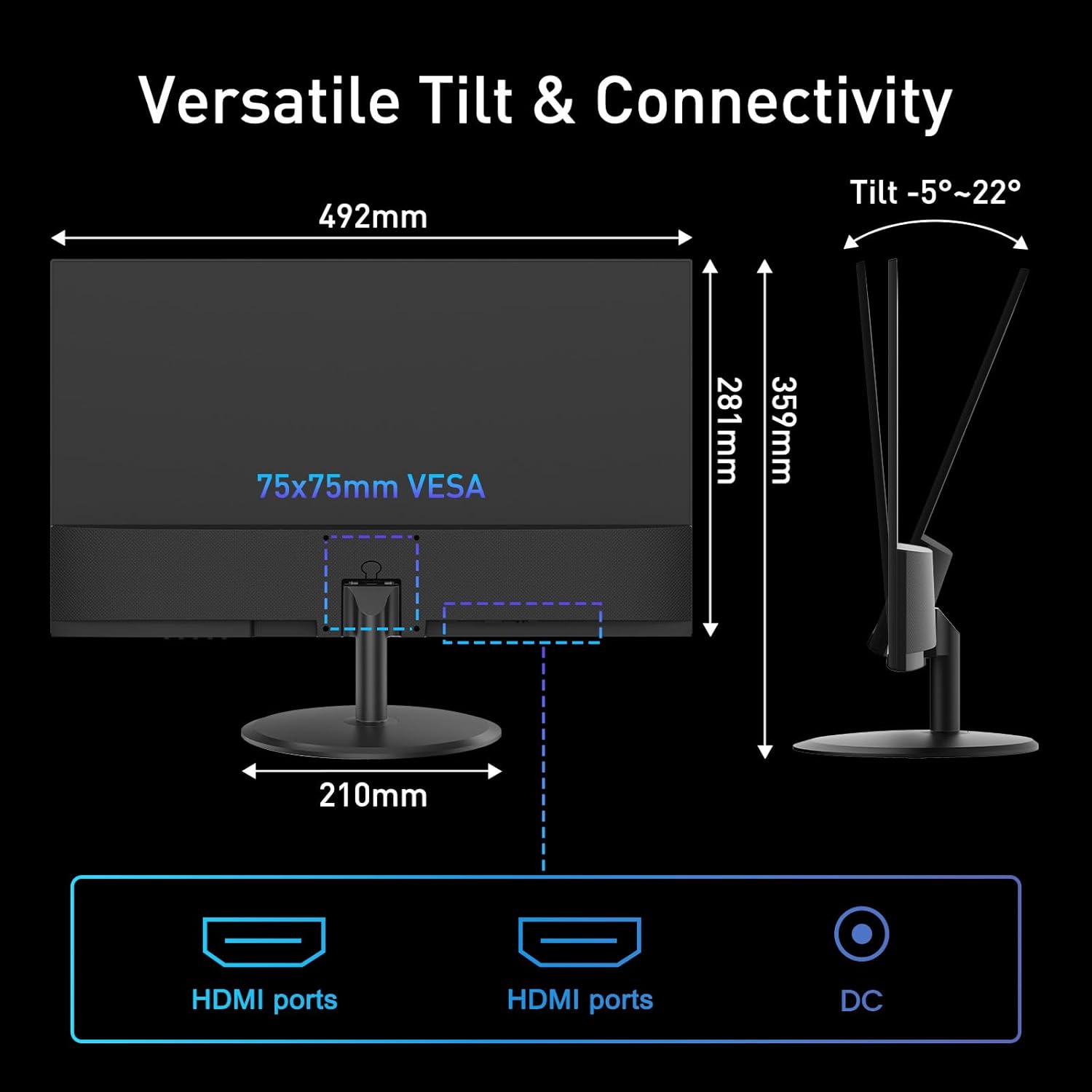
Illustration of the monitor's connectivity options, including HDMI and DC power ports.
4. Instruccions de funcionament
4.1 Encès/Apagat
Premeu el botó d'engegada, que normalment es troba a la part inferior dreta o posterior del monitor, per encendre o apagar el monitor. L'indicador lluminós d'engegada s'il·luminarà quan el monitor estigui encès.
4.2 Menú de visualització en pantalla (OSD)
The OSD menu allows you to adjust various monitor settings. Use the control buttons (joystick or individual buttons) typically found on the back or bottom of the monitor to navigate the menu.
- Brillantor/Contrast: Ajusta la luminància i la distinció de la imatge.
- Configuració de color: Modifica la temperatura de color, el to i la saturació.
- Selecció d'entrada: Manually switch between HDMI inputs.
- Mode d'imatge: Select preset display modes (e.g., Standard, Game, Movie).
- Sincronització adaptativa: Enable or disable Adaptive Sync for smoother visuals.
- Mode HDR: Activate High Dynamic Range for enhanced contrast and color.
4.3 Característiques clau
4.3.1 120Hz Refresh Rate
The 120Hz refresh rate provides smoother motion and reduced input lag, beneficial for fast-paced content and general desktop use. Ensure your connected device is configured to output at 120Hz for optimal performance.
Image: High Refresh Rate Visual

Visual representation of the monitor's 120Hz refresh rate, ensuring ultra-fluid visuals.
4.3.2 Sincronització adaptativa
Adaptive Sync technology synchronizes the monitor's refresh rate with your graphics card's frame rate, eliminating screen tearing and stuttering for a more fluid visual experience. This feature is automatically enabled when supported by your graphics card and enabled in the OSD.
Image: Adaptive Sync vs. Conventional Display

Demonstration of Adaptive Sync technology providing tear-free and smooth visuals compared to a conventional display.
4.3.3 HDR (alt rang dinàmic)
HDR mode enhances the contrast and color accuracy of compatible content, providing deeper blacks, brighter whites, and a wider range of colors. Enable HDR through the OSD menu or your operating system settings for supported media.
Image: HDR Clarity Comparison
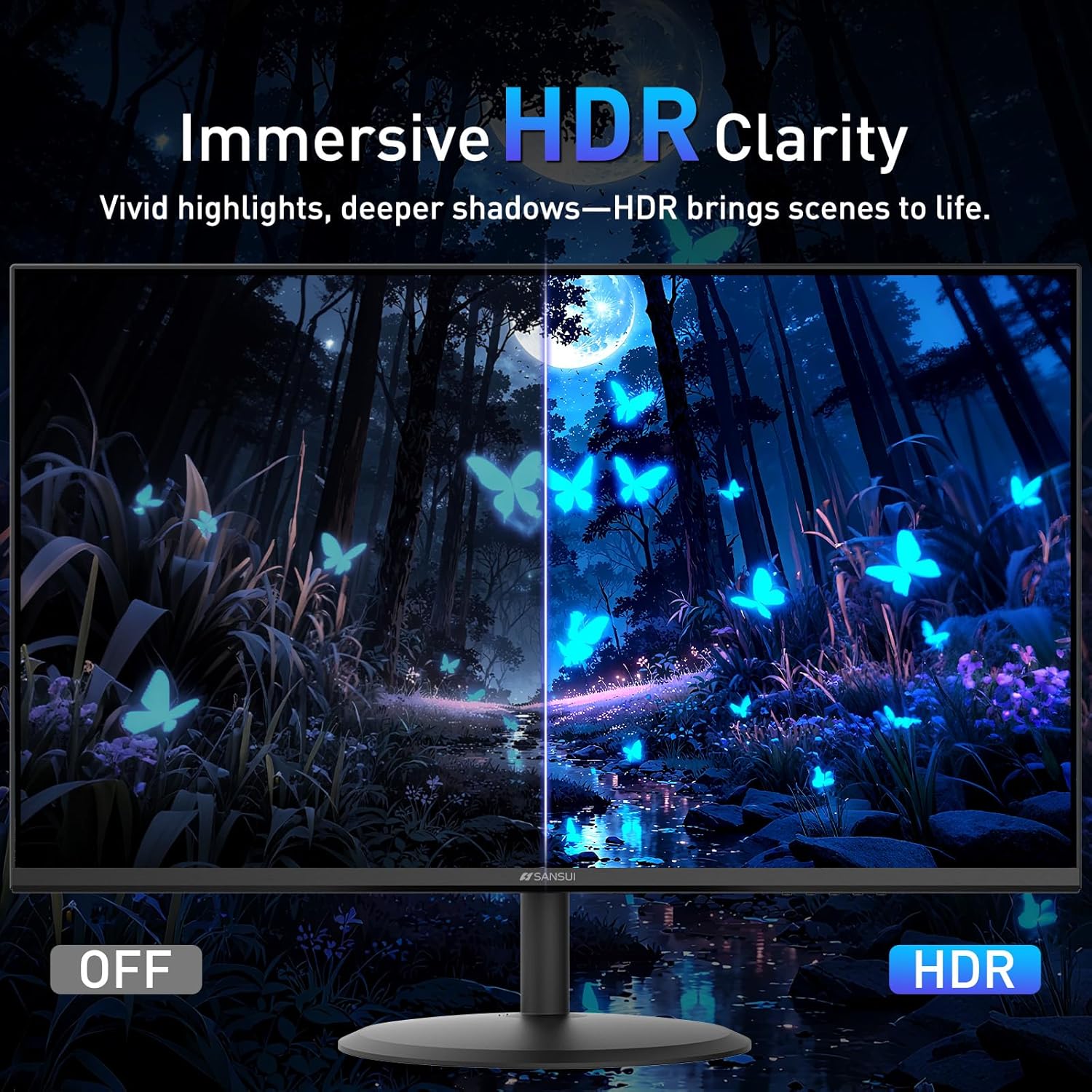
Visual comparison demonstrating the enhanced clarity and color depth provided by HDR mode.
4.3.4 Característiques de la cura dels ulls
The monitor incorporates several features to reduce eye strain during prolonged use:
- Anti-parpelleig: Reduces screen flickering that can cause eye fatigue.
- Llum blava baixa: Filters harmful blue light emissions.
- Recobriment antireflejos: Minimizes reflections on the screen surface.
Image: Eye Care & Comfort Viewing
Depiction of the monitor's eye care features contributing to comfortable viewdurant un ús prolongat.
5. Manteniment
5.1 Neteja del monitor
To ensure the longevity and optimal performance of your monitor, follow these cleaning guidelines:
- Apagueu sempre el monitor i desendolleu-lo de la presa de corrent abans de netejar-lo.
- Utilitzeu un drap suau i sense pelusa lleugerament dampNetegeu-ho amb aigua o una solució especialitzada de neteja de pantalles.
- Gently wipe the screen surface and the monitor casing. Avoid applying excessive pressure.
- Do not use abrasive cleaners, alcohol, ammonia, or petroleum-based solvents, as these can damage the screen or casing.
- Never spray cleaning solution directly onto the screen.
5.2 Emmagatzematge
Si guardeu el monitor durant un període prolongat, assegureu-vos que estigui apagat, desendollat i guardeu-lo en un lloc fresc i sec, allunyat de la llum solar directa i de temperatures extremes. Feu servir l'embalatge original si en teniu per a una millor protecció.
6. Solució De Problemes
If you encounter issues with your SANSUI ES-22X3AH monitor, refer to the following common problems and solutions:
| Problema | Causa possible | Solució |
|---|---|---|
| No hi ha imatge a la pantalla | Monitor not powered on; Incorrect input selected; Loose video cable. | Ensure power cable is connected and monitor is on. Select correct input source via OSD. Check HDMI cable connection. |
| La imatge és borrosa o distorsionada | Incorrect resolution; Graphics driver issues. | Set display resolution to 1920x1080. Update graphics drivers on your computer. |
| La pantalla parpelleja | Discrepància de freqüència d'actualització; Cable defectuós. | Ensure refresh rate is set to 120Hz in your computer's display settings. Try a different HDMI cable. |
| No sound (if external speakers are connected) | Monitor does not have built-in speakers; Audio output not configured. | This monitor does not have built-in speakers. Ensure your external speakers are properly connected and selected as the audio output device on your computer. |
| Adaptive Sync not working | Feature not enabled; Incompatible graphics card. | Enable Adaptive Sync in the monitor's OSD menu and your graphics card control panel. Ensure your graphics card supports Adaptive Sync. |
If the problem persists after trying these solutions, please contact SANSUI customer support.
7. Especificacions
Below are the technical specifications for the SANSUI ES-22X3AH monitor:
- Número de model: ES-22X3AH
- Mida de la pantalla: 22 polzades
- Tipus de panell: Not specified (typically VA or IPS for 4000:1 contrast)
- Resolució: 1920 x 1080 (FHD 1080p)
- Relació d'aspecte: 16:9
- Freqüència d'actualització: 120 Hz
- Relació de contrast: 4000:1
- Brillantor de la imatge: 250 Candela per Square Meter (nits)
- Gamma de colors: 100% sRGB
- Connectivitat: 2 x HDMI 1.4 ports (up to 120Hz), DC Power Input
- Muntatge VESA: 75 x 75 mm
- Ajust d'inclinació: -5° a 22°
- Dimensions del producte: 8.27 x 19.37 x 14.13 polzades
- Pes de l'article: 6.64 lliures
- Característiques de la cura dels ulls: Anti-flicker, Low Blue Light, Anti-glare coating
- Sincronització adaptativa: Admet
- HDR: Admet
- Fabricant: EXPRESS LUCK INDUSTRIAL(ZHONGSHAN)LIMITED
8. Garantia i Suport
8.1 Informació de la garantia
SANSUI provides a money-back and free replacement warranty for your monitor within 30 days from the order date. Please retain your proof of purchase for warranty claims.
8.2 Suport tècnic
Lifetime technical support is available for your SANSUI monitor. For assistance with setup, troubleshooting, or any other inquiries, please contact SANSUI customer service. You can typically find contact information on the SANSUI official weblloc web o a través del vostre distribuïdor.
Image: Lifetime Technical Support

Acabatview of SANSUI's commitment to customer satisfaction, including warranty and support services.


