1. Introducció
This manual provides detailed instructions for the safe and efficient use of your boAt Rockerz Plus 550 Bluetooth Headphones. Please read this manual thoroughly before using the product and retain it for future reference.
2. Què hi ha a la caixa
- boAt Rockerz Plus 550 Headphones
- Cable de càrrega
- Cable AUX
- Manual d'usuari

Image: boAt Rockerz Plus 550 Bluetooth Headphones, showcasing the Blue Psyche color variant and customizable earcups.
3. Producte acabatview i Controls
Familiarize yourself with the various parts and controls of your headphones.

Imatge: Detallada view of the headphone's control buttons and ports, including the charging port and AUX input.
Controls clau:
- Botó d'encesa: Manteniu premut per encendre/apagar.
- Augment de volum / pista següent: Premeu curt per pujar el volum, premeu llargament per passar a la següent pista.
- Baixada de volum / pista anterior: Premeu curt per baixar el volum, premeu llargament per anar a la pista anterior.
- Botó multifunció (MFB): Reproduir/pausa, respondre/finalitzar trucades, activar l'assistent de veu.
- Port AUX: Per a connexió amb cable.
- Port de càrrega: Per carregar els auriculars.
4. Configuració
4.1 Càrrega dels auriculars
- Connecteu el cable de càrrega al port de càrrega dels auriculars.
- Connecteu l'altre extrem del cable a un adaptador de corrent USB (no inclòs) o al port USB d'un ordinador.
- The LED indicator will show charging status. It will turn off or change color when fully charged.
Una càrrega completa proporciona fins a 100 hores de reproducció.

Image: The boAt Rockerz Plus 550 headphones highlighting their extended battery life of up to 100 hours.
4.2 Vinculació Bluetooth
- Assegureu-vos que els auriculars estiguin completament carregats.
- Premeu i manteniu premut el botó d'engegada fins que l'indicador LED parpellegi en blau i vermell, cosa que indica el mode d'emparellament.
- Al dispositiu (telèfon intel·ligent, tauleta, ordinador portàtil), activeu el Bluetooth i cerqueu els dispositius disponibles.
- Select "boAt Rockerz Plus 550" from the list of devices.
- Un cop connectat, l'indicador LED parpellejarà blau lentament.
4.3 Emparellament dual
The headphones support dual pairing, allowing connection to two devices simultaneously.
- Emparelleu els auriculars amb el primer dispositiu tal com es descriu a la secció 4.2.
- Desactiva el Bluetooth al primer dispositiu. Els auriculars tornaran a entrar en mode d'emparellament.
- Vincula els auriculars amb el segon dispositiu.
- Enable Bluetooth on the first device. The headphones will automatically connect to both devices.
You can now seamlessly switch between audio sources from both connected devices.
Image: Visual representation of the dual pairing functionality, showing a phone and a tablet simultaneously connected to the headphones.
4.4 Connexió AUX
For a wired connection, use the provided AUX cable.
- Connect one end of the AUX cable to the headphone's AUX port.
- Connecteu l'altre extrem al connector d'àudio de 3.5 mm del vostre dispositiu d'àudio.
- Els auriculars canviaran automàticament al mode AUX.
5. Instruccions de funcionament
5.1 Reproducció de música
- Reproduir/pausa: Premeu el MFB una vegada.
- Pista següent: Premeu llargament el botó de pujar el volum.
- Pista anterior: Premeu llargament el botó per baixar el volum.
- Pujar el volum: Premeu breument el botó de pujar el volum.
- Baixar el volum: Premeu breument el botó per baixar el volum.
5.2 Gestió de trucades
- Respondre/Finalitzar la trucada: Premeu el MFB una vegada.
- Rebutja la trucada: Manteniu premut el MFB durant 2 segons.
5.3 Assistent de veu
Activate your device's voice assistant (Siri, Google Assistant) directly from the headphones.
- Activa l'Assistent de veu: Premeu dues vegades el MFB.
5.4 Customizable Earcups
The boAt Rockerz Plus 550 features customizable earcups, allowing you to change their appearance.
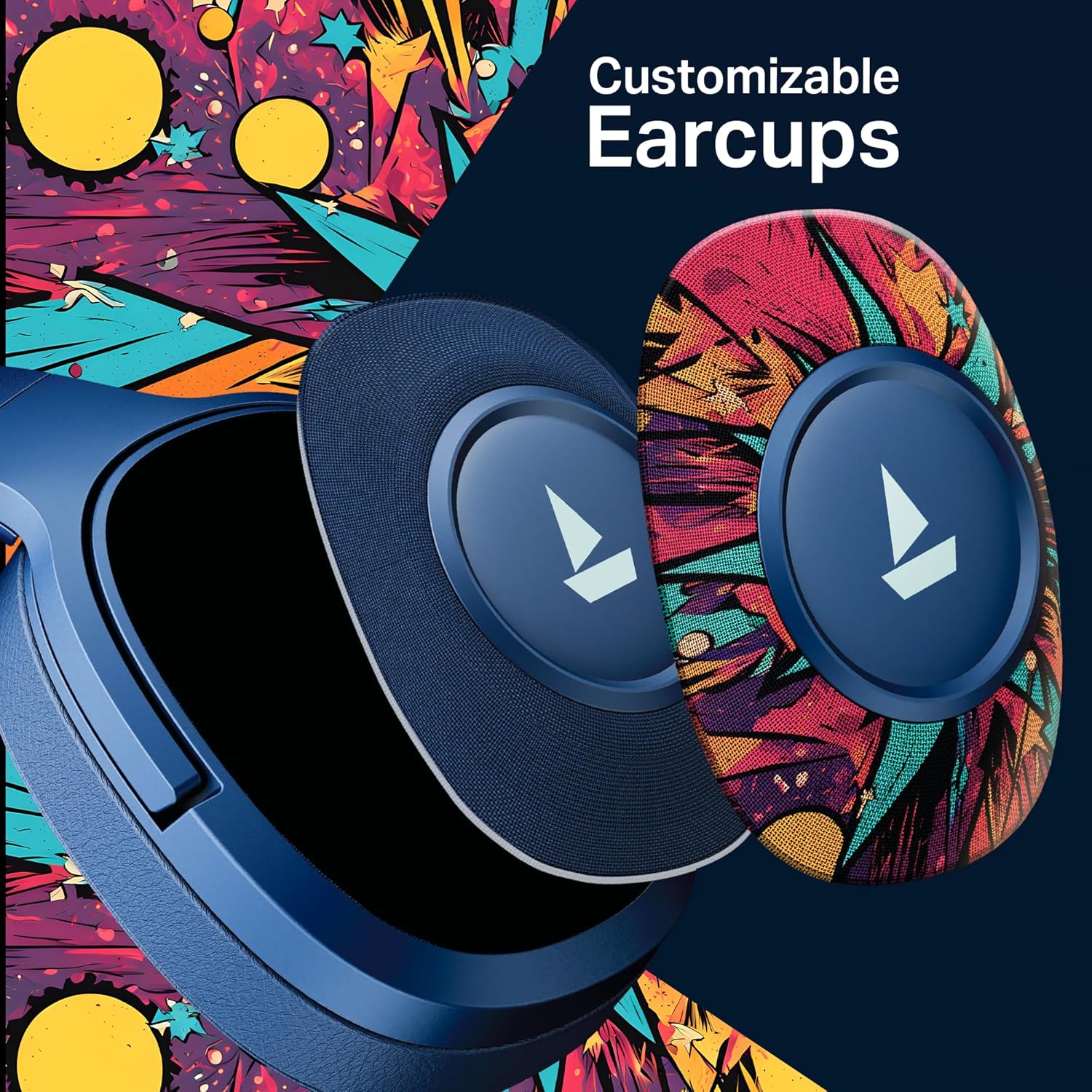
Imatge: Una imatge detallada view demonstrating how the customizable earcups can be removed and replaced on the headphones.
5.5 boAt Hearables App Support
Enhance your experience by downloading the boAt Hearables App. The app provides additional features and user guides.

Image: A smartphone showing the boAt Hearables App interface, including a QR code for easy access. Scan the QR code or visit https://l.ead.me/bdAX6k per descarregar l'aplicació.
6. Manteniment
- Neteja: Netegeu els auriculars amb un drap suau i sec. No utilitzeu productes de neteja abrasius ni dissolvents.
- Emmagatzematge: Guardeu els auriculars en un lloc fresc i sec, allunyat de la llum solar directa i de temperatures extremes.
- Cura de la bateria: To prolong battery life, charge the headphones regularly, even if not in frequent use. Avoid fully discharging the battery for extended periods.
7. Solució De Problemes
| Problema | Causa possible | Solució |
|---|---|---|
| Els auriculars no s'engeguen. | Bateria baixa. | Carregueu els auriculars completament. |
| No es pot emparellar amb el dispositiu. | Bluetooth not enabled, headphones not in pairing mode, or device too far. | Ensure Bluetooth is on, headphones are in pairing mode (flashing red/blue), and within range (10 meters). Try restarting both devices. |
| Sense so o amb un volum baix. | Volume too low on headphones or device, incorrect audio output selected, or loose AUX cable. | Adjust volume on both devices. Check audio output settings. Ensure AUX cable is securely connected. |
| Connexió intermitent. | Interference, device too far, or low battery. | Move closer to the device, avoid obstacles, and ensure headphones are charged. Avoid environments with strong Wi-Fi or other Bluetooth signals. |
8. Especificacions
| Característica | Detall |
|---|---|
| Nom del model | 550. Rockerz |
| Tecnologia de connectivitat | Bluetooth v5.4, 3.5 mm Jack |
| Tipus de controlador d'àudio | Conductor dinàmic |
| Mida del controlador | 50 mm |
| Durada de la bateria | Fins a 100 hores |
| Forma de l'auricular | Sobre l'orella |
| Control de soroll | Passive Sound Isolation |
| Mètode de control | Pulsador |
| Pes de l'article | 250 grams |
| Dimensions del producte | 17 x 9 x 20 cm |
| Tipus de bateria | Ió de liti (recarregable) |
| Fabricant | Imagine Marketing Ltd |
| País d'origen | Xina |

Imatge: Una imatge interna view highlighting the 50mm audio drivers, responsible for the boAt Signature Sound.
9. Garantia i Suport
Your boAt Rockerz Plus 550 headphones come with a standard manufacturer's warranty. Please refer to the warranty card included in your package for specific terms and conditions.
For technical support, service, or warranty claims, please contact boAt customer service:
- Fabricant: Imagine Marketing Ltd
- Correu electrònic: info@imaginemarketingindia.com
- Assistència en línia: Visit the official boAt weblloc web per a preguntes freqüents i recursos de suport.


