Introducció
This manual provides comprehensive instructions for the setup, operation, maintenance, and troubleshooting of your Fi Series 3+ Smart Dog Collar. The Fi Series 3+ is designed to provide advanced GPS tracking, activity monitoring, and safety features for your dog.
Please read this manual thoroughly before using your device to ensure proper functionality and to maximize the benefits of your Fi collar.
Què hi ha a la caixa

Figure 1: The Fi Series 3+ Smart Dog Collar package includes the smart collar, a charging base, and a USB charging cable.
- Fi Series 3+ Smart Dog Collar (Yellow, Large)
- Fi Charging Base
- Cable de càrrega USB
Guia de configuració
1. Charging the Collar
Before initial use, fully charge your Fi Series 3+ collar. Connect the USB charging cable to the Fi Charging Base and plug it into a power source. Place the collar module onto the charging base. The LED light on the collar will indicate charging status.
2. Downloading the Fi App
The Fi Series 3+ collar requires the Fi mobile application for full functionality. Download the "Fi" app from your device's app store (available on iOS and Android).
3. Creating an Account and Pairing
Open the Fi app and follow the on-screen instructions to create a new account or log in. The app will guide you through the process of pairing your new Fi collar with your account and setting up your dog's profile.
4. Adjusting the Collar Fit
Ensure the collar fits snugly but comfortably around your dog's neck. You should be able to fit two fingers between the collar and your dog's neck. Refer to the neck size chart below for guidance.

Figure 2: Fi Collar Neck Size Chart. Select the appropriate size for your dog to ensure comfort and accurate tracking.
Instruccions de funcionament
GPS Tracking and Location Monitoring
The Fi Series 3+ collar utilizes GPS technology to track your dog's location. You can view your dog's real-time location on a map within the Fi app. The app displays the dog's current status, such as "Online" and battery percentage.

Figure 3: Real-time GPS tracking in the Fi app. The map displays your dog's current position and allows for quick activation of "Track Lost Dog" mode.
Activity and Fitness Monitoring
The collar monitors your dog's daily activity, including steps taken and sleep patterns. This data is synchronized with the Fi app, allowing you to track your dog's fitness levels and set activity goals.
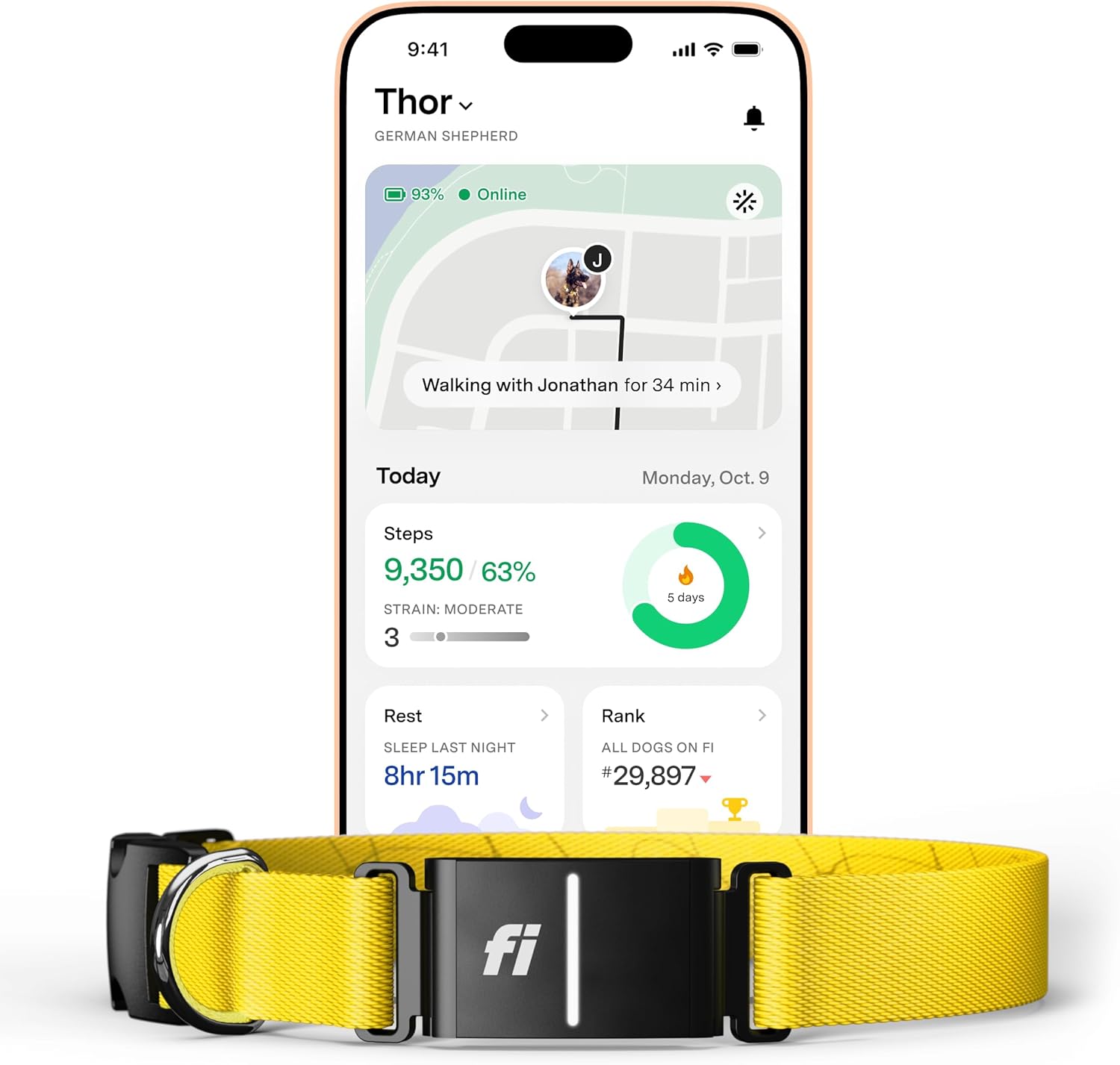
Figure 4: Activity monitoring dashboard in the Fi app. View daily steps, activity levels, and sleep duration to ensure your dog is healthy and active.
Setting Up Safe Zones (Virtual Fences)
Create custom "Safe Zones" within the Fi app. If your dog leaves a designated Safe Zone, you will receive an immediate escape alert on your mobile device.

Figure 5: Configuring a Virtual Fence (Safe Zone) in the Fi app. Define custom perimeters on the map to receive alerts if your dog exits the designated area.
Activació de la llum LED
The collar features an integrated LED light for enhanced visibility in low-light conditions. This light can be activated and controlled through the Fi app.
Manteniment
Cleaning the Collar
The Fi Series 3+ collar is waterproof. To clean, gently wipe the collar and module with a damp cloth. For stubborn dirt, a mild soap solution can be used. Ensure the charging contacts on the module are clean and dry before charging.
Durada de la bateria i càrrega
Battery life varies based on usage and signal strength. Regularly charge the collar to ensure continuous tracking and monitoring. The Fi app provides real-time battery status.
Resolució de problemes
Collar Not Connecting to App
- Assegureu-vos que el Bluetooth estigui habilitat al vostre dispositiu mòbil.
- Make sure the collar is charged and within range of your phone or a Fi Base.
- Restart the Fi app and/or your mobile device.
- If issues persist, try re-pairing the collar through the app settings.
Inaccurate Location Tracking
- GPS accuracy can be affected by dense foliage, tall buildings, or indoor environments.
- Assegureu-vos que el collar tingui una superfície clara view del cel per obtenir un senyal GPS òptim.
- Verify that your Fi subscription is active.
La bateria s'esgota ràpidament
- Frequent "Lost Dog" mode activation or constant GPS updates in areas with poor signal can drain the battery faster.
- Ensure the collar is connecting to a Fi Base or Wi-Fi when at home to conserve battery.
- Check for any app updates.
Especificacions
| Característica | Detall |
|---|---|
| Model | Fi Series 3+ |
| Dimensions (paquet) | 9.13 x 6.69 x 1.97 polzades |
| Pes de l'article | 14.1 unces |
| Bateria | 1 bateria no estàndard (inclosa) |
| Connectivitat | GPS, LTE-M, Wi-Fi, Bluetooth |
| Resistència a l'aigua | Impermeable |
| Color | groc |
| UPC | 850064800449 |
Informació de la garantia
The Fi Series 3+ Smart Dog Collar comes with a manufacturer's warranty. For detailed information regarding warranty terms, conditions, and duration, please refer to the official Fi website or contact Fi customer support. Keep your proof of purchase for warranty claims.
Atenció al client
For further assistance, technical support, or inquiries about your Fi Series 3+ Smart Dog Collar, please visit the official Fi support page or contact their customer service team.
Oficial Weblloc: www.tryfi.com
Pàgina de suport: Consulteu la secció de suport a la pàgina oficial website for FAQs, guides, and contact options.