1. Introducció
The BAOFENG UV-32 is a high-power, multi-band two-way radio designed for reliable communication. It features advanced functionalities such as Bluetooth programming, integrated GPS/APRS, 10 NOAA weather channels, and versatile Type-C USB charging. This manual provides essential information for setting up, operating, and maintaining your UV-32 radio.
2. Contingut del paquet
Upon opening the package, ensure all items listed below are present:
- BAOFENG UV-32 Two-Way Radio Unit
- Rechargeable Battery (Nonstandard Battery)
- Antena (estàndard)
- Telescopic Antenna (Longer Whip Antenna)
- Base del carregador de bateries
- Cable de càrrega USB tipus C
- Adaptador d'alimentació
- Clip de cinturó
- Corda
- Flathead Screwdriver (for battery attachment)
- Auricular amb micròfon
- Manual d'usuari

Image: BAOFENG UV-32 radio with all standard accessories including battery, charger, antennas, belt clip, and earpiece.
Video: Unboxing and display of BAOFENG UV-32 accessories.
3. Producte acabatview & Característiques clau
The BAOFENG UV-32 is equipped with a range of features to enhance your communication experience:
- Sortida d'alta potència de 10 W: Provides strong and clear long-range communication with H/M/L power switching.
- Programació Bluetooth: Customize frequencies and settings easily via a smartphone application.
- GPS / APRS: Global Positioning System for real-time positioning and automatic position reporting.
- Multi-Band Transceiver: Supports various frequency bands for versatile use.
- 10 estacions meteorològiques de la NOAA: Receive critical weather hazard broadcasts for preparedness.
- Càrrega USB tipus C: Convenient charging via Type-C port, power bank, or car charger.
- Pantalla de 2.0 polzades: Clear and intuitive display for easy navigation and information viewing.
- High Performance Audio System: Features a 40mm large-sized speaker with intelligent noise reduction for clear call quality.

Image: BAOFENG UV-32 showcasing Bluetooth APP programming and GPS capabilities.

Image: Illustration of the 10W Tri-power output settings (High, Mid, Low) on the UV-32.

Image: Diagram showing the high-quality speaker and clear call sound quality of the UV-32.
4. Configuració inicial
Follow these steps to prepare your BAOFENG UV-32 for first use:
- Instal·la la bateria: Use the provided flathead screwdriver to secure the battery to the radio unit.
- Connecteu l'antena: Carefully screw the desired antenna (standard or telescopic) onto the antenna connector at the top of the radio. Ensure it is finger-tight.
- Fixeu el clip del cinturó: If desired, attach the belt clip to the back of the radio for convenient carrying.
Video: Demonstration of installing the battery and antenna on the BAOFENG UV-32.
Vídeo: Acabatview of BAOFENG UV-32 operation, including initial setup and feature demonstration.
5. Funcionament de la ràdio
This section covers the basic operation of your UV-32 radio.
5.1 Encès/Apagat
- To power on, rotate the Power/Volume knob clockwise until the display illuminates.
- Per apagar-lo, gireu el botó d'engegada/volum en sentit antihorari fins que sentiu un clic i la pantalla s'apagui.
5.2 Channel Mode & Frequency Adjustment
- Use the numeric keypad to directly input frequencies or navigate through channels.
- The Encoder/Channel selector switch can be used to change channels or adjust frequencies.
- The 2.0-inch color LCD screen displays current frequencies, channel information, and other operational data.
5.3 Personalització de les tecles laterals
The UV-32 allows customization of its side keys (SK1, SK2, P1, P2) for quick access to frequently used functions like FM Radio, Alarm, or Monitor.
Video: Demonstration of various features including side key customization, text messaging, and GPS.
5.4 Copy Frequency
The radio supports a quick copy frequency function to easily duplicate frequencies from another radio or a specific band.
Video: Shows copy frequency operation and other features.
6. Funcions avançades
6.1 Bluetooth Programming (APP)
The UV-32 can be programmed wirelessly via a smartphone application. This allows for easy customization of frequencies and other settings.
- Turn on the walkie-talkie's Bluetooth function through the radio's menu.
- Download and open the programming application (e.g., "walkie-talkietool") on your smartphone.
- Connect to the UV-32 via Bluetooth within the app.
- Select the radio model and proceed to read/write frequencies and settings.

Image: BAOFENG UV-32 demonstrating wireless programming via a smartphone app for both iOS and Android.
Video: Detailed steps for programming the BAOFENG UV-32 using a smartphone application.
Video: Guide on viewing product features and downloading the companion application for the BAOFENG UV-32.
6.2 GPS / APRS Function
The integrated GPS allows for real-time positioning and Automatic Packet Reporting System (APRS) functionality, useful for tracking and location sharing.
- Access the GNSS settings in the radio menu to enable or disable GPS.
- Configure time zone and GPS mode as needed.
Video: Shows GPS function activation and other features.
6.3 Recepció meteorològica de la NOAA
The radio can receive broadcasts from 10 NOAA weather stations, providing timely alerts for hazardous weather conditions.

Image: BAOFENG UV-32 displaying NOAA Weather Reception capability.
7. Càrrega
The BAOFENG UV-32 offers multiple convenient charging methods:
- Càrrega USB tipus C: Directly plug a Type-C USB cable into the radio for charging from a power bank, laptop, or car charger.
- Carregador base: Place the radio in the provided charging base, which connects to a power outlet via the power adapter.
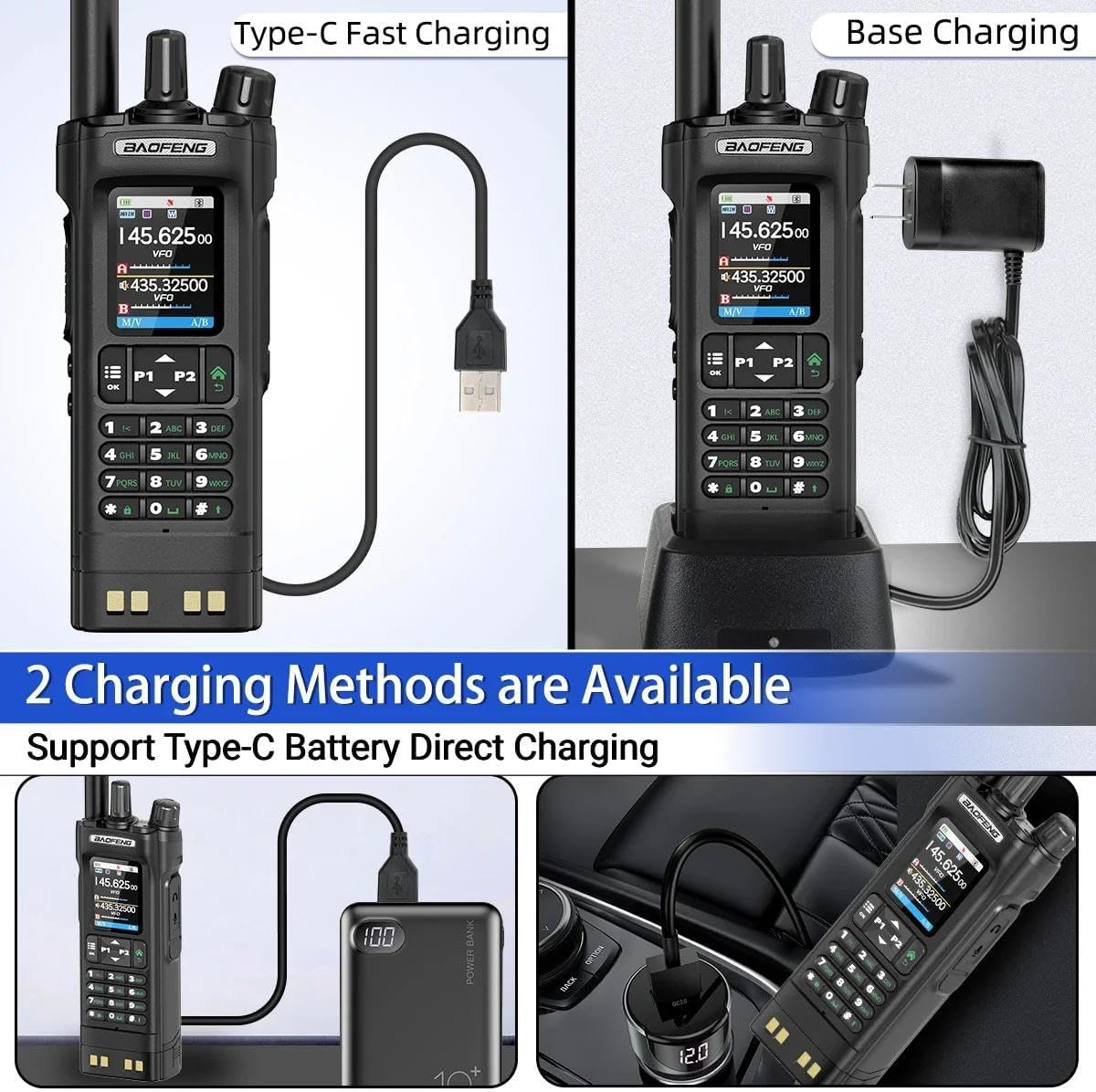
Image: Two available charging methods for the UV-32: Type-C direct charging and traditional base charging.
8. Programming via PC (CPS Software)
For advanced programming and management of channels and settings, you can use the CPS (Customer Programming Software) on a computer.
- Ensure the radio is turned on and connected to your computer via a programming cable (not explicitly listed in package contents, but implied by CPS).
- Download and install the appropriate CPS software from the official BAOFENG weblloc.
- Open the CPS software and select the correct communication port (COM port) for your radio.
- Read data from the radio, make desired edits to channels and settings, and then write the updated data back to the radio.
Video: Step-by-step guide on how to program BAOFENG walkie-talkies using CPS software on a computer.
9. Especificacions
| Característica | Detall |
|---|---|
| Pes de l'article | 1.7 lliures |
| Dimensions del paquet | 10.63 x 8.66 x 2.56 polzades |
| Número de model de l'article | UV-32 |
| Bateries | Cal 1 bateria no estàndard (inclosa) |
| Nombre de canals | 1000 |
| Característica especial | Dual Band, Long Range, Rechargeable |
| Interval de conversa màxim | 8 quilòmetre |
| Voltage | 7.4 Volts |
| Nivell de resistència a l'aigua | No resistent a l'aigua |
| Fabricant | BAOFENG |
10. Garantia i assistència
The product information indicates "No Warranty". For any support or service inquiries, please contact the seller or refer to the official BAOFENG website for available resources.
BAOFENG oficial Weblloc: www.baofengradio.com


