Introducció
The Dreamegg D1 Nova is an advanced sound machine designed to create an optimal sleep environment for babies and adults. It combines 25 soothing sounds, a dimmable night light, and an alarm clock with a compact, travel-friendly design. This manual provides detailed instructions for setup, operation, and maintenance to ensure proper use and longevity of your device.

Image: Dreamegg D1 Nova Sound Machine highlighting its features for a seamless sleep experience.
Informació de seguretat
Please read and follow all safety instructions before using this product to prevent injury or damage.
- This product is not rechargeable and must remain connected to mains power during use.
- Utilitzeu només l'adaptador d'alimentació inclòs.
- Mantingueu el dispositiu allunyat de l'aigua o la humitat.
- No desmunteu ni intenteu reparar el dispositiu.
- Keep out of reach of children to prevent accidental damage or misuse.
Contingut del paquet
- Dreamegg D1 Nova Sound Machine
- Adaptador d'alimentació
- Manual d'usuari
Producte acabatview
Familiaritzeu-vos amb els components i els controls del dispositiu.
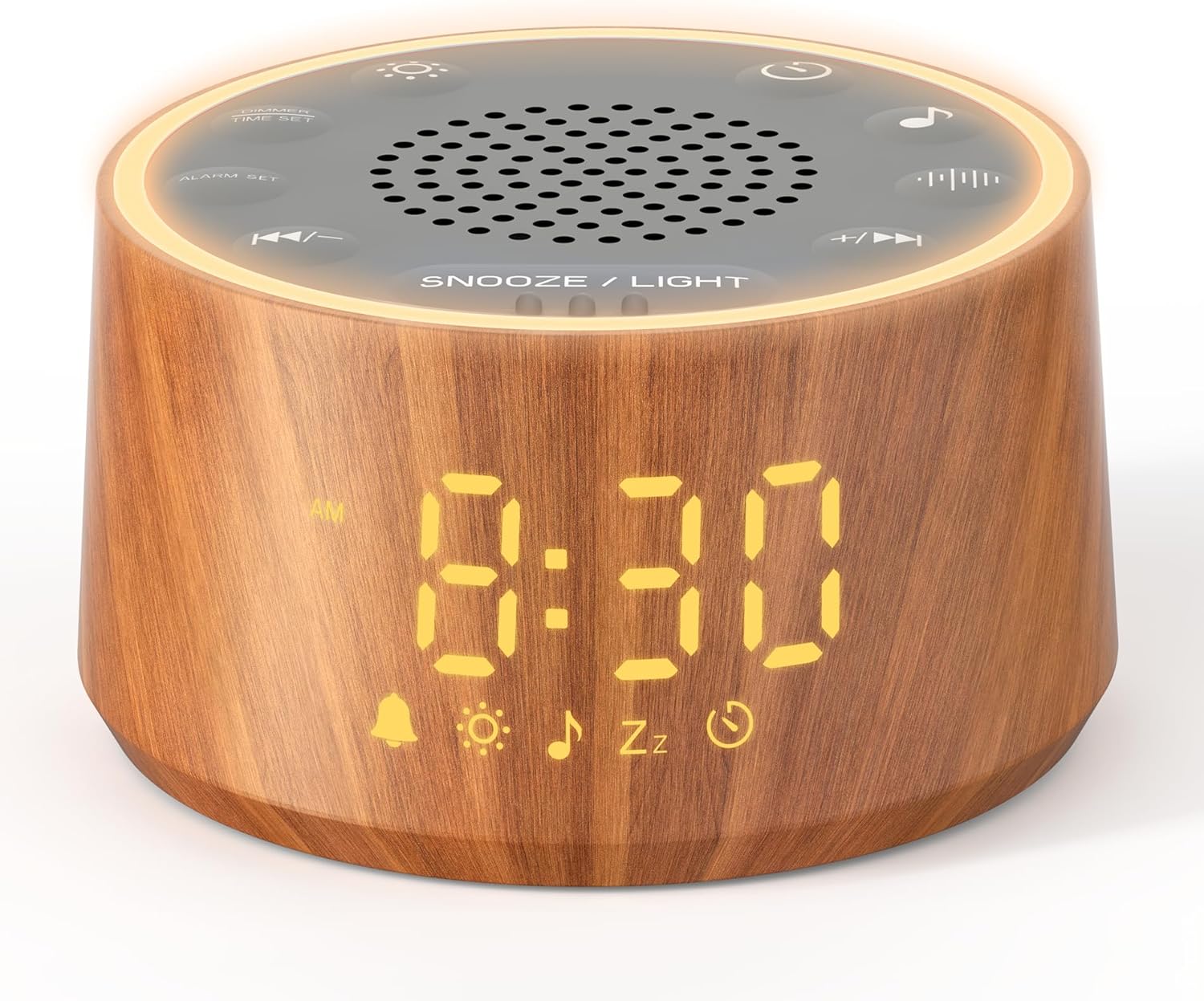
Imatge: De dalt a baix view of the Dreamegg D1 Nova Sound Machine, showing the digital clock display and various control buttons for sound, light, and timer functions.
Botons de control:
- Botó d'encesa: Encén/apaga el dispositiu.
- Selecció de so: Cicla entre 25 sons relaxants.
- Volum +/-: Ajusta el volum del so.
- Botó del temporitzador: Sets the auto-off timer (10-480 minutes).
- Conjunt d'alarma: Configures the alarm time and sound.
- Botó Posposa/Llum: Activates snooze or adjusts night light settings.
- Time Set/Dimmer: Adjusts time and display brightness.
Configuració
- Desembalar: Traieu amb cura tots els components de l'embalatge.
- Connexió d'alimentació: Connect the included power adapter to the DC IN port on the back of the sound machine. Plug the adapter into a standard wall outlet. The device will power on automatically and display the current time.
- Establir hora: Press and hold the 'Time Set/Dimmer' button to enter time setting mode. Use the 'Volume +/-' buttons to adjust hours and minutes. Press 'Time Set/Dimmer' again to confirm each setting.
- Ajusta la brillantor de la pantalla: Briefly press the 'Time Set/Dimmer' button to cycle through 5 levels of display brightness or turn it off.

Image: Dreamegg D1 Nova Sound Machine demonstrating adjustable time display brightness levels for phone-free time checks.
Instruccions de funcionament
Encès/Apagat
- Premeu el botó Botó d'engegada per encendre o apagar el dispositiu.
Selecció de so
The D1 Nova offers 25 soothing sounds, including 6 white noise, 2 fan, 8 lullabies, and 9 nature sounds.
- Premeu el botó Botó de selecció de so to start playing sounds.
- Premeu el botó Botó de selecció de so repeatedly to cycle through the available sounds.

Image: Dreamegg D1 Nova Sound Machine illustrating the categories of its 25 soothing sounds: Nature Sounds, Color Noise, and Ambient Sounds.
Ajust de volum
- Premeu el botó Volum + botó per augmentar el volum.
- Premeu el botó Volum - botó per baixar el volum.

Image: Dreamegg D1 Nova Sound Machine showing the volume control buttons (+ and -) on its top panel.
Funció de temporitzador
Set an auto-off timer for 10 to 480 minutes.
- Premeu el botó Botó del temporitzador repeatedly to select a desired auto-off duration. The selected time will be displayed.
- The device will automatically turn off after the set time.

Image: Dreamegg D1 Nova Sound Machine with a hand pressing the timer button, showing a timer setting of 10-480 minutes.
Configuració del despertador
Wake up gently with 7 soothing nature alarms and a 9-minute snooze.
- Manteniu premut el botó Botó de configuració d'alarma per entrar al mode de configuració d'alarma.
- Utilitza el Volum +/- buttons to adjust the alarm hour and minute. Press Conjunt d'alarma per confirmar cadascun.
- After setting the time, use the Botó de selecció de so to choose one of the 7 nature alarm sounds.
- Premeu Conjunt d'alarma de nou per activar l'alarma. Apareixerà una icona d'alarma a la pantalla.
- Quan soni l'alarma, premeu el botó Botó Posposa/Llum for a 9-minute snooze.
- Per apagar l'alarma, premeu el botó Botó de configuració d'alarma.

Image: Dreamegg D1 Nova Sound Machine showing a woman waking up gently with various alarm sound options like Birds, Brook, Beep, Piano, and Meditation.
Llar d'infants Lamp / Llum nocturna
The D1 Nova features a dimmable night light with 10 color options.
- Premeu el botó Botó Posposa/Llum per encendre la llum de la nit.
- Premeu el botó Botó Posposa/Llum repeatedly to cycle through the 10 color options.
- To adjust the brightness, press and hold the Botó Posposa/Llum to cycle through 5 brightness levels.
- To turn off the night light, press and hold the Botó Posposa/Llum fins que s'apaga.

Image: Dreamegg D1 Nova Sound Machine showcasing its versatile 10-color night lights, perfect for creating a peaceful and secure environment.
Vídeo demostració
Vídeo: Un overview of the Dreamegg D1+ Sound Machine and Alarm Clock, demonstrating its features and sounds.
Manteniment
- Neteja: Netegeu el dispositiu amb un drap suau i sec. No utilitzeu netejadors líquids ni materials abrasius.
- Emmagatzematge: Guardeu el dispositiu en un lloc fresc i sec quan no l'utilitzeu.
Resolució de problemes
| Problema | Possible solució |
|---|---|
| El dispositiu no s'encén. | Assegureu-vos que l'adaptador de corrent estigui connectat correctament al dispositiu i a una presa de corrent que funcioni. |
| Sense so o amb un volum baix. | Check the volume level using the Volume +/- buttons. Ensure a sound is selected. |
| L'alarma no sona. | Verify that the alarm time is correctly set and the alarm function is activated (alarm icon visible). |
| La llum nocturna no funciona. | Press the Snooze/Light button to turn on the light. Adjust brightness if necessary. |
Especificacions
- Dimensions del producte: 3.8 x 3.8 x 2 polzades
- Pes de l'article: 8 unces
- Material: Acrilonitril butadiè estirè (ABS)
- Número de model: SM04-WOOD-US
- Fabricant: Dreamegg
Garantia i Suport
For warranty information or further assistance, please refer to the product packaging or contact Dreamegg customer support. Keep this manual in a safe place for future reference.


