1. Introducció
Thank you for choosing the Baseus Enercore 100W USB C Charger. This compact and versatile charging solution is designed to provide efficient and fast power delivery for a wide range of devices, including laptops, tablets, and smartphones. Its innovative retractable cable and foldable plug enhance portability and reduce cable clutter, making it an ideal companion for travel and daily use. This manual provides essential information on product features, setup, operation, maintenance, and troubleshooting to ensure optimal performance and safety.
2. Producte acabatview
Característiques clau
- 3-in-1 Retractable Charger: Features 1 USB-C and 1 USB-A port, with a built-in retractable 100W USB-C cable, and a foldable plug.
- Càrrega ultraràpida de 100 W: Supports full-speed 100W fast charging for laptops such as MacBook Pro/Air, charging a MacBook Pro 14" M4 Pro up to 54% in just 30 minutes when single connected.
- Assignació d'energia intel·ligent: Automatically detects connected devices and intelligently allocates power to ensure optimal performance without overheating.
- Durable Built-in USB-C Cable: The 2.6ft (80cm) retractable cable has been tested for 30,000 pulls and stretches, ensuring long-term durability.
- Compatibilitat universal: Compatible with mainstream laptops, mobile phones, iPads, Switch, Steam Deck, Rog Ally, DJI, and more.
Què hi ha a la caixa
- 100W USB C Charger with built-in retractable cable
- Manual d'usuari
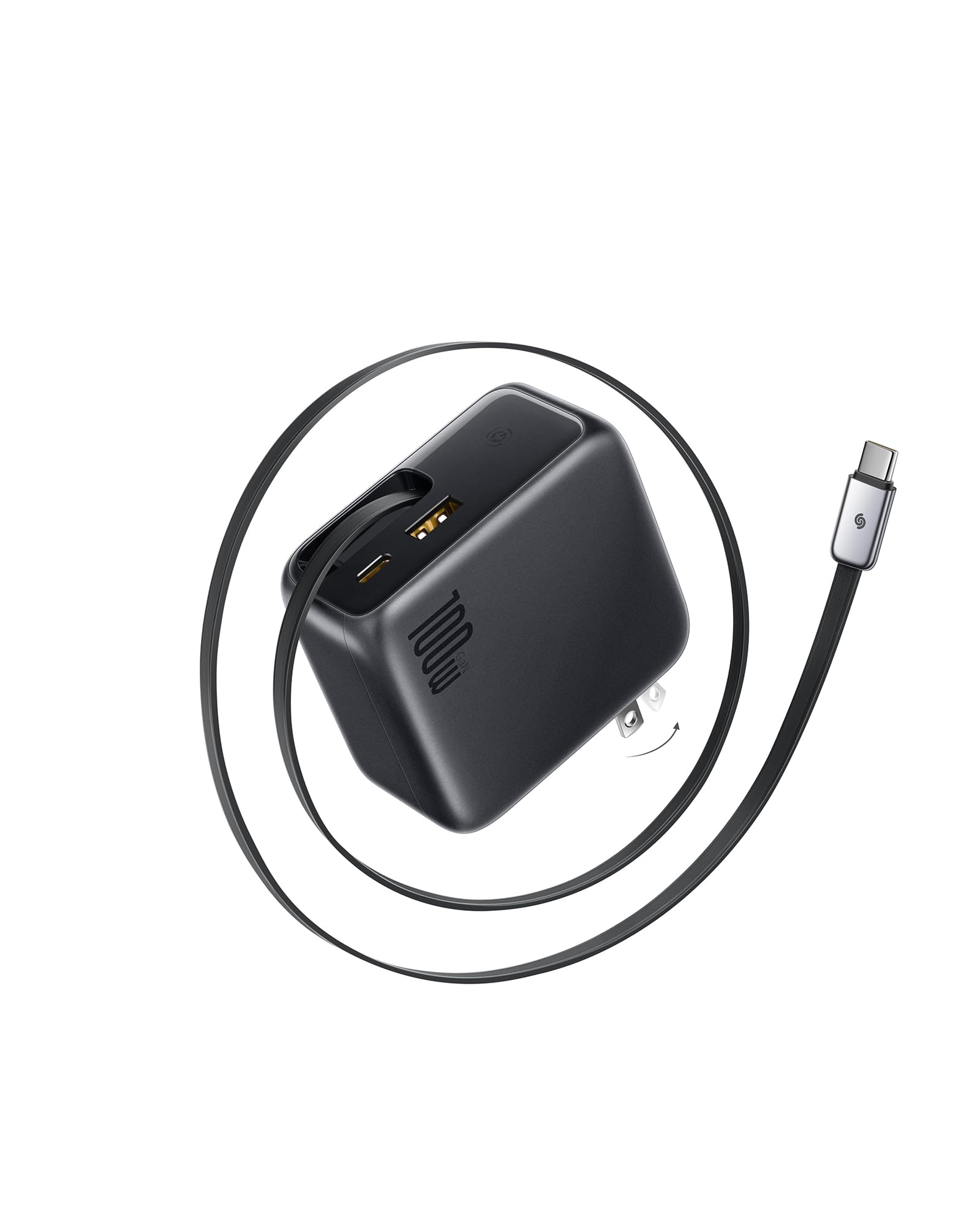
Image: Baseus Enercore 100W USB C Charger with its compact design and foldable plug.
3. Configuració
Unfolding the Plug
- Locate the foldable prongs on the back of the charger.
- Gently pull the prongs outwards until they lock into place, ready to be inserted into a wall outlet.
Extending and Retracting the Built-in Cable
- To extend the built-in USB-C cable, gently pull the USB-C connector outwards from its housing. The cable will extend to your desired length (up to 2.6ft / 80cm).
- To retract the cable, pull the USB-C connector slightly further out, then release it. The cable will automatically retract back into the charger.

Image: Illustration of the retractable cable mechanism, showing how to pull and retract the cable.
Connexió a una presa de corrent
- Ensure the foldable plug is fully extended.
- Insert the charger firmly into a standard wall outlet.
4. Instruccions de funcionament
Dispositius de càrrega
The Baseus Enercore 100W charger offers multiple ports for simultaneous charging:
- Built-in Retractable USB-C Cable: Provides up to 100W output for compatible devices.
- USB-C Port (USB-C1): Provides up to 100W output for compatible devices.
- USB-A Port (USB-A1): Provides up to 22.5W output for compatible devices.
The charger features Smart Power Allocation, which automatically detects connected devices and distributes power optimally. For maximum charging speed on a single device, use the built-in USB-C cable or the dedicated USB-C1 port.

Image: The Baseus Enercore 100W charger simultaneously charging two MacBook Air laptops.
Charging Scenarios
The charger intelligently adjusts power output based on the number and type of connected devices:
- Ús d'un sol port:
USB-C1 Output: 100W Max.
USB-C2 Output (built-in cable): 100W Max.
Sortida USB-A: 22.5 W màx. - Two Ports Usage:
USB-C1 + USB-A Output: 87.5W Max.
USB-C1 + USB-C2 Output: 100W Max.
USB-A + USB-C2 Output: 87.5W Max. - Three Ports Usage:

USB-C1 + USB-C2 + USB-A Output: 97.5W Max.
Video: A user demonstrates the unboxing, foldable plug, and retractable cable functionality of the Baseus Enercore charger, showcasing its ease of use and compact design for travel.
5. Manteniment
- Neteja: Use a soft, dry cloth to clean the charger. Avoid using liquid cleaners or aerosols.
- Emmagatzematge: When not in use, ensure the foldable plug is retracted and the built-in cable is fully stored within the charger to prevent damage. Store in a cool, dry place.
- Cura del cable: Avoid excessive force when extending or retracting the cable. Do not yank the cable or allow it to snap back forcefully, as this may damage the internal mechanism.
6. Solució De Problemes
- El dispositiu no es carrega:
- Assegureu-vos que el carregador estigui ben connectat a una presa de corrent amb corrent.
- Verifiqueu que el cable de càrrega estigui connectat correctament tant al carregador com al dispositiu.
- Check if your device is compatible with the charger's output specifications.
- Try using a different port or cable to isolate the issue.
- Càrrega lenta:
- Assegureu-vos que el dispositiu admeti la càrrega ràpida i que feu servir un cable compatible.
- When multiple devices are connected, the power is allocated, which may result in slower charging for individual devices. Disconnect other devices for maximum speed.
- Check your device's charging requirements; some devices may require specific power delivery profiles.
- Sobreescalfament del carregador:
- The charger has a triple-layer cooling system. If it feels excessively hot, disconnect it immediately.
- Ensure adequate ventilation around the charger. Do not cover it or use it in enclosed spaces.
- Reduce the number of devices being charged simultaneously.
7. Especificacions
| Característica | Detall |
|---|---|
| Número de model | E0120N |
| Dimensions del paquet | 5.31 x 3.39 x 1.73 polzades |
| Pes de l'article | 12.3 unces |
| Tecnologies de connectivitat | USB |
| Característiques especials | Built-in Retractable Cable, Fast Charging, Foldable Plug, Multi Device Charging, Travel |
| Color | Negre |
| Tipus de connector | USB tipus A, USB tipus C |
| Entrada Voltage | 240 Volts |
| Ampedat | 5 Amps |
| Ports USB totals | 3 |
8. Informació de seguretat
- Do not expose the charger to liquids, extreme temperatures, or direct sunlight.
- Eviteu deixar caure el carregador ni sotmetre'l a impactes forts.
- Do not attempt to disassemble, repair, or modify the charger. This will void the warranty and may cause safety hazards.
- Mantenir fora de l'abast dels nens.
- Feu servir només amb dispositius i cables compatibles.
- Desendolleu el carregador durant tempestes o quan no l'utilitzeu durant períodes prolongats.
9. Garantia i Suport
Per obtenir informació sobre la garantia i l'atenció al client, consulteu la pàgina oficial de Baseus. website or contact their customer service. The included User Manual also contains detailed warranty terms and contact information.


