1. Introducció
This manual provides essential information for the proper installation, operation, and maintenance of your MikroTik hEX S (E60iUGS) wired router. Please read this document thoroughly before using the device to ensure optimal performance and safety.
1.1 Contingut del paquet
- MikroTik hEX S (E60iUGS) wired router
- Adaptador de corrent
- Guia d'inici ràpid
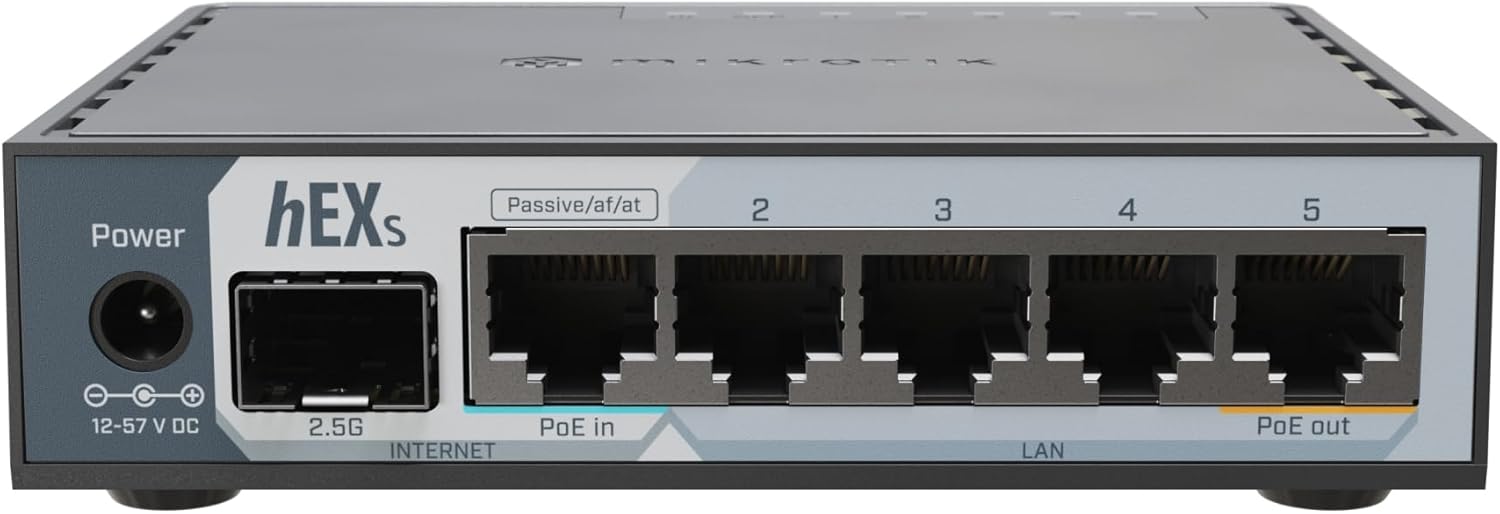
Figura 1: MikroTik hEX S (E60iUGS) wired router. This image shows the front panel of the router, highlighting the power input, 2.5G SFP port, and five Gigabit Ethernet ports, with one supporting PoE in and another supporting PoE out.

Figura 2: Power adapter for the MikroTik hEX S. This image displays the black power adapter with its cable and barrel connector, used to power the router.
2. Configuració
2.1 Instal·lació física
- Col·locació: Position the router on a flat, stable surface in a well-ventilated area, away from direct sunlight and heat sources. Ensure the ambient temperature is within the tested range of -40°C to 70°C.
- Connexió d'alimentació: Connect the provided power adapter to the DC jack input on the router and then plug the adapter into a power outlet. The router supports 12-57 V DC input. Alternatively, the device can be powered via PoE-IN on the Ether1 port (18-57 V).
- Connexions Ethernet:
- Connecteu la vostra font d'Internet (per exemple, el mòdem) al Èter 1 port (labeled 'Internet' or 'PoE in').
- Connect your local network devices (computers, switches, access points) to the Ether2-Ether5 ports.
- El Èter 5 port supports Passive PoE out up to 57V, with a current limit of 0.5 A for both low and high voltage.
- SFP Port Connection: If using fiber optic connectivity, insert a compatible 2.5G SFP module into the SFP port.
- Connexió USB: The USB 3.0 Type A port can be used for external storage or other compatible USB devices.
2.2 Accés a la configuració inicial
The MikroTik hEX S runs on RouterOS. For initial configuration, connect a computer directly to one of the LAN Ethernet ports (Ether2-Ether5). The device typically has a default IP address (e.g., 192.168.88.1) and can be accessed via a web browser (WinBox utility is also available for Windows users).
Refer to the MikroTik documentation for detailed RouterOS configuration guides, as the initial setup may require network knowledge.
3. Funcionament del dispositiu
The hEX S is a powerful wired router designed for advanced network management. It does no include wireless functionality.
3.1 RouterOS sobreview
RouterOS is a highly versatile operating system offering extensive control over network functions including routing, firewall rules, Quality of Service (QoS), VLANs, and more. While powerful, it has a learning curve for users unfamiliar with advanced networking concepts.
3.2 Característiques clau
- CPU: Dual-core EN7562CT at 950 MHz for efficient processing.
- Memòria: 512 MB RAM and 128 MB NAND storage.
- Ports Ethernet: Cinc ports Gigabit Ethernet 10/100/1000.
- Port SFP: One 2.5G SFP port for high-speed fiber connectivity.
- PoE Capabilities: PoE-IN on Ether1 (802.3af/at) and Passive PoE-OUT on Ether5.
- USB: One USB 3.0 Type A port with USB Power Reset functionality.
- IPsec Hardware Acceleration: Enhances VPN performance.
4. Manteniment
4.1 actualitzacions de microprogramari
Regularly update RouterOS to the latest stable version to ensure security, stability, and access to new features. Updates can be performed via the RouterOS interface (WebFig or WinBox).
4.2 Condicions ambientals
The device is designed for operation in ambient temperatures from -40°C to 70°C. Ensure proper airflow around the device as it uses passive cooling. Avoid exposing the device to excessive dust or moisture.
4.3 Neteja
Feu servir un drap suau i sec per netejar l'exterior del dispositiu. No utilitzeu netejadors líquids ni aerosols.
5. Solució De Problemes
5.1 Problemes comuns
- Sense energia: Assegureu-vos que l'adaptador de corrent estigui connectat correctament tant al router com a una presa de corrent que funcioni. Comproveu l'indicador LED d'engegada.
- Cannot Access Configuration Interface:
- Verify your computer is connected to a LAN port (Ether2-Ether5).
- Check your computer's IP settings to ensure it's on the same subnet as the router (e.g., 192.168.88.x).
- Try accessing via WinBox if web l'accés falla.
- Sense connexió a Internet:
- Ensure the internet source is connected to Ether1.
- Verifiqueu que la connexió del vostre proveïdor d'Internet estigui activa.
- Check RouterOS configuration for correct WAN settings (IP address, gateway, DNS).
5.2 Restabliment del dispositiu
The hEX S features a Mode button. Pressing and holding this button during power-up can initiate various reset options, including resetting to factory defaults. Consult the RouterOS documentation for specific reset procedures and their implications.
6. Especificacions
| Característica | Detall |
|---|---|
| Codi de producte | E60iUGS |
| Arquitectura | ARM |
| CPU | EN7562CT, Dual-core 950 MHz |
| RAM | 512 MB |
| Emmagatzematge | 128 MB NAND |
| Sistema operatiu | RouterOS v7 (License 4) |
| Ports Ethernet | 5x 10/100/1000 Gigabit Ethernet |
| Ports SFP | 1x 2.5G SFP |
| PoE In | 802.3af/at (18-57 V) |
| PoE Out | Passive PoE up to 57V on Ether5 (0.5 A limit) |
| Port USB | 1x USB 3.0 Type A (with Power Reset) |
| Consum màxim d'energia | 23 W (5 W without attachments) |
| Dimensions | 2.36 x 0.79 x 0.79 polzades (aproximadament) |
| Pes de l'article | 13.1 unces (370 grams) |
| Tested Ambient Temperature | -40 °C a 70 °C |
| Certificació | CE, EAC, ROHS |
7. Garantia i Suport
7.1 Garantia del producte
MikroTik products are covered by a limited warranty. Please refer to the official MikroTik website or the warranty card included with your product for specific terms and conditions regarding warranty coverage, duration, and claims.
7.2 Suport tècnic
For technical assistance, detailed documentation, and community forums, please visit the official MikroTik website. The RouterOS documentation provides comprehensive guides for configuration and advanced features.
- Oficial Weblloc: mikrotik.com
- Documentació: wiki.mikrotik.com


