1. Introducció
Gràcies per la compraasinel Moukey MAMP3 canals estèreo de 2.0 Amplifier. This manual provides essential information for the safe and efficient operation of your device. Please read it thoroughly before use and retain it for future reference.
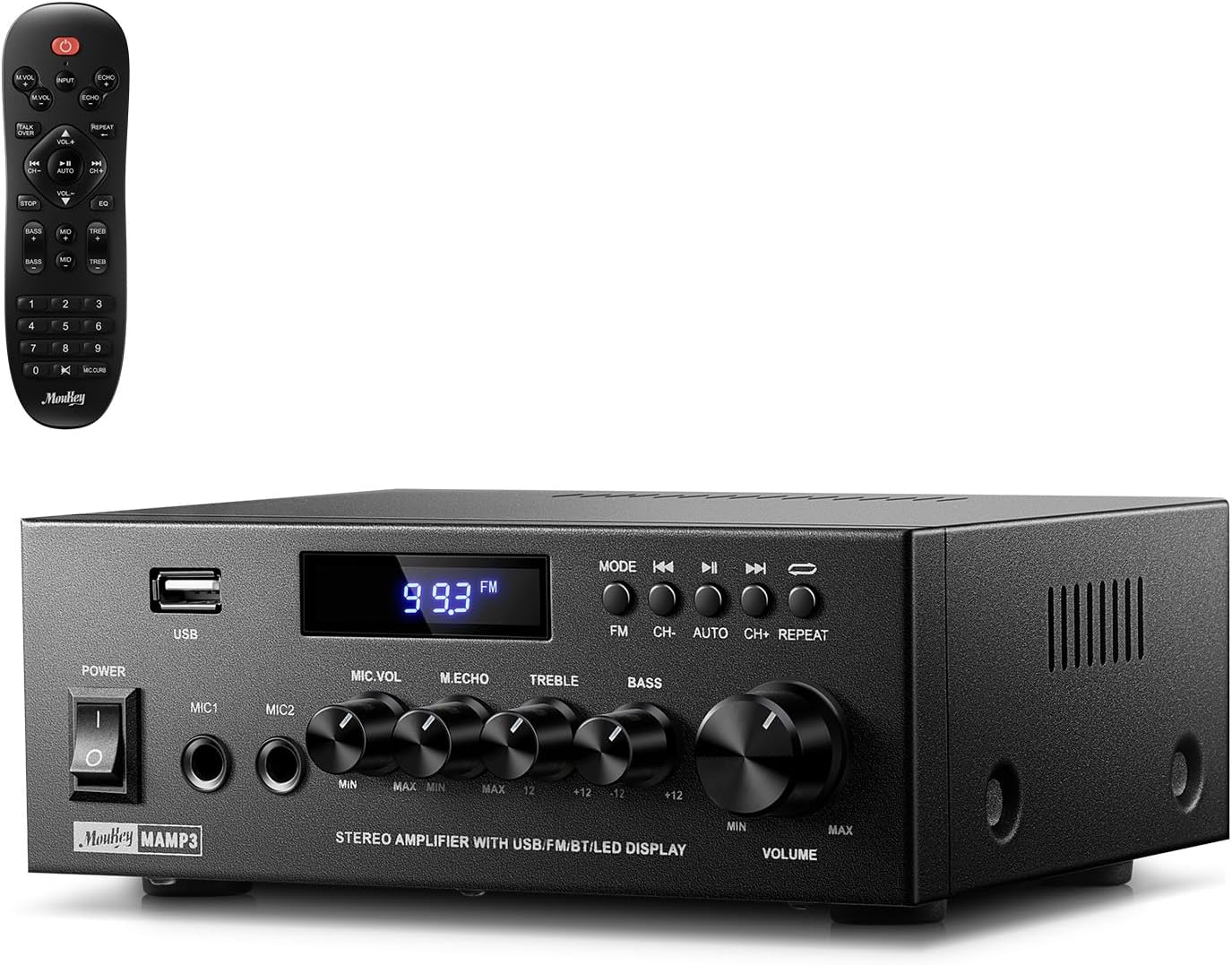
Image 1.1: The Moukey MAMP3 amplifier and its remote control.
2. Instruccions de seguretat
- Llegiu totes les instruccions abans d'utilitzar ampmés viu.
- Mantenir el amplifier away from water, moisture, and extreme temperatures.
- Do not block ventilation openings. Ensure proper airflow around the unit.
- Utilitzeu només l'adaptador d'alimentació subministrat amb la unitat.
- No intenteu reparar o modificar la unitat vosaltres mateixos. Envieu totes les tasques de manteniment a personal qualificat.
- Disconnect the power cord from the outlet if the unit will be unused for extended periods.
3. Producte acabatview
3.1 Característiques clau
- 2.0 Channel Stereo Audio Output
- Bluetooth 5.3 for stable wireless connection
- Multiple Audio Inputs: RCA, USB, FM Radio, 2 Microphone Inputs
- Full-function Remote Control with EQ adjustments
- Customizable Treble, Midrange, and Bass controls
- Memory function for mode, volume, and EQ settings
- 300 Watts Peak Power Output
3.2 Controls i indicadors del tauler frontal

Image 3.1: Front Panel Layout
- Interruptor d'alimentació: Encén o apaga la unitat.
- MIC1/2: Preses d'entrada de micròfon de 6.35 mm.
- Control de volum del micròfon: Ajusta el volum dels micròfons connectats.
- Botó d'eco: Ajusta l'efecte d'eco per als micròfons.
- Pom treble: Ajusta la sortida d'àudio d'alta freqüència.
- Pom de baix: Ajusta la sortida d'àudio de baixa freqüència.
- Control de volum de música: Main volume control for all audio sources.
- Ranura USB: Per connectar dispositius d'emmagatzematge USB per a la reproducció d'àudio.
- Pantalla LED: Mostra el mode actual, la informació de la pista o la freqüència FM.
- Botó MODE: Switches between input sources (BT, Aux, CD, USB, FM).
- Botó anterior: Skips to the previous track (USB/BT) or FM station.
- Botó Reproduir/Pausa: Plays or pauses audio (USB/BT).
- Botó següent: Skips to the next track (USB/BT) or FM station.
- Botó de repetició: Repeats current track or all tracks (USB).
3.3 Connexions del panell posterior

Imatge 3.2: Connexions del panell posterior
- Entrada d'antena FM: Connecteu l'antena FM inclosa per a la recepció de ràdio.
- AUDIO INPUT (RCA): Connect external audio sources like CD/DVD players using RCA cables.
- SORTIDA D'ÀUDIO (Terminals d'altaveu): Connect passive speakers. Ensure correct polarity (+ to + and - to -).
- POWER AC INPUT: Connecteu el cable d'alimentació a una presa de corrent altern.
4. Configuració
4.1 Desembalatge
Traieu amb cura amplifier and all accessories from the packaging. Verify that all items listed in the 'What's in the Box' section are present.
4.2 Connectar altaveus
La MAMP3 amplifier supports two passive speakers. Connect your speakers to the SORTIDA D'ÀUDIO terminals on the rear panel. Ensure that the positive (+) terminal on the amplifier connects to the positive (+) terminal on your speaker, and the negative (-) terminal on the amplifier connects to the negative (-) terminal on your speaker. Incorrect polarity can affect sound quality.

Image 4.1: Speaker Connection Diagram
4.3 Connexió de fonts d'àudio
El amplifier offers multiple input options:
- Entrada RCA: Use RCA cables to connect devices such as CD players, DVD players, or other audio equipment to the Entrada d’Àudio jacks on the rear panel.
- Entrada USB: Inseriu una unitat flaix USB al Ranura USB on the front panel for direct audio playback.
- Bluetooth: Pair your Bluetooth-enabled device (smartphone, tablet, laptop) wirelessly.
- Ràdio FM: Connect the included FM antenna to the Entrada d'antena FM on the rear panel for radio reception. Extend the antenna for optimal signal.
- Entrades de micròfon: Connecteu fins a dos micròfons a la MIC1/2 jacks on the front panel for karaoke or public address.

Image 4.2: Available Signal Inputs
4.4 Connexió d'alimentació
Connecteu el cable d'alimentació a la xarxa POWER AC INPUT on the rear panel and then plug it into a standard AC power outlet.
5. Instruccions de funcionament
5.1 Encès/Apagat
Premeu el botó Interruptor d'alimentació al panell frontal per engegar el ampactivar o desactivar el lificador. La pantalla LED s'il·luminarà quan la unitat estigui engegada.
5.2 Selecció d'entrada
Premeu el botó MODE button on the front panel or the remote control to cycle through the available input sources: Bluetooth (BT), Auxiliary (Aux), CD, USB, and FM radio. The selected mode will be shown on the LED display.
5.3 Control de volum
Gira el gran Music Volume Knob on the front panel clockwise to increase volume and counter-clockwise to decrease it. Volume can also be adjusted using the remote control.
5.4 Ajust de l'equalitzador (EQ)
Adjust the sound characteristics using the Maneta d'aguts i Pom de baix on the front panel. The remote control also provides dedicated buttons for Treble, Midrange, and Bass adjustments. The amplifier will automatically save your preferred EQ settings.
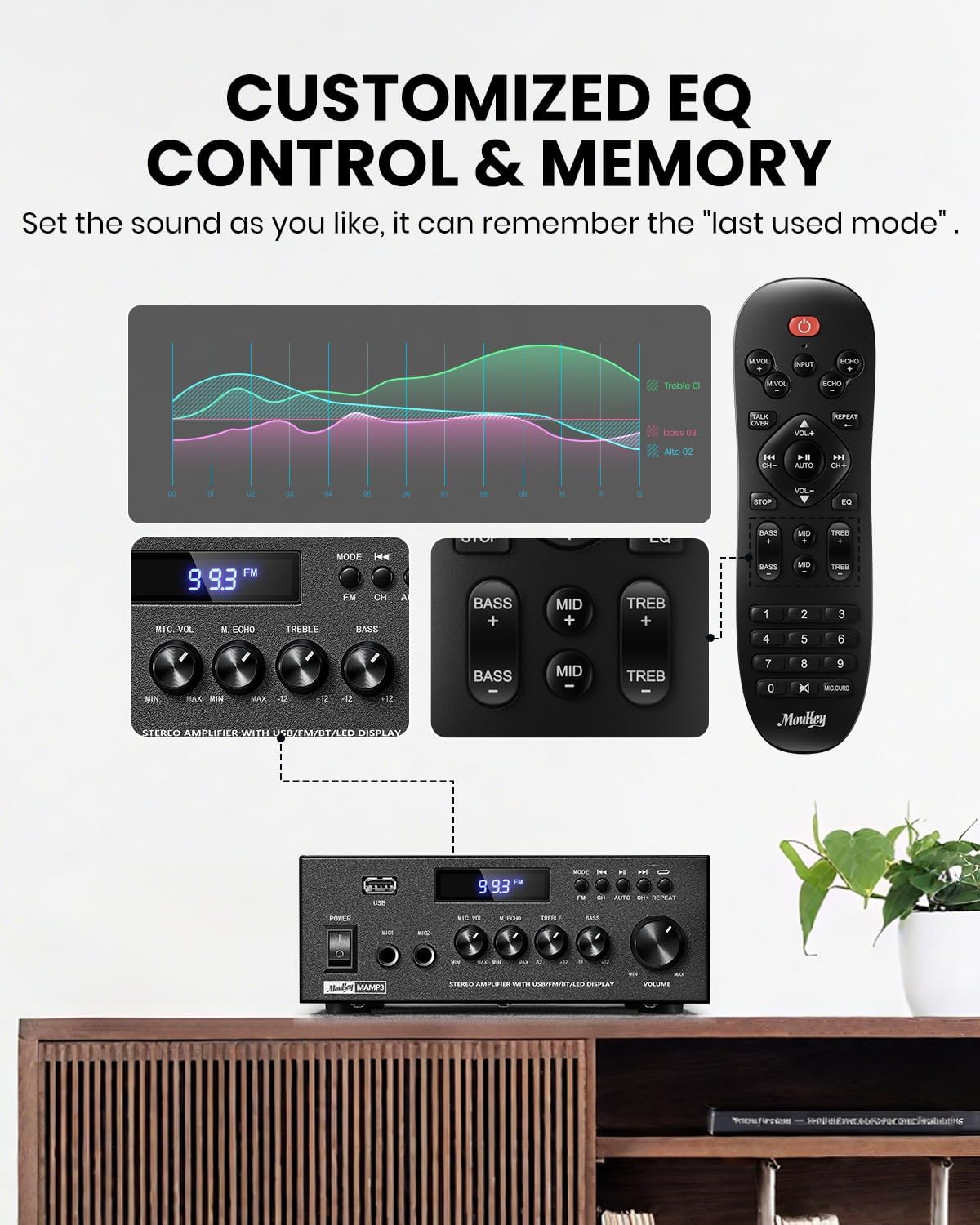
Image 5.1: Customizable EQ Control
5.5 Controls del micròfon
If microphones are connected, use the Pom de volum de micròfon to adjust their output level and the Pom d'eco to add an echo effect. The remote control also features a 'Talkover' function.
5.6 Funcionament Bluetooth
- Premeu el botó MODE button until "BT" appears on the LED display. The amplifier is now in Bluetooth pairing mode.
- On your mobile device, enable Bluetooth and search for "Moukey MAMP3".
- Seleccioneu "Moukey M"AMP3" to pair. Once connected, you will hear a confirmation tone.
- Ara podeu reproduir àudio des del vostre dispositiu a través de ampmés viu.

Image 5.2: Bluetooth Pairing
5.7 Funcionament de la ràdio FM
- Premeu el botó MODE button until "FM" appears on the LED display.
- Escaneig automàtic: Press the "AUTO" button on the remote to automatically scan and save available FM stations.
- Sintonització manual: Use the number pad on the remote control to directly enter the desired FM frequency (e.g., for 101.1 MHz, enter 1011).
- Utilitza el Anterior i A continuació buttons to navigate between saved stations or fine-tune frequencies.
Reproducció USB 5.8
Inseriu una unitat flash USB que contingui àudio MP3 o WAV files a la Ranura USB. El amplifier will automatically switch to USB mode and begin playback. Use the Anterior, Reproduir/Pausa, i A continuació buttons to control playback. The Repetiu button allows you to repeat the current track or all tracks.
5.9 Control remot
The included full-function remote control allows for convenient operation from a distance. It provides control over input selection, volume, EQ settings (treble, midrange, bass), microphone echo, and talkover functions across all input modes.

Image 5.3: Upgraded Remote Control Functionality
6. Manteniment
- Neteja: Utilitzeu un drap suau i sec per netejar l'exterior ampNo utilitzeu netejadors líquids ni dissolvents.
- Ventilació: Ensure that the ventilation openings are free from dust and debris to prevent overheating.
- Emmagatzematge: Quan no s'utilitzi durant períodes prolongats, guardeu-lo ampGuardar en un lloc fresc i sec, allunyat de la llum solar directa i de temperatures extremes.
7. Solució De Problemes
| Problema | Causa possible | Solució |
|---|---|---|
| Sense poder | Cable d'alimentació no connectat; Presa de corrent defectuosa; Interruptor apagat. | Ensure power cord is securely connected; Test outlet with another device; Turn power switch on. |
| Sense sortida de so | Volume too low; Incorrect input selected; Speaker wires loose/incorrectly connected; Audio source issue. | Increase volume; Select correct input mode; Check speaker wire connections and polarity; Verify audio source is playing. |
| Bluetooth no connectat | Amplifier not in BT mode; Device too far; Device already connected to another unit; Interference. | Canvia amplifier to BT mode; Move device closer; Disconnect from other devices; Reduce interference. |
| Mala recepció FM | Antena no connectada o mal posicionada; Senyal feble. | Connect and adjust FM antenna position; Try auto-scan or manual tuning for stronger stations. |
| Problemes de reproducció per USB | Sense suport file format; USB drive not formatted correctly; USB drive capacity too large. | Assegureu-vos files are MP3/WAV; Format USB drive to FAT32; Use USB drives 32GB or less. |
8. Especificacions
| Característica | Especificació |
|---|---|
| Número de model | MAMP3 |
| Potència de sortida | 300 watts (pic) |
| Canals | 2.0 estèreo |
| Tecnologia de connectivitat | Auxiliary, Bluetooth 5.3, FM, USB |
| Dispositius compatibles | Smartphone, Tablet, Laptop, Computer, Speakers, CD/DVD Player |
| Tipus de connector | RCA, USB, 2 Mic input |
| Mode de sortida d'àudio | estèreo |
| Dimensions del producte | 6.1" de profunditat x 7.1" d'amplada x 2.8" d'alçada (15.5 x 18.0 x 7.1 cm) |
| Pes de l'article | 2.14 lliures (0.97 kg) |
| Color | Negre |
8.1 Què hi ha a la caixa
- Moukey MAMP3 Ampmés viu
- Control remot
- Antena FM
- Manual d'usuari
- Adaptador d'alimentació
9. Garantia i Suport
9.1 Informació de la garantia
Moukey products are designed and manufactured to the highest quality standards. This product is covered by a limited warranty against defects in materials and workmanship. Please refer to the warranty card included with your purchase for specific terms and conditions, or visit the official Moukey weblloc per obtenir informació detallada sobre la garantia.
9.2 Atenció al client
If you encounter any issues or have questions regarding your Moukey MAMP3 amplifier, please contact our customer support team. You can find contact information on the official Moukey weblloc web o a través de la vostra plataforma de compra.
Weblloc: www.moukey.com (Exampl'enllaç, consulteu la documentació del producte)
Correu electrònic: support@moukey.com (Example email, please refer to actual product documentation)


