1. Introducció
The 70mai Dash Cam Battery Pack BL96NNX is a high-capacity LiFePO4 backup power solution designed to provide extended parking surveillance for your dash camera without draining your vehicle's main battery. This manual provides detailed instructions for the proper installation, operation, and maintenance of your battery pack.

Figure 1: 70mai Dash Cam Battery Pack BL96NNX
2. Què hi ha a la caixa
Si us plau, verifiqueu que tots els elements siguin presents al vostre paquet:
- Paquet de bateries x1
- Fuse box charging cable x1
- Parking surveillance cable adapter x1
- Type C to Type-C output cable x1
- Fuse holders and fuses x4
- Brida de cable x1
- Velcro tape x2
- Manual d'usuari
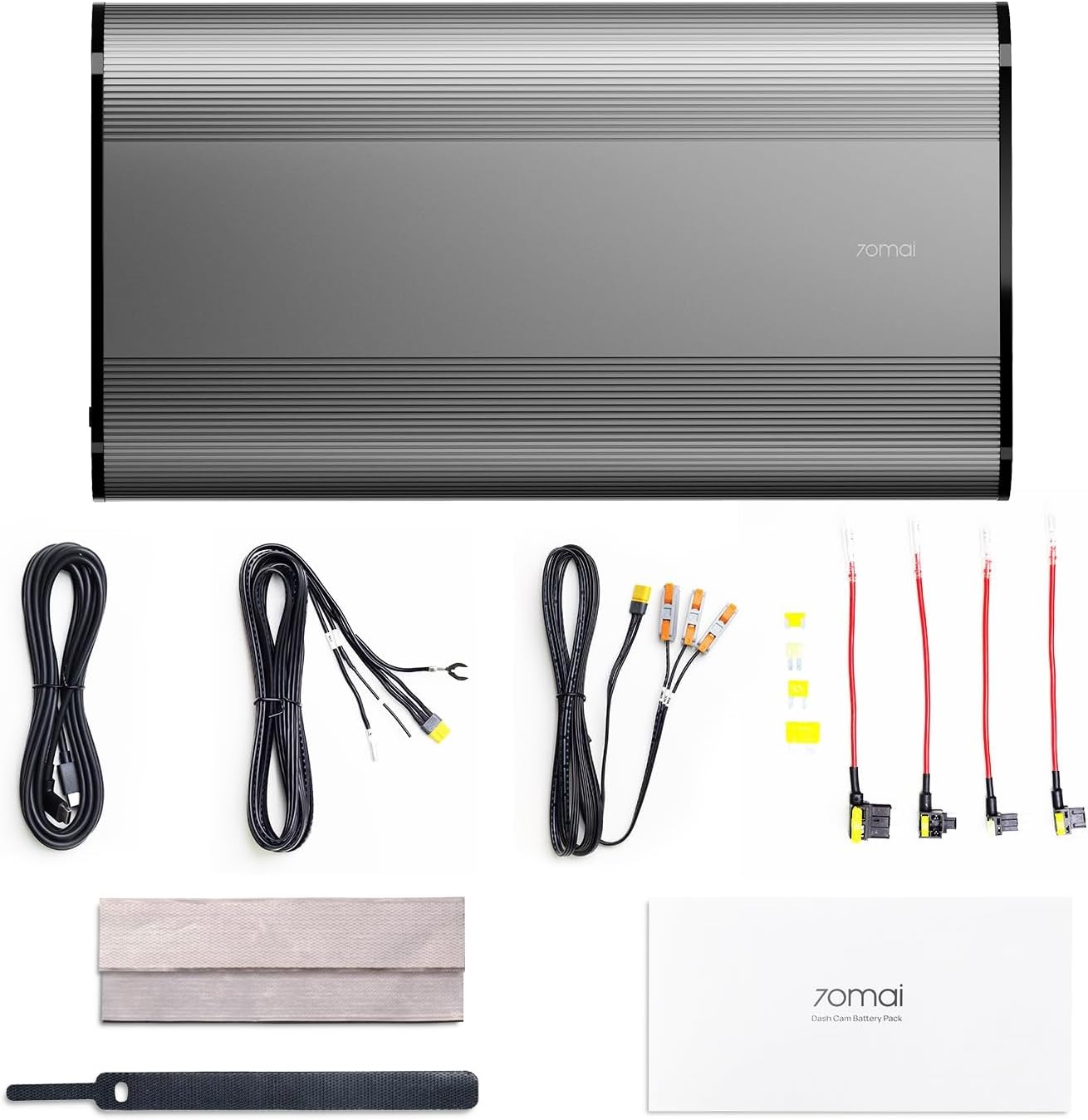
Figura 2: Contingut del paquet
3. Configuració i instal·lació
The 70mai Dash Cam Battery Pack offers two primary charging methods: via the vehicle's cigarette lighter socket or a hardwired connection to the fuse box. The fuse box solution is recommended for faster charging and optimal performance.
3.1. Charging Setup Options
Option 1: Cigarette Lighter Charging
Connect the provided cigarette lighter charging cable to the 'DC in' port on the battery pack and then plug the adapter into your vehicle's cigarette lighter socket. This method routes power to the battery pack, which then powers the dash cam. Ensure your vehicle's cigarette lighter socket turns off when the engine is off to prevent draining the car battery. If your socket is constantly powered, this method is unsuitable for parking surveillance.
Option 2: Hardwire Connection (Recommended)
Utilize the fuse box charging cable to connect the battery pack directly to your vehicle's fuse box. This method provides up to 50% faster charging. Refer to the wiring diagram below for proper connections. This solution ensures the battery pack charges only when the engine is running and provides power for parking surveillance when the engine is off.

Figure 3: Charging Setup Options
3.2. Discharging Setup Options
Option 1: Direct Connection to 70mai Dash Cams
The battery pack features a Type-C 5V output interface. Use the included Type-C to Type-C output cable to connect directly to your compatible 70mai dash cam. For 70mai 4G dash cam users, the battery pack enables parking surveillance without a hardwire kit if the 4G module is unused.
Option 2: Connect via Parking Surveillance Cable
The battery pack also includes a 12V output interface, compatible with all 70mai dash cam models equipped with 70mai standard Hardwire Kits or 4G Hardwire Kits, and most other dash cams with parking surveillance cables. This ensures seamless integration for various setups.

Figure 4: Discharging Setup Options
3.3. Securely Mount Your Battery Pack
Considering potential vibrations during driving, it is recommended to securely place the battery pack with its wide surface facing downwards on the vehicle's floor. Use the provided adhesive Velcro for fixation. After securing the battery pack, use cable ties to fasten the wires to prevent any loose connections.

Figure 5: Mounting in the Glove Box

Figure 6: Mounting Under the Seat
4. Instruccions de funcionament
4.1. Encès / apagat
Locate the 'ON/OFF' switch on the battery pack. Slide the switch to the 'ON' position to activate the battery pack. The LED indicators will illuminate to show the current charge level. To turn off, slide the switch to the 'OFF' position.

Figure 7: Battery Pack Ports and Switch
4.2. Parking Surveillance
When your vehicle's engine is turned off, the battery pack automatically switches to its internal power source, enabling continuous dash cam recording for extended parking surveillance. This prevents any drain on your car's main battery.

Figure 8: Extended Parking Surveillance
4.3. Automatic Current Limiting & Delayed Charging
The battery pack features automatic current limiting, dynamically adjusting the charging current based on the charging method to prevent vehicle battery depletion. It also incorporates a smart 20-second delayed charging mechanism, initiating charging only after vehicle startup to protect your vehicle's electrical system during ignition.

Figure 9: Smart Charging Features
5. Manteniment
To ensure the longevity and optimal performance of your 70mai Dash Cam Battery Pack, follow these maintenance guidelines:
- Neteja: Use a soft, dry cloth to clean the exterior of the battery pack. Avoid using harsh chemicals or abrasive materials.
- Emmagatzematge: If storing the battery pack for an extended period, ensure it is charged to approximately 50-75% and stored in a cool, dry place away from direct sunlight and extreme temperatures.
- Temperatura: Avoid exposing the battery pack to extreme heat or cold, as this can affect its performance and lifespan.
- Inspecció del cable: Periodically check all cables and connections for any signs of wear, damage, or loose connections. Replace any damaged components immediately.
6. Solució De Problemes
If you encounter issues with your 70mai Dash Cam Battery Pack, refer to the following common problems and solutions:
- La bateria no es carrega:
- Ensure all charging cables are securely connected to both the battery pack and the vehicle's power source (cigarette lighter or fuse box).
- Verify that the vehicle's power source is active (engine running for hardwire, or accessory power for cigarette lighter).
- Check the fuses in your vehicle's fuse box if using the hardwire connection.
- Dash Cam Not Receiving Power from Battery Pack:
- Confirm the battery pack is turned 'ON'.
- Ensure the output cable from the battery pack to the dash cam is securely connected.
- Check the battery pack's charge level; it may be depleted.
- Parking Surveillance Not Activating:
- Ensure the battery pack is sufficiently charged.
- Verify that your dash cam's parking mode settings are correctly configured.
- If using the cigarette lighter, confirm it powers off with the engine; otherwise, the hardwire solution is necessary for proper parking mode functionality.
7. Especificacions
| Característica | Detall |
|---|---|
| Model | BL96NNX |
| Tipus de bateria | LiFePO4 |
| Capacitat de la bateria | 96 Wh / 7500 mAh |
| Entrada Voltage | 11.2-30V |
| Ports de sortida | XT30 (12V), Type-C (5V) |
| Charging Time (Hardwire) | Aprox. 60 minuts (0-100%) |
| Charging Time (Cigarette Lighter) | Aprox. 90 minuts (0-100%) |
| Dimensions | 11.02 x 6.54 x 2.91 polzades |
| Pes de l'article | 4.31 lliures |
8. Garantia i Suport
70mai provides the following support for its products:
- Garantia: 18 mesos
- Atenció al client: 24 hores
- Política de devolució: 30 dies
For technical assistance, warranty claims, or any product-related inquiries, please contact 70mai customer support:
- Correu electrònic: ajuda@70mai.com
- Telèfon: 1-877-746-6088 (Mon-Fri 9am-6pm PST)


