Introducció
This manual provides detailed instructions for the setup, operation, and maintenance of your HTC N15 Wireless Clip On Earbuds. Please read this manual thoroughly before using the product to ensure proper function and longevity.
Contingut del paquet
Verifiqueu que tots els elements siguin presents al paquet del producte:
- 1 Pair HTC N15 Clip On Earbuds
- 1 Estoig de càrrega
- 1 cable de càrrega USB-C
- 1 Quick Start Guide (Basic Operations)
Producte acabatview
The HTC N15 Wireless Clip On Earbuds feature an open-ear design for situational awareness and a lightweight, secure fit. They come with a compact charging case for extended use.
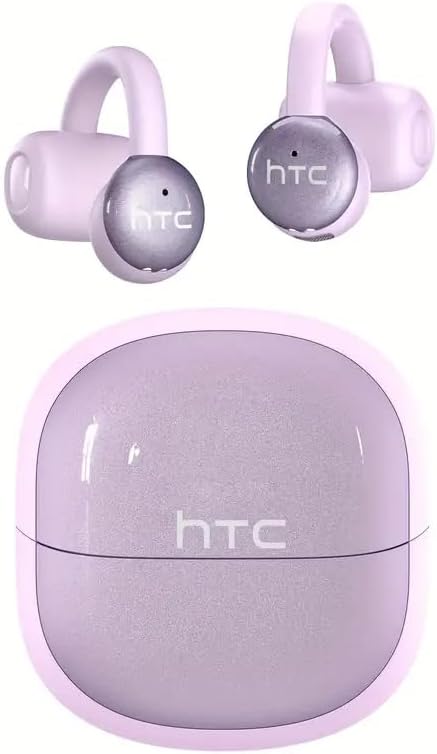
Image: HTC N15 Wireless Clip On Earbuds and Charging Case.

Image: The HTC N15 earbuds and charging case, highlighting battery life features such as 1.5 hours fast charging, 24 hours with the charge case, 8 hours on a single charge, and a Type-C charge port.
Càrrega dels auriculars i la funda
Before first use, fully charge the earbuds and charging case. The charging case provides additional power for on-the-go charging.
- Càrrega de la caixa: Connect the provided USB-C cable to the charging port on the case and a power source. The indicator lights on the case will show the charging status.
- Càrrega dels auriculars: Place the earbuds into the charging case. Ensure they are correctly seated. The earbuds will begin charging automatically.
A single charge provides approximately 8 hours of playback. The charging case extends total playtime to about 22 hours. Fast charging allows for quick power replenishment.

Image: Visual representation of the HTC N15 earbuds' battery life: 8 hours on a single charge, 24 hours with the charging case, and 1.5 hours for fast charging.
Configuració i aparellament
The HTC N15 earbuds utilize Bluetooth 6.0 technology for a stable and low-latency connection. They are compatible with iOS and Android devices.
- Encès: Obre l'estoig de càrrega. Els auriculars s'encendran automàticament i entraran en mode d'emparellament.
- Activa el Bluetooth: Al dispositiu (telèfon intel·ligent, tauleta, ordinador portàtil), activeu el Bluetooth.
- Seleccioneu el dispositiu: In your device's Bluetooth settings, search for 'HTC NE15' and select it to pair.
- Confirmació: Once paired, a voice prompt will confirm the connection.

Image: A diagram illustrating the 'Upgraded Bluetooth 6.0 Technology' with a comparison to Bluetooth 5.3 and 5.4, emphasizing low latency and fast connection.

Image: The HTC N15 earbuds and charging case shown with various compatible devices including notebooks, TVs, desktops, watches, phones, and iPads, demonstrating flexible connectivity. A phone screen displays 'HTC NE15 Connected'.
Operating Instructions (Touch Control)
The HTC N15 earbuds feature smart touch controls on both earbuds for easy management of calls and music playback.
- Respondre/Finalitzar la trucada: Click either earbud once.
- Rebutja la trucada: Manteniu premut qualsevol dels auriculars durant 2 segons.
- Reproduir/pausar música: Feu doble clic a qualsevol dels auriculars.
- Cançó anterior: Feu tres clics a l'auricular esquerre.
- Següent cançó: Feu tres clics a l'auricular dret.
- Pujar el volum: Click the right earbud once.
- Baixar el volum: Click the left earbud once.
- Assistent de veu: Manteniu l'auricular esquerre durant 2 segons.
- Mode de joc: Manteniu l'auricular dret durant 2 segons.

Image: A diagram illustrating the touch control functions for the HTC N15 earbuds, showing actions for answering/ending calls, rejecting calls, playing/pausing music, skipping tracks, adjusting volume, activating voice assistant, and enabling game mode.
Instruccions de vestir
The HTC N15 earbuds feature an ergonomic open-ear clip design for a secure and comfortable fit, allowing you to remain aware of your surroundings.
- Identify L/R: Confirm the left (L) and right (R) earbuds.
- Posicionament: Confirm the direction of the earbud.
- Enganxar: Gently clip the earbud onto the thinnest part of your ear by sliding it down.
- Ajustar: Adjust the earbud tip to align with your ear canal for optimal sound and comfort.
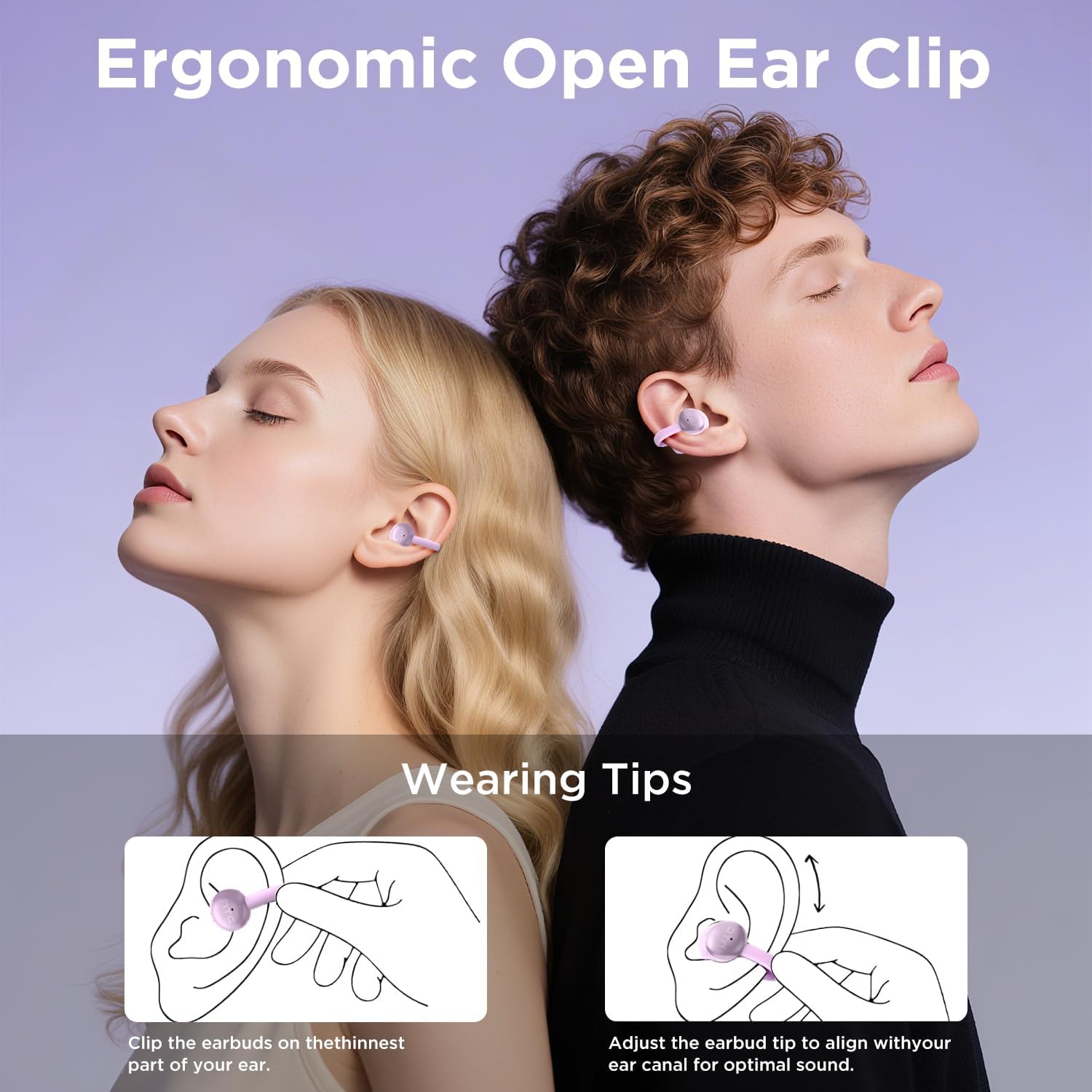
Image: A visual guide demonstrating the ergonomic open-ear clip design and wearing tips for the HTC N15 earbuds, showing how to clip them onto the ear and adjust for optimal sound.

Image: The HTC N15 earbuds emphasizing 'All-Day Comfort' with features like '4.7g Super Light' and a 'Flexible C-Bridge Design' for a secure fit.

Image: A four-step visual guide titled 'HOW TO WEAR?' showing how to correctly position and adjust the HTC N15 earbuds on the ear.
Manteniment
To ensure the longevity and optimal performance of your HTC N15 earbuds, follow these maintenance guidelines:
- Neteja: Netegeu regularment els auriculars i l'estoig de càrrega amb un drap suau i sec. Eviteu utilitzar productes químics agressius o materials abrasius.
- Resistència a l'aigua: The earbuds are IPX4 sweatproof, meaning they are resistant to splashes and sweat. Do not submerge them in water or expose them to heavy rain.
- Emmagatzematge: Quan no els utilitzeu, guardeu els auriculars a la seva funda de càrrega per protegir-los de la pols i els danys.
- Temperatura: Eviteu exposar els auriculars a temperatures extremes (calor o fred) o a la llum solar directa durant períodes prolongats.
Resolució de problemes
If you encounter issues with your HTC N15 earbuds, refer to the following common solutions:
- Auriculars que no s'emparellan: Assegura't que tots dos auriculars estiguin carregats i en mode d'emparellament. Desactiva i activa el Bluetooth del dispositiu i, a continuació, intenta l'emparellament de nou.
- Sense so o volum baix: Check the volume levels on both your device and the earbuds. Ensure the earbuds are correctly positioned in your ears. Due to the open-ear design, you may need to increase the volume slightly in noisy environments.
- Auriculars que cauen: Ensure you are wearing the earbuds correctly as per the wearing instructions. Adjust the clip and earbud tip for a snug fit.
- Els controls tàctils no responen: Assegura't que els dits estiguin nets i secs. Prova de reiniciar els auriculars tornant-los a posar a la funda i traient-los.
- Problemes de càrrega: Verify the USB-C cable and power source are working. Ensure the earbuds are properly seated in the charging case.
Especificacions
| Característica | Detall |
|---|---|
| Nom del model | HTC NE15 |
| Tecnologia de connectivitat | Sense fil (Bluetooth 6.0) |
| Forma de l'auricular | Orella oberta |
| Mètode de control | Toca |
| Durada de la bateria (auriculars) | 8 hores (una sola càrrega) |
| Temps de reproducció total (amb estoig) | 22 hores |
| Nivell de resistència a l'aigua | IPX4 (resistent a la suor) |
| Material | Plàstic, silicona |
| Pes de l'article | 4.6 unces |
| Dispositius compatibles | Telèfons mòbils, tauletes |
| UPC | 768649989703 |
Vídeo del producte
Vídeo: Un unboxing i mésview of the HTC Wireless Clip On Earbuds N15 Bluetooth 6.0. This video demonstrates the product packaging, contents, and the physical appearance of the earbuds and charging case.
Garantia i Suport
HTC provides customer support for its products. For any questions or assistance, please refer to the contact information provided with your purchase or visit the official HTC support weblloc.
Atenció al client: 7*24 Live Chat Support is available for assistance with your HTC N15 earbuds.
Conserveu el vostre comprovant de compra per a reclamacions de garantia.


