Introducció
The AGM M9 is a rugged feature phone designed for reliability and ease of use. It supports 4G LTE connectivity and is built to withstand challenging environments with IP68 and IP69K waterproof, dustproof, and drop-resistant standards. This manual provides essential information for setting up, operating, maintaining, and troubleshooting your device.

Figure 1: Front, Side, and Back Views of the AGM M9 Feature Phone.
Què hi ha a la caixa
Verifiqueu que tots els elements siguin presents al paquet:
- AGM M9 Feature Phone x1
- 1000mAh Replaceable Battery x1
Configuració
1. Instal·lació de la bateria
The AGM M9 comes with a replaceable 1000mAh battery. To install or replace the battery:
- Traieu amb cura la tapa posterior del telèfon.
- Alineeu els contactes de la bateria amb els terminals de l'interior del compartiment de la bateria.
- Premeu suaument la bateria al seu lloc fins que quedi fixada.
- Replace the back cover, ensuring it clicks firmly into position.
2. Instal·lació de la targeta SIM i la targeta TF
The phone supports dual SIM cards and one TF (microSD) card for expandable storage up to 128GB.
- With the back cover and battery removed, locate the SIM card slots (SIM1, SIM2) and the TF card slot.
- Insert your 4G LTE compatible SIM cards into the designated SIM slots with the gold contacts facing down.
- Insert the TF card into its slot until it is securely seated.
- Torneu a instal·lar la bateria i la coberta posterior.
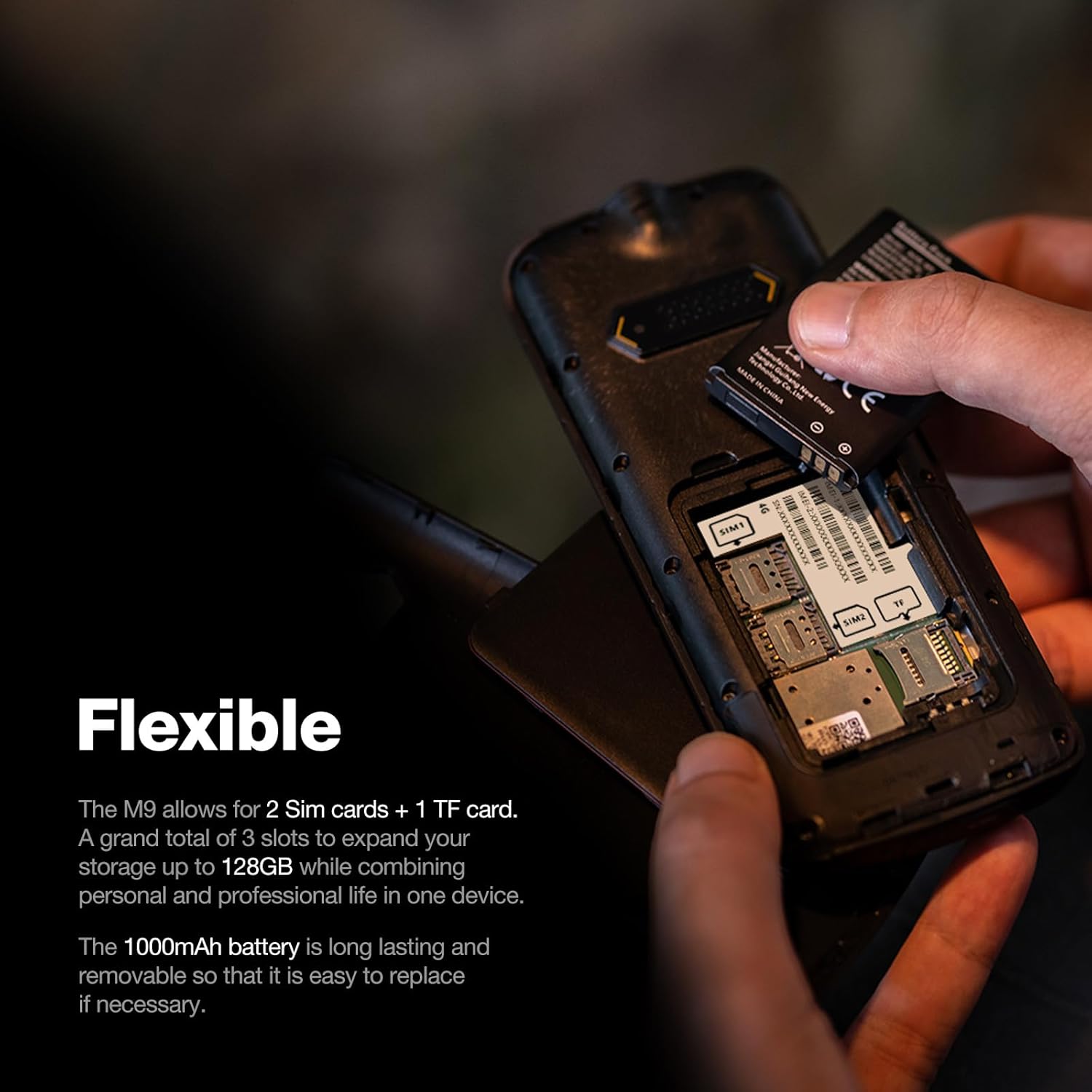
Figure 2: Installation of SIM and TF Cards.
3. Engegada inicial
Press and hold the Power/End Call button until the screen illuminates. Follow any on-screen prompts for initial setup.
Instruccions de funcionament
Navegació bàsica
The AGM M9 features an oversized keypad and large fonts for easy operation. Use the navigation keys (up, down, left, right) and the central OK button to move through menus and select options. The green call button initiates calls, and the red end call button terminates calls or powers off the device when held.
Fer i rebre trucades
- Per fer una trucada: Introduïu el número de telèfon amb el teclat numèric i premeu el botó verd de trucada.
- Per rebre una trucada: Press the green call button when the phone rings.
- Per finalitzar una trucada: Press the red end call button.
Marcatge ràpid
The phone supports speed dial for up to 9 contacts. To set up speed dial:
- Navegueu fins al menú "Configuració de trucades" o "Llibreta telefònica".
- Select 'Speed dial' and assign contacts to numbers 2-9 (number 1 is typically for voicemail).
- To use speed dial, long-press the assigned number key from the idle screen.

Figure 3: Speed Dial Menu on the AGM M9.
Text Messaging (T9 Input)
The phone supports T9 predictive text input for efficient messaging. To compose a message:
- Go to 'Messages' from the main menu.
- Select 'Write message' or 'New message'.
- Use the keypad to type your message. Press a key multiple times for different letters, or use T9 mode for predictive text.
- Enter the recipient's number and send.

Figure 4: Effortless T9 Typing on the AGM M9.
Ràdio FM
The AGM M9 has a built-in FM radio that does not require an external antenna. To use the FM radio:
- Navigate to the 'FM Radio' application from the main menu.
- Feu servir les tecles de navegació per cercar emissores o sintonitzar-les manualment.

Figure 5: AGM M9 FM Radio Functionality.
Llanterna
The phone includes a high-intensity flashlight for convenience. Refer to your phone's specific key assignments or menu options to activate the flashlight. Typically, it can be turned on/off via a dedicated side button or a shortcut in the menu.

Figure 6: AGM M9 Built-in Flashlight.
Connectivitat d'àudio
The AGM M9 features a 3.5mm audio jack for wired headphones and supports Bluetooth for wireless audio devices.
- Jack de 3.5 mm: Plug compatible headphones directly into the audio jack located on the phone.
- Bluetooth: To pair with Bluetooth devices, navigate to the Bluetooth settings in the phone's menu, enable Bluetooth, and search for available devices.

Figure 7: 3.5mm Audio Jack on the AGM M9.
Manteniment
The AGM M9 is designed for durability with IP68 and IP69K ratings, making it waterproof, dustproof, and drop-resistant. Proper maintenance ensures its longevity.
- Neteja: If the phone gets dirty, it can be rinsed with fresh water. Ensure all ports are closed before rinsing. Do not use harsh chemicals or abrasive materials.
- Cura de la bateria: The replaceable battery allows for easy replacement if performance degrades over time. Store the phone and battery in a cool, dry place away from extreme temperatures.
- Protecció contra caigudes: While drop-resistant up to 1.8m, avoid unnecessary drops to preserve the phone's integrity.

Figure 8: Durability Features of the AGM M9.
Resolució de problemes
Aquesta secció tracta problemes comuns que podeu trobar amb el vostre telèfon AGM M9.
| Problema | Causa possible | Solució |
|---|---|---|
| El telèfon no s'encén. | Battery is drained or not installed correctly. | Ensure battery is charged and properly installed. Try charging the phone for at least 30 minutes. |
| No es poden fer ni rebre trucades. | No hi ha senyal de xarxa, problema amb la targeta SIM o configuració de xarxa incorrecta. | Check signal strength. Ensure SIM card is correctly inserted and activated. Verify network settings are correct for your carrier (T-Mobile compatible in US). Restart the phone. |
| Mala qualitat de trucada. | Weak signal, environmental interference. | Mou-te a una zona amb millor senyal. Evita els obstacles. |
| La bateria s'esgota ràpidament. | Heavy usage, background processes, aging battery. | Redueix la brillantor de la pantalla. Tanca les aplicacions que no fas servir. Considera substituir la bateria si és antiga. |
| Cannot send/receive text messages. | Incorrect message center number, no credit, network issue. | Check message center number in settings. Ensure sufficient credit/plan. Verify network connection. |
If the issue persists, refer to the Support section for further assistance.
Especificacions
Key technical specifications for the AGM M9 Feature Phone:
- Nom del model: AGM M9
- Sistema operatiu: RTOS
- Mida de la pantalla: 2.4 polzades
- Tecnologia cel·lular: 4G
- Wireless Carrier Compatibility: T-Mobile (US), unlocked for global carriers outside US
- Ranures per a targetes SIM: Doble SIM
- Capacitat d'emmagatzematge de memòria: Expandable up to 128GB via TF card
- Mida de la memòria RAM instal·lada: 48 MB
- Classificació de la potència de la bateria: 1000 milionsamp Hours (Replaceable)
- Característiques especials: Basic Phone, Dual SIM, Expandable Memory, Rugged Body, Water Resistant (IP68 & IP69K), Drop-Proof (1.8m MIL-STD-810H), FM Radio, Flashlight, Large Buttons & Font, Speed Dial, 3.5mm Audio Jack, Bluetooth
- Color: Negre
- Pes de l'article: 4.6 unces
- Dimensions del paquet: 5.56 x 2.32 x 0.66 polzades

Figure 9: AGM M9 Dimensions.
Garantia i Suport
AGM is committed to providing reliable products and dedicated customer support.
- Quality Commitment: The AGM M9 is backed by professional after-sales support.
- Procés de substitució: In case of quality issues, a straightforward replacement process is available.
- Suport expert: 24/7 expert support is provided to assist with any inquiries or issues.
For assistance, please contact AGM Direct through their official support channels. Refer to your purchase documentation or the AGM weblloc web per obtenir informació de contacte específica.

Figure 10: AGM Brand Promise for Support.