Introducció
The Poclink POC-1 Lite is a state-of-the-art 4G LTE two-way radio designed for unlimited range communication. Operating over cellular networks, it provides nationwide and global coverage without traditional distance limitations. This manual provides essential information for setting up, operating, and maintaining your device, ensuring clear and secure communication.
Què hi ha a la caixa
Your Poclink POC-1 Lite package includes the following items:
- 2 x Poclink POC-1 Lite Radios
- 2 x cables USB-C
- 2 carregadors
- 2 x clips de cinturó
- 2 x cordons
- 2 x SIM Cards (pre-installed)
- 1 x Manual d'usuari

The package contains two Poclink POC-1 Lite radios, along with two USB-C charging cables and wall chargers. Two belt clips and lanyards are provided for convenient carrying. Each radio comes with a pre-installed SIM card for immediate use, and a user manual is included for detailed instructions.
Guia de configuració
1. Instal·lació de la targeta SIM i la bateria
Your Poclink POC-1 Lite radios come with pre-installed SIM cards. To access the SIM card slot or install the battery:
- Press down on the designated area on the back of the radio to slide off the battery cover.
- Ensure the nano SIM card is correctly seated in its slot.
- Insert the battery into its compartment.
- Feu lliscar la coberta de la bateria al seu lloc fins que faci un clic de manera segura.
This image shows the internal layout of the radio's back, highlighting where the SIM card is inserted and the battery is placed. Proper installation ensures device functionality.
2. Càrrega del dispositiu
Before first use, fully charge both radios.
- Connect the USB-C cable to the charging port on the top of the radio.
- Plug the other end of the USB-C cable into the provided wall charger.
- Connecteu el carregador de paret a una presa de corrent.
- L'indicador de càrrega mostrarà l'estat de càrrega.

The image illustrates the correct way to connect the USB-C cable to the radio and the wall adapter for charging. Ensure a secure connection for efficient power delivery.
3. Encès / apagat
To power on your Poclink POC-1 Lite radio, press and hold the power button (usually a dedicated button on the side or top) for approximately 5 seconds until the screen illuminates and displays the startup logo. To power off, repeat the process.
4. Instal·lació i emparellament de l'aplicació
The Poclink POC-1 Lite can be managed via a dedicated smartphone app. This app allows for user-controlled group management and other advanced features.
- Download the Poclink app from your smartphone's app store.
- Open the app and create an account or sign in.
- On your radio, navigate to the Bluetooth menu and enable Bluetooth.
- In the app, search for nearby devices and select your POC-1 Lite radio to pair.
- Alternatively, you can link the app via IMEI by entering the IMEI number found in the radio's settings.

This image demonstrates the smartphone app's interface, showing how users can manage groups, rename devices, and control various settings for their Poclink radio.
5. Group Creation and Management
The POCLINK POC-1 Lite allows for flexible group management directly through the app or via Bluetooth.
- Create/Join/Manage Groups: You can build, join, and manage up to 100 different groups with up to 100 members each, all through the app or Bluetooth.
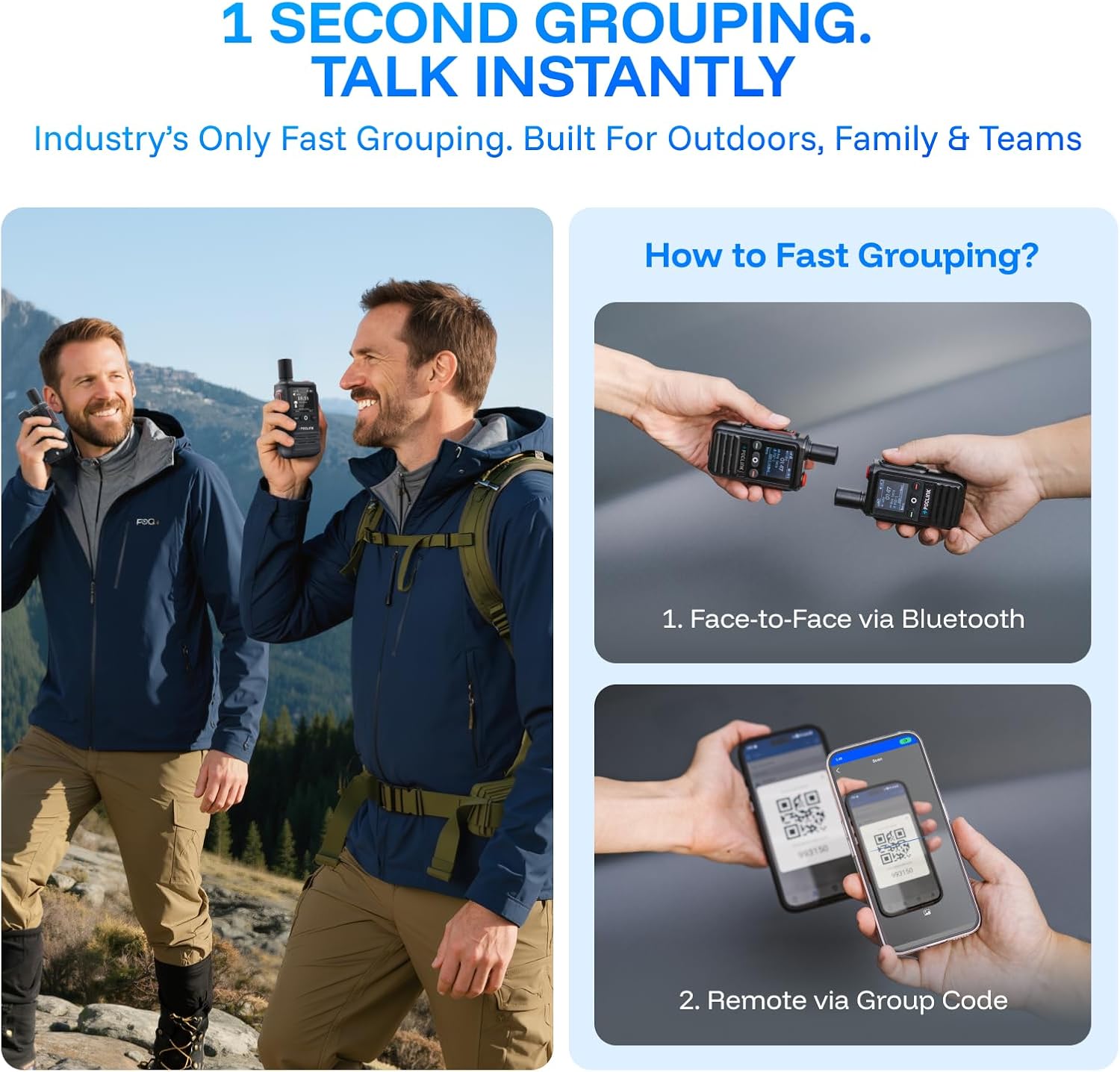
- Fast Grouping: Connect radios face-to-face via Bluetooth or remotely using a group code.

This image illustrates two methods for fast grouping: face-to-face via Bluetooth for proximity connections, and remotely via a group code for users who are further apart, enabling quick team connectivity.
Instruccions de funcionament
1. Funció Premeu per parlar (PTT)
To transmit your voice, press and hold the large PTT button located on the side of the radio. Release the button to listen. A slight delay (1-2 seconds) may occur due to cellular network transmission.
2. Control de volum
Adjust the volume using the dedicated up/down buttons on the radio. The device offers multiple preset volume levels.
3. Funció de llanterna
Your radio includes a built-in flashlight. Press the designated flashlight button (often an orange button) to activate or deactivate it.
4. Using with Headphones/Bluetooth
The POC-1 Lite supports both wired headphones via its audio ports and Bluetooth headsets for flexible communication.
- Wired Headsets: Plug your wired headset into the appropriate audio port on the top of the radio.
- Bluetooth Headsets: Pair your Bluetooth headset through the radio's Bluetooth menu. The device supports dedicated PTT Bluetooth headsets and standard Bluetooth earbuds.

This image shows the versatility of the Poclink radio, allowing users to connect either a wired headset for direct audio and microphone input or a wireless Bluetooth headset for hands-free operation.
Característiques clau
- Unlimited Global Coverage: Enjoy communication across nationwide and global distances (up to 25,000 miles) using 4G LTE networks. The device offers lifetime free service for standard global plans in many popular countries.
- User-Controlled Group Management: Create, join, and manage communication groups independently via the app or Bluetooth, without needing to contact customer support.
- Bluetooth & Flexible Calling Modes: Supports both dedicated PTT Bluetooth headsets and standard Bluetooth earbuds, allowing seamless switching between private and speaker calls.
- 100% Encrypted Communication: Features end-to-end encryption (E2EE) and multi-layer security for private conversations. HD voice and noise cancellation ensure crisp audio in various environments.
- Easy to Use & Long-Lasting: Simple operation with instant push-to-talk functionality. The rechargeable battery provides 8–10 days of use on a single charge.
- Rugged & Weather-Resistant: Built with an IP54 rating, making it resistant to dust and splashes, suitable for outdoor use.

This image visually represents the extensive reach of the Poclink POC-1 Lite, emphasizing its unlimited range and global coverage capabilities, along with the benefit of no hidden fees and lifetime free service.

This image contrasts a smartphone showing 'No Service' with the Poclink radio displaying a strong signal, illustrating the radio's enhanced signal reception and multi-carrier coverage, making it reliable even when mobile phones struggle.
Especificacions
| Característica | Detall |
|---|---|
| Pes de l'article | 4.6 unces |
| Dimensions del producte | 1.14 "P x 2.17" W x 3.43" H |
| Número de model | POC-1 |
| Bateries | Cal 1 bateria no estàndard |
| Color | Negre |
| Nombre de canals | 1 |
| Característiques especials | Global Coverage, Lightweight, Long Range, Noise Reduction, Rechargeable |
| Interval de freqüència | B1/2/3/4/5/7/8/12/13/17/66/38/40/41 |
| Interval de conversa màxim | 100,000 milles |
| Voltage | 5 Volts |
| Nivell de resistència a l'aigua | Resistent a l'aigua (IP54) |
Resolució de problemes
- No Signal/Poor Coverage: While Poclink radios have stronger signal reception than mobile phones and connect to multiple carriers, they will not work in areas with absolutely no base stations. Ensure you are within an area with some cellular coverage.
- Targeta SIM no detectada: Ensure the nano SIM card is correctly inserted and the battery cover is securely closed. Refer to the Setup Guide for proper installation.
- Retard/retard d'àudio: A 1-2 second delay is normal for cellular network-based communication. This is not a malfunction.
- Problemes de volum: Adjust the volume using the dedicated buttons. If the volume is too loud or too quiet, cycle through the preset strengths.
- Problemes de connexió de l'aplicació: Ensure Bluetooth is enabled on both your radio and smartphone. Restart both devices and the app if connection issues persist.
Manteniment
- Neteja: Feu servir un drap suau i sec per netejar l'exterior de la ràdio. Eviteu utilitzar productes químics agressius o materials abrasius.
- Emmagatzematge: Guardeu la ràdio en un lloc fresc i sec, allunyat de la llum solar directa i de temperatures extremes.
- Cura de la bateria: Per allargar la durada de la bateria, eviteu descarregar-la completament amb freqüència. Carregueu el dispositiu regularment, sobretot si l'emmagatzemareu durant un període prolongat.
- Resistència a l'aigua: The device is IP54 water-resistant, meaning it is protected against dust and splashing water. Do not submerge the device in water.
Garantia i Suport
Your Poclink POC-1 Lite radio comes with a 1 any de garantia. For any questions, technical assistance, or warranty claims, please contact Poclink customer support.
Poclink offers Atenció al client 24 hores al dia, 7 dies a la setmana to assist you with any issues or inquiries.
Vídeos oficials de productes
How to use Poclink
This video provides a comprehensive guide on how to use your Poclink radio, covering various functionalities and operational steps.
Unboxing and Quick Start
Watch this video for an unboxing experience and a quick start guide to get your Poclink radio up and running efficiently.
4G LTE Unlimited Range POC Two-Way Radios
This video highlights the key features and benefits of the 4G LTE unlimited range Push-to-Talk (POC) two-way radios.
Global Two-Way Radios
Un acabatview presentació de vídeoasing the global communication capabilities of the Poclink two-way radios.
Poclink Long Range Walkie Talkies
This video provides a brief demonstration of the long-range capabilities of the Poclink walkie-talkies.


