1. Introducció
The BLUETTI Hub A1 Parallel Box is designed to significantly expand the power capabilities of your BLUETTI Apex 300 units. By enabling parallel connection of 1 to 3 Apex 300 units, the Hub A1 facilitates a robust energy solution with a maximum output of 11.5kW. This system is ideal for demanding applications such as home backup, electric vehicle (EV) charging, and powering industrial tools. This manual provides essential information for the safe installation, efficient operation, and proper maintenance of your Hub A1 Parallel Box.
2. Instruccions de seguretat importants
Please read and understand all safety instructions before operating the BLUETTI Hub A1. Failure to follow these instructions may result in electric shock, fire, or serious injury.
- Llegeix totes les instruccions: Familiarize yourself with the entire manual before use.
- Connexió a terra adequada: Ensure the system is properly grounded according to local electrical codes.
- Eviteu condicions humides: Do not operate the Hub A1 in wet environments or expose it to rain or moisture.
- Mantenir allunyat dels nens: Store and operate the unit out of reach of children.
- Compatibilitat: Use the Hub A1 exclusively with compatible BLUETTI Apex 300 units.
- Desconnecteu l'alimentació: Always disconnect all power sources before performing any maintenance or servicing.
- Ventilació: Assegureu-vos que hi hagi una ventilació adequada al voltant de la unitat per evitar el sobreescalfament.
- Instal·lació professional: For complex installations involving grid integration or sub panels, consult a qualified electrician.
3. Contingut del paquet
Carefully unpack your BLUETTI Hub A1 Parallel Box and verify that all items listed below are included and undamaged. If any items are missing or damaged, please contact BLUETTI customer support.
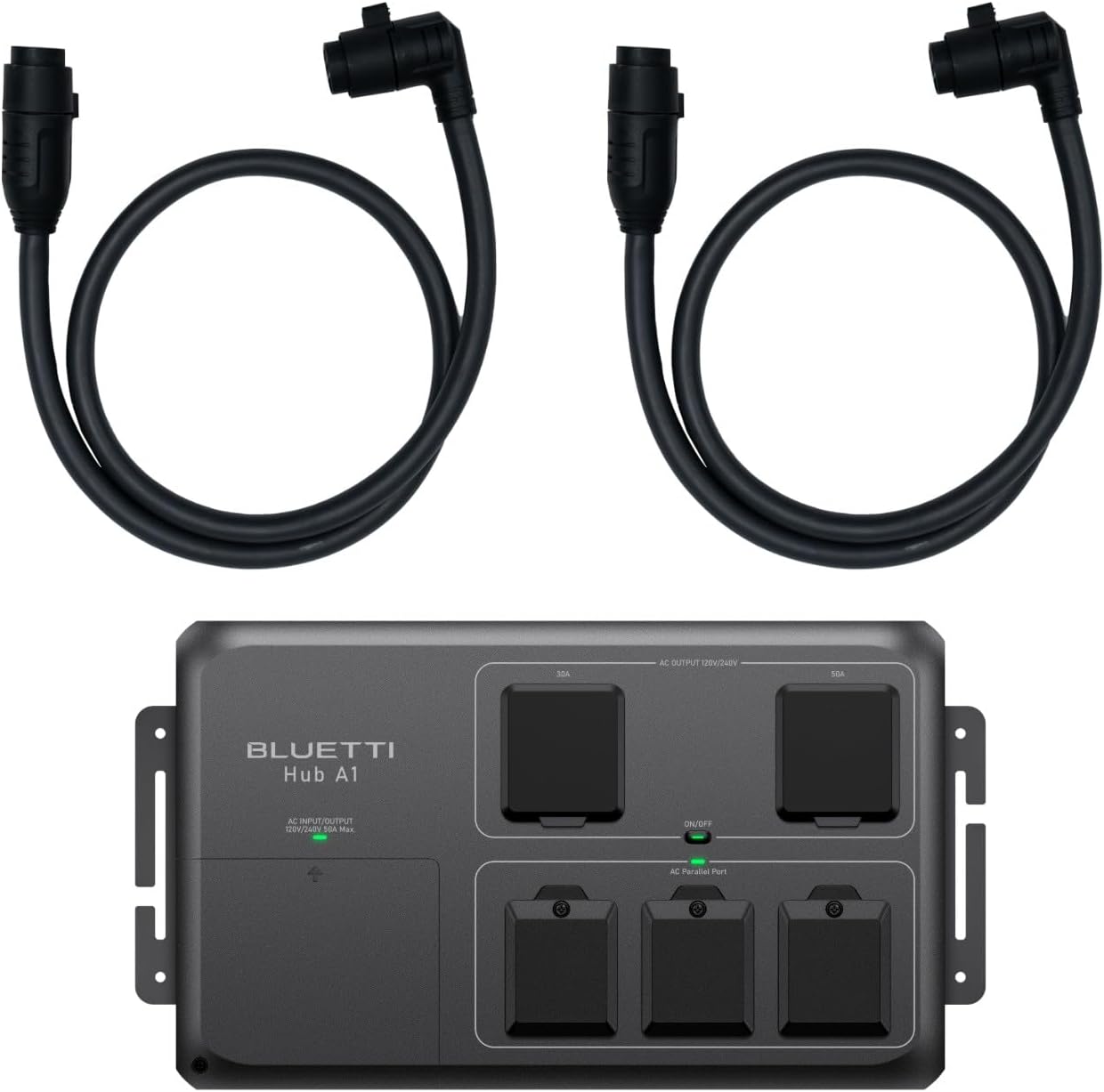
Image: The BLUETTI Hub A1 Parallel Box unit shown with two P050A parallel cables. The Hub A1 features multiple AC output ports and parallel connection ports.
- BLUETTI Hub A1 Parallel Box
- 2 x P050A Parallel Cables
4. Producte acabatview
The BLUETTI Hub A1 features a robust design with clearly labeled ports and indicators for ease of use.
Imatge: Detallada view of the BLUETTI Hub A1 unit, highlighting the various ports and controls.
- AC Input/Output (120V/240V 50A Max): Main power connection point.
- 30A AC Output Port: For connecting high-power 230V devices (up to 7.36kW).
- 50A AC Output Port: For connecting very high-power 230V devices (up to 11.5kW).
- Interruptor ON / OFF: Controls the power to the Hub A1 unit.
- AC Parallel Ports: Connectors for linking 1-3 BLUETTI Apex 300 units.
5. Característiques clau
The BLUETTI Hub A1 Parallel Box offers advanced features for enhanced power management:
- High-Power Parallel System: Connects 1-3 Apex 300 units to achieve a combined maximum output of 11.5kW via P050A ports, supporting heavy loads like EV chargers, home appliances, and industrial tools.
- Smart Grid Integration: Features seamless UPS backup mode with grid bypass functionality. Supports scheduled charging and discharging via a sub panel and is compatible with ATI distribution cabinets for comprehensive whole-house energy management.
- Dual High-Current AC Outputs: Equipped with a 32A (7.36kW) and a 16A (3.68kW) 230V outlet, allowing simultaneous operation of multiple high-power devices. Auto-reset circuit breakers provide protection against overload and short-circuits.
- Real-Time Monitoring & Safety: Synchronizes settings across all parallel-connected Apex 300 units via the BLUETTI app. Provides alerts for critical conditions such as voltage mismatch, phase loss, or over-temperature (up to 40°C).
- Construcció de grau industrial: Features a compact 3kg design (17.83 × 9.84 × 5.28 inches) with options for wall or rack mounting. Designed for operation in temperatures ranging from -20°C to 40°C and complies with 50Hz EU-standard for versatile use in homes, RVs, and worksites.
6. Guia de configuració
6.1. Desembalatge i inspecció
- Carefully remove the Hub A1 and its accessories from the packaging.
- Inspect all components for any signs of damage during shipping. If damage is found, do not proceed with installation and contact BLUETTI support.
- Verify that all items listed in the 'Package Contents' section are present.
6.2. Mounting the Hub A1
The Hub A1 supports both wall and rack mounting options. Choose a location that is:
- Ben ventilat per evitar el sobreescalfament.
- Protected from direct sunlight, moisture, and extreme temperatures.
- Accessible for connections and maintenance.
Secure the unit using appropriate mounting hardware (not included) suitable for your chosen surface.
6.3. Connecting to BLUETTI Apex 300 Units
To enable parallel operation, connect the Hub A1 to your Apex 300 units:
- Ensure all Apex 300 units are powered off before making connections.
- Use the provided P050A Parallel Cables to connect the AC Parallel Ports on the Hub A1 to the corresponding parallel ports on your 1-3 BLUETTI Apex 300 units.
- Ensure all cable connections are secure and fully seated.
6.4. Connecting AC Loads
Once the Apex 300 units are connected to the Hub A1, you can connect your electrical loads:
- Connect your appliances, EV chargers, or industrial tools to the 30A or 50A AC output ports on the Hub A1.
- Ensure that the total power draw of your connected devices does not exceed the maximum output capacity of the Hub A1 (11.5kW).
- For grid-tied applications or sub panel integration, consult a qualified electrician to ensure compliance with local electrical codes.
7. Funcionament
7.1. Encès / apagat
- To power on the Hub A1, press the ON/OFF switch located on the unit.
- Per apagar-lo, premeu de nou l'interruptor ON/OFF.
7.2. Monitoring with BLUETTI App
The BLUETTI Hub A1 can be monitored and controlled via the BLUETTI mobile application:
- Download the official BLUETTI app from your device's app store.
- Follow the in-app instructions to connect your Hub A1 and Apex 300 units.
- The app provides real-time system status, allows adjustment of settings, and delivers alerts for critical conditions.
7.3. UPS Backup Mode
The Hub A1 system supports a seamless Uninterruptible Power Supply (UPS) backup mode. In the event of a grid power outage, the system automatically switches to battery power from the connected Apex 300 units, ensuring continuous power supply to your critical loads.
7.4. Scheduled Charging/Discharging
Utilize the BLUETTI app or integrated sub panel controls to set up scheduled charging and discharging cycles. This feature allows for optimized energy management, such as charging during off-peak hours and discharging during peak hours to save on electricity costs.
8. Manteniment
Regular maintenance ensures the longevity and optimal performance of your BLUETTI Hub A1.
- Neteja: Keep the unit clean and free from dust and debris. Use a dry, soft cloth for cleaning. Do not use liquid cleaners.
- Ventilació: Periodically check that all ventilation openings are clear and unobstructed to ensure proper airflow.
- Connexions de cable: Regularly inspect all cable connections for security and signs of wear or damage. Tighten any loose connections.
- Emmagatzematge: When not in use for extended periods, store the Hub A1 in a dry, temperate environment, away from direct sunlight and extreme temperatures.
9. Solució De Problemes
If you encounter issues with your BLUETTI Hub A1, refer to the table below for common problems and their solutions. For persistent issues, contact BLUETTI customer support.
| Problema | Causa possible | Solució |
|---|---|---|
| Hub A1 not powering on. | Loose cable connections, Apex 300 units off, Hub A1 ON/OFF switch off. | Check all parallel and power cable connections. Ensure connected Apex 300 units are powered on. Verify the Hub A1 ON/OFF switch is in the 'ON' position. |
| No AC output from ports. | Circuit breaker tripped, Apex 300 units not supplying power, incorrect connection. | Check the auto-reset circuit breakers on the Hub A1. Ensure Apex 300 units are operational and correctly connected to the Hub A1. Reduce load if overloaded. |
| BLUETTI app alerts for voltage mismatch, phase loss, or over-temperature. | System imbalance, environmental factors, internal fault. | Consult the BLUETTI app for specific error codes and recommended actions. Ensure proper ventilation to prevent overheating. If alerts persist, contact BLUETTI support. |
| Missing neutral wire cleat (installation issue). | Defecte de fabricació. | Immediately contact BLUETTI customer support for assistance and replacement parts. Do not attempt to operate the unit. |
10. Especificacions tècniques
Below are the key technical specifications for the BLUETTI Hub A1 Parallel Box:
| Característica | Especificació |
|---|---|
| Nom del model | Hub A1 |
| Marca | BLUETTI |
| Potència de sortida màxima | 11.5 kW |
| Vol. De sortida de CAtage / Actual | 230V 50A (includes 32A and 16A ports) |
| Entrada/sortida de CA | 120V/240V 50A Màx |
| Connexió paral·lela | 1-3 BLUETTI Apex 300 units via P050A ports |
| Dimensions (L×W×H) | 17.83 × 9.84 × 5.28 polzades |
| Pes | 3 kg |
| Temperatura de funcionament | -20 °C a 40 °C |
| Característiques de visualització | Wireless (via BLUETTI App) |
| Fabricant | BLUETTI |
| Data de primera disponibilitat | 22 de juliol de 2025 |
11. Garantia i Suport
BLUETTI products are designed for reliability and performance. Your BLUETTI Hub A1 Parallel Box is covered by a manufacturer's warranty. For detailed warranty information, technical assistance, or to report any issues, please visit the official BLUETTI website or contact their dedicated customer service team.
També podeu trobar més informació i recursos de suport a BLUETTI Store on Amazon.


