Introducció
This manual provides detailed instructions for the setup, operation, and maintenance of your DAYBETTER Smart Plug (Model FCZ004). This smart plug allows you to control your electronic devices remotely, set schedules, and use voice commands through compatible smart home assistants. Please read this manual thoroughly before use to ensure proper functionality and safety.
Característiques del producte
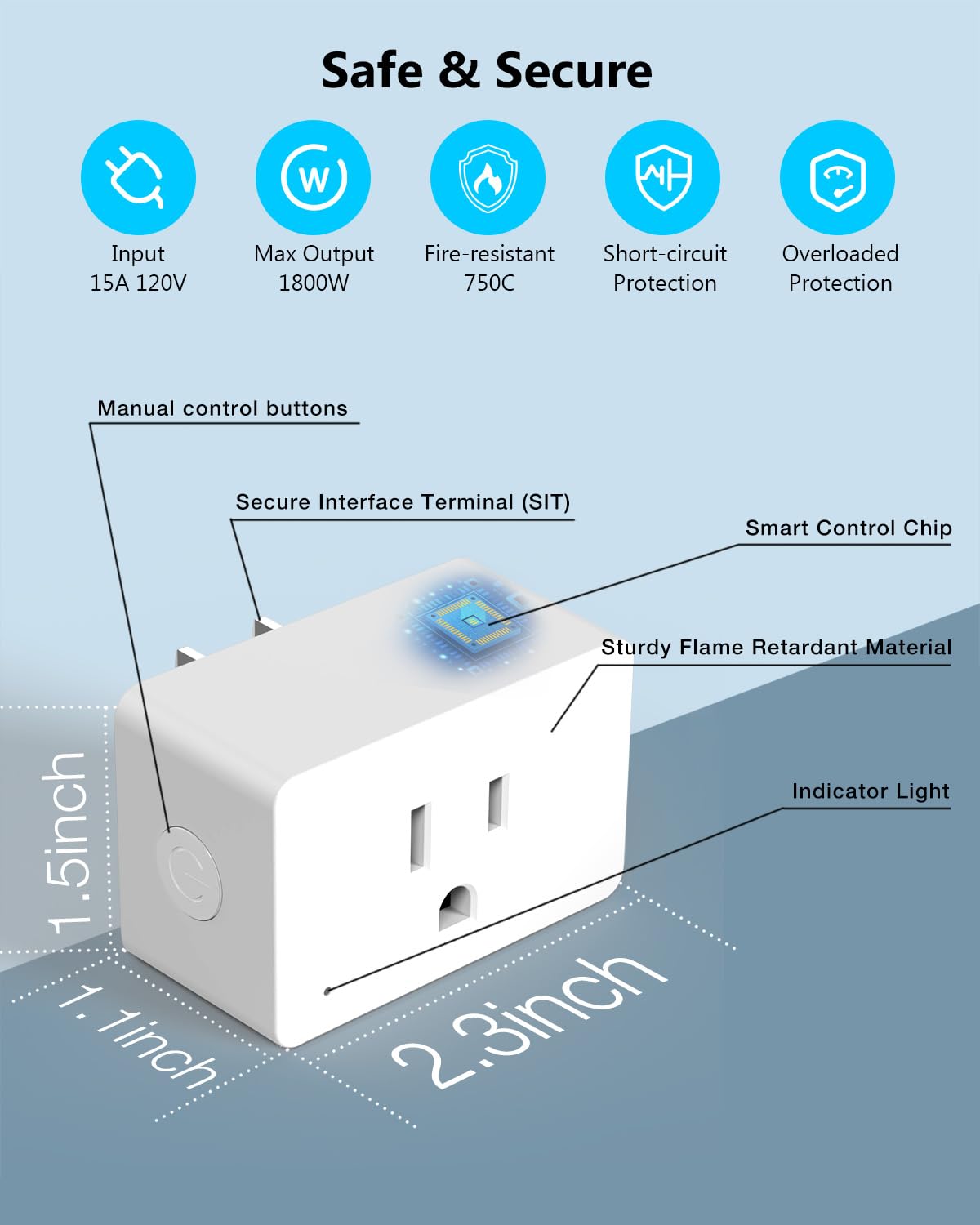
- Control de veu: Compatible amb Amazon Alexa i Google Assistant per a un funcionament amb mans lliures.
- Comandament a distància: Manage connected devices from anywhere using the DAYBETTER mobile application.
- Funcions de programació i temporitzador: Program devices to turn on/off automatically with custom schedules, countdowns, and recurring tasks.
- Fàcil instal·lació: Quick setup process with 2.4GHz WiFi and Bluetooth connectivity.
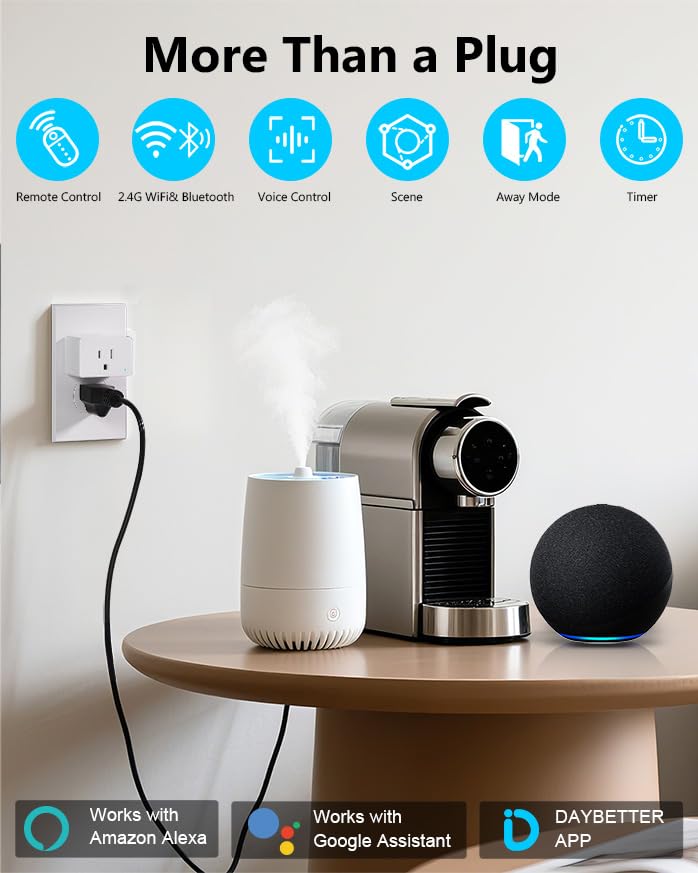
- Disseny compacte: Small form factor (approximately 2.32 x 1.97 x 1.5 inches) designed to avoid blocking adjacent outlets.
- Certificacions de seguretat: ETL and FCC certified for reliable and safe operation.
- Potència nominal: Supports up to 15A / 1800W.
Contingut del paquet
- DAYBETTER Smart Plug (4 units)
- Manual d'usuari

Configuració i instal·lació
1. Requisits de la xarxa
- The DAYBETTER Smart Plug requires a 2.4GHz Wi-Fi network for connectivity. It does not support 5GHz Wi-Fi networks.
- Ensure your Wi-Fi router is broadcasting a 2.4GHz signal.
2. Instal·lació física
- Plug the DAYBETTER Smart Plug into a standard 120V wall outlet.
- Ensure the indicator light on the smart plug begins blinking. If it does not blink, press and hold the manual control button on the side of the plug for 5 seconds until it starts blinking.
- Connect your appliance to the smart plug.
Instal·lació i emparellament d'aplicacions
- Download the DAYBETTER App: Cerca "DAYBETTER" in the Apple App Store (for iOS devices) or Google Play Store (for Android devices). Ensure you download the official DAYBETTER App.
- Enable Wi-Fi and Bluetooth: On your smartphone, ensure both Wi-Fi and Bluetooth are enabled.
- Obriu l'aplicació i afegiu un dispositiu: Open the DAYBETTER App. The app should automatically detect the smart plug if its indicator light is blinking. Follow the on-screen prompts to add the device.
- Connecta't a Wi-Fi: Seleccioneu la vostra xarxa Wi-Fi de 2.4 GHz i introduïu la contrasenya quan se us demani.
- Pairing Completion: The smart plug will successfully pair in less than 2 minutes. Once paired, the indicator light will stop blinking and remain solid.

Instruccions de funcionament
1. Control manual
Press the manual control button on the side of the smart plug to manually turn the connected appliance on or off.
2. APP Remote Control
Once paired, open the DAYBETTER App on your smartphone. You can remotely turn your connected appliances on or off from anywhere with an internet connection.
3. Control per veu (Alexa i Google Home)
Integrate your DAYBETTER Smart Plug with Amazon Alexa or Google Assistant for voice-activated control.
- Ensure your Alexa or Google Home device is set up and connected to the same 2.4GHz Wi-Fi network as your smart plug.
- Obre l'aplicació Alexa o Google Home.
- Cerca and enable the "DAYBETTER" skill/service.
- Follow the app instructions to discover new devices. Your smart plug should appear.
- Assign a name to your smart plug (e.g., "Living Room Lamp," "Fan").
- Utilitzeu ordres de veu com ara:
- "Alexa, activa el [nom del dispositiu]."
- "Ei Google, desactiva el [nom del dispositiu]."
4. Scheduling and Timer Functions
The DAYBETTER App allows you to create various automated tasks for your smart plug.
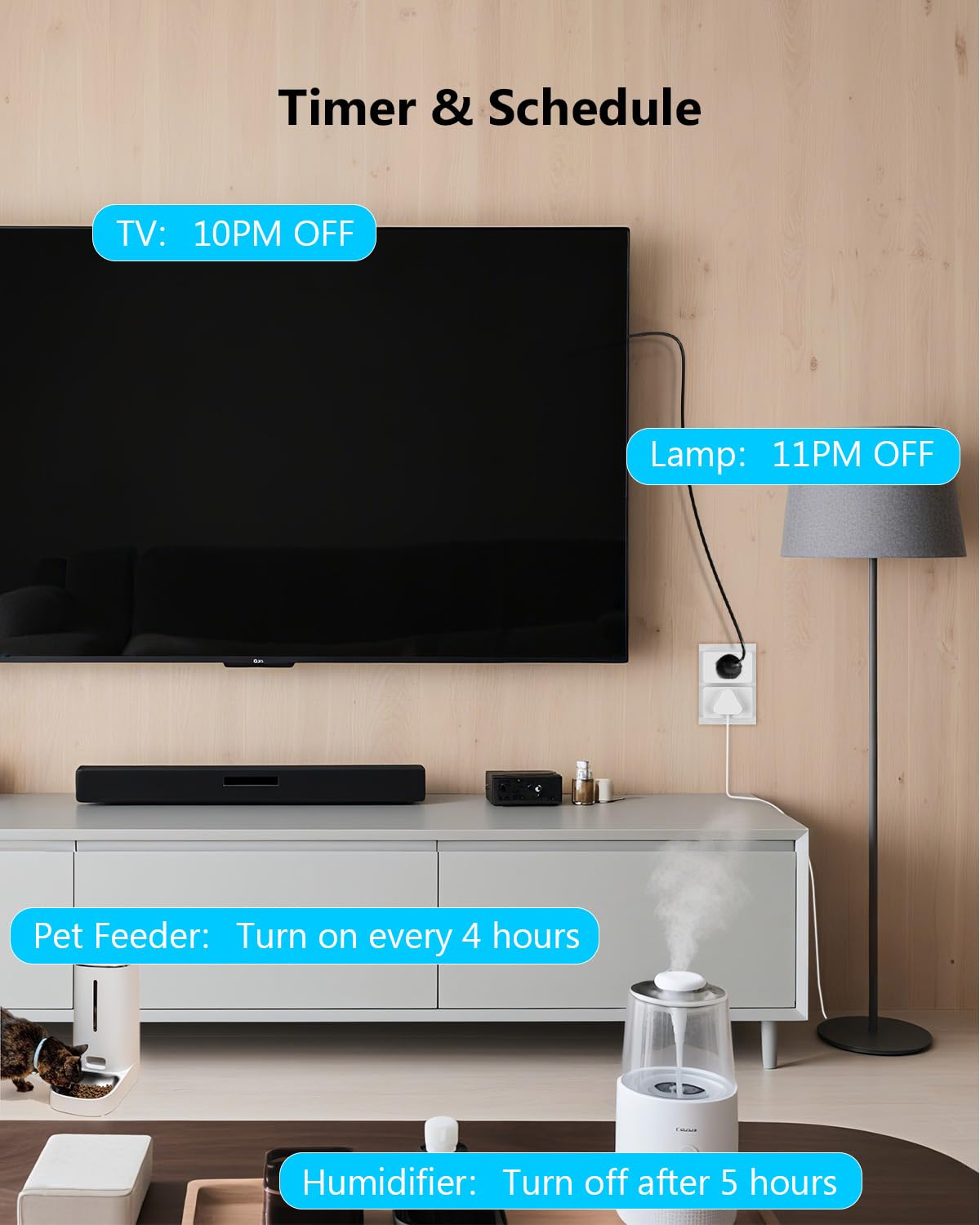
- Tasques programades: Set specific times for your devices to turn on or off daily or on selected days of the week. For example, turn on lights at 8 AM.
- Countdown Tasks: Set a timer for a device to turn off after a specified duration. For example, turn off a humidifier after 5 hours.
- Recurring Tasks (Cyclic Timer): Program devices to cycle on and off at regular intervals. For example, a pet water feeder dispensing water for 10 minutes every 5 hours.


Informació de seguretat
The DAYBETTER Smart Plug is designed with multiple safety features. Please adhere to the following guidelines:
- Entrada Voltage: 15A, 120V. Do not exceed these ratings.
- Sortida màxima: 1800W. Ensure connected appliances do not exceed this wattage.
- Resistent al foc: Constructed with fire-resistant materials (up to 750°C).
- Característiques de protecció: Includes short-circuit protection and overloaded protection to prevent damage to the plug and connected devices.
- No desmunteu ni modifiqueu l'endoll intel·ligent.
- Avoid using in wet environments or near water.
- Mantenir fora de l'abast dels nens.
Especificacions
| Característica | Especificació |
|---|---|
| Dimensions del producte | Aprox. 2.32 x 1.97 x 1.5 polzades |
| Pes de l'article | 9.59 unces (per a un paquet de 4) |
| Número de model | FCZ004 |
| Fabricant | MILLOR DIA |
| Mode d'operació | ON-OFF |
| Valoració actual | 15 Amps |
| Vol. Operatiutage | 120 Volts |
| Sortida màxima | 1800 watts |
| Tipus de contacte | Normalment tancat |
| Tipus de connector | Connectar-se |
| Terminal | Forat a través |
| Tipus de circuit | 2 vies |
| Material de contacte | Metall |
| Connectivitat sense fil | Wi-Fi de 2.4 GHz, Bluetooth |
| Compatibilitat | Amazon Alexa, Google Home |
Resolució de problemes
- Smart Plug not connecting to Wi-Fi:
- Ensure your Wi-Fi network is 2.4GHz. The smart plug does not support 5GHz Wi-Fi.
- Verifiqueu que la contrasenya del Wi-Fi sigui correcta.
- Make sure the smart plug's indicator light is blinking during pairing. If not, press and hold the manual button for 5 seconds to reset.
- Move the smart plug closer to your Wi-Fi router to improve signal strength.
- Reinicieu el vostre encaminador Wi-Fi i torneu a intentar l'emparellament.
- Voice control not working with Alexa/Google Home:
- Confirm the smart plug is successfully paired with the DAYBETTER App and is online.
- Ensure the "DAYBETTER" skill/service is enabled in your Alexa or Google Home app.
- Check that your voice assistant device (e.g., Echo Dot, Google Home speaker) is connected to the same 2.4GHz Wi-Fi network.
- Try rediscovering devices in the Alexa or Google Home app.
- Verify the name you are using for the smart plug in your voice command matches the name set in the Alexa/Google Home app.
- Smart Plug frequently loses connection:
- This can occur if the Wi-Fi signal is weak. Try relocating the smart plug closer to your router or consider a Wi-Fi extender.
- Ensure there are no physical obstructions or interference sources (e.g., thick walls, other wireless devices) between the plug and the router.
- Check for any firmware updates for the smart plug within the DAYBETTER App.
- Incompatibility with other smart home platforms:
- The DAYBETTER Smart Plug is not compatible with Tuya, Smartlife, Magic Home, or Home Assistant. Please use the official DAYBETTER App for control.
Manteniment
- Keep the smart plug clean and dry. Wipe with a soft, dry cloth if necessary.
- No utilitzeu productes químics ni productes de neteja abrasius.
- Ensure the plug is unplugged from the wall outlet before cleaning.
- Regularly check for firmware updates in the DAYBETTER App to ensure optimal performance and security.
Garantia i Suport
For warranty information or technical support, please refer to the official DAYBETTER website or contact their customer service directly. Contact details are typically found on the product packaging or the official brand weblloc.
Fabricant: MILLOR DIA


