1. Introducció
Thank you for choosing the Oakcastle IR200 Internet Radio. This manual provides essential information for the safe and efficient operation of your device. Please read it thoroughly before use and retain it for future reference.
The Oakcastle IR200 is a versatile audio system offering multiple listening options, including Internet Radio, DAB+, FM, Bluetooth 5.3, and AUX input. It features a color display, remote control, and podcast support for a comprehensive audio experience.
2. Contingut del paquet
Carefully unpack the box and ensure all items listed below are present and in good condition:
- Oakcastle IR200 Internet Radio Unit
- Cable d'alimentació
- Control remot
- Manual d'usuari (aquest document)
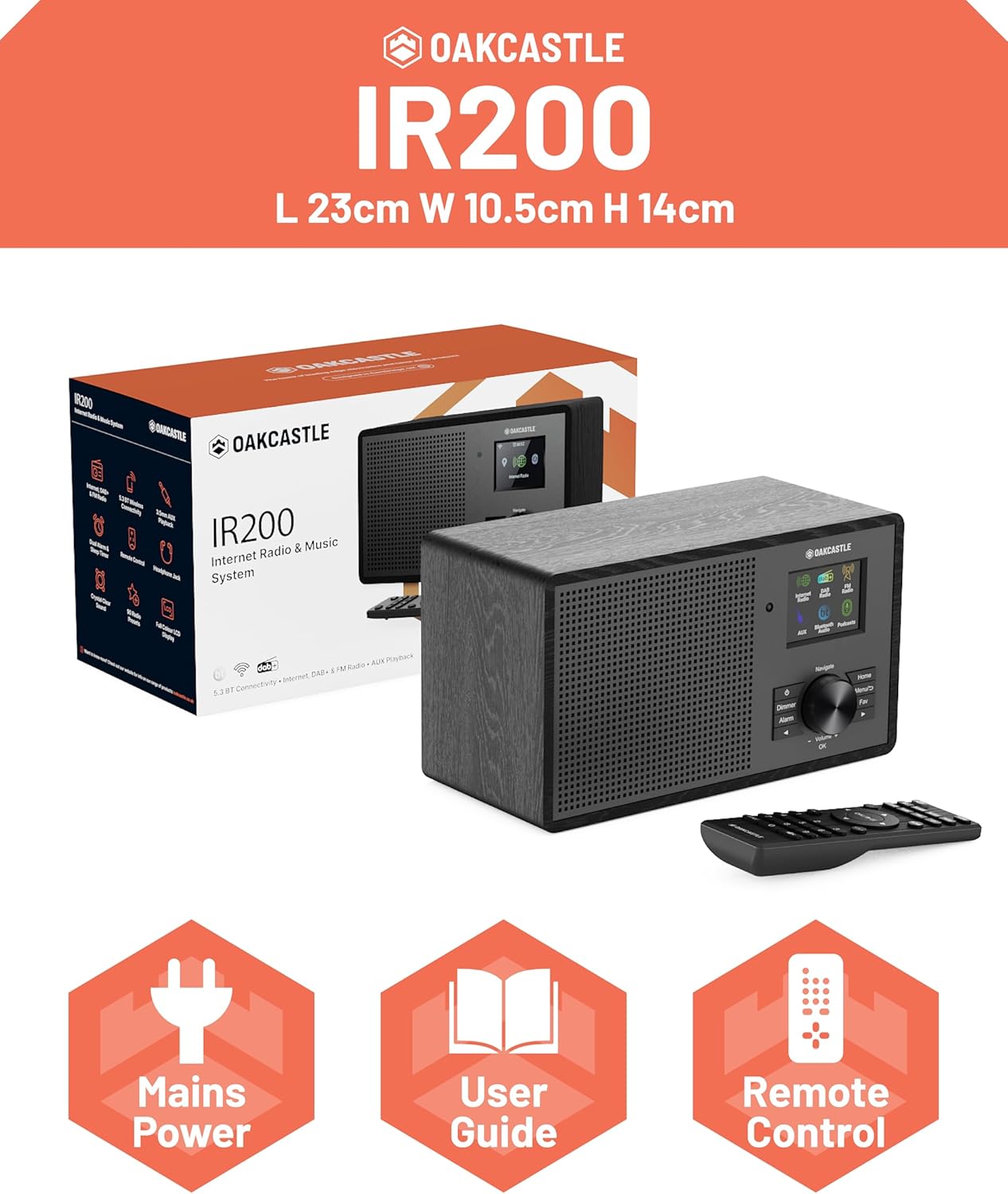
Image 2.1: Contents of the Oakcastle IR200 package, including the radio unit, its box, power cable, remote control, and user manual.
3. Producte acabatview
Familiarize yourself with the main components and controls of your Oakcastle IR200 radio.
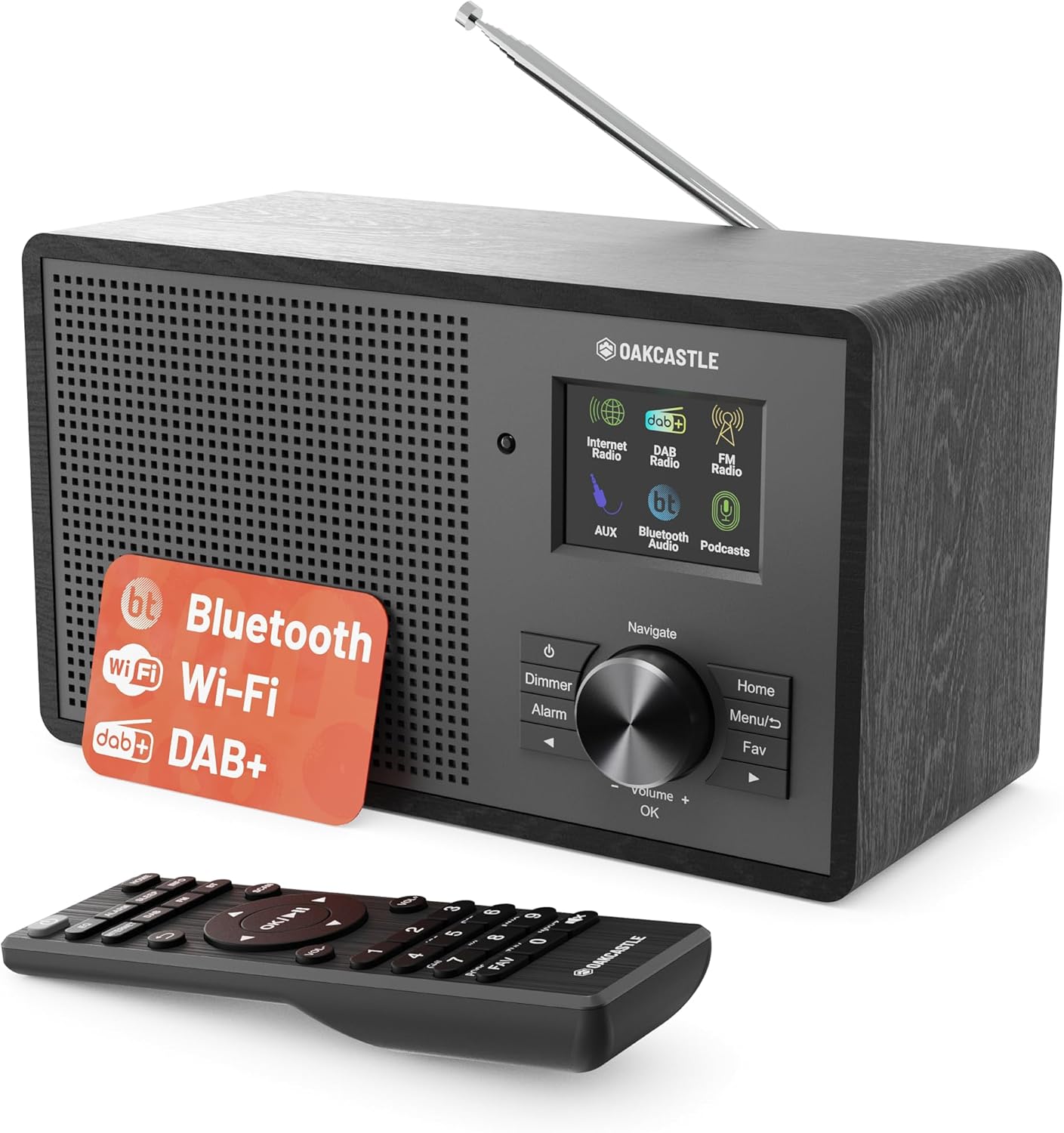
Imatge 3.1: Frontal view of the Oakcastle IR200 radio, showcasing the display, control knob, buttons, and the included remote control.
3.1 Controls del panell frontal
- Pantalla de visualització: Mostra informació de l'estació, l'hora i les opcions del menú.
- Navigate/Volume/OK Knob: Rotate to navigate menus or adjust volume; press to confirm selections.
- Botó d'encesa: Turns the unit on/off or puts it into standby.
- Botó de regulació: Ajusta la brillantor de la pantalla.
- Botó d'alarma: Accedeix a la configuració de l'alarma.
- Botó d'inici: Torna al menú principal.
- Botó de menú: Accesses mode-specific menus.
- Botó de preferits: Accesses favorite station presets.
3.2 Connexions del panell posterior

Imatge 3.2: posterior view of the Oakcastle IR200, highlighting the headphone output and AUX input ports.
- Antena telescòpica: For DAB+ and FM reception.
- Entrada AUX: Connecteu dispositius d'àudio externs.
- Sortida d'auriculars: Connecteu els auriculars per a una escolta privada.
- DC IN: Connexió de l'adaptador d'alimentació.
4. Configuració inicial
4.1 Connexió d'alimentació
- Insert the power cable into the DC IN port on the rear of the radio.
- Plug the other end of the power cable into a wall socket.
- Press the Power button on the front panel or remote control to turn on the radio.
4.2 Ajust de l'antena
For optimal DAB+ and FM reception, fully extend the telescopic antenna located at the rear of the unit.
4.3 Network Connection (for Internet Radio)
- Upon first power-on, the radio will guide you through the network setup.
- Select "Network Wizard" or "Wi-Fi Setup" from the menu.
- La ràdio buscarà les xarxes Wi-Fi disponibles. Seleccioneu la vostra xarxa de la llista.
- Enter your Wi-Fi password using the navigation knob and OK button.
- Un cop connectada, la ràdio mostrarà un missatge de confirmació.
5. Modes de funcionament
The Oakcastle IR200 offers several listening modes. Press the "Home" button to access the main menu and select your desired mode.
5.1 Ràdio per Internet
Access thousands of global radio stations via your Wi-Fi connection.

Image 5.1: The radio's display screen in Internet Radio mode, showing station information.
- Al menú principal, seleccioneu "Ràdio per Internet".
- You can browse stations by location, genre, or search by name.
- Rotate the Navigate knob to scroll through options and press OK to select.
- To save a station as a favorite, press the "Fav" button during playback.
Ràdio DAB+ 5.2
Gaudeix d'emissions de ràdio digital d'alta qualitat.

Image 5.2: The radio's display screen in DAB+ Radio mode, showing the current station.
- From the main menu, select "DAB+ Radio".
- La ràdio cercarà automàticament les emissores DAB+ disponibles.
- Use the Navigate knob to select a station from the list.
- To save a station as a favorite, press the "Fav" button during playback.
5.3 Ràdio FM
Tune into traditional analog FM broadcasts.
- Al menú principal, seleccioneu "Ràdio FM".
- To auto-scan for stations, press and hold the OK button or use the scan function via the menu.
- To manually tune, rotate the Navigate knob.
- To save a station as a favorite, press the "Fav" button during playback.
5.4 Connectivitat Bluetooth
Reprodueix àudio en streaming sense fil des dels teus dispositius amb Bluetooth.

Image 5.3: The radio's display screen in Bluetooth mode, indicating readiness for pairing.
- From the main menu, select "Bluetooth". The radio will enter pairing mode.
- On your external device (e.g., smartphone), enable Bluetooth and search for "Oakcastle IR200".
- Select "Oakcastle IR200" to pair. Once connected, you can stream audio.
5.5 Entrada AUX
Connecteu fonts d'àudio externes amb un cable d'àudio de 3.5 mm.
- Connect one end of a 3.5mm audio cable to the AUX IN port on the rear of the radio.
- Connecteu l'altre extrem a la presa d'auriculars o a la sortida d'àudio del dispositiu extern.
- From the main menu, select "AUX".
- Controla la reproducció des del teu dispositiu extern.
5.6 Podcasts
Browse and listen to a wide range of podcasts.
- From the main menu, select "Podcasts".
- Browse podcasts by category or search for specific titles.
- Select a podcast to start listening.
6. Configuració i característiques
6.1 Configuració del sistema
Access general system settings via the main menu to configure time, language, display, and more.
- Hora/Data: Set time format, synchronize time.
- Idioma: Select your preferred language for the menu.
- Visualització: Adjust backlight, color scheme.
- Xarxa: Reconfigure Wi-Fi settings.
- Actualització de programari: Check for and install firmware updates.
6.2 Equalitzador (EQ)
Customize the audio output to your preference using the equalizer settings, accessible via the remote control or system menu.
6.3 presets
The radio supports over 90 presets for your favorite Internet, DAB+, and FM stations. To recall a preset, press the "Fav" button and select from the list.
6.4 Alarmes
Set alarms to wake up to your favorite radio station or a buzzer sound. Access alarm settings via the "Alarm" button on the front panel or remote.
7. Control remot
The included remote control provides convenient access to all radio functions from a distance.
Ensure batteries are correctly inserted. Point the remote control towards the front of the radio for optimal response.
7.1 Funcions de control remot
- Potència: On/Off/Standby.
- Volum +/-: Ajusteu el nivell de volum.
- Botons de navegació (amunt/avall/esquerra/dreta): Navega pels menús.
- D'ACORD: Confirmeu la selecció.
- Mode Buttons (Internet, DAB, FM, Bluetooth, AUX): Canvia entre els modes.
- Botons predefinits (1-90+): Directly select saved favorite stations.
- EQ: Accediu a la configuració de l'equalitzador.
- Menú: Access mode-specific menus.
- Fav: Access favorite station list.
8. Manteniment
8.1 Neteja
To clean the radio, use a soft, dry cloth. Do not use abrasive cleaners, waxes, or solvents as these may damage the finish.
8.2 Atenció general
- Mantingueu la unitat allunyada de la llum solar directa, de fonts de calor i de la humitat.
- Eviteu deixar caure la unitat o sotmetre-la a impactes forts.
- Assegureu-vos una ventilació adequada al voltant de la unitat.
9. Solució De Problemes
| Problema | Causa possible | Solució |
|---|---|---|
| Sense poder | Cable d'alimentació no connectat; presa de paret no activa. | Check power cable connection; try a different wall socket. |
| Sense so | Volum massa baix; Silenciament activat; Font incorrecta seleccionada. | Increase volume; Check mute status; Select correct input mode. |
| La ràdio per Internet no es connecta | Incorrect Wi-Fi password; Weak Wi-Fi signal; Router issue. | Re-enter Wi-Fi password; Move radio closer to router; Restart router. |
| Mala recepció DAB+/FM | Antenna not extended; Poor signal area. | Fully extend antenna; Reposition radio for better signal. |
| Bluetooth no emparellat | Radio not in pairing mode; Device too far; Device already paired. | Ensure radio is in Bluetooth mode; Move device closer; Unpair from other devices. |
10. Especificacions
| Característica | Detall |
|---|---|
| Marca | Oakcastle |
| Model | IR200 |
| Color | Negre |
| Tecnologia de connectivitat | Wi-Fi, Bluetooth 5.3, AUX |
| Tecnologia d'afinació | Internet Radio, DAB+, FM |
| Característiques especials | Bluetooth, EQ, Podcasts, Internet Radio, Remote Control |
| Font d'alimentació | Electric Cable (Mains) |
| Dimensions del producte (A x A x P) | 14 cm x 10.5 cm x 23 cm (aprox.) |
| Pes del producte | 0.94 kg |
| Dispositius compatibles | MP3 Player, Smartphone, Tablet |
11. Garantia i Suport
11.1 Informació de la garantia
The Oakcastle IR200 comes with a standard warranty. An extended 3-year warranty is available upon product registration on the manufacturer's website. Please refer to the warranty card included in your package or visit the official Oakcastle weblloc per obtenir més informació.
11.2 Atenció al client
For technical assistance, troubleshooting, or further inquiries, please contact Oakcastle customer support. Contact details can typically be found on the official Oakcastle weblloc web o a la targeta de garantia.


