1. Producte acabatview
The Bewinner 4G 5G Portable WiFi Hotspot is a modern, high-speed mobile router designed for convenient internet access on the go. It operates by simply inserting a 4G or 5G SIM card (not included), eliminating the need for a broadband connection. This device provides fast internet speeds, supporting LTE Cat4 for up to 300 Mbps, making it ideal for travel, business trips, camping i ús de vehicles recreatius.
Equipped with a built-in 3650mAh battery, it offers over 10 hours of continuous use. It can also be powered externally via a USB-C port, allowing for charging through a computer, power bank, or car charger. The hotspot supports network bands B1, B3, B5, B40 and can connect up to 10 devices simultaneously, including smartphones, tablets, and laptops. Its plug-and-play design ensures ease of use.

Imatge 1.1: Frontal view of the Bewinner 4G 5G Portable WiFi Hotspot, showing the display and power button.
2. Contingut del paquet
Please check the package contents upon unboxing to ensure all items are present.
- 1 x Bewinner 4G 5G Portable WiFi Hotspot
- 1 x cable de càrrega USB-C
- 1 x Manual d'usuari (aquest document)
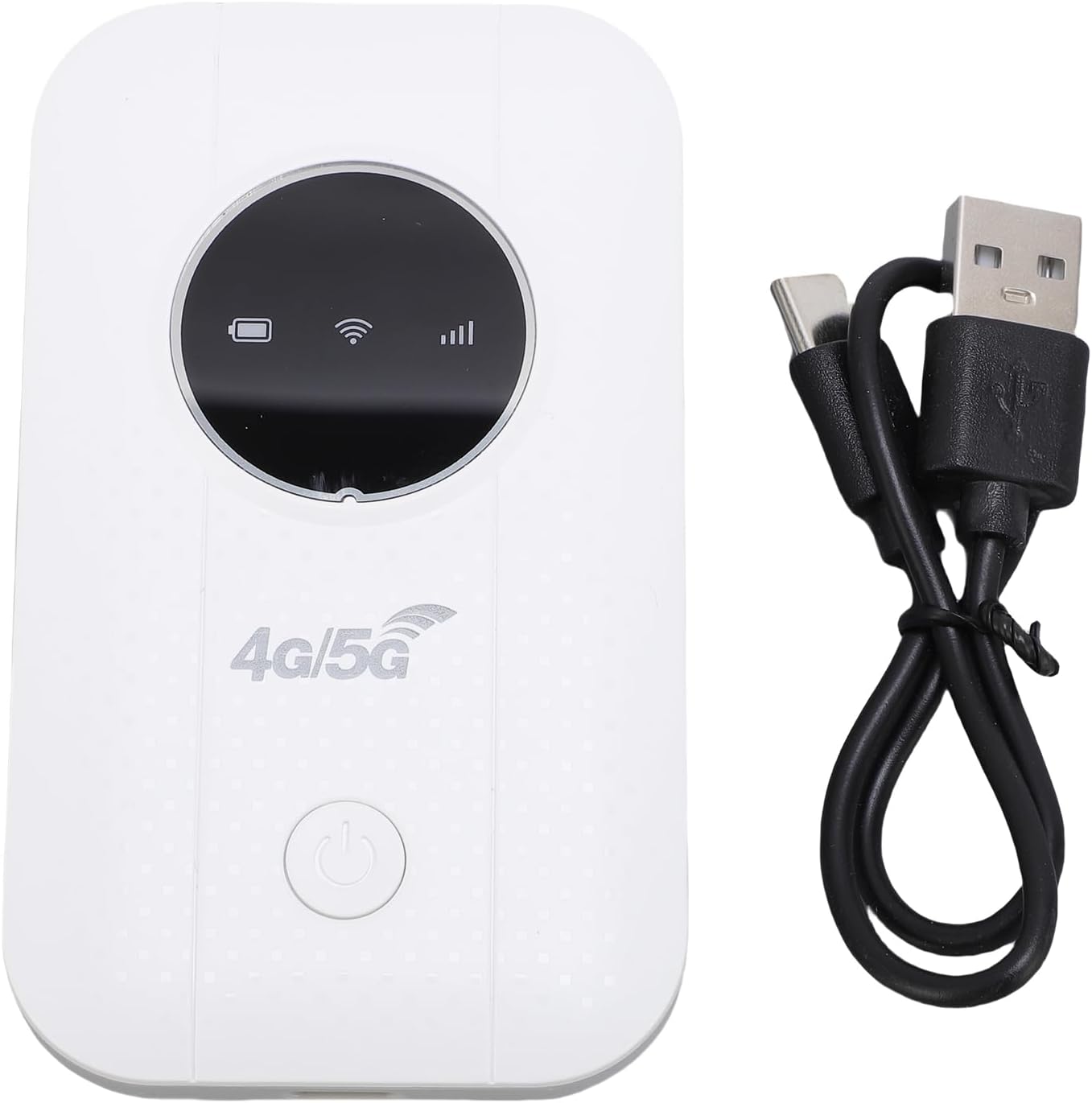
Image 2.1: The portable WiFi hotspot alongside its USB-C charging cable.
3. Instruccions de configuració
3.1. Inserció de la targeta SIM
- Assegureu-vos que el dispositiu estigui apagat.
- Locate the SIM card slot on the side or back of the device.
- Gently open the SIM card slot cover.
- Insert a standard 4G or 5G SIM card (not included) into the slot with the gold contacts facing down and the notched corner aligned correctly.
- Tanqueu bé la tapa de la ranura de la targeta SIM.
3.2. Càrrega del dispositiu
- Connect the provided USB-C charging cable to the device's USB-C port.
- Connect the other end of the cable to a USB power source (e.g., computer USB port, power bank, or USB wall adapter).
- The battery indicator on the device's display will show charging status. A full charge typically takes several hours.

Image 3.1: Illustration of the device's battery life, indicating a 3650mAh capacity for over 10 hours of continuous use.
4. Instruccions de funcionament
4.1. Encès / apagat
- To power on: Press and hold the power button (usually located on the front or side) for a few seconds until the display lights up.
- Per apagar: premeu i manteniu premut el botó d'engegada de nou fins que el dispositiu s'apagui.
4.2. Connexió de dispositius al punt d'accés
- Once the hotspot is powered on and has detected the SIM card, it will broadcast a Wi-Fi network.
- On your smartphone, tablet, or laptop, go to your Wi-Fi settings.
- Cerca available Wi-Fi networks. The hotspot's network name (SSID) and password (WPA2-PSK, WPA3) are typically displayed on the device's screen or on a sticker inside the battery compartment.
- Select the hotspot's SSID and enter the password when prompted.
- Your device should now be connected to the internet via the portable hotspot. The hotspot supports up to 10 connected devices simultaneously.
4.3. Checking Network Status
The device's display provides real-time information on network signal strength, battery level, and the number of connected devices.
5. Manteniment
- Neteja: Feu servir un drap suau i sec per netejar el dispositiu. Eviteu netejadors líquids o materials abrasius.
- Emmagatzematge: Guardeu el dispositiu en un lloc fresc i sec, allunyat de la llum solar directa i de temperatures extremes.
- Cura de la bateria: Per allargar la durada de la bateria, eviteu descarregar-la completament amb freqüència. Si la guardeu durant períodes prolongats, carregueu-la fins a un 50% aproximadament i torneu-la a carregar cada pocs mesos.
- Dissipació de calor: If the device is used for long periods, especially when charging or with multiple connected devices, ensure it has adequate ventilation to prevent overheating.
6. Solució De Problemes
| Problema | Causa possible | Solució |
|---|---|---|
| Sense connexió a Internet |
|
|
| El dispositiu no s'encén |
|
|
| Velocitat d'internet lenta |
|
|
7. Especificacions
| Característica | Detall |
|---|---|
| Número de model | Bewinner16r4afipkd |
| Freqüència de xarxa | LTE: B1 / B3 / B5 / B40, WCDMA: B1 / B3 |
| Estàndard sense fils | 802.11b, 802.11g, 802.11n |
| Wireless Transfer Rate | Up to 300 Mbps (LTE Cat4) |
| Ranura per a targeta SIM | 1 x SIM card (not included) |
| Tipus de bateria | Bateria d'ió de liti de 3650 mAh integrada |
| Durada de la bateria | Over 10 hours continuous use |
| Tecnologia de connectivitat | LTE, Wi-Fi |
| Protocol de seguretat | WPA2-PSK, WPA3 |
| Màxim dispositius connectats | 10 |
| Dispositius compatibles | Ordinador portàtil, telèfon intel·ligent, tauleta |
| Mètode de potència | USB-C |
8. Garantia i Suport
8.1. Garantia del fabricant
This Bewinner product comes with a 2 any de garantia del fabricant. Please retain your proof of purchase for warranty claims. The warranty covers defects in materials and workmanship under normal use. It does not cover damage caused by misuse, accidents, unauthorized modifications, or natural disasters.
8.2. Atenció al client
For technical assistance, troubleshooting, or warranty inquiries, please contact Bewinner customer support. Refer to the product packaging or the official Bewinner weblloc web per obtenir la informació de contacte més actualitzada.
- Assistència en línia: Visit the official Bewinner weblloc web per a preguntes freqüents i recursos de suport.
- Suport per correu electrònic: Check your product documentation for a support email address.
