1. Introducció
Thank you for choosing the MONODEAL CD401 Portable HiFi Stereo CD Player. This versatile device combines classic CD playback with modern connectivity options, including Bluetooth, FM radio, USB, and AUX input. Enjoy high-fidelity audio with built-in speakers, dynamic RGB lighting, and convenient remote control. This manual provides essential information for setup, operation, and maintenance to ensure optimal performance.
2. Què hi ha a la caixa
- 1x MONODEAL CD401 CD Player
- 1 x manual d'usuari
- 1x comandament a distància
- 1x cable d'àudio de 3.5 mm
- 1x Charging Cable and Plug
3. Producte acabatview
The MONODEAL CD401 is designed for both portability and desktop use, offering a blend of classic and contemporary audio features. Its compact design includes integrated speakers and a clear display for easy navigation.
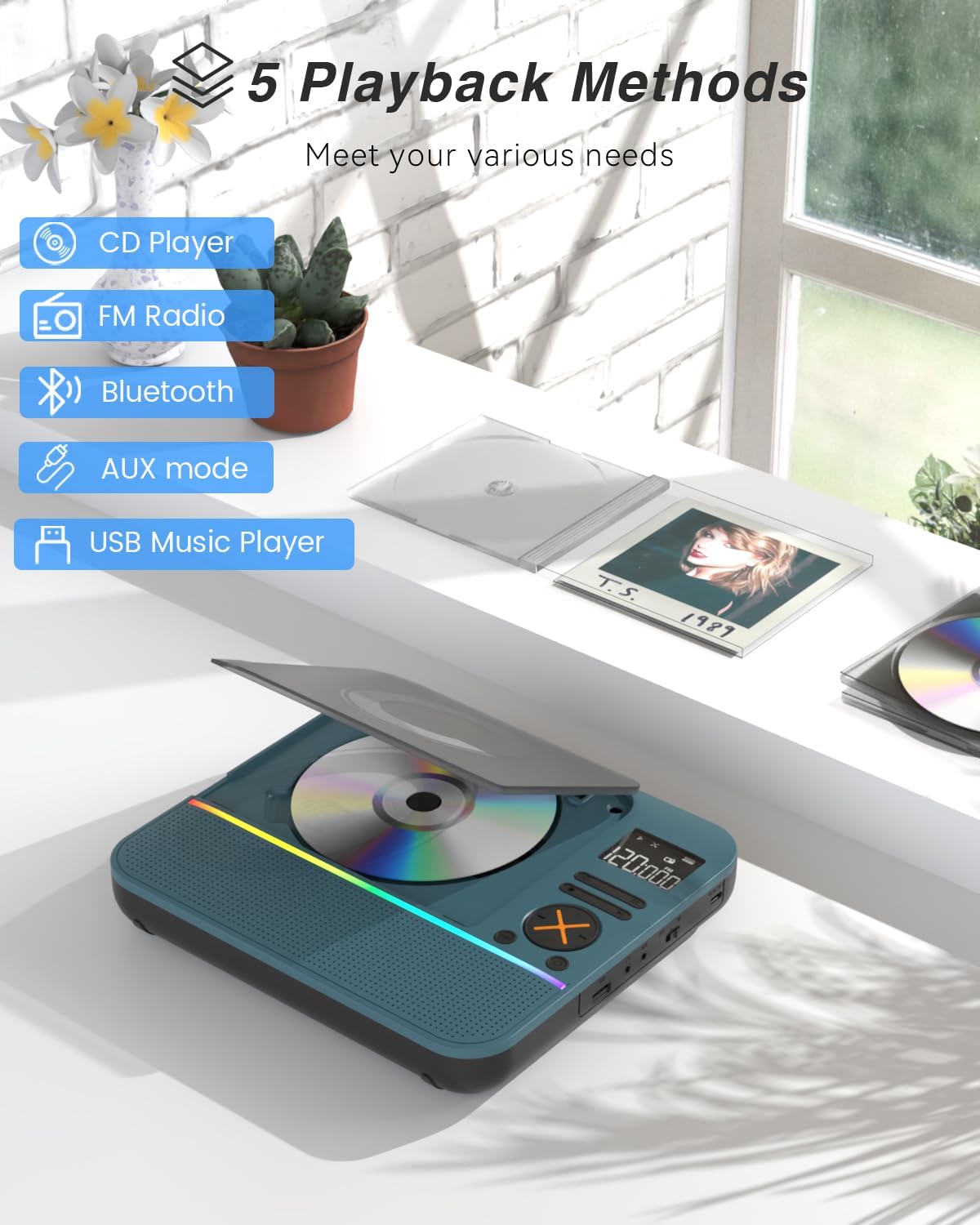
Figura 1: Frontal view of the MONODEAL CD401 Portable CD Player, showcasing its compact design and central display.
Característiques principals:
- Multi-Color RGB Lighting: Dynamic lighting effects that change color to the beat of the music, enhancing visual and auditory experience.
- Bluetooth 5.3: Functions as both a Bluetooth transmitter (to headphones/speakers) and receiver (from phones/tablets).
- Integrated 4*HIFI Speakers: Provides surround sound for an immersive listening experience.
- Múltiples modes de reproducció: Easily switch between CD, Bluetooth, FM Radio, AUX, and USB modes via a large LCD screen.
- Wide CD Compatibility: Supports CD, CD-R, CD-RW, MP3, and WMA formats.
- Efectes de so: Choose from five equalizer presets: Flat, Rock, Pop, Jazz, and Classic.
- Ràdio FM: Access FM frequencies from 76MHz to 108MHz.
- USB & AUX Connectivity: Play music from a USB flash drive or connect external devices via the 3.5mm AUX cable.
- Bateria recarregable: Built-in 3000mAh battery offers up to 8 hours of continuous playback.
- Temporitzador de son: Customizable sleep timer from 10 to 90 minutes.

Figure 2: The MONODEAL CD401 displaying its multi-color RGB lighting effects, which synchronize with the music.
Controls i ports:
The device features intuitive controls on its top panel and essential ports on the side for easy access.

Figure 3: Top panel of the CD player showing playback controls, mode selection, and display.

Figure 4: The side panel of the CD player, illustrating the AUX input, USB port, and charging port.
Vídeo oficial del producte:
Video 1: Official product video from MonoDeals showcasing the Desktop CD Player with Bluetooth and RGB Light features.
Video 2: Official product video from MonoDeals demonstrating the Desktop Player's Bluetooth functionality and colorful lighting effects.
4. Configuració
4.1 Càrrega del dispositiu
- Connect the provided USB charging cable to the charging port on the side of the CD player.
- Plug the other end of the USB cable into a compatible USB power adapter (included) or a computer's USB port.
- The battery indicator on the LCD screen will show charging status. A full charge provides up to 8 hours of playback.
4.2 Inserció d'un CD
- Obriu suaument la tapa del compartiment del CD.
- Place the CD with the label side facing up onto the spindle. Ensure it clicks into place.
- Tanqueu fermament la tapa del compartiment del CD fins que encaixi.
4.3 Engegada/apagada
- To power on, slide the ON/OFF switch to the 'ON' position. The LCD screen will light up.
- Per apagar-lo, feu lliscar l'interruptor ON/OFF a la posició 'OFF'.
5. Instruccions de funcionament
5.1 Selecció del mode
Premeu el botó MODE button on the device or remote control to cycle through the available modes: CD, Bluetooth, FM, AUX, and USB.

Figure 5: The CD player's display indicating the five available playback methods: CD, FM Radio, Bluetooth, AUX mode, and USB Music Player.
5.2 Reproducció de CD
- Insert a compatible CD (CD, CD-R, CD-RW, MP3, WMA).
- Select 'CD' mode. The player will automatically start reading the disc.
- Utilitza el Reproduir/Pausa, Pista següent, i Pista anterior botons per controlar la reproducció.
- Premeu el botó REPETIR button to cycle through repeat options (e.g., repeat one, repeat all).
- Premeu el botó EQ button to select desired sound effects (Flat, Rock, Pop, Jazz, Classic).
5.3 Mode Bluetooth
The CD401 supports both Bluetooth transmission (BT TX) and reception (BT RX).
- Bluetooth Receiver (BT RX): Select 'Bluetooth' mode. The device will enter pairing mode. On your phone/tablet, search for 'CD401' and connect. Audio from your device will play through the CD player's speakers.
- Bluetooth Transmitter (BT TX): Select 'Bluetooth' mode. Press and hold the BT TX button. The CD player will search for nearby Bluetooth headphones or speakers. Once connected, CD audio will transmit to the external Bluetooth device.

Figure 6: Illustration of the CD player's dual Bluetooth functionality, allowing it to receive audio from a phone (RX) or transmit to headphones (TX).
5.4 Ràdio FM
- Select 'FM' mode.
- Utilitza el Pista següent i Pista anterior buttons to scan for radio stations.
- The FM frequency range is 76MHz to 108MHz.
5.5 Entrada AUX
- Select 'AUX' mode.
- Connect an external audio device (e.g., smartphone, computer) to the AUX IN port using the provided 3.5mm audio cable.
- The CD player will now act as a wired speaker for the connected device.
- Note: Bluetooth connectivity is not supported in cars; use the 3.5mm AUX cable for car audio.
Reproducció USB 5.6
- Seleccioneu el mode 'USB'.
- Inseriu una unitat flash USB que contingui àudio MP3 o WMA files al port USB.
- The player will automatically detect and begin playing the audio files.
5.7 Control de volum
Adjust the volume using the dedicated volume buttons on the device or the remote control.
5.8 Temporitzador de repòs
- Premeu el botó DORMIR botó del comandament a distància.
- Cycle through the available sleep timer durations (10, 20, 30, 40, 50, 60, 70, 80, 90 minutes).
- The device will automatically power off after the selected time.

Figure 7: The CD player featuring its sleep timer function, allowing users to set automatic shutdown after a specified duration.
6. Manteniment
6.1 Neteja
- Netegeu el dispositiu amb un drap suau i sec. No utilitzeu netejadors líquids ni materials abrasius.
- Keep the CD compartment clean and free of dust.
6.2 Emmagatzematge
- Store the CD player in a cool, dry place away from direct sunlight and extreme temperatures.
- Remove any CDs or USB drives before storing for extended periods.
7. Solució De Problemes
| Problema | Causa possible | Solució |
|---|---|---|
| El dispositiu no s'encén | Bateria baixa o l'interruptor d'alimentació està apagat. | Carregueu el dispositiu completament. Assegureu-vos que l'interruptor d'encès/apagat estigui a la posició "ON". |
| No hi ha so dels altaveus | Volume is too low or incorrect mode selected. | Increase volume. Verify correct playback mode (CD, Bluetooth, FM, AUX, USB). |
| El CD no es reprodueix | El CD està brut, ratllat o inserit incorrectament. | Clean the CD. Check for scratches. Reinsert the CD correctly with the label side up. |
| S'ha produït un error en l'aparellament de Bluetooth | El dispositiu no està en mode d'emparellament o està massa lluny de la font. | Ensure the CD player is in Bluetooth pairing mode. Move devices closer. Disconnect from other Bluetooth devices. |
8. Especificacions
| Característica | Detall |
|---|---|
| Número de model | CD401 |
| Marca | MONODEAL |
| Tecnologia de connectivitat | Bluetooth 5.3 |
| Tipus d'altaveu | 4*HIFI Stereo |
| Capacitat de la bateria | 3000 mAh (integrada) |
| Temps de reproducció | Fins a 8 hores (amb càrrega completa) |
| Formats de disc compatibles | CD, CD-R, CD-RW |
| Formats d'àudio compatibles | MP3, WMA |
| Interval de freqüència FM | 76MHz a 108MHz |
| Dimensions del paquet | 10.83 x 9.13 x 1.93 polzades |
| Pes de l'article | 2.48 lliures |
9. Garantia i Suport
For warranty information, technical support, or customer service inquiries, please refer to the contact details provided in your product packaging or visit the official MONODEAL weblloc. Conserveu el rebut de compra per a reclamacions de garantia.


