1. Configuració inicial
This section guides you through the initial setup of your OPPO Reno 14 F 5G CPH2743 device, ensuring it is ready for use.
1.1 Contingut del paquet
Abans de continuar, comproveu que el paquet contingui els elements següents:
- OPPO Reno 14 F 5G CPH2743 Smartphone
- Cable USB-Type C
- Adaptador d'alimentació
- Eina expulsora de SIM
- Guia d'inici ràpid
- Informació de seguretat i Targeta de garantia
1.2 Inserting SIM Cards and Charging
- Locate the SIM Card Tray: Use the provided SIM ejector tool to open the SIM card tray, typically located on the side of the device.
- Inserir targetes SIM: Carefully place your Nano-SIM cards into the designated slots on the tray. This device supports Dual SIM functionality. Ensure the gold contacts face downwards.
- Torna a inserir la safata: Gently push the SIM card tray back into the device until it is flush.
- Carregueu el dispositiu: Connect the USB Type-C cable to the phone's charging port and the power adapter. Plug the adapter into a power outlet. Allow the device to charge for at least 30 minutes before initial power-on.
1.3 Engegada i configuració inicial
- Encès: Press and hold the Power button (usually on the right side) until the OPPO logo appears.
- Segueix les instruccions que apareixen a la pantalla: The device will guide you through the initial setup process, including language selection, Wi-Fi connection, Google account setup, and security settings.
- Transferència de dades (opcional): If you are transferring data from an old device, follow the on-screen instructions or use OPPO's dedicated data migration tools.
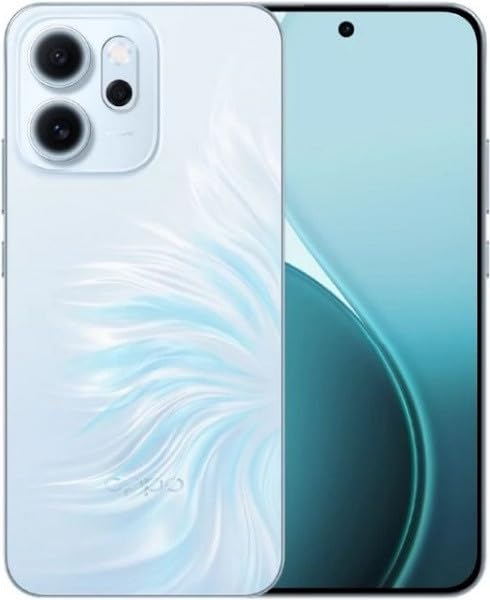
This image displays the OPPO Reno 14 F 5G CPH2743 smartphone. The front view shows the full-screen display with a punch-hole camera at the top center. The back view highlights the triple camera module in the upper left corner and the distinctive light blue, feather-like pattern on the Opal Blue finish, with the OPPO logo near the bottom.
2. Funcionament bàsic
Understand the fundamental operations of your OPPO Reno 14 F 5G CPH2743 to navigate and utilize its features effectively.
2.1 Gestos de pantalla tàctil
- Toca: Touch the screen once to select an item, open an app, or confirm an action.
- Toca i mantén premut: Mantingueu premut un element per accedir als menús contextuals o moure les icones.
- Llisca: Drag your finger across the screen to scroll through lists, switch between home screens, or navigate tabs.
- Pessigar: Feu servir dos dits per ampliar o reduir fotos, mapes o web pàgines.
2.2 Navegació
Your device uses on-screen navigation gestures or buttons. You can customize these in Settings > System settings > System navigation.
- Inici: Torna a la pantalla d'inici.
- Enrere: Torneu a la pantalla anterior.
- Aplicacions recents: View i canviar entre les aplicacions utilitzades recentment.
2.3 Fer trucades i enviar missatges
- Fer una trucada: Open the Phone app, enter the number, and tap the call icon. Alternatively, select a contact from your Contacts app.
- Enviament d'un missatge: Open the Messages app, tap the new message icon, enter the recipient's number or select a contact, type your message, and tap send.
2.4 Connexió a xarxes
- Wi-Fi: Vés a Configuració > Wi-Fi, turn on Wi-Fi, select your desired network, and enter the password if required.
- Bluetooth: Vés a Configuració > Bluetooth, turn on Bluetooth, and pair with compatible devices.
- Dades mòbils: Assegureu-vos que la targeta SIM estigui activa i que les dades mòbils estiguin habilitades a Configuració > Xarxa mòbil.
2.5 Ús de la càmera
Open the Camera app from your home screen or lock screen. Select your desired mode (Photo, Video, Portrait, Night, etc.), frame your shot, and tap the shutter button to capture.
3. Cura i Manteniment
Proper care extends the lifespan of your OPPO Reno 14 F 5G CPH2743 and ensures optimal performance.
3.1 Neteja del vostre dispositiu
- Feu servir un drap suau i sense borrissol per netejar la pantalla i el panell posterior.
- Eviteu l'ús de productes químics agressius, materials abrasius o aerosols.
- Per a taques persistents, lleugerament dampNetegeu el drap amb aigua o un netejador de pantalles dissenyat específicament per a electrònica.
3.2 Cura de la bateria
- Eviteu les temperatures extremes, ja que poden degradar el rendiment de la bateria.
- Feu servir només el carregador i el cable originals que s'inclouen amb el dispositiu.
- No deixeu el dispositiu carregant-se durant períodes prolongats després que hagi arribat al 100%.
3.3 Actualitzacions de programari
Comproveu i instal·leu regularment si hi ha actualitzacions de programari per assegurar-vos que el dispositiu tingui les darreres funcions, pegats de seguretat i millores de rendiment. Aneu a Configuració > Quant al dispositiu > Actualitzat per comprovar si hi ha actualitzacions.
3.4 Gestió d'emmagatzematge
Your device comes with 512GB of internal storage. To maintain optimal performance:
- Elimina regularment els innecessaris files, fotos i vídeos.
- Desinstal·la les aplicacions no utilitzades.
- Utilitzeu serveis d'emmagatzematge al núvol per a còpies de seguretat.
4. Solució De Problemes
This section addresses common issues you might encounter with your OPPO Reno 14 F 5G CPH2743 and provides basic solutions.
4.1 El dispositiu no s'encén
- Comproveu la bateria: Ensure the device has sufficient charge. Connect it to the charger for at least 15 minutes.
- Força el reinici: Press and hold the Power button and Volume Up button simultaneously for about 10-15 seconds until the OPPO logo appears.
4.2 Problemes de connectivitat de xarxa
- Sense senyal/Senyal deficient: Comproveu si la targeta SIM està inserida correctament. Intenteu reiniciar el dispositiu. Assegureu-vos que sou en una zona amb cobertura de xarxa.
- Problemes de connexió Wi-Fi: Restart your Wi-Fi router. Forget the network on your phone and reconnect.
4.3 Les aplicacions es bloquegen o es bloquegen
- Force Close App: Go to Recent Apps, swipe up on the problematic app to close it, then reopen.
- Esborra la memòria cau: Vés a Settings > Apps > App management, select the app, then Storage usage > Clear cache.
- Actualitza l'aplicació: Assegureu-vos que l'aplicació estigui actualitzada a la seva darrera versió des de Google Play Store.
4.4 Restabliment de fàbrica (últim recurs)
Si els problemes persisteixen, un restabliment de fàbrica els pot resoldre. Avís: Això esborrarà totes les dades del dispositiu. Fes una còpia de seguretat de les dades importants abans de continuar.
- Vés a Configuració > Configuració del sistema > Còpia de seguretat i restabliment > Restablir telèfon.
- Seleccioneu Esborra totes les dades i seguiu les instruccions a la pantalla.
5. Especificacions tècniques
Key technical specifications for the OPPO Reno 14 F 5G CPH2743.
| Característica | Especificació |
|---|---|
| Marca | OPPO |
| Nom del model | Oppo Reno 14 F 5G CPH2743 |
| Capacitat d'emmagatzematge de memòria | 512 GB |
| Mida instal·lada de la memòria RAM | 12 GB |
| Tipus de visualització | AMOLED |
| Tecnologia cel·lular | 5G |
| Nombre de ranures per a targetes SIM | Doble SIM |
| Color | Blau |
| Factor de forma | Bar |
| País/Regió d'origen | Xina |
6. Garantia i Suport
For detailed warranty information, please refer to the warranty card included in your product package or visit the official OPPO weblloc web. Conserveu el comprovant de compra per a reclamacions de garantia.
6.1 Atenció al client
If you encounter issues not covered in this manual or require further assistance, please contact OPPO customer support through their official channels. You can often find support contact information on the OPPO website or within the device's settings under 'About phone' or 'Support'.
Visita el OPPO Store per a més informació sobre el producte i accessoris.


