1. Introducció
The Nobsound M5.1PRO is a versatile 5.1 channel Bluetooth amplifier designed for home theater audio systems. It features professional DSP decoding, multiple input options including Bluetooth 5.1, Optical, Coaxial, and USB, and supports high-resolution audio formats up to DSD256. This amplifier delivers immersive surround sound and offers flexible output modes (2.0, 2.1, 5.1) to integrate with various speaker configurations. An intuitive OLED display and remote control provide convenient operation.

Figure 1: Nobsound M5.1PRO 5.1 Channel Bluetooth Amplificador amb comandament a distància.
2. Contingut del paquet
Verifiqueu que tots els elements que s'enumeren a continuació s'inclouen al vostre paquet:
- 1x M5.1PRO Ampmés viu
- 1x font d'alimentació de 24V/8A
- 1x Cable òptic
- 1x Bluetooth Antenna
- 1x comandament a distància
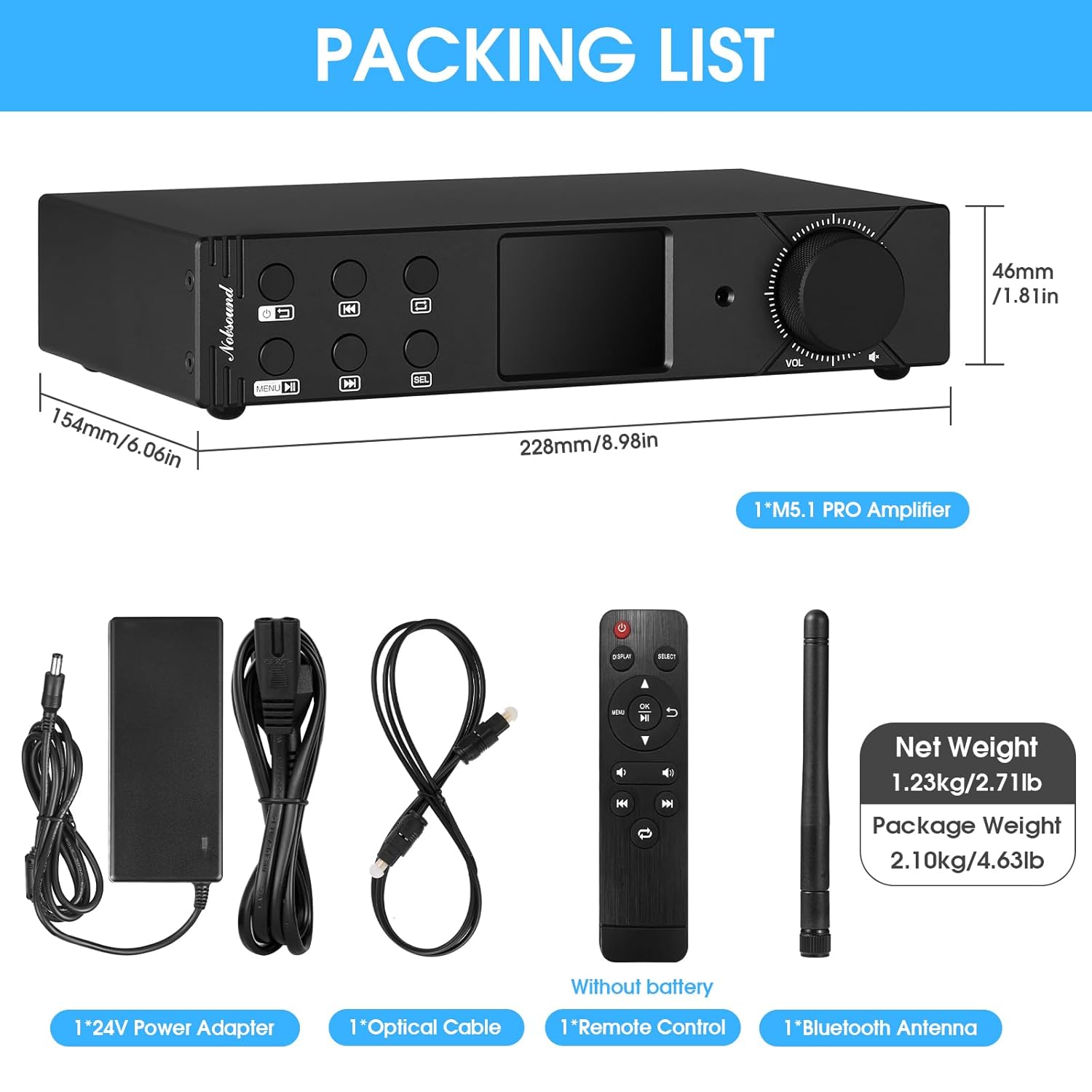
Figure 2: Contents included in the Nobsound M5.1PRO package.
3. Producte acabatview
3.1 Tauler frontal
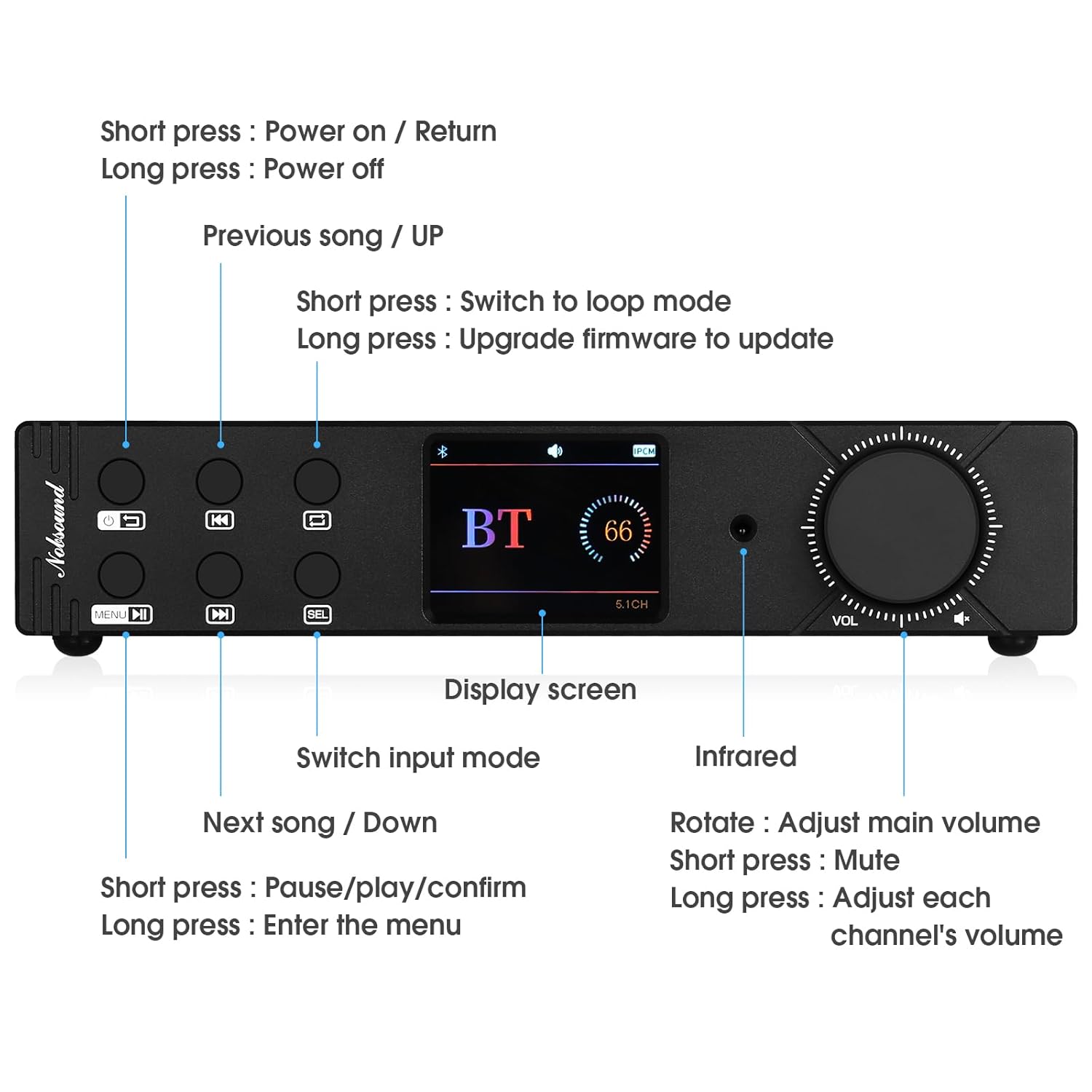
Figure 3: Front panel controls and display of the M5.1PRO ampmés viu.
- Botó d'encesa: Short press to power on/return. Long press to power off.
- Previous Song / Up: Short press for previous song. Long press to switch to loop mode.
- Pantalla de visualització: 2.4-inch OLED screen showing input mode, connection status, and track information.
- Interruptor de mode d'entrada: Button to cycle through available input sources.
- Next Song / Down: Short press for next song. Long press for firmware update.
- Play/Pause / Confirm: Short press for play/pause/confirm. Long press to enter the menu.
- Receptor d'infrarojos: Per a senyals de comandament a distància.
- Pom de volum: Rotate to adjust main volume. Short press to mute. Long press to adjust individual channel volumes.
3.2 Panell posterior

Figure 4: Rear panel connections of the M5.1PRO ampmés viu.
- Sortides dels altaveus: Banana speaker jacks for Front (FL/FR), Surround (SL/SR), Center (CEN), and Subwoofer (SUB) channels. Supports 2.0, 2.1, and 5.1 channel configurations.
- Sortida RCA: Stereo RCA output for connecting to an external amplifier o altaveus actius.
- Entrades de potència: Dual DC 15V-24V power inputs (Main Power and Sub Power).
- Entrada USB: For U-disk or hard disk playback.
- Entrada coaxial: Entrada d'àudio digital.
- Entrada òptica: Entrada d'àudio digital.
- Ranura per a targeta SD: Per a la reproducció amb targeta SD.
- Port d'antena Bluetooth: Per connectar l'antena Bluetooth inclosa.
4. Instruccions de configuració
4.1 Connectar altaveus
The M5.1PRO supports 2.0, 2.1, and 5.1 channel speaker configurations. Use banana plugs or bare wire to connect your passive speakers to the corresponding speaker terminals on the rear panel.
- Per Canal 2.0: Connect front left (FL) and front right (FR) speakers.
- Per Canal 2.1: Connect front left (FL), front right (FR) speakers, and a passive subwoofer to the SUB output.
- Per Canal 5.1: Connect front left (FL), front right (FR), surround left (SL), surround right (SR), center (CEN) speakers, and a passive subwoofer to the SUB output.
Assegureu-vos de la polaritat correcta (+ a + i - a -) per a totes les connexions d'altaveus.
4.2 Connexió de fonts d'àudio
- Bluetooth: Screw the Bluetooth antenna into its port on the rear panel.
- Òptic/Coaxial: Connect your digital audio source (e.g., TV, Blu-ray player) to the Optical or Coaxial input using the appropriate cable.
- Targeta USB/SD: Insert a USB drive (U-disk or hard disk, FAT32/exFAT format, max 2TB) or an SD card (CLASS 10 or above, max 512G) into the respective ports.
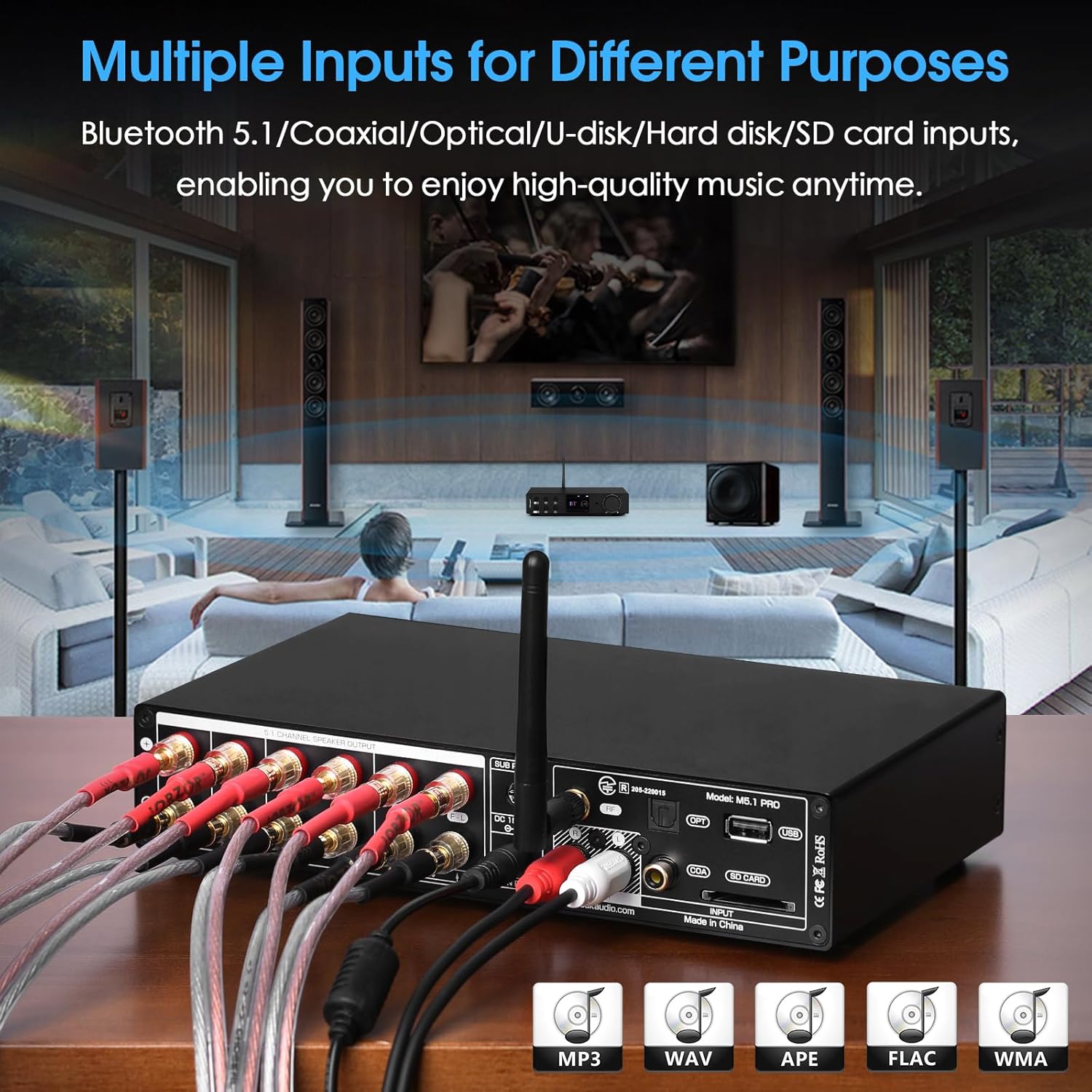
Figura 5: Example of multiple input connections to the M5.1PRO ampmés viu.
4.3 Connexió d'alimentació
Connect the provided 24V/8A power adapter to one of the DC power inputs (Main Power or Sub Power) on the rear panel, then plug it into a wall outlet. The M5.1PRO features dual power inputs for stable power delivery.
5. Instruccions de funcionament
5.1 Encès/Apagat
Short press the Power button on the front panel or the remote control to turn the amplifier on. Long press the Power button to turn it off.
5.2 Selecció d'entrada
Press the "Input Mode Switch" button on the front panel or the "INPUT" button on the remote control to cycle through the available input sources: Bluetooth, Coaxial, Optical, USB, SD Card.
5.3 Control de volum
Rotate the "Volume Knob" on the front panel or use the volume buttons on the remote control to adjust the main volume. Short press the volume knob to mute/unmute. Long press the volume knob to access individual channel volume adjustments.
5.4 Vinculació Bluetooth
- Select Bluetooth as the input source. The OLED display will show "BT" and indicate pairing mode.
- On your Bluetooth device (e.g., smartphone, tablet), search for "Nobsound M5.1PRO" in the Bluetooth settings.
- Seleccioneu el amplifier to pair. Once connected, the display will confirm the connection.
- To reset Bluetooth pairing, use the dedicated Bluetooth reset function (refer to front panel controls or remote).
5.5 Reproducció des de targeta USB/SD
Insert a USB drive or SD card containing supported audio files. El amplifier will automatically switch to the USB or SD card input and begin playback. Use the "Previous Song / Up" and "Next Song / Down" buttons to navigate tracks, and the "Play/Pause / Confirm" button for playback control.
Música suportada file formats and max samptaxa de ling:
- WAV: 384kHz / 32Bit
- MP3: 48kHz / 16Bit
- FLAC: 192kHz / 24Bit
- ISO: DSD256
- APE: 48kHz / 16Bit
- DSF: DSD256
- DFF: DSD256
- DTS: Support
- CUE support: MP3 / WAV / APE / FLAC

Figure 6: The 2.4-inch OLED screen displays connection status and playback information.
6. Especificacions
| Paràmetre | Valor |
|---|---|
| Marca | Nobsound |
| Model | M5.1PRO |
| Entrada d'àudio | Bluetooth 5.1 / Coaxial / Optical / USB (U-disk / Hard disk) / SD-Card |
| Sortida d'àudio | Banana Speaker Jacks / Stereo RCA |
| Rated Output Power @ 4Ω | Front: 60W+60W, Surround: 60W+60W, Center: 60W, Bass: 60W |
| SNR | ≥98.5 dB |
| THD | 0.04% |
| Rated Output Level of RCA | 2V |
| Max Sampling Rate (Optical/Coaxial) | PCM 192kHz / 32Bit |
| U-disk / Hard-disk Format | FAT32, exFAT |
| Max Capacity (Hard disk) | 2 TB |
| Max Capacity (U-disk / SD-Card) | 512G |
| Port USB | USB 3.0 or below |
| Port SD | CLASS 10 or above |
| Dimensions (W*D*H) | 228*154*46mm / 8.98*6.06*1.81in |
| Pes net | 1.23 kg / 2.71 lliures |
| Pes del paquet | 2.10 kg / 4.63 lliures |
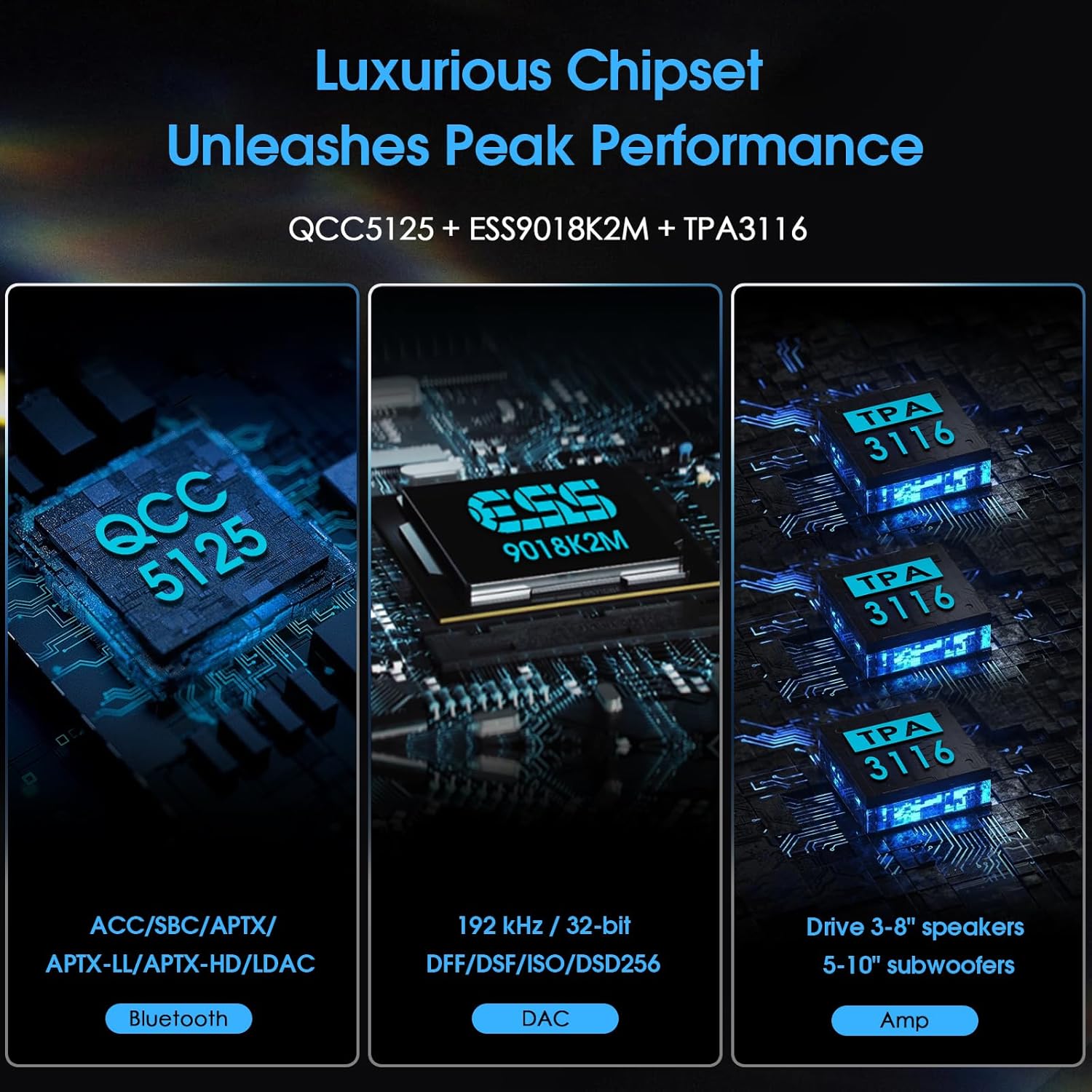
Figure 7: Diagram illustrating the internal chipsets (QCC5125, ESS9018K2M, TPA3116) for Bluetooth, DAC, and amplificació.
7. Solució De Problemes
- Sense energia:
- Assegureu-vos que l'adaptador de corrent estigui connectat correctament a tots dos amplifier and a working power outlet. Verify the power outlet is active.
- Sense so:
- Check that the correct input source is selected on the ampmés viu.
- Verify all speaker cables are securely connected to both the amplifier and speakers, with correct polarity.
- Ensure the volume is not muted and is turned up to an audible level.
- If using digital inputs (Optical/Coaxial), confirm the source device is outputting audio in a compatible format (PCM, DTS). Some TVs may require setting the digital audio output to "PCM" or "Stereo" instead of "Bitstream" or "Dolby Digital" for compatibility.
- Si feu servir Bluetooth, assegureu-vos que el dispositiu estigui correctament emparellat i connectat.
- Problemes de connexió Bluetooth:
- Assegureu-vos que l'antena Bluetooth estigui ben connectada.
- Try resetting the Bluetooth connection on the amplifier and your source device.
- Acosteu el dispositiu Bluetooth a la amplificador per descartar problemes d'abast.
- Ensure no other devices are actively connected to the amplifier mitjançant Bluetooth.
- USB/SD Card Not Playing:
- Check that the USB drive or SD card is inserted correctly.
- Verifiqueu el file system is FAT32 or exFAT.
- Assegureu-vos l'àudio files are in a supported format (WAV, MP3, FLAC, ISO, APE, DSF, DFF, DTS).
- The maximum capacity for hard disks is 2TB, and for U-disks/SD cards is 512G.
8. Informació de seguretat
- No exposeu aquest dispositiu a la pluja o la humitat.
- No desmunteu la unitat. Encarregueu tot el manteniment a personal qualificat.
- Assegureu-vos una ventilació adequada al voltant amplificador per evitar el sobreescalfament.
- Use only the provided power adapter or a compatible replacement with the correct voltage i qualificacions actuals.
- Eviteu col·locar la unitat a prop de fonts de calor o sota la llum solar directa.
- Mantenir fora de l'abast dels nens.
9. Garantia i Suport
For warranty information or technical support, please refer to the documentation provided with your purchase or contact Nobsound customer service directly. You can often find support contact details on the manufacturer's official website or the retailer's product page.
Per a recursos addicionals, visiteu el Botiga Nobsound a Amazon.


