1. Producte acabatview
The GAMDIAS ATHENA M4M WOOD is a compact micro-ATX gaming case designed for high-performance builds. It features a real walnut-finish mesh front panel and a tempered glass side panel, offering both aesthetic appeal and component visibility. This case supports micro-ATX and mini-ITX motherboards and is optimized for efficient cooling and smart cable management.
Característiques principals:
- Disseny Premium: Real walnut-finish mesh front panel and tempered glass side panel.
- High-Airflow Cooling: Includes three pre-installed 120mm NOTUS M1 fans (two front intake, one rear exhaust). Supports up to nine fans and dual 360mm radiators (top and bottom).
- Compact Compatibility: Accommodates micro-ATX and mini-ITX motherboards, graphics cards up to 395mm, and CPU coolers up to 175mm.
- Smart Layout: Front-mounted PSU with downward-facing connectors for improved cable management. Supports connector-hidden (BTF) motherboards.
- Connectivitat moderna: Front I/O includes one USB 3.2 Gen2 Type-C port, two USB 3.0 ports, and audio connectivity.
- Resistència a la pols: Equipped with dust filters on the top, front, bottom, and side.
- Emmagatzematge flexible: Supports one 3.5" drive and multiple 2.5" bays.

Figure 1: GAMDIAS ATHENA M4M WOOD Micro-Tower Gaming Case, front-side view.
2. Configuració i instal·lació
This section provides general guidelines for installing components into your ATHENA M4M WOOD case. For detailed, step-by-step visual instructions, please refer to the official online manual by scanning the QR code provided with your product packaging.
2.1 Preparació del cas
- Traieu els panells laterals: Locate the thumb screws on the tempered glass side panel and the solid side panel. Unscrew them and carefully remove both panels.
- Kit d'accessoris: Locate the accessory box inside the case, which contains screws, cable ties, and other mounting hardware.
2.2 Instal·lació de la placa base
- Ensure the correct standoffs are installed for your micro-ATX or mini-ITX motherboard.
- Carefully place the motherboard into the case, aligning it with the standoffs and the I/O shield opening.
- Fixeu la placa base amb els cargols proporcionats.
2.3 Instal·lació de la unitat d'alimentació (PSU).
The ATHENA M4M WOOD features a front-mounted PSU design. The PSU is installed vertically at the front of the case, with its connectors oriented downwards for easier cable management.
- Mount the PSU to the designated bracket at the front of the case.
- Secure the PSU with screws. Ensure all cables are routed through the cable management cutouts.
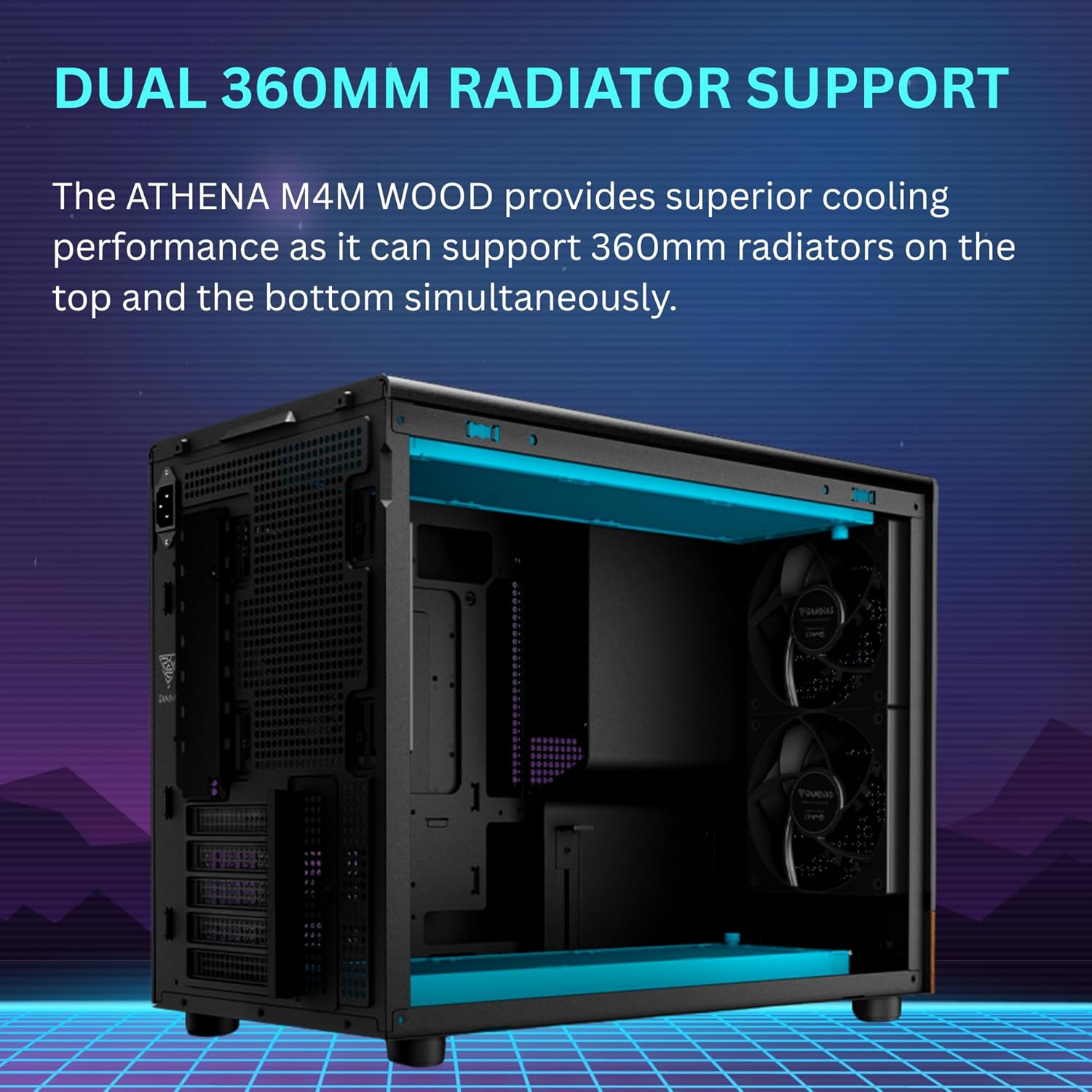
Figure 2: Illustration of the front-mounted PSU design with downward-facing connectors.
2.4 Instal·lació de la targeta gràfica (VGA)
- Traieu les cobertes de les ranures PCIe necessàries de la part posterior de la carcassa.
- Inseriu la targeta gràfica a la ranura PCIe adequada de la placa base.
- Secure the graphics card with screws. The case includes a built-in support bracket for longer GPUs.
2.5 Cooling System Installation (Fans & Radiators)
The case comes with three pre-installed 120mm NOTUS M1 fans. Additional fans and radiators can be installed as follows:
- Davant: Supports up to two 120mm fans (two pre-installed).
- posterior: Supports one 120mm fan (one pre-installed).
- A dalt: Supports up to three 120mm fans or one 360mm radiator.
- A baix: Supports up to three 120mm fans or one 360mm radiator.
- lateral: Admet fins a dos ventiladors de 120 mm.

Figure 3: Extensive airflow configuration with three built-in PWM fans.
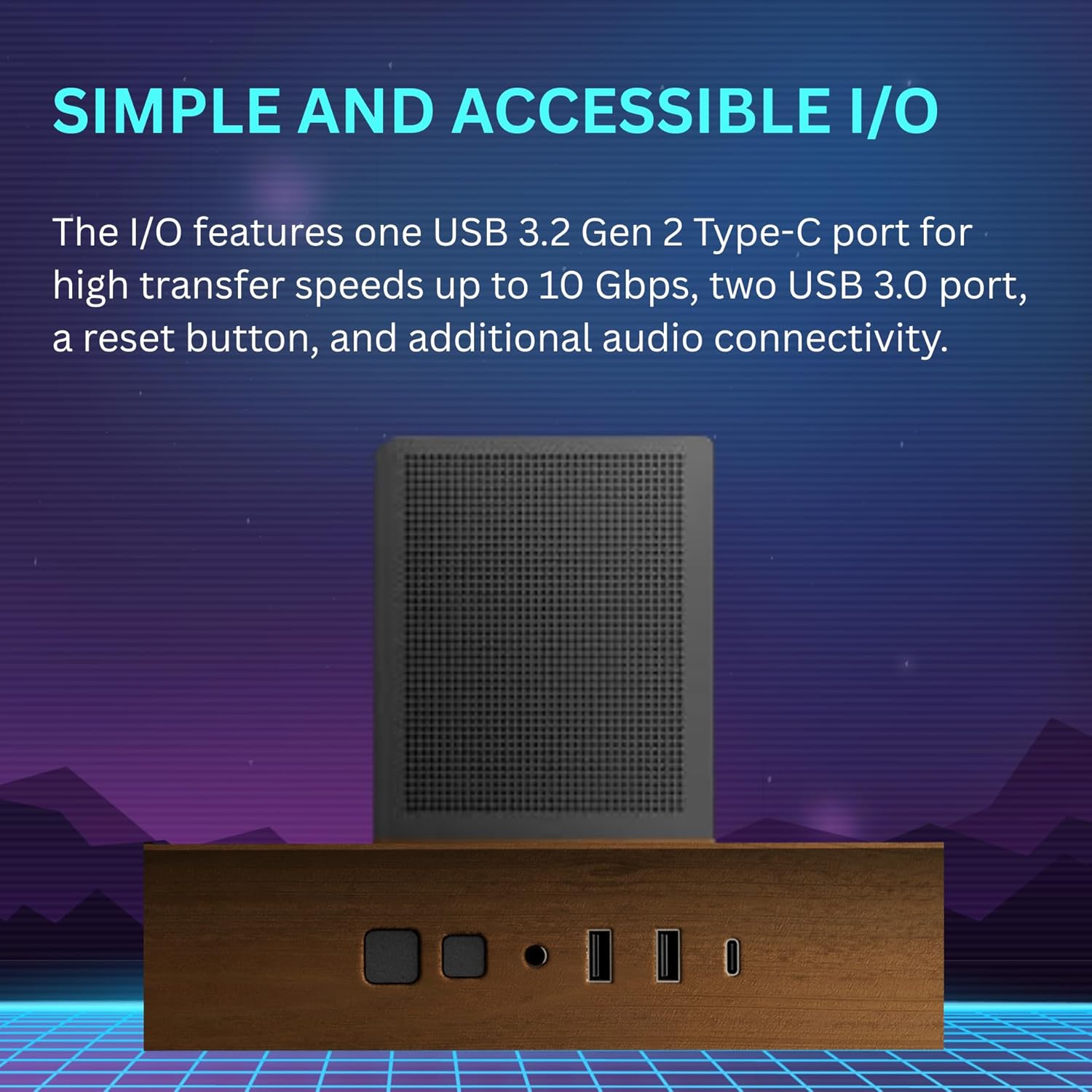
Figure 4: Dual 360mm radiator support for top and bottom mounting.

Figure 5: Cooling compatibility diagram showing fan and radiator placements.
2.6 Instal·lació de la unitat d'emmagatzematge
La funda ofereix opcions d'emmagatzematge flexibles:
- One 3.5" HDD bay.
- Multiple 2.5" SSD bays.
Mount your drives to the designated brackets using the provided screws.

Figure 6: Flexible storage options for HDDs and SSDs, also showing dust filters.
2.7 Gestió de cables
Utilize the cable routing cutouts and tie-down points behind the motherboard tray to organize cables. The front-mounted PSU with downward-facing connectors simplifies cable routing. For BTF (Back-To-the-Future) motherboards, the case is designed to accommodate hidden connectors for an ultra-clean build.
3. Instruccions de funcionament
3.1 Panell frontal d'E/S
El panell frontal d'E/S proporciona un accés convenient als ports i controls essencials:
- Botó d'encesa: Per encendre o apagar el sistema.
- Botó de restabliment: Per reiniciar el sistema.
- USB 3.2 Gen2 Type-C Port: For high-speed data transfer (up to 10 Gbps).
- Ports USB 3.0 (x2): For standard USB connectivity.
- Preses d'àudio: Per a connexions d'auriculars i micròfon.

Figure 7: Front I/O panel with USB-C, USB 3.0, and audio ports.
3.2 Control del ventilador
The case includes a fan/connection hub at the back, allowing you to connect more fans than your motherboard might natively support. Note that this hub may not include individual fan sensors, meaning manual speed control for each fan might be limited. Fan speeds are typically controlled via your motherboard's BIOS/UEFI settings or dedicated software.
4. Manteniment
4.1 Neteja del filtre de pols
The ATHENA M4M WOOD is equipped with dust filters on the top, front, bottom, and side panels to prevent dust accumulation. Regular cleaning of these filters is crucial for maintaining optimal airflow and cooling performance.
- Carefully remove the dust filters from their respective locations.
- Clean the filters using compressed air, a soft brush, or by rinsing them with water (ensure they are completely dry before reinstallation).
- Reinstall the dust filters securely.
Figura 8: Explotat view showing dust filters on top and side panels.
4.2 Neteja general
Use a soft, dry cloth to wipe down the exterior surfaces of the case. Avoid abrasive cleaners or solvents that could damage the finish, especially the walnut front panel and tempered glass.
5. Solució De Problemes
- Difficulty connecting front USB 3.0/3.2 cables: The front USB 3.0/3.2 Gen2 Type-C connectors can be challenging to connect due to cable length and angle. Consider using a 90-degree adapter if you encounter difficulty.
- PSU Fitment Issues: Some larger PSUs (e.g., over 150mm in length) or specific models might have tight fitment due to the front-mounted design. Verify PSU dimensions before installation. If issues persist, ensure the PSU shroud is not obstructing.
- Top Plate Not Sitting Flush: If the top plate does not sit flush, gently check for any obstructions or misalignments. Avoid forcing it, as this may damage the metal.
- Fan Control Limitations: The included fan hub may not allow individual fan speed control via software. Fan speeds might be regulated by the motherboard's BIOS/UEFI settings based on temperature curves.
- SSD Placement and SATA Power Cables: Ensure that standard SATA power cables can reach and connect properly to SSDs, especially if using daisy-chained cables, as placement might be tight.
For further assistance, please consult the GAMDIAS support weblloc o contacteu amb el servei d'atenció al client.
6. Especificacions
| Característica | Detall |
|---|---|
| Nom del model | ATHENA M4M WOOD |
| Tipus de cas | Micro-Tower |
| Compatibilitat amb la placa base | Micro ATX, Mini ITX |
| Material | Metal, Stainless Steel, Tempered Glass, Walnut Wood |
| Color | Black (with Walnut front panel) |
| Dimensions (L x A x A) | 17.56 x 9.25 x 13.66 polzades (446 x 235 x 347 mm) |
| Pes de l'article | 12.36 lliures (5.62 kg) |
| Tipus de muntatge de la font d'alimentació | Muntatge frontal |
| Límit d'alçada del refrigerador de la CPU | Fins a 175 mm |
| VGA Card Length Limit | Fins a 395 mm |
| Suport dels fans |
|
| Suport del radiador |
|
| Drive Bays | 1 x 3.5", Multiple 2.5" |
| Ports d'E / S frontals | 1 x USB 3.2 Gen2 Type-C, 2 x USB 3.0, Audio (Headphone/Mic), Power, Reset |

Figure 9: Interior accommodation showing CPU cooler and VGA card clearance.
7. Informació de la garantia
GAMDIAS products are covered by a limited warranty. The specific terms and duration of the warranty may vary by region and product. Please retain your proof of purchase for warranty claims.
For detailed warranty information, including coverage, limitations, and the claims process, please visit the official GAMDIAS weblloc web o poseu-vos en contacte amb el vostre distribuïdor local.
8. Atenció al client
If you encounter any issues or have questions regarding your GAMDIAS ATHENA M4M WOOD gaming case, please refer to the following resources:
- Manual en línia: Scan the QR code provided in your product packaging for the most up-to-date and detailed installation guide.
- Oficial de GAMDIAS Weblloc: Visita www.gamdias.com for product information, FAQs, and support contact options.
- Suport tècnic: Contact GAMDIAS technical support directly through their weblloc web per a assistència personalitzada.


