1. Introducció
The siaviala P6-14.1inch Laptop Screen Extender is designed to enhance your productivity by providing an additional 14-inch Full HD 1080P IPS display. This portable monitor supports various operating modes and is compatible with a wide range of laptops and devices, offering a versatile solution for expanding your workspace.

Figure 1.1: The siaviala P6-14.1inch Laptop Screen Extender in use.
2. Característiques del producte
- Visualització: 14-inch FHD 1080P IPS panel with 1920x1080 resolution, 300cd/㎡ brightness, 72% NTSC color gamut, and 1000:1 contrast ratio.
- Viewangle: IPS ample viewing angle for consistent image quality.
- Cura dels ulls: Features low blue light technology to reduce eye strain.
- Compatibilitat: Supports 13-inch to 17.3-inch laptops, compatible with Windows, Mac OS (including M1, M2, M3), Linux, Surface, Chrome, Switch, PS5, Xbox, and Android devices.
- Connectivitat: Equipped with USB-C (full-function), Mini HDMI, and USB-A ports.
- Ajustabilitat: 180° rotation and adjustable kickstand for customized viewangles d'ajust.
- Portabilitat: Ultra-lightweight at 2.5 lbs, designed for easy transport and setup.

Figure 2.1: Key display features of the siaviala P6-14.1inch.
3. Contingut del paquet
- 1 x Laptop Screen Extender (P6-14.1inch)
- 1 x cable USB-C a USB-C
- 1 x HDMI to Mini HDMI Cable
- 1 x cable USB-A a USB-C
- 1 x Guia d'usuari

Figure 3.1: Items included in the package.
4. Instruccions de configuració
- Expand the Screen Extender: Gently unfold the screen extender from its compact form.
- Ajusteu el suport: Extend and adjust the integrated kickstand to provide stable support for the screen extender at your desired viewangle de ing.
- Connect to your Laptop: Refer to the 'Connection Methods' section below to connect the screen extender to your laptop using the appropriate cables.

Figure 4.1: Basic setup steps for the screen extender.
5. Mètodes de connexió
The siaviala P6-14.1inch offers flexible connection options depending on your laptop's available ports. It is a plug-and-play device, requiring no additional driver installation.
Option 1: Laptop with Full-Function USB-C Port
If your laptop has a full-function USB-C port (which supports both video and power delivery), you only need one USB-C to USB-C cable for both signal transmission and power supply.
Option 2: Laptop with HDMI and USB-A Ports
If your laptop does not have a full-function USB-C port, you will need two cables:
- An HDMI to Mini HDMI cable for video signal transmission.
- A USB-A to USB-C cable for power supply to the screen extender.
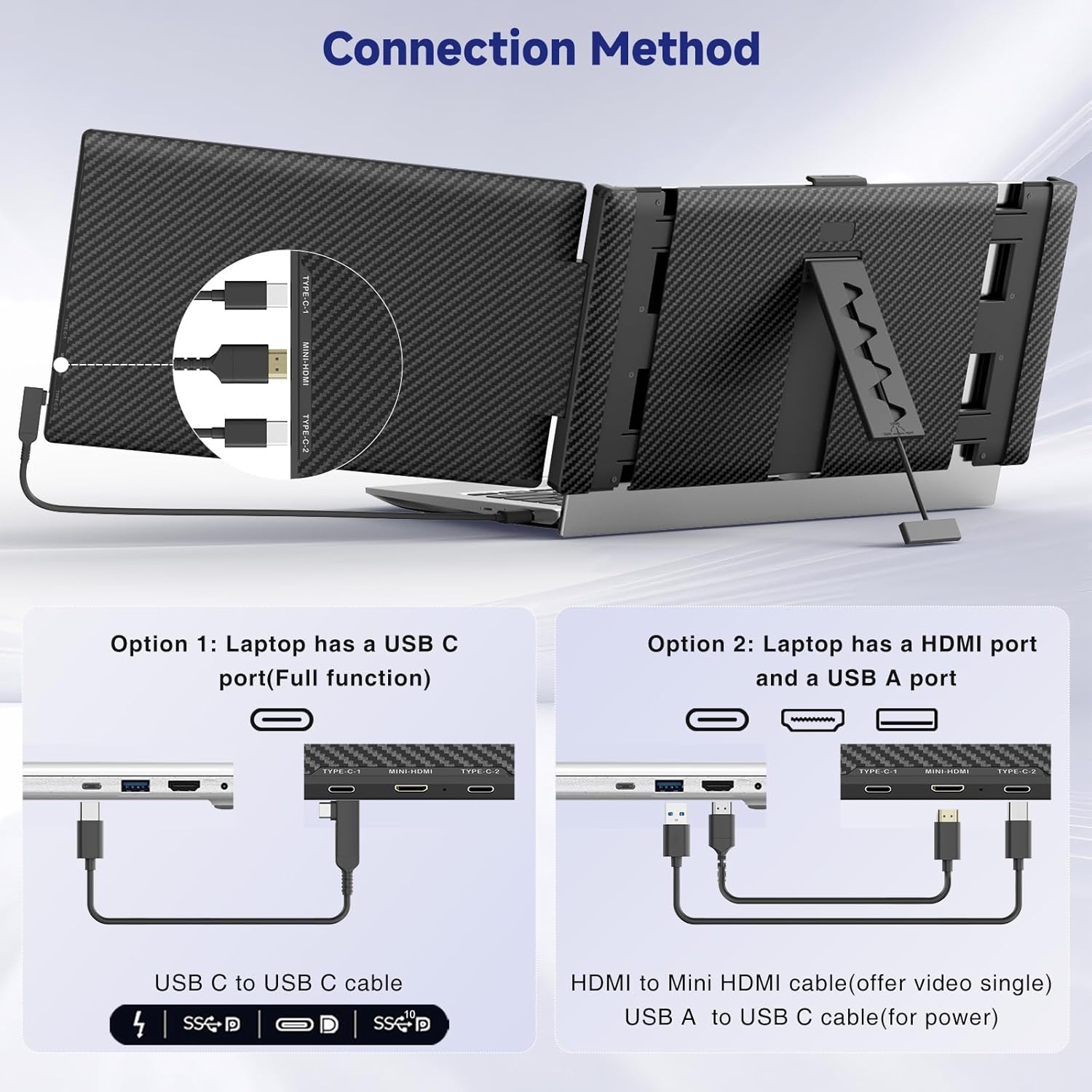
Figure 5.1: Connection methods for the screen extender.
Video 5.1: Official demonstration of the Siaviala 14" 1080P FHD IPS Laptop Monitor Extender setup and functionality.
6. Modes de funcionament
The screen extender supports multiple display modes to suit various tasks and preferences:
- Mode mirall: Duplicates your laptop's display on the external screen, ideal for presentations or sharing content.
- Mode estès: Expands your desktop workspace across both screens, allowing for multitasking and increased productivity.
- Mode de retrat: The external screen can be rotated 90 degrees for vertical viewing, beneficial for reading documents or coding.

Figure 6.1: Various operating modes for enhanced productivity.
7. Ajustar la configuració
The screen extender features multi-function keys that allow independent adjustment of display parameters for each screen.
- Brillantor: Adjust the screen's luminance to your preference.
- Contrast: Modify the difference between the darkest and lightest areas of the display.
- So: Control the audio output volume.
- Altres paràmetres: Access additional settings via the On-Screen Display (OSD) menu for fine-tuning.

Figure 7.1: Adjustable features including 180° rotation and kickstand.
8. Compatibilitat
The siaviala P6-14.1inch is designed for broad compatibility:
- Laptop Sizes: Suitable for laptops ranging from 13 inches to 17.3 inches.
- Sistemes operatius: Fully compatible with Mac OS (including M1, M2, M3 chips), Windows, Android, and Linux.
- Dispositius: Supports various devices including PCs, Surface, Chrome devices, Nintendo Switch, PlayStation 5, and Xbox.
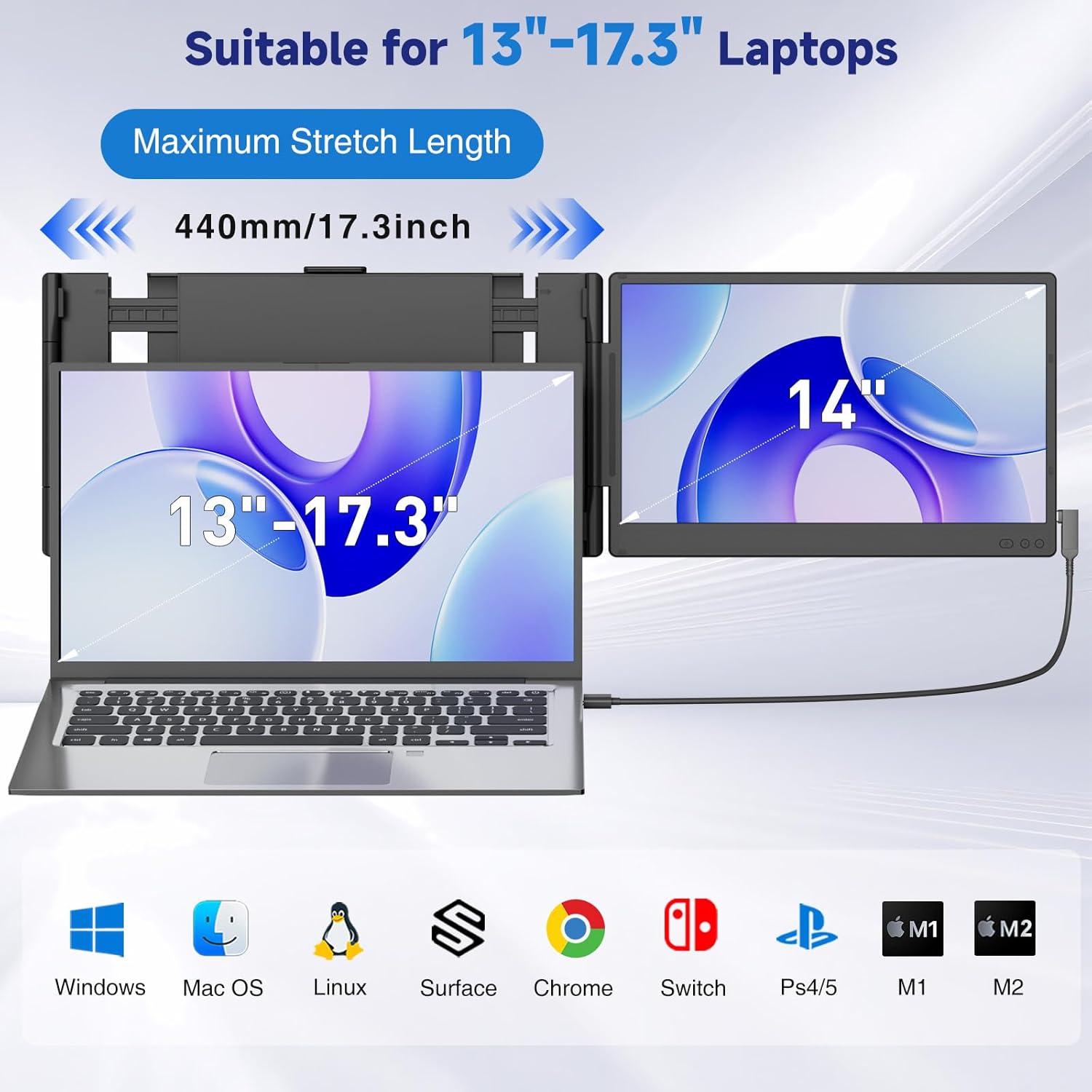
Figure 8.1: Broad compatibility with various devices and operating systems.
9. Escenaris d'ús
The portable design and versatile functionality make the siaviala P6-14.1inch suitable for numerous applications:
- Oficina de casa: Enhance your home workstation with extended display space.
- Business Travel: Maintain productivity on the go with a lightweight, portable setup.
- Meetings & Presentations: Easily share content in mirror mode or use extended mode for notes.
- Jocs i entreteniment: Connect to consoles for an immersive gaming experience.

Figure 9.1: Versatile usage scenarios for the screen extender.
10. Solució De Problemes
If you encounter any issues, please refer to the following common problems and solutions:
- "No Signal" / Black Screen: Ensure all cables are securely connected. Verify that your laptop's USB-C port is full-function or that both HDMI and USB-A (for power) cables are connected correctly.
- "Power Saving Mode": This may occur if the screen extender is not receiving sufficient power. Ensure your laptop is adequately charged or connected to a power source, or use a dedicated power adapter if needed.
- Configuració de la pantalla: Check your operating system's display settings to ensure the external monitor is detected and configured for the desired mode (extended or mirrored).
Per a més ajuda, poseu-vos en contacte amb l'atenció al client.
11. Especificacions
| Mida de la pantalla | 14 polzades |
| Resolució | 1920 x 1080 (FHD 1080p) |
| Relació d'aspecte | 16:9 |
| Brillantor de la imatge | 300 candela_per_square_meter |
| Superfície de la pantalla | Mat |
| Pes de l'article | 3.89 lliures |
| Dimensions del paquet | 16.22 x 11.02 x 2.64 polzades |
12. Garantia i Suport
The siaviala P6-14.1inch Laptop Screen Extender comes with a one-year warranty. For any questions, technical support, or warranty claims, please contact our dedicated 24/7/365 after-sales support team. We are committed to providing sincere and fast customer service to help you resolve any issues.
Fabricant: Shenzhen Baijiayoupu Technology Co., Ltd


