Introducció
Welcome to the bmani Wireless Earbuds user manual. These Bluetooth headphones are designed for comfort and performance, featuring a secure over-ear fit, long battery life, and intuitive controls. This manual will guide you through setting up, operating, and maintaining your new earbuds.
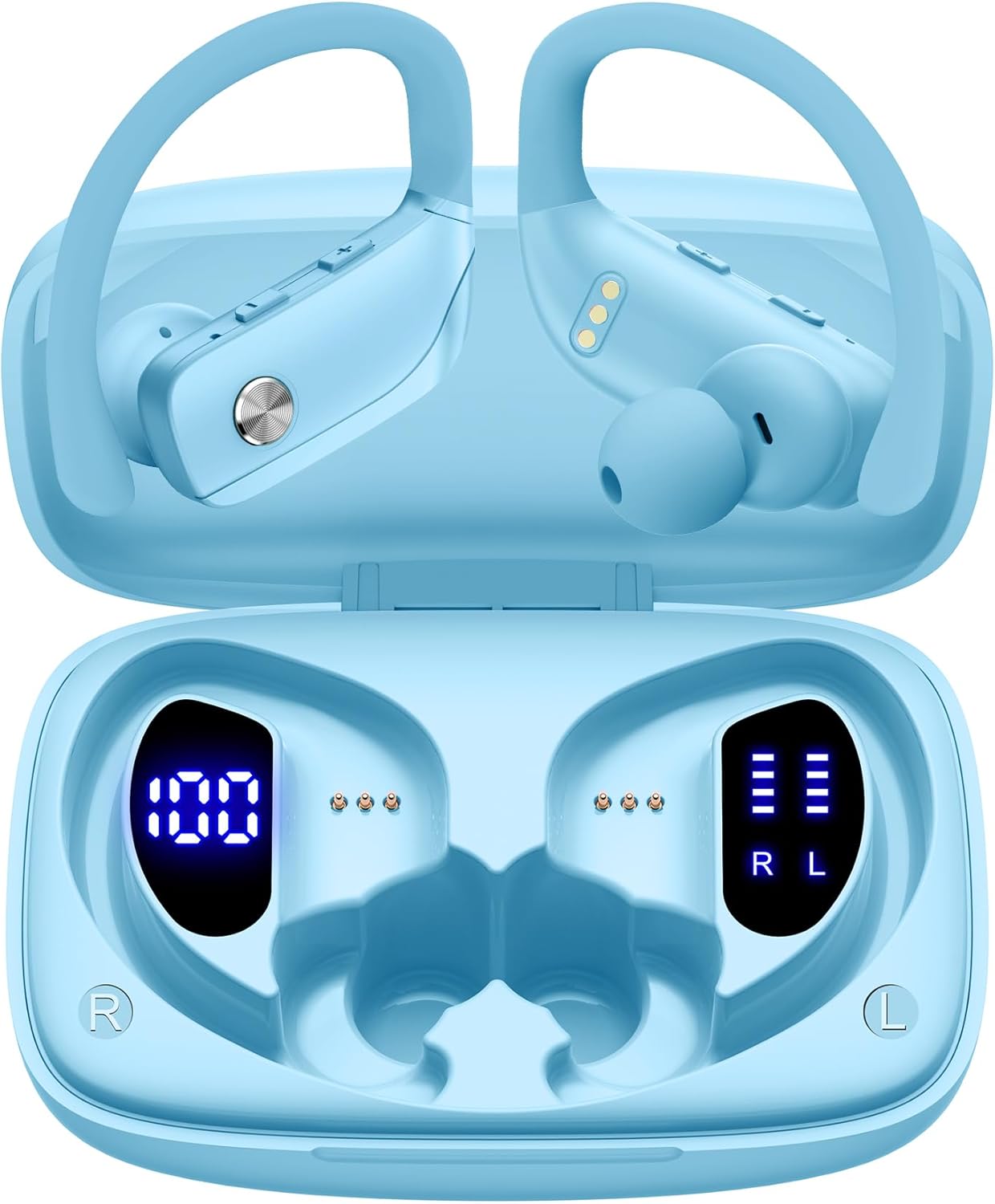
Image: The bmani Wireless Earbuds in their open sky blue charging case, showcasing the earbuds and the case's interior.
Què hi ha a la caixa
- Auriculars sense fil
- Estoig de càrrega
- Eartips (three size options: L, M, S)
- Cable tipus C
- Manual d'usuari (aquest document)

Image: This image displays all the items included in your bmani Wireless Earbuds package: the two wireless earbuds, their charging case, a set of three different sized eartips (L, M, S), a Type-C charging cable, and the user manual.
Producte acabatview & Característiques
The bmani Wireless Earbuds are engineered for an exceptional audio experience with user-friendly features.
Dual LED Displays Charging Case
The charging case features dual LED displays. The left display shows the remaining battery power of the case in percentage. The right side indicates the charging process of each earbud with four grids, each representing 25% of the bud's power. The LED indicator light will flash during charging.

Image: This image highlights the dual LED digital display on the charging case. The left screen shows the charging case's battery capacity as a percentage, while the right screen displays the power status of the left (L) and right (R) earbuds using four bars each.
Llarga vida útil de la bateria
Enjoy extended listening sessions with up to 8 hours of music time per earbud and an additional 40 hours provided by the 600mAh charging case, totaling 48 hours of playback.

Image: This diagram illustrates the impressive battery life: 8 hours of music time per earbud (50mAh each) and an additional 40 hours of listening time provided by the 600mAh charging case, totaling 48 hours of playback.
Bluetooth 5.0 and Hi-Fi Stereo Sound Quality
Equipped with advanced Bluetooth 5.0 technology, these earbuds provide a clear and smooth connection with extended range and fewer dropouts, ensuring crystal-clear calls and uninterrupted music listening. The 10mm speakers deliver Hi-Fi stereo sound.

Image: This image visually represents the 10mm speakers within the earbuds, emphasizing their capability to deliver Hi-Fi stereo sound.

Image: This image emphasizes the Bluetooth 5.0 technology, offering extended range and fewer dropouts, and the integration with voice assistants like Siri.
Designed for Sports (IPX5 Water Resistant)
These sport headphones are designed to stay securely in place during long hours of training, preventing shifting or falling out. They come with flexible earhooks and three pairs of ear caps (S, M, L) to ensure a comfortable and suitable fit, even during intense activities like camping, running, or working out. They are also IPX5 water-resistant, protecting them from splashes and sweat.

Image: This image shows a woman wearing the earbuds during exercise, highlighting their secure fit. An inset graphic demonstrates the flexible earhooks and the three included eartip sizes (L, M, S) for personalized comfort.

Image: This infographic summarizes key features: Dual LED Battery Display, 600mAh Charging Case, Anti-skid Earhooks, IPX5 Waterproof rating, Hi-Fi Stereo sound, and Voice Assistant compatibility.
Configuració
Càrrega dels auriculars i la funda
Abans del primer ús, carregueu completament els auriculars i l'estoig de càrrega.
- Connect the provided Type-C cable to the charging port on the back of the case.
- Connecteu l'altre extrem a una font d'alimentació USB.
- La pantalla LED de la carcassa mostrarà el progrés de la càrrega.
- Once fully charged, the display will show 100% for the case and full bars for both earbuds.
Pairing with Your Device (One-step Pairing)
The bmani earbuds feature automatic pairing for convenience.
- Open the charging case and take out both earbuds. They will automatically power on and attempt to pair with each other.
- Al dispositiu (telèfon intel·ligent, tauleta, ordinador portàtil, etc.), activeu el Bluetooth.
- Cerca "T16" in the list of available Bluetooth devices and select it to connect.
- Un cop connectats, sentireu un missatge d'àudio i els auriculars estaran llestos per al seu ús.
- Els auriculars es tornaran a connectar automàticament a l'últim dispositiu emparellat quan es treguin de l'estoig.

Image: This image demonstrates the one-step pairing process, showing the earbuds connected to a smartphone. It also highlights their wide compatibility with various Bluetooth-enabled devices, including notebooks, TVs, desktops, smartwatches, and tablets.
Instruccions de funcionament
Portant els auriculars
For optimal sound and comfort, ensure the earbuds are worn correctly.
- Col·loca el ganxo per a l'orella a la part posterior de l'orella.
- Insert the ear cap into your ear canal.
- Adjust by twisting the earbud for a comfortable and secure fit.

Image: This visual guide provides three simple steps for wearing your earbuds: 1. Place the ear hook over your ear. 2. Insert the ear cap into your ear. 3. Adjust the earbud by twisting it for a secure and comfortable fit.
Controls
The bmani earbuds feature intuitive button controls.
| Acció | Funció |
|---|---|
| Feu clic una vegada | Reproduir/Pausar música, Respondre/Finalitzar trucada |
| Quick Double-click (R) | Pista següent |
| Quick Double-click (L) | Pista anterior |
| Premeu el botó "+" | Puja el volum |
| Premeu el botó "-" | Baixa el volum |
| Triple clic ràpid | Activa l'Assistent de veu |
| Aguanta | Encès/Apagat |

Image: This image illustrates the dual audio controls on the earbuds. It shows the physical volume buttons (+/-) and a diagram explaining single click for play/pause, double click for track navigation, and holding the button for power on/off.

Image: This infographic details the various controls: single click for call answer/end and play/pause, double click for next/previous track, pressing +/- for volume, and triple click for voice assistant.
Manteniment
To ensure the longevity and optimal performance of your bmani Wireless Earbuds, follow these maintenance guidelines:
- Neteja: Regularly clean the earbuds and charging case with a soft, dry, lint-free cloth. Do not use harsh chemicals or abrasive materials.
- Orelles: Remove and clean the eartips periodically. You can gently wash them with mild soap and water, then ensure they are completely dry before reattaching.
- Resistència a l'aigua: The earbuds are IPX5 water-resistant, meaning they can withstand splashes and sweat. Do not submerge them in water or expose them to heavy rain. Ensure they are dry before placing them back in the charging case.
- EmmagatzematgeQuan no els feu servir, guardeu els auriculars a l'estoig de càrrega per protegir-los de la pols i els danys.
- Carregant: Use only the provided Type-C cable for charging. Avoid extreme temperatures during charging and storage.
Resolució de problemes
If you encounter any issues with your bmani Wireless Earbuds, please refer to the following common solutions:
Auriculars que no s'aparellen entre si ni amb el dispositiu:
- Assegureu-vos que els dos auriculars estiguin completament carregats.
- Place both earbuds back into the charging case, close the lid, wait a few seconds, then open the lid and take them out again. This often resets the pairing.
- On your device, forget or delete "T16" from your Bluetooth device list. Then, try the pairing process again from step 1.
- Assegureu-vos que cap altre dispositiu Bluetooth interfereixi amb la connexió.
Sense so o volum baix:
- Comprova el nivell de volum tant dels auriculars com del dispositiu connectat.
- Assegureu-vos que els auriculars estiguin correctament col·locats a les orelles.
- Clean any debris from the eartips or earbud speakers.
- Torneu a connectar els auriculars al dispositiu.
La caixa de càrrega no es carrega:
- Assegureu-vos que el cable tipus C estigui connectat correctament tant a la carcassa com a la font d'alimentació.
- Proveu un altre adaptador d'alimentació o port USB.
- Comproveu el cable de càrrega per si hi ha danys.
Auriculars que cauen:
- Try different sizes of eartips provided in the box to find the best fit for your ears.
- Assegureu-vos que els ganxos per a les orelles estiguin correctament col·locats sobre les orelles.
Especificacions
| Característica | Detall |
|---|---|
| Nom del model | T16 |
| Tecnologia de connectivitat | Sense fil (Bluetooth 5.0) |
| Durada de la bateria | Fins a 8 hores (auriculars), 40 hores (amb estoig de càrrega) |
| Capacitat de la caixa de càrrega | 600 mAh |
| Capacitat de la bateria dels auriculars | 50 mAh (cada una) |
| Resistència a l'aigua | IPX5 |
| Tipus de control | Control de botons |
| Material | Plàstic |
| Pes de l'article | 2 unces |
| Dimensions del producte | 3.54 x 2.36 x 0.79 polzades |
| Components inclosos | Charging Case, Eartip, Type-C Cable, User Manual, Wireless Earbuds |
| Dispositius compatibles | All Bluetooth-enabled mobile phones, tablets, laptops, computers, audiobooks, TV, and all devices with Bluetooth 5.0 |
Garantia i suport
bmani products are designed with quality and reliability in mind. For specific warranty information or technical support, please refer to the contact details provided on the product packaging or visit the official bmani weblloc. Conserveu el rebut de compra per a reclamacions de garantia.


