Introducció
The Aune N7D DAC Edition is a compact Class-A fully-discrete headphone amplifier and USB DAC, designed to deliver high-fidelity audio. It features twin JFET input, a fully-balanced four-channel R2R electronic volume control, dual-level Class A current adjustment, dual gain settings, and an independent Class-A preamp function. This manual provides essential information for setting up, operating, maintaining, and troubleshooting your N7D device.
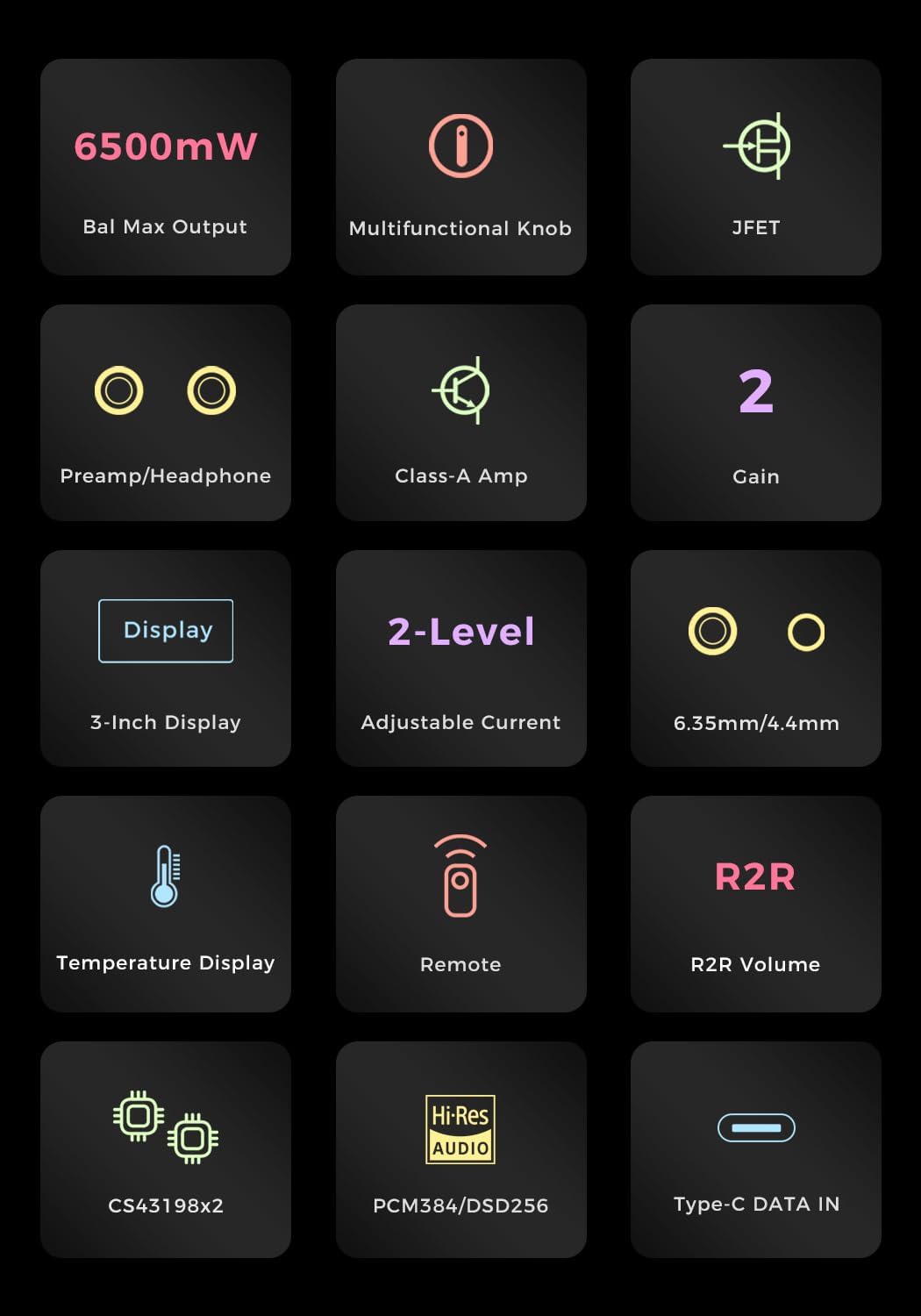
Image: The Aune N7D DAC Edition Headphone Amplifier shown with a pair of high-fidelity headphones, highlighting its primary use case.
Configuració
Desembalatge i inspecció inicial
Carefully remove the Aune N7D from its packaging. Inspect the device for any signs of damage. Ensure all components are present. The package typically includes the N7D unit and a power cable.
Connexió a l'alimentació
Connect the provided power cable to the AC input on the rear panel of the N7D. Plug the other end into a suitable power outlet (AC 100-240V). Ensure the power switch on the rear panel is in the OFF position before connecting to power.
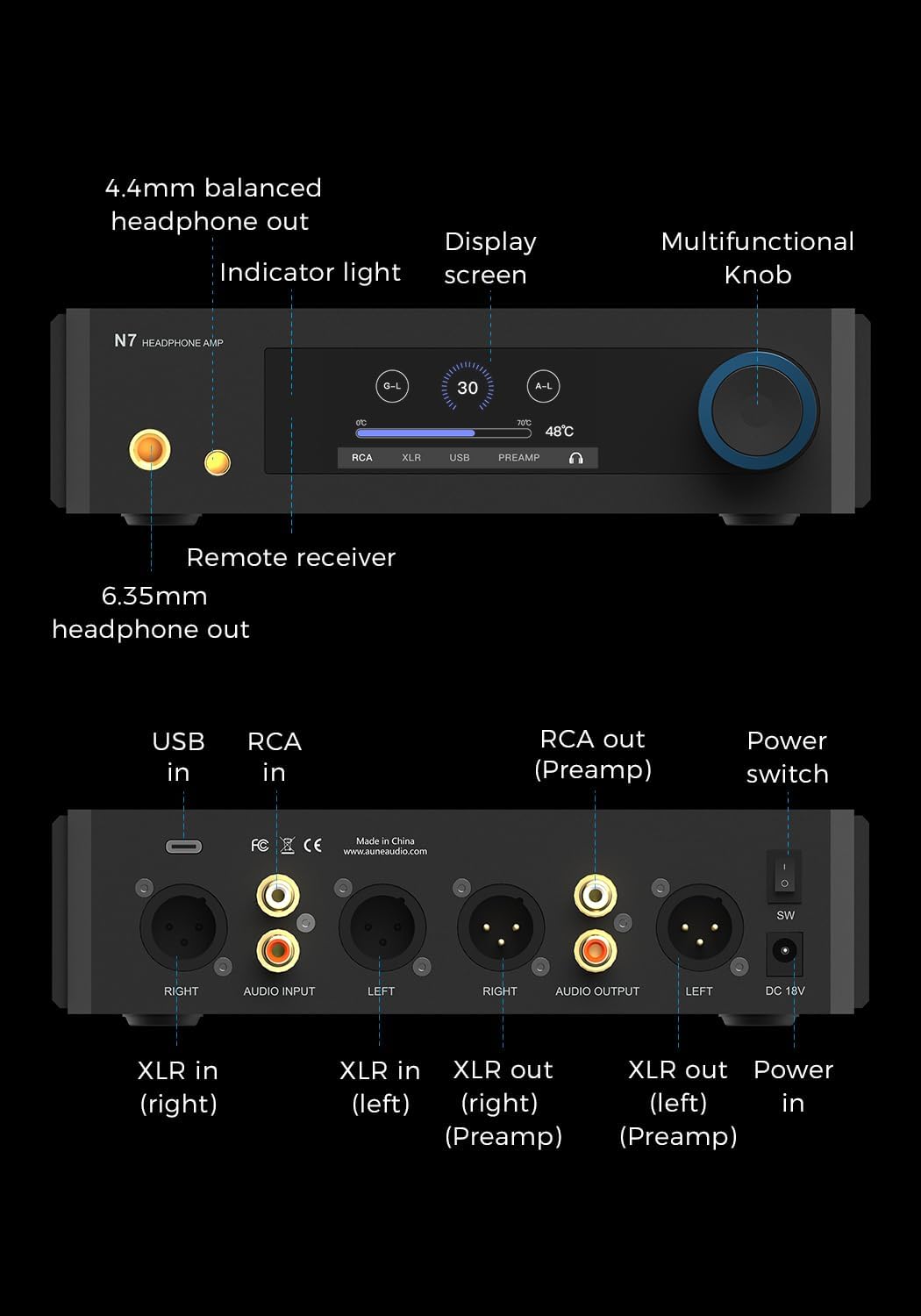
Imatge: Detallada view of the Aune N7D's rear panel, illustrating the power input, USB-C, RCA, and XLR input/output connections.
Connexions d'àudio
The N7D offers multiple input and output options:
- Entrada USB-C: Connect to a computer, smartphone, or tablet for digital audio playback (PCM 384kHz, DSD256).
- RCA/XLR Analog Input: Connect to an external DAC for amplificació.
- Sortides d'auriculars: Use the 6.35mm or 4.4mm balanced headphone jacks on the front panel for headphones.
- RCA/XLR Preamp Sortides: Connect to active speakers or a power ampmés viu.
Ensure all cables are securely connected to prevent signal loss or interference.
Instruccions de funcionament
Encès/Apagat
Flip the power switch on the rear panel to the ON position. The front display will illuminate. To power off, flip the switch back to the OFF position.
Controls del panell frontal

Image: Close-up of the Aune N7D's front panel, featuring the 3-inch display, multifunctional knob, and 6.35mm/4.4mm headphone outputs.
- Pom multifuncional: This knob controls volume, input selection, gain settings, and headphone amp/ preamp switching. Rotate to adjust volume. Press to cycle through input options or access settings.
- Pantalla de 3 polzades: Shows current volume, input source (RCA, XLR, USB, PREAMP), gain level (G-L for Low, G-H for High), Class-A current setting (50mA/100mA), and device temperature.
- Receptor remot: Located on the front panel, it receives signals from the included remote control for convenient wireless operation.
Configuració de guany
The N7D offers two gain settings to match various headphone sensitivities:
- Low Gain (G-L): Ideal for sensitive In-Ear Monitors (IEMs), providing controlled power.
- High Gain (G-H): Delivers up to 6.5W output for demanding full-size headphones.
Adjust the gain via the multifunctional knob or remote control as indicated on the display.

Image: The Aune N7D with headphones, demonstrating its dual-gain settings for optimal performance with various audio devices.
Class-A Current Adjustment
The N7D features a dual-level Class-A bias current adjustment for the output stage, ensuring true Class-A operation. This can be adjusted to 50mA or 100mA, affecting the tonality and warmth of the audio output.

Image: The Aune N7D's display showing the Class-A current adjustment feature, offering two shades of warm sound.
Manteniment
- Neteja: Feu servir un drap suau i sec per netejar l'exterior del dispositiu. Eviteu utilitzar netejadors líquids o dissolvents, ja que poden danyar l'acabat o els components interns.
- Ventilació: Ensure the N7D has adequate ventilation. Do not block the ventilation holes on the chassis.
- Emmagatzematge: Quan no l'utilitzeu durant períodes prolongats, guardeu el dispositiu en un lloc fresc i sec, allunyat de la llum solar directa i de temperatures extremes.
Resolució de problemes
Sense poder
- Check if the power cable is securely connected to both the N7D and the power outlet.
- Ensure the power switch on the rear panel is in the ON position.
- Try a different power outlet to rule out an issue with the current outlet.
Sense sortida de so
- Verify that the correct input source is selected on the N7D's display.
- Check all audio cables (USB, RCA, XLR, headphone) for secure connections.
- Assegureu-vos que el nivell de volum no estigui al mínim ni silenciat.
- Confirm that your headphones or active speakers are properly connected and functioning.
Qualitat de so distorsionada o deficient
- Check the quality of your audio source and cables. Try a different source or cables.
- Ensure the gain setting is appropriate for your headphones. Too high a gain for sensitive headphones can cause distortion.
- Verify that the Class-A current setting is suitable for your preference and equipment.
El control remot no respon
- Ensure there are no obstructions between the remote and the N7D's remote receiver.
- Reviseu i substituïu les piles del comandament a distància si cal.
Especificacions
| Característica | Detall |
|---|---|
| Nom del model | N7 D |
| Pes de l'article | 4.36 lliures |
| Dimensions del producte | 14 x 11 x 2.76 polzades (35.56 x 27.94 x 7.01 cm) |
| Color | Negre |
| Font d'alimentació | USB Powered (also AC input) |
| Tipus de connectors | 3.5mm Jack, 6.35mm Jack, RCA, USB, XLR |
| Xips DAC | CS43198 dual |
| Suport PCM | Fins a 384 kHz |
| DSD Support | Fins a DSD256 |
| Sortida d'auriculars | Up to 6.5W (High Gain) |
| Control de volum | R2R Electronic Volume Chip (JRC) |
| Entrada Stage | Twin JFET |
Garantia i Suport
For warranty information and technical support, please refer to the official Aune website or contact your authorized Aune dealer. Keep your purchase receipt as proof of purchase for warranty claims.


