1. Introducció
This manual provides essential information for the safe and efficient operation of your TOPTRO Quadra Projector. Please read this manual thoroughly before using the projector and retain it for future reference. The TOPTRO Quadra Projector is designed to deliver a high-quality visual and audio experience with its advanced features and smart capabilities.
2. Informació de seguretat
- No bloquegeu les obertures de ventilació. Assegureu-vos que hi hagi un flux d'aire adequat al voltant del projector per evitar el sobreescalfament.
- Do not expose the projector to rain or moisture to avoid electric shock or fire.
- Feu servir només l'adaptador de corrent que s'inclou amb el projector.
- Eviteu mirar directament a la lent del projector quan lamp està encès, ja que la llum brillant pot causar lesions oculars.
- Col·loqueu el projector sobre una superfície estable i plana per evitar que caigui.
- No intenteu desmuntar ni reparar el projector vosaltres mateixos. Encarregueu totes les tasques de manteniment a personal qualificat.
3. Contingut del paquet
Verifiqueu que tots els elements siguin presents al paquet:
- 1 x TOPTRO Quadra Projector
- 1 x cable HDMI
- 1 x Manual d'usuari
- 1 x comandament a distància
4. Producte acabatview
Familiarize yourself with the main components and interfaces of your TOPTRO Quadra Projector.
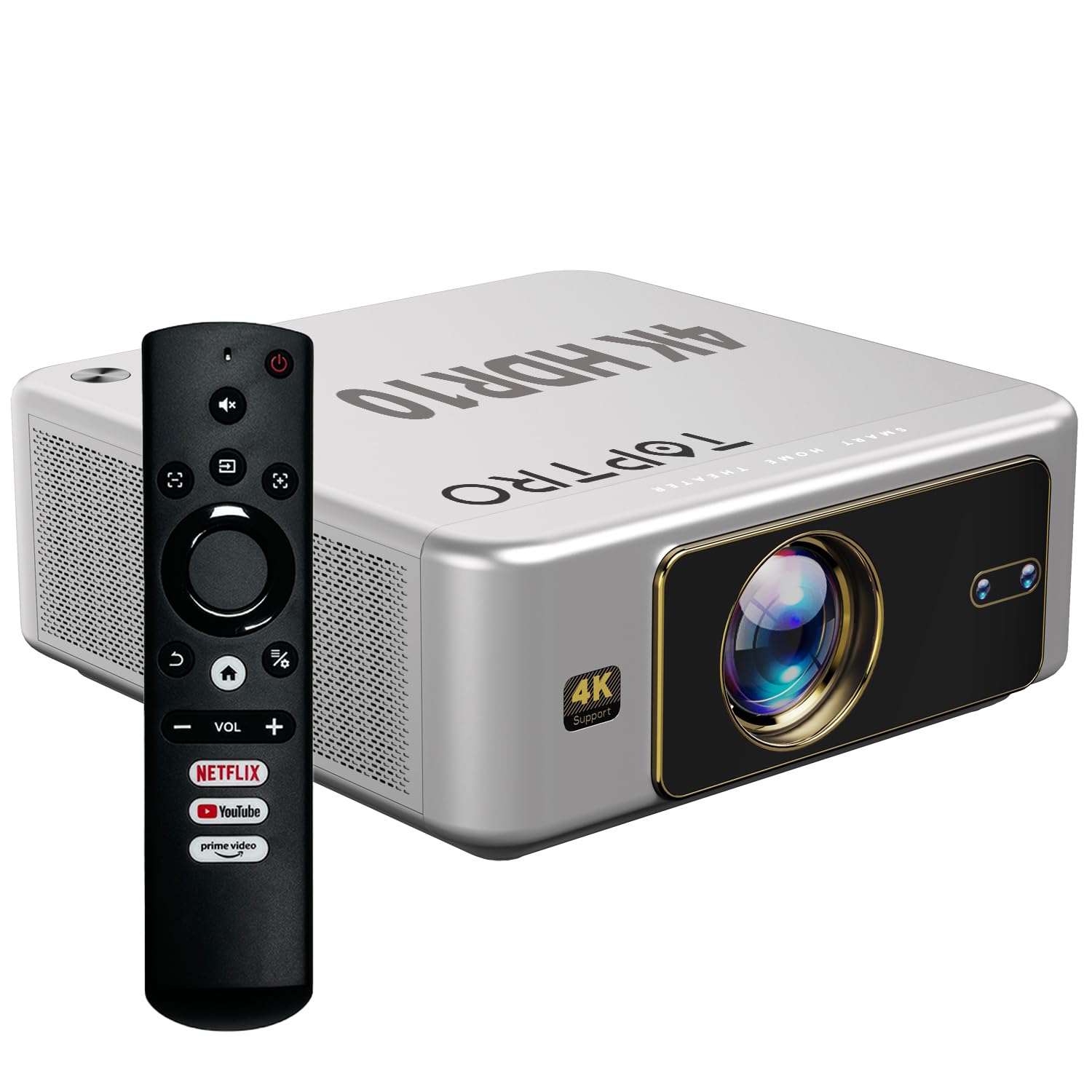
Figura 4.1: Frontal view of the TOPTRO Quadra Projector with included remote control.

Figure 4.2: Rear panel of the projector displaying the power input, audio jack, HDMI ports, and USB ports.
5. Configuració
5.1 Placement and Projection Size
Position the projector on a stable surface. The TOPTRO Quadra Projector supports a maximum screen size of 300 inches. Adjust the distance from the wall or screen to achieve your desired image size.

Figure 5.1: Recommended projection distances for different screen sizes.
5.2 Connexió d'alimentació
- Connecteu el cable d'alimentació al port d'entrada d'alimentació del projector.
- Connecteu l'altre extrem del cable d'alimentació a una presa de corrent adequada.
5.3 Engegada inicial i configuració bàsica
- Premeu el botó d'encesa del projector o del comandament a distància per encendre-lo.
- Upon first use, the projector may guide you through initial setup steps, including language selection and network connection.
5.4 Correcció de focus i trapezoide
The TOPTRO Quadra Projector features AI-powered automatic focus and keystone correction. This system automatically adjusts the image for optimal clarity and shape.
- Enfocament automàtic: The projector will automatically adjust the image sharpness.
- Keystone automàtic: The projector will automatically correct trapezoidal distortion to ensure a rectangular image.
- Auto Obstacle Avoidance & Screen Fit: The projector can detect obstacles and adjust the image to fit the screen area.
If automatic adjustments are not satisfactory, manual adjustments can be made through the settings menu. Navigate to the 'Display & Sound' settings to access these options.

Figura 5.2: Funcions de correcció automàtica d'imatges.
6. Funcionament
6.1 Interfície d'usuari i navegació
The TOPTRO Quadra Projector runs on a Net-Flix Certified Linux OS, providing a user-friendly interface. Use the remote control to navigate through menus and select applications.

Figure 6.1: Home screen with pre-installed streaming applications.
6.2 Connectivitat
The projector offers various connectivity options for external devices.
- HDMI: Connect your laptop, MacBook, Blu-ray player, TV sticks, TV boxes, or gaming consoles (e.g., PS4) using the dual HDMI ports. The projector supports HDMI CEC and HDMI EARC for enhanced audio return channel functionality.
- USB: Two USB ports are available for connecting pendrives or hard disks to play media files directament.
- Sortida d'àudio de 3.5 mm: Connect external headphones or speakers for a personalized audio experience.
- Wi-Fi: Utilize the 6th Gen Dual Band Wi-Fi (2.4 GHz + 5 GHz) for internet access and streaming.
- Bluetooth 5.2: Connect Bluetooth speakers, headphones, or other compatible audio devices. The projector also supports two-way Bluetooth, allowing it to function as a Bluetooth speaker.
- Miracast: Wirelessly mirror your screen from compatible devices.

Figura 6.2: Opcions de connectivitat per a dispositius externs.
6.3 Configuració de la pantalla
Adjust image quality and display features through the 'Display & Sound' menu.
- Mode d'imatge: Select from various preset picture modes (e.g., Vivid) or customize settings like brightness, contrast, and color.
- 4K HDR10+ Support: The projector plays true 4K resolution HDR10+ videos, offering enhanced contrast and color depth.
- MEMC (Estimació de moviment, Compensació de moviment): This technology improves video smoothness and clarity, especially for fast-moving scenes, by interpolating frames.

Figure 6.3: MEMC technology for smoother visuals.
6.4 Configuració d'àudio
Manage audio output and formats via the 'Display & Sound' menu.
- Dolby Atmos & Dolby Digital Plus: The projector supports these advanced audio technologies for immersive sound.
- Mode eARC: Enable eARC for high-quality audio return from compatible devices.
- Format de sortida: Select the appropriate audio output format (e.g., Auto, PCM, Passthrough, Dolby Digital, Dolby Digital Plus) based on your connected audio system.

Figure 6.4: Immersive audio with Dolby Atmos support.
7. Manteniment
Un manteniment adequat garanteix la longevitat i el rendiment òptim del vostre projector.
- Neteja de lents: Netegeu suaument la lent del projector amb un drap suau i sense borrissol dissenyat específicament per a superfícies òptiques. Eviteu materials abrasius o productes químics agressius.
- Neteja exterior: Feu servir un drap suau i sec per netejar l'exterior del projector.
- Prevenció de pols: The TOPTRO Quadra Projector features a fully sealed optical engine, which helps prevent dust, dirt, and moisture from entering the light path. This design reduces the need for frequent internal cleaning and maintains consistent image quality.
8. Solució De Problemes
Si teniu problemes amb el projector, consulteu els problemes i solucions més comuns següents:
| Problema | Causa possible | Solució |
|---|---|---|
| No es mostra cap imatge | Incorrect input source selected; loose HDMI/USB connection; power issue. | Verify input source in settings; check cable connections; ensure projector is powered on. |
| Sense so | Volume too low or muted; incorrect audio output setting; external audio device not connected properly. | Adjust volume; check 'Sound output' settings; ensure external speakers are connected and powered. |
| La imatge és borrosa o distorsionada | Focus or keystone correction issues; projector not placed correctly. | Allow auto-focus/keystone to complete. If issues persist, manually adjust focus and keystone in 'Display & Sound' settings. Ensure the projector is perpendicular to the screen. |
| El comandament a distància no funciona | Batteries are low or depleted; remote not pointed at IR receiver; obstruction. | Replace batteries; ensure clear line of sight to the projector's IR receiver. |
| Fan noise is noticeable | Normal operation; projector is working hard; ventilation blocked. | Ensure adequate ventilation around the projector. Fan noise is a normal part of projector operation, especially during high-performance tasks. |
9. Especificacions
Key technical specifications of the TOPTRO Quadra Projector:
| Característica | Detall |
|---|---|
| Marca | TOPTRO |
| Nom del model | TOPTRO Quadra Projector 4K HDR10+ Dolby |
| Dimensions del producte | 24 x 20 x 10 cm |
| Pes de l'article | 2 kg |
| Interfície del maquinari | 3.5mm Audio, Bluetooth 5.2, Dual HDMI (CEC, EARC), Dual USB |
| Dispositius compatibles | Gaming Console, Laptop, Smartphone, Speaker, Television |
| Característiques especials | Dolby Atmos - Dolby Digital Plus, 4K HDR 10+/HLG, Net-Flix Certified Linux OS, 2GB RAM, 32GB ROM, Auto Focus & Keystone, Native 1080p Full HD & True 4K Support, 32000 Lumens Brightness (2600 ANSI), 15W Big Speakers, HDMI ARC, Dual HDMI, Built-in Apps, Dual 5G & 2.4G WiFi 6, Bluetooth, WiFi Display, Electronic Focus & 6D Electronic correction, Fully Sealed Optical Engine, MEMC |
| Tecnologia de visualització | LCD |
| Brillantor de la imatge | 32000 lúmens (2600 ANSI) |
| Relació de contrast de la imatge | 22000:1 |
| Relació d'aspecte | 16:9 |
| Native Screen Resolution | 1920 x 1080 (Full HD) |
| Resolució suportada | Fins a 3840 x 2160 píxels (4K) |
| Freqüència d'actualització | 60 Hz |
| Lamp La vida | 50000 hores |
| Factor de forma | Portàtil |
| Tipus de muntatge | Muntatge al sostre |
| País d'origen | Xina |
10. Garantia i Suport
For warranty information, technical support, or service inquiries, please contact TOPTRO Projectors India using the details below:
- Correu electrònic: support@toptro.in or sreeprojectors@gmail.com
- Whatsapp: 8341888860
- Weblloc: toptro.in
Please have your product model number (Quadra 4K HDR10+ Dolby) and purchase details ready when contacting support.


