1. Introducció
Thank you for choosing the SWOFY D08 MP3 Player. This device combines high-capacity music storage with modern connectivity features, including Bluetooth and Wi-Fi, powered by a durable 2000mAh lithium polymer battery. This manual provides essential instructions for setting up, operating, and maintaining your device to ensure optimal performance and longevity.
Please read this manual thoroughly before using your SWOFY D08 MP3 Player and retain it for future reference.
2. Contingut del paquet
Assegureu-vos que tots els elements següents estiguin presents al vostre paquet:
- SWOFY D08 MP3 Player (160GB advertised capacity)
- Cable USB-Type C
- Manual d'usuari (aquest document)
- Auriculars amb cable
3. Producte acabatview
The SWOFY D08 MP3 Player features a compact design with a touchscreen interface for easy navigation. Familiarize yourself with the device's physical components and screen layout.

Imatge 3.1: Davant view of the SWOFY D08 MP3 Player. This image displays the device's overall form factor, screen, and general appearance.
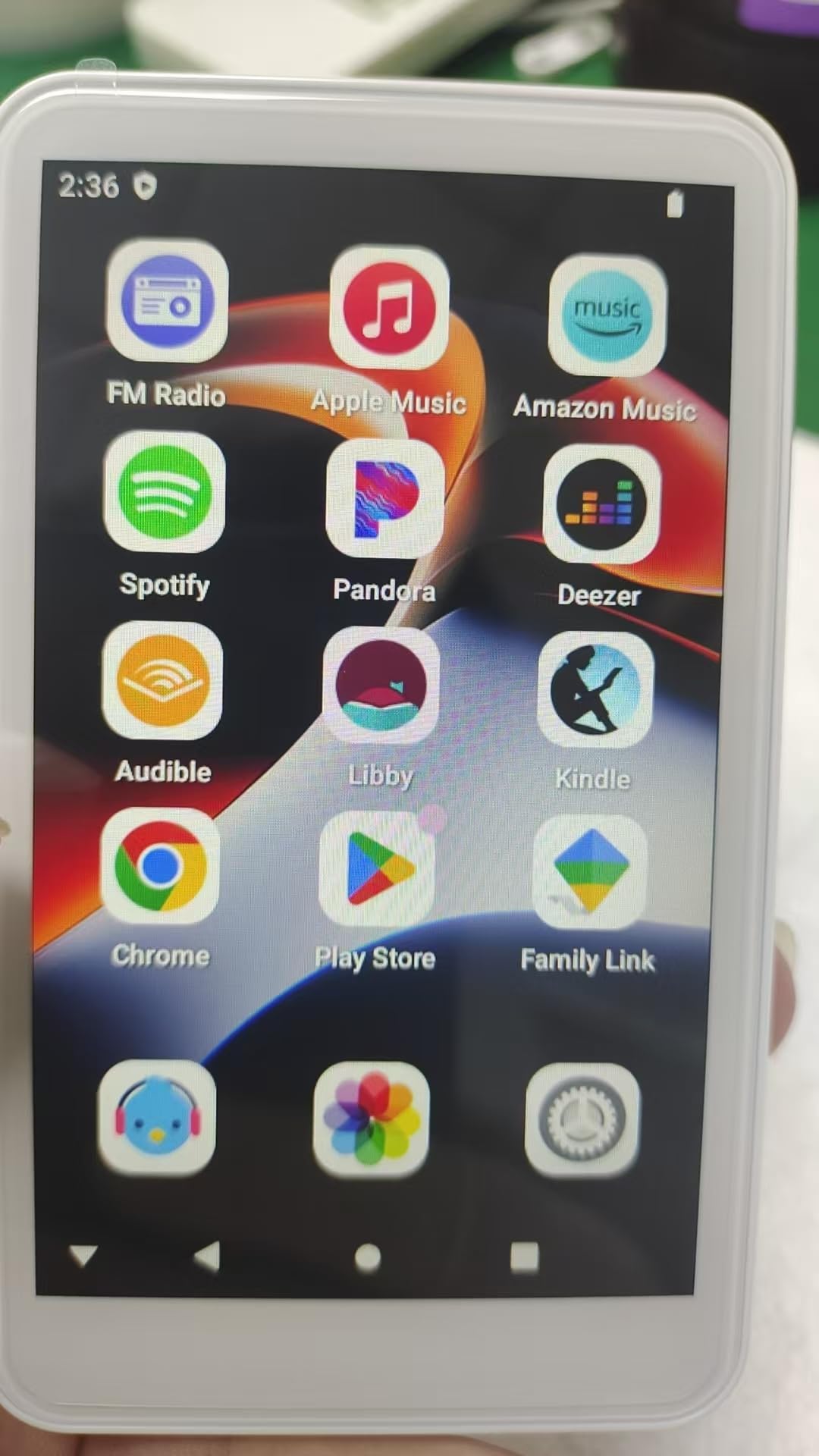
Imatge 3.2: The SWOFY D08 MP3 Player's screen interface, showing a grid of application icons. Visible applications include FM Radio, Apple Music, Amazon Music, Spotify, Pandora, Deezer, Audible, Libby, Kindle, Chrome, Play Store, and Family Link. The top bar displays the time (2:36) and battery status.
4. Configuració
4.1. Càrrega inicial
Before first use, fully charge your SWOFY D08 MP3 Player. Connect the provided USB Type-C cable to the device's charging port and the other end to a USB power adapter (not included) or a computer's USB port. A full charge typically takes approximately 2 hours.
4.2. Encendre/apagar
- Per encendre: Press and hold the Power button (location varies by model, typically on the side) until the screen illuminates.
- Per apagar: Mantingueu premut el botó d'engegada i, a continuació, seleccioneu "Apagar" a les opcions que apareixen a la pantalla.
4.3. Configuració Inicial
Upon first power-on, you may be prompted to select your preferred language, region, and connect to a Wi-Fi network. Follow the on-screen instructions to complete the initial setup.
4.4. Connexió a Wi-Fi
- Des de la pantalla d'inici, navegueu fins a "Configuració".
- Seleccioneu "Xarxa i Internet" o "Wi-Fi".
- Activa el Wi-Fi.
- Seleccioneu la xarxa Wi-Fi que vulgueu de la llista.
- Introduïu la contrasenya de xarxa si se us demana i, a continuació, toqueu "Connecta".
4.5. Transferència de música Files
Connect the MP3 player to your computer using the provided USB Type-C cable. The device will appear as a removable storage drive. You can then drag and drop your music files (e.g., MP3, FLAC, WAV) into the designated music folder on the device.
5. Instruccions de funcionament
5.1. Reproducció de música
To play music, tap the 'Music' application icon on the home screen. You can browse your music library by artist, album, song, or genre. Tap a song to begin playback. Use the on-screen controls for play/pause, skip forward/backward, and volume adjustment.
5.2. Connectivitat Bluetooth
The SWOFY D08 supports Bluetooth for wireless audio streaming to compatible headphones or speakers.
- Assegureu-vos que el dispositiu d'àudio Bluetooth estigui en mode d'emparellament.
- On the MP3 player, go to 'Settings' > 'Connected devices' > 'Bluetooth'.
- Toggle Bluetooth 'On'.
- El dispositiu buscarà dispositius Bluetooth disponibles. Seleccioneu el dispositiu de la llista per emparellar-lo.
- Confirma l'emparellament en tots dos dispositius si se't demana.
5.3. Using Wi-Fi Applications
With Wi-Fi connected, you can access various online applications. The device comes pre-installed with apps such as FM Radio, Apple Music, Amazon Music, Spotify, Pandora, Deezer, Audible, Libby, Kindle, and Chrome. You can also download additional applications via the 'Play Store'.
- Ràdio FM: Tap the 'FM Radio' icon to access local radio stations. You may need to connect wired earbuds as an antenna.
- Serveis de streaming: Open apps like Apple Music, Amazon Music, Spotify, Pandora, or Deezer. Log in with your existing accounts to stream music.
- Audiobooks/E-books: Use Audible, Libby, or Kindle for audiobooks and e-books.
- Web Navegació: Use 'Chrome' for internet browsing.
- Instal·lació de l'aplicació: Access the 'Play Store' to download and install new applications.
6. Manteniment
6.1. Cura de la bateria
- Avoid exposing the device to extreme temperatures (hot or cold) as this can degrade battery performance.
- Do not allow the battery to fully discharge frequently. Charge the device when the battery level is low.
- For long-term storage, charge the device to approximately 50% and store it in a cool, dry place.
6.2. Neteja
Use a soft, dry, lint-free cloth to clean the device's screen and body. Avoid using harsh chemicals, abrasive cleaners, or excessive moisture, which can damage the device.
6.3. Actualitzacions de programari
Periodically check for software updates in the device's settings to ensure optimal performance and access to the latest features and security enhancements.
7. Solució De Problemes
If you encounter issues with your SWOFY D08 MP3 Player, refer to the following common solutions:
| Problema | Possible solució |
|---|---|
| El dispositiu no s'encén | Ensure the battery is charged. Connect to a power source and try again. If unresponsive, perform a hard reset (refer to device documentation for specific instructions, usually holding power button for 10-15 seconds). |
| El dispositiu no es carrega | Check the USB Type-C cable and power adapter. Try a different cable or power source. Ensure the charging port is clean and free of debris. |
| Problemes de connexió Bluetooth | Ensure both devices are in pairing mode and within range. Turn Bluetooth off and on again on both devices. Forget the device in Bluetooth settings and re-pair. |
| Problemes de connexió Wi-Fi | Restart the MP3 player and your Wi-Fi router. Ensure you are entering the correct Wi-Fi password. Check if other devices can connect to the same network. |
| Música fileno està jugant | Comproveu que la música files are in a supported format (e.g., MP3, FLAC, WAV). Ensure files are transferred to the correct music folder on the device. |
| Device is slow or unresponsive | Close unnecessary background applications. Restart the device. If the issue persists, consider a factory reset (this will erase all data, back up important files primer). |
8. Especificacions
The following are the technical specifications for the SWOFY D08 MP3 Player:
| Característica | Detall |
|---|---|
| Marca | SWOFY |
| Número de model | SF-D08-160GB/CA |
| Capacitat d'emmagatzematge intern | 80 GB (Note: Product is often marketed with 160GB, which may refer to total potential capacity including expandable storage or a specific variant.) |
| Capacitat d'emmagatzematge digital | 80 GB |
| Bateria | Bateria de polímer de liti de 2000 mAh |
| Battery Life (Wired Earbuds) | Aproximadament 50 hores |
| Battery Life (FM Radio Recording) | Aproximadament 7.5 hores |
| Temps de càrrega | Aproximadament 2 hores (càrrega completa) |
| Connectivitat | Bluetooth, Wi-Fi, USB tipus C |
| Components inclosos | MP3 Player, USB Type-C Cable, User Manual, Wired Earbuds |
| UPC | 765826119540 |
| ASIN | B0FKM61YXM |
| Data de primera disponibilitat | 31 de juliol de 2025 |
9. Garantia i Suport
9.1. Informació de la garantia
The SWOFY D08 MP3 Player comes with a limited manufacturer's warranty. Please refer to the warranty card included with your purchase or the seller's terms and conditions for specific details regarding warranty coverage, duration, and claims process.
9.2. Atenció al client
For technical assistance, troubleshooting beyond this manual, or warranty inquiries, please contact the seller or SWOFY customer support through the contact information provided at your point of purchase or on the official SWOFY weblloc.


