1. Introducció i finalview
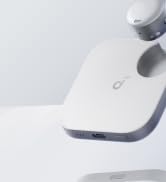
The soundcore Work by Anker is a portable AI voice recorder designed for efficient note-taking, transcription, and summarization. This compact device offers instant recording capabilities, high-accuracy AI-powered transcription, and intelligent summarization features to streamline your workflow. It is MFi certified for broad compatibility with iPhones and prioritizes user privacy with robust data encryption.
2. Què hi ha a la caixa
- 1 soundcore Work AI Voice Recorder
- 1 cable USB-C
- 1 Necklace Chain
- 1 Anell magnètic
Note: Log in to the soundcore app first to connect the device for initial setup.

Image: The soundcore Work package contents, showing the compact recorder, USB-C cable, necklace chain, and magnetic ring.
3. Configuració
3.1 Càrrega inicial
Connect the soundcore Work device to a power source using the provided USB-C cable. Ensure the device is fully charged before first use for optimal performance.
3.2 Connexió a l'aplicació
Download the official soundcore app from your device's app store. Log in to the app and follow the on-screen instructions to connect your soundcore Work device for initial setup. This step is crucial for accessing transcription and summarization features.
3.3 Wearing and Attachment
The soundcore Work device is designed for versatile attachment:
- Pin: Use the built-in clip to attach the device to your collar or clothing.
- Necklace: Utilize the included necklace chain to wear the device around your neck.
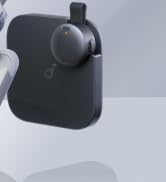
- Phone Accessory: Attach the charging case (with the microphone inside) to your phone using the magnetic ring for secure attachment.

Image: Demonstrates the three primary ways to wear the soundcore Work: pinned to a shirt, worn on a necklace, or magnetically attached to a phone.
4. Instruccions de funcionament
4.1 Enregistrament instantani
To begin recording, simply press the single button on the device. The device will start recording instantly, and you can monitor the recording status in real-time via the soundcore app.

Image: A close-up of a hand pressing the single button on the soundcore Work device, indicating instant recording activation.
4.2 Double Tap Marking
During a recording, double-tap the soundcore Work device to mark important moments. This action triggers a vibration to confirm task completion. These marks will be highlighted in the transcription and summary for easy reference.

Image: A person double-tapping the soundcore Work device, which is clipped to their shirt, to mark a specific point in the recording. The corresponding app screen shows highlighted text.
4.3 Real-Time Sync
The soundcore app auto-launches for recording on iOS devices and instantly uploads files when recording is stopped, eliminating the need for manual transfers. Android users must enable background app permissions for simultaneous recording and uploading.

Image: A group of people in a meeting, with the soundcore Work device placed on the table, illustrating its real-time synchronization capabilities with a smartphone.
4.4 Precise Transcription
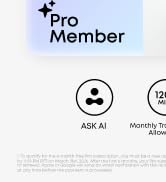
The device features a speech-to-text model supporting over 100 languages for seamless cross-border communication. It can also distinguish between different speakers in a conversation, providing clear and organized text. The Pro plan offers 1,200 minutes of transcription monthly.

Image: A smartphone screen displaying a transcription with distinct speaker identification, highlighting the clarity and organization of the text generated by the soundcore Work device.
4.5 Intelligent Summarization
The soundcore Work generates structured summaries using GPT-powered templates tailored to the content of your meetings. The Pro plan allows you to manually select summaries from multiple recordings and combine them into a single file.

Image: A smartphone screen displaying aggregated summaries from various recordings, illustrating the soundcore Work's capability to organize and manage information.
5. Seguretat i privadesa de les dades
Your audio and transcription data are encrypted with AES-256 and stored locally on your device. Cloud data is promptly deleted post-transcription, with a 7-day buffer for access to unretrieved files to protect your credits. The soundcore app is SOC 2 Type I certified, and the device complies with EN 18031-1/-2 standards, referencing the NIST IR 8425 baseline.

Image: A graphic illustrating the soundcore Work's data security measures, including independent audits and certifications, emphasizing privacy protection.
6. MFi Certification
The soundcore Work is MFi-Certified, featuring an Apple-authorized chipset that ensures broad compatibility with iPhones. It is built to meet strict Apple performance standards and has been tested in Apple-authorized facilities for safer, more reliable quality. Note: This product is compatible with Android devices, but iPhone 7 and earlier models are not supported.

Image: A graphic explaining the Apple MFi certification, emphasizing the authorized chipset, adherence to strict standards, and testing in Apple-authorized facilities for reliable quality.
7. Pro Plan Features
New users who authorize a Pro monthly subscription before 11:59 PM PT on March 31st, 2026, will receive a 6-month free trial. After the trial, the subscription will automatically renew at the standard monthly rate from the 7th month. Users may cancel anytime before the billing date. After connecting the device for the first time, users automatically become Starter members and receive 300 minutes of transcription per month. If a user upgrades to a paid membership, their Starter membership will be paused and will automatically resume once the paid subscription expires.

Image: A comparison table outlining the features and allowances for Starter, Pro, and Unlimited membership plans, with the Pro plan offering 1200 minutes of transcription and other advanced features.
8. Especificacions
| Característica | Detall |
|---|---|
| Dimensions del producte | 4.29 x 4.25 x 1.52 polzades |
| Pes de l'article | 1.41 unces (40 grams) |
| Número de model de l'article | D3200 |
| Bateries | Cal piles de 1 9V. |
| Capacitat d'emmagatzematge de memòria | 8 GB |
| Marca | Soundcore |
| Interfície del maquinari | USB tipus C |
| Factor de forma del micròfon | Lavalier |
| Dispositius compatibles | Smartphone |
| Data de primera disponibilitat | 3 de novembre de 2025 |
9. Solució De Problemes
9.1 Problemes de connexió
If the device fails to connect to the app, ensure Bluetooth is enabled on your smartphone and the soundcore Work device is powered on and within range. Try restarting both the device and the app. For persistent issues, refer to the app's help section or reinstall the app.
9.2 Problemes d'enregistrament
If recordings are not saving or are of poor quality, check the device's battery level. Ensure the microphone is not obstructed and that you are within the optimal recording range (within 5 meters). Verify that the device's internal storage is not full. If using the app, ensure it has necessary permissions.
9.3 Transcription/Summarization Errors
Accuracy of transcription and summarization can be affected by background noise, speaker clarity, and language settings. Ensure the recording environment is as quiet as possible. Verify that the correct language is selected in the app. For best results, consider using the Pro plan's advanced features.
10. Garantia i Suport
For warranty information and customer support, please refer to the documentation included with your product or visit the official Soundcore website. You can also contact Soundcore customer service directly for assistance with your device.
11. Galeria de mitjans
11.1 Imatges del producte