Introducció
Thank you for choosing the Bigben Karaoke Microphone. This all-in-one portable karaoke system combines a stereo microphone with a powerful 15W Bluetooth speaker and dynamic light effects, designed to enhance your singing and music listening experience. This manual provides essential information for safe and optimal use of your device.
Informació de seguretat
- Llegiu totes les instruccions abans d'utilitzar el dispositiu.
- Mantingueu el dispositiu allunyat de l'aigua i la humitat.
- No exposar a temperatures extremes ni a la llum solar directa.
- No intenteu desmuntar ni reparar el dispositiu vosaltres mateixos. Poseu-vos en contacte amb personal de servei qualificat.
- Feu servir només els accessoris de càrrega especificats.
- Mantenir fora de l'abast dels nens.
Contingut del paquet
Si us plau, comproveu que tots els elements siguin presents al paquet:
- Bigben Karaoke Microphone (Model PARTYBTMIC2WH)
- Cable de càrrega (USB)
- Manual d'usuari (aquest document)
- Front Glass (as an included component, likely pre-installed or a protective cover)

Imatge 1: The Bigben Karaoke Microphone shown in its retail packaging. The packaging highlights features such as Bluetooth connectivity, 4 vocal effects, and wireless speaker functionality.
Producte acabatview
The Bigben Karaoke Microphone features an integrated speaker and various controls for an interactive experience.
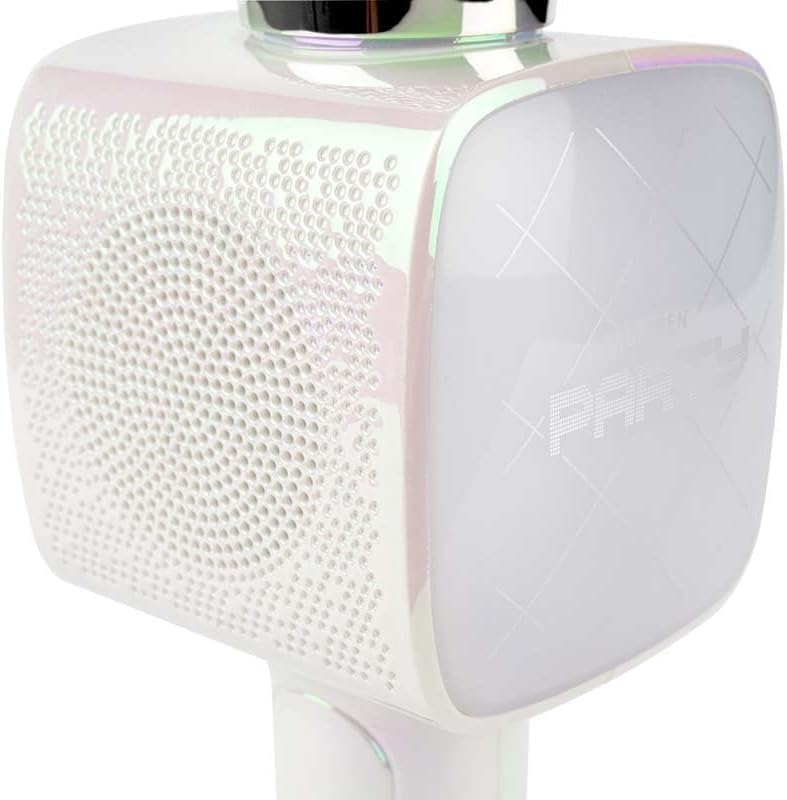
Imatge 2: Un primer pla view of the Bigben Karaoke Microphone, focusing on the speaker grille and the light-up panel. The panel displays "PARTY" and shows dynamic light effects.
Característiques principals:
- Bluetooth 5.0: For stable wireless connection to your devices.
- Altaveu integrat: 15W output for clear and powerful sound.
- Efectes de llum: Dynamic lighting to enhance the karaoke experience.
- Efectes de so: 4 different vocal effects and an echo effect.
- Múltiples entrades: USB, Micro SD, and 3.5mm headphone jack.
Configuració
1. Càrrega del micròfon
- Connecteu el cable de càrrega USB proporcionat al port de càrrega del micròfon.
- Connecteu l'altre extrem del cable USB a un adaptador de corrent USB compatible (no inclòs) o al port USB d'un ordinador.
- El llum indicador de càrrega s'il·luminarà. Un cop completament carregat, el llum pot canviar de color o apagar-se.
2. Encès / apagat
- To power on, press and hold the Power button for a few seconds until the indicator light illuminates and you hear an audible prompt.
- Per apagar-lo, premeu i manteniu premut el botó d'engegada de nou fins que l'indicador lluminós s'apagui.
3. Emparellament Bluetooth
- Ensure the microphone is powered on and in Bluetooth pairing mode (usually indicated by a flashing light).
- Al telèfon intel·ligent, la tauleta o un altre dispositiu compatible amb Bluetooth, aneu a la configuració de Bluetooth.
- Cerca available devices and select "Bigben Karaoke Mic" (or similar name) from the list.
- Once paired, you will hear a confirmation sound, and the indicator light will stop flashing.
Instruccions de funcionament
1. Reproducció de música
- Mitjançant Bluetooth: After successful pairing, play music from your connected device. The sound will output through the microphone's speaker.
- Via USB/Micro SD: Insert a USB drive or Micro SD card (with music files) into the respective port. The microphone will automatically detect and play music.
- Via 3.5mm Audio Cable: Connect an external audio source using a 3.5mm audio cable (not included) to the headphone input.
2. Ús del micròfon
- Speak or sing directly into the microphone grille.
- Adjust the microphone volume using the dedicated controls on the device.
3. Efectes de so
- Vocal Effects: The microphone offers 4 different vocal effects. Press the "Effect" button (or similar labeled button) to cycle through these effects.
- Efecte d'eco: Activate or adjust the echo effect using its dedicated control.
4. Efectes de llum
The microphone features dynamic light effects. These lights typically activate automatically when the device is on and can often be toggled or changed using a dedicated light button, if available.
Manteniment
- Neteja: Wipe the microphone with a soft, dry cloth. Do not use abrasive cleaners or solvents.
- Emmagatzematge: Guardeu el dispositiu en un lloc fresc i sec, lluny de la llum solar directa quan no l'utilitzeu.
- Cura de la bateria: Per a una durada òptima de la bateria, carregueu el dispositiu regularment, fins i tot si no l'utilitzeu amb freqüència.
Resolució de problemes
| Problema | Causa possible | Solució |
|---|---|---|
| Sense poder | La bateria està esgotada. | Charge the microphone fully. |
| No hi ha so de l'altaveu | Volume is too low; device not connected; incorrect input mode. | Increase volume; ensure Bluetooth is paired or cable is connected; check USB/Micro SD insertion. |
| El micròfon no funciona | Microphone volume is too low; microphone function is off. | Increase microphone volume; ensure microphone is active. |
| Connexió Bluetooth inestable | Device is too far from the microphone; interference. | Move devices closer; avoid obstacles; disconnect and re-pair. |
Especificacions
| Característica | Detall |
|---|---|
| Marca | Bigben |
| Número de model | PARTYBTMIC2WH |
| Connectivitat | Bluetooth 5.0, USB, Micro SD, 3.5mm Headphone Jack |
| Sortida de l'altaveu | 15W |
| Efectes de so | 4 Vocal Effects, Echo Effect |
| Dimensions del producte (LxWxH) | 20 x 15 x 10 cm |
| Pes de l'article | 300 grams |
| Color | Blanc |
| Nombre de canals | 2 |
| Piles necessàries | Yes (type unknown, likely integrated rechargeable) |
Garantia i Suport
For warranty information and customer support, please refer to the documentation provided with your purchase or visit the official Bigben weblloc web. Conserveu el comprovant de compra per a reclamacions de garantia.
For technical assistance or further inquiries, please contact Bigben customer service through their official channels.


