1. Introducció
This manual provides essential instructions for the safe operation, setup, and maintenance of your JIKEFUN S156 RC Drone. Please read this manual thoroughly before operating the drone to ensure proper function and to prevent damage or injury. The S156 drone features a 4.5-inch screen display remote control, UHD dual cameras, brushless motors, optical flow hovering, and a 360° propeller guard for enhanced flight stability and safety.
2. Contingut del paquet
Verifiqueu que tots els elements que s'enumeren a continuació siguin presents al vostre paquet. Si falta algun component o hi ha algun dany, poseu-vos en contacte amb el servei d'atenció al client.
- S156 RC Drone (Orange)
- Remote Control with 4.5-inch Screen Display
- Rechargeable Drone Battery (Lithium Polymer)
- Cable de càrrega USB
- Spare Propellers (2 pairs)
- Propeller Guard (pre-installed)
- Manual d'usuari
- Estoig d'emmagatzematge
- Micro SD Card and USB Card Reader
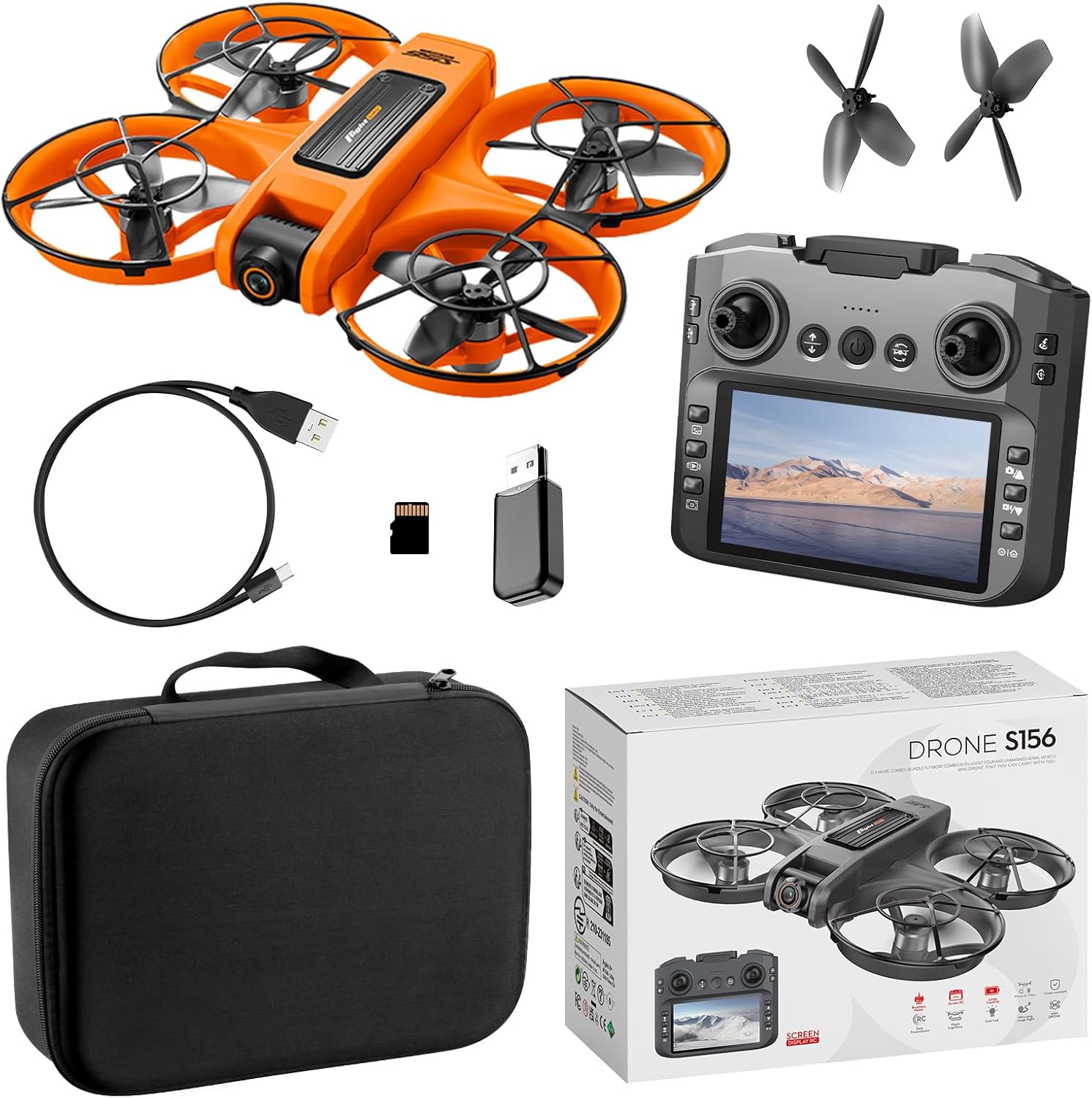
Figura 2.1: Contents of the S156 RC Drone package. This image displays the orange S156 drone, the remote control with an integrated screen, a USB charging cable, a micro SD card with a USB reader, two pairs of spare propellers, and a black storage case, alongside the product box.

Figura 2.2: The S156 drone shown with its removable battery and spare propellers. The drone is orange with black propeller guards. The battery is also orange.
3. Configuració
3.1 Càrrega de la bateria del dron
- Connecteu el cable de càrrega USB a la bateria del dron.
- Connecteu l'altre extrem del cable USB a un adaptador de corrent USB de 5 V/1 A (no inclòs).
- The charging indicator light on the battery will show its status (refer to battery instructions for specific light patterns).
- Charging typically takes 60-90 minutes. Disconnect once fully charged.
3.2 Instal·lació de la bateria del dron
- Assegureu-vos que el drone estigui apagat.
- Insert the fully charged battery into the battery compartment on the drone, ensuring it clicks securely into place.
3.3 Configuració del control remot
- Install 3x AA batteries (not included) into the remote control's battery compartment, observing correct polarity.
- Enceneu el comandament a distància prement el botó d'engegada.
3.4 Instal·lació/substitució de l'hèlix
The S156 drone comes with pre-installed propeller guards. If propellers need replacement, ensure you use the correct type (A or B) as indicated on the propeller and motor arm.
- Carefully remove the old propeller by gently pulling it upwards.
- Alineeu la nova hèlix amb l'eix del motor i premeu fermament fins que estigui fixada.
4. Instruccions de funcionament
4.1 Emparellar el dron i el comandament a distància
- Col·loqueu el drone sobre una superfície plana i plana.
- Power on the drone. The drone's indicator lights will flash.
- Enceneu el comandament a distància.
- Push the left joystick (throttle) up to its maximum position, then pull it down to its minimum position. The drone's lights will stop flashing and remain solid, indicating successful pairing.
- Nota important: When using multiple drones simultaneously, power on and pair each drone and remote control separately to avoid frequency interference.
4.2 Llista de verificació prèvia al vol
- Assegureu-vos que les bateries del dron i del comandament a distància estiguin completament carregades.
- Comproveu que les hèlixs estiguin ben fixades i no estiguin danyades.
- Verify the drone is placed on a flat, level surface for calibration.
- Ensure sufficient clear space for flight, away from obstacles, people, and animals.
4.3 Controls bàsics de vol

Figura 4.1: Detailed guide to the S156 remote control functions. This image labels the various buttons and joysticks, including Velocity, Throttle stick, Emergency stop, Headless Mode, One-click return, View photos, Check out the video, Screen switch, 12.5cm LCD screen, Lens adjustments, Steering sticks, Back off, Calibration, 360° Rolling, Select up/Photo, Select Down/Record, and Play/Main interface.
- Enlairament/aterratge amb una sola tecla: After pairing, press the One-Key Takeoff/Landing button (refer to Figure 4.1) to automatically launch the drone to a stable hovering height or to land it gently.
- Throttle Stick (Left Joystick):
- Push up: Ascend
- Pull down: Descend
- Push left/right: Rotate left/right
- Directional Stick (Right Joystick):
- Push up: Fly forward
- Pull down: Fly backward
- Push left: Fly left (sideways)
- Push right: Fly right (sideways)
- Mode sense cap: Press the Headless Mode button to activate. In this mode, the drone's orientation is relative to the pilot, regardless of the drone's front direction. Press again to exit.
- Ajust de 3 velocitats: Use the speed adjustment button to cycle through low, medium, and high-speed modes.
4.4 Funcions avançades

Figura 4.2: The S156 drone and its remote control, highlighting the 4.5-inch screen display. The screen shows a live feed from the drone's camera, and text overlays indicate features like optical flow hovering, brushless power, and 360° protection.
- Flux òptic en suspensió: The drone utilizes optical flow sensors for stable hovering, especially useful in indoor environments or areas with clear ground patterns.
- UHD Dual Camera: The drone is equipped with two cameras. The front lens can be adjusted 90° via the remote control for varied viewing angles. Use the dedicated buttons on the remote (Figure 4.1) to take photos or record videos.
- Zoom de 50X: Utilize the digital zoom function through the remote control interface or connected app to magnify your view.
- Control de gestos: Perform specific hand gestures in front of the drone's camera to trigger photo or video recording (refer to the app manual for specific gestures).
- Vol de trajectòria: Draw a flight path on the connected app's screen, and the drone will automatically follow the designated route.
- Night LED: The drone features built-in LED lights for improved visibility during low-light conditions or night flights.
- Evitació intel·ligent d'obstacles: The drone is equipped with sensors to detect and avoid obstacles, enhancing flight safety.
4.5 App Connectivity (Wi-Fi)
For advanced features like real-time video transmission, gesture control, and trajectory flight, download the dedicated JIKEFUN drone app (check QR code in packaging or app store). Connect your smartphone to the drone's Wi-Fi network (SSID usually starts with 'S156' or 'Drone_XXXX').
5. Manteniment
5.1 Neteja
- Use a soft, dry cloth to clean the drone's body and camera lenses.
- Avoid using liquids or solvents that could damage electronic components.
5.2 Cura de l'hèlix
- Regularly inspect propellers for cracks, bends, or damage. Replace immediately if any damage is found.
- Ensure propellers are free from debris (grass, hair, etc.) before each flight.
5.3 Emmagatzematge de la bateria
- Guardeu les piles en un lloc fresc i sec, allunyat de la llum solar directa i de temperatures extremes.
- Per a l'emmagatzematge a llarg termini, carregueu les bateries fins a aproximadament un 50% de la seva capacitat.
6. Solució De Problemes
- El dron no respon al comandament a distància:
- Ensure both drone and remote control are powered on.
- Re-pair the drone and remote control (Section 4.1).
- Comproveu les bateries del comandament a distància.
- El dron és inestable durant el vol:
- Ensure the drone was placed on a flat, level surface during pairing/calibration.
- Check for damaged or bent propellers and replace if necessary.
- Calibrate the gyroscope (refer to remote control guide, Figure 4.1, for calibration button).
- No image from camera/Wi-Fi connection issues:
- Ensure the drone's Wi-Fi is enabled and your phone is connected to the correct network.
- Restart both the drone and your smartphone.
- Assegureu-vos que l'aplicació tingui els permisos necessaris al vostre telèfon intel·ligent.
- Temps de vol curt:
- Assegureu-vos que la bateria del dron estigui completament carregada abans de cada vol.
- Battery performance may degrade over time; consider replacing old batteries.
7. Especificacions
| Característica | Detall |
|---|---|
| Nom del model | S156 |
| Marca | JIKEFUN |
| Color | Taronja |
| Material | Plastic (Aviation PA/PC material fuselage) |
| Pes de l'article | 127 grams (aproximadament 4.5 unces) |
| Dimensions del producte (L x A x A) | 22.5cm x 19cm x 5cm (approx. 8.86" x 7.48" x 1.97") |
| Tecnologia de connectivitat | Wi-Fi (5G WIFI Transmission) |
| Càmera | UHD Dual Camera (ESC adjustable front lens) |
| Tipus de motor | Motor sense escombretes |
| Tipus de bateria | Lithium Polymer (1 Nonstandard Battery included) |
| Característiques especials | Optical Flow Hovering, 360° Propeller Guard, 6-Axis Gyro, Headless Mode, One-Key Takeoff/Landing, 3-Speed Adjustable, 50X Zoom, Gesture Control, Trajectory Flight, Night LED, Intelligent Obstacle Avoidance |
| UPC | 797457704499 |

Figura 7.1: Dimensions of the S156 RC Drone. The image shows the drone with measurements of 22.5cm in length, 19cm in width, and 5cm in height.
8. Pautes de seguretat
- Feu servir el dron sempre en zones obertes, lluny de persones, animals, edificis i línies elèctriques.
- No voli amb vents forts o condicions meteorològiques adverses.
- Mantingueu una distància de seguretat amb el dron durant l'operació.
- Never attempt to catch a flying drone with your hands.
- Mantingueu els dits i la roba solta allunyats de les hèlixs giratòries.
- Supervise children during drone operation.
- No modifiqueu el dron ni els seus components.
- Follow all local regulations and laws regarding drone operation.
9. Garantia i Suport
The JIKEFUN S156 RC Drone comes with a standard manufacturer's warranty. For specific warranty details, please refer to the warranty card included in your package or contact JIKEFUN customer support directly. If you encounter any issues or require assistance, please reach out to the manufacturer via their official weblloc web o la informació de contacte que es proporciona a l'embalatge del producte.


