Introducció
This manual provides essential information for the proper use and maintenance of your Motorola Razr 50 Ultra XT2451-1 5G Foldable Smartphone. Please read this guide thoroughly before operating your device to ensure optimal performance and longevity.
The Motorola Razr 50 Ultra XT2451-1 features a 6.9-inch pOLED main display with a 165Hz refresh rate and a 4-inch external display. It is designed for multitasking, gaming, and productivity with its advanced processing capabilities. The device includes a 50MP main camera, a 50MP telephoto lens with 2x optical zoom, and supports global 5G connectivity. It is crafted with premium materials and offers IPX8 water resistance.
Què hi ha a la caixa
Verifiqueu que tots els elements siguin presents a l'embalatge del producte:
- Motorola Razr 50 Ultra XT2451-1 Smartphone
- Adaptador d'alimentació
Si falta algun element o està malmès, poseu-vos en contacte amb l'atenció al client.
Configuració
1. Càrrega del dispositiu
Before initial use, fully charge your Motorola Razr 50 Ultra. Connect the provided Power Adapter to the charging port on your device and plug it into a power outlet. The device features a 4000 mAh battery and supports 45W TurboPower fast charging. A full charge typically takes approximately 2 hours.
2. Instal·lació de la targeta SIM
The Motorola Razr 50 Ultra XT2451-1 is an unlocked device supporting 5G cellular technology. Locate the SIM card tray on the side of the device. Use the SIM ejector tool (not included, typically found with new SIM cards) to open the tray. Insert your nano-SIM card into the tray with the gold contacts facing down, then carefully reinsert the tray into the device.
3. Engegada inicial
Press and hold the power button located on the side of the device until the Motorola logo appears. Follow the on-screen prompts to complete the initial setup, including language selection, Wi-Fi connection, and Google account setup.
Funcionament del dispositiu
Main and External Displays
Your device features a large 6.9-inch pOLED main display when unfolded and a functional 4-inch external display when folded. The external display allows for quick access to notifications, widgets, and certain applications without needing to unfold the phone.
Plegat i desplegament
To unfold the device, gently open it from the folded position until it clicks into place. To fold, close the device until the two halves meet. Avoid applying excessive force when folding or unfolding.
Ús de la càmera
The Motorola Razr 50 Ultra is equipped with a 50MP main camera and a 50MP telephoto lens with 2x optical zoom. Open the Camera application to access various shooting modes, including standard photo, portrait, and video. Utilize the advanced AI photography features for enhanced image quality.
Programari i connectivitat
The device operates on Android 14, providing access to a wide range of applications and features. It supports global 5G connectivity for high-speed data access. Ensure your SIM card is properly installed and your mobile data or Wi-Fi is enabled for internet access.
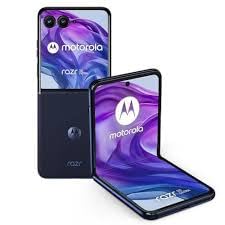
Image of the Motorola Razr 50 Ultra XT2451-1 foldable smartphone, showcasing el seu disseny compacte.
Manteniment
Neteja del teu dispositiu
To clean your Motorola Razr 50 Ultra, use a soft, lint-free cloth. For stubborn smudges, slightly dampNetegeu el drap amb aigua o un netejador de pantalles dissenyat específicament per a electrònica. Eviteu utilitzar productes químics agressius o materials abrasius.
Actualitzacions de programari
Comproveu i instal·leu regularment si hi ha actualitzacions de programari per assegurar-vos que el dispositiu tingui les funcions, els pegats de seguretat i les millores de rendiment més recents. Normalment podeu trobar opcions d'actualització al menú de configuració del dispositiu, a "Sistema" o "Quant al telèfon".
Cura de la bateria
To prolong battery life, avoid exposing the device to extreme temperatures. It is recommended to keep the battery charge between 20% and 80% for optimal long-term health. Use only the provided power adapter or certified compatible chargers.
Resistència a l'aigua
The device features IPX8 water resistance, meaning it can withstand immersion in up to 1.5 meters of fresh water for up to 30 minutes. This protection is not permanent and may decrease over time with normal wear. Avoid exposing the device to saltwater, chlorinated water, or other liquids. If the device gets wet, dry it thoroughly before charging or using the ports.
Resolució de problemes
El dispositiu no s'encén
Ensure the battery is sufficiently charged. Connect the device to the power adapter and allow it to charge for at least 15 minutes before attempting to power it on again. If the issue persists, perform a force restart by holding the power button for an extended period (usually 10-15 seconds).
Problemes de visualització
If the screen is unresponsive or frozen, try restarting the device. Check for any physical damage to the display. Ensure the device is not in a mode that turns off the screen (e.g., power saving mode).
Connectivity Problems (Wi-Fi/5G)
For Wi-Fi issues, restart your router and the device. For 5G cellular issues, ensure your SIM card is correctly inserted and your mobile data is enabled. Check if you have network coverage in your area. Try toggling airplane mode on and off.
Rendiment lent
Close unnecessary background applications. Clear cache data from apps or perform a system cache clear. Ensure your device has sufficient storage space. If performance issues continue, consider a factory reset (back up your data first).
Especificacions
| Característica | Especificació |
|---|---|
| Nom del model | Razr 50 Ultra XT2451-1 256GB 8GB |
| Número de model de l'article | XT2451-1 |
| Sistema operatiu | Android 14 |
| Model de CPU | Qualcomm Snapdragon MSM8260A |
| Velocitat de la CPU | 2.2 GHz |
| Mida instal·lada de la memòria RAM | 8 GB |
| Capacitat d'emmagatzematge de memòria | 8 GB (Nota: Això fa referència a la RAM, l'emmagatzematge intern és de 256 GB segons el títol del producte) |
| Capacitat de la bateria | 4000 mAh (Battery Power Rating) |
| Temps de càrrega | 2 hores |
| Tecnologia cel·lular | 5G |
| Operador sense fil | Desbloquejat |
| Factor de forma | Bar (Foldable) |
| Color | Gris espacial |
| Pes de l'article | 7 unces |
| Dimensions del paquet | 7 x 6.5 x 3.2 polzades |
Garantia i Suport
Per obtenir informació detallada sobre la garantia, consulteu la targeta de garantia inclosa amb el producte o visiteu el lloc web oficial de Motorola. website. For technical support, software updates, or service inquiries, please visit the Motorola support page or contact their customer service directly. Keep your proof of purchase for warranty claims.