1. Introducció
This manual provides essential information for the safe and efficient use of your OPPO Reno 14F 5G smartphone. Please read this guide thoroughly before operating the device to ensure proper functionality and to understand its features. Keep this manual for future reference.
2. Contingut del paquet
Verifiqueu que el paquet del producte conté els elements següents:
- OPPO Reno 14F 5G Smartphone
- Auriculars
- Expulsor de la safata SIM
- Cable USB (tipus C)
If any items are missing or damaged, please contact your retailer or OPPO customer support.
3. Dispositiu acabatview
Familiarize yourself with the physical components of your OPPO Reno 14F 5G.

Figura 3.1: Frontal View. This image displays the front of the OPPO Reno 14F 5G smartphone, highlighting the display screen and the front-facing camera located at the top center.

Figura 3.2: Esquena View. This image shows the rear of the OPPO Reno 14F 5G smartphone in Luminous Green, featuring the dual camera module and the OPPO branding.
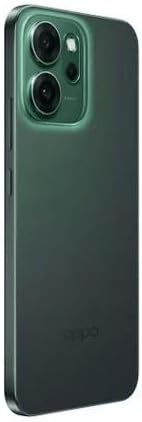
Figura 3.3: lateral View. Aquesta imatge il·lustra el costat profile of the OPPO Reno 14F 5G, indicating the location of the volume buttons, power button, and SIM card tray.
3.1. Botons i ports
- Botó d'encesa: Located on the right side. Press and hold to power on/off or restart. Press briefly to lock/unlock the screen.
- Botons de volum: Located on the left side. Press to adjust media volume, call volume, or notification volume.
- Port USB tipus C: Located at the bottom. Used for charging, data transfer, and connecting the included headset.
- Safata de la targeta SIM: Located on the side. Use the provided SIM ejector tool to open.
- Càmeres: Front-facing camera for selfies and video calls. Rear dual-camera system for high-quality photos and videos.
4. Configuració
4.1. Càrrega del dispositiu
Before first use, fully charge your OPPO Reno 14F 5G. Connect the USB cable to the USB Type-C port on the phone and the other end to a compatible power adapter. Plug the adapter into a power outlet.
4.2. Inserció de la targeta SIM
- Apagueu el dispositiu.
- Locate the SIM card tray on the side of the phone (refer to Figure 3.3).
- Insert the SIM ejector tool into the small hole on the SIM tray and press gently until the tray pops out.
- Col·loca la targeta o targetes nano-SIM a la safata amb els contactes daurats cap avall. Assegura't que estiguin orientades correctament.
- Empenyeu amb cura la safata cap al telèfon fins que encaixi al seu lloc.
4.3. Assistent d'encesa inicial i configuració
Press and hold the Power button until the OPPO logo appears. Follow the on-screen instructions to complete the initial setup, which includes:
- Selecció de la llengua
- Connexió a una xarxa Wi-Fi
- Configuració del vostre compte de Google
- Configuring security features (fingerprint, face unlock, PIN/pattern)
- Transferring data from an old device (optional)
5. Funcionament del dispositiu
5.1. Navegació bàsica
Your OPPO Reno 14F 5G runs on Android 14 and supports gesture navigation or traditional navigation buttons. You can configure your preferred navigation method in the Settings menu.
- Llisca cap amunt: Aneu a la pantalla d'inici.
- Swipe Up and Hold: Open recent apps.
- Swipe from Left/Right Edge: Torna enrere.
5.2. Fer trucades i enviar missatges
Use the Phone app to make calls and the Messages app to send and receive SMS/MMS messages. Ensure your SIM card is active and has network coverage.
5.3. Ús de la càmera
Open the Camera app to capture photos and videos. The rear camera system offers various modes for different scenarios, while the front camera is ideal for selfies and video calls. Tap the shutter button to take a photo or record a video.
5.4. Connectivitat
- Wi-Fi: Connecteu-vos a xarxes sense fil per accedir a Internet.
- Bluetooth: Emparella amb auriculars sense fil, altaveus o altres dispositius compatibles amb Bluetooth.
- 5G: Utilize high-speed mobile data networks where available.
- GPS: Per a serveis de localització i navegació.
6. Manteniment
6.1. Neteja del dispositiu
Use a soft, lint-free cloth to clean the screen and body of your phone. Avoid using harsh chemicals or abrasive materials, as these can damage the device's finish.
6.2. Cura de la bateria
Per allargar la durada de la bateria:
- Eviteu temperatures extremes.
- Feu servir el carregador i el cable originals.
- No deixeu el telèfon carregant-se durant llargs períodes després que estigui ple.
6.3. Actualitzacions de programari
Comproveu i instal·leu regularment si hi ha actualitzacions de programari per assegurar-vos que el dispositiu tingui les darreres funcions, pegats de seguretat i millores de rendiment. Aneu a Configuració > Quant al dispositiu > Actualitzat per comprovar si hi ha actualitzacions.
6.4. Còpia de seguretat de dades
Fes còpies de seguretat regulars de les teves dades importants (fotos, contactes, documents) en un servei al núvol o a un ordinador per evitar la pèrdua de dades.
7. Solució De Problemes
Si teniu problemes amb el dispositiu, consulteu les solucions habituals següents:
| Problema | Solució |
|---|---|
| El dispositiu no s'encén | Assegureu-vos que la bateria estigui carregada. Premeu i manteniu premut el botó d'engegada durant almenys 10 segons per forçar un reinici. |
| La pantalla no respon | Force restart the device. If the issue persists, contact support. |
| Problemes de connectivitat de xarxa | Check if Airplane Mode is off. Restart the device. Reinsert the SIM card. Reset network settings (Settings > System settings > Back up and reset > Reset phone > Reset network settings). |
| Les aplicacions es bloquegen o es bloquegen | Clear the app's cache and data (Settings > Apps > App management > [App Name] > Storage usage). Update the app. Uninstall and reinstall the app. |
| La bateria s'esgota ràpidament | Check battery usage in Settings to identify power-hungry apps. Reduce screen brightness. Disable unnecessary features like GPS, Bluetooth, or Wi-Fi when not in use. |
| Sobreescalfament | Close background apps. Avoid using the phone while charging or in direct sunlight. If overheating persists, power off the device and allow it to cool. |
7.1. Restabliment de fàbrica
As a last resort for persistent software issues, you may perform a factory reset. This will erase all data on your phone. Back up your data before proceeding. Go to Configuració > Configuració del sistema > Còpia de seguretat i restabliment > Restablir telèfon > Esborrar totes les dades.
8. Especificacions
Detailed technical specifications for the OPPO Reno 14F 5G smartphone:
| Característica | Detall |
|---|---|
| Sistema operatiu | Android 14 |
| Memòria RAM instal·lada | 12 GB |
| Capacitat d'emmagatzematge de memòria | 256 GB |
| Tecnologia de connectivitat | 5G |
| Tecnologia cel·lular | 5G |
| Proveïdor de sense fil | Desbloquejat per a tots els transportistes |
| Potència nominal de la bateria | 6000 mAh |
| Pes de l'article | 187 g |
| Dimensions del paquet | 18.3 x 9.9 x 5.9 cm |
| Jack d'àudio | USB tipus C |
| Color | Luminous Green |
| Nom del model | Reno 5G |
| Número de model de l'article | 6932169376945 |
9. Garantia i Suport
Your OPPO Reno 14F 5G smartphone is covered by a limited warranty. For detailed warranty terms and conditions, please refer to the warranty card included in your package or visit the official OPPO website. For technical support, service, or further assistance, please contact OPPO customer service through their official channels.


