This manual provides essential instructions for the safe operation, setup, and maintenance of your JIKEFUN CZ20 Drone. Please read this manual thoroughly before operating the drone to ensure proper function and to prevent damage or injury. Keep this manual for future reference.
Image 1: JIKEFUN CZ20 Drone with included accessories, showcasing the drone, remote control, batteries, and carrying case.
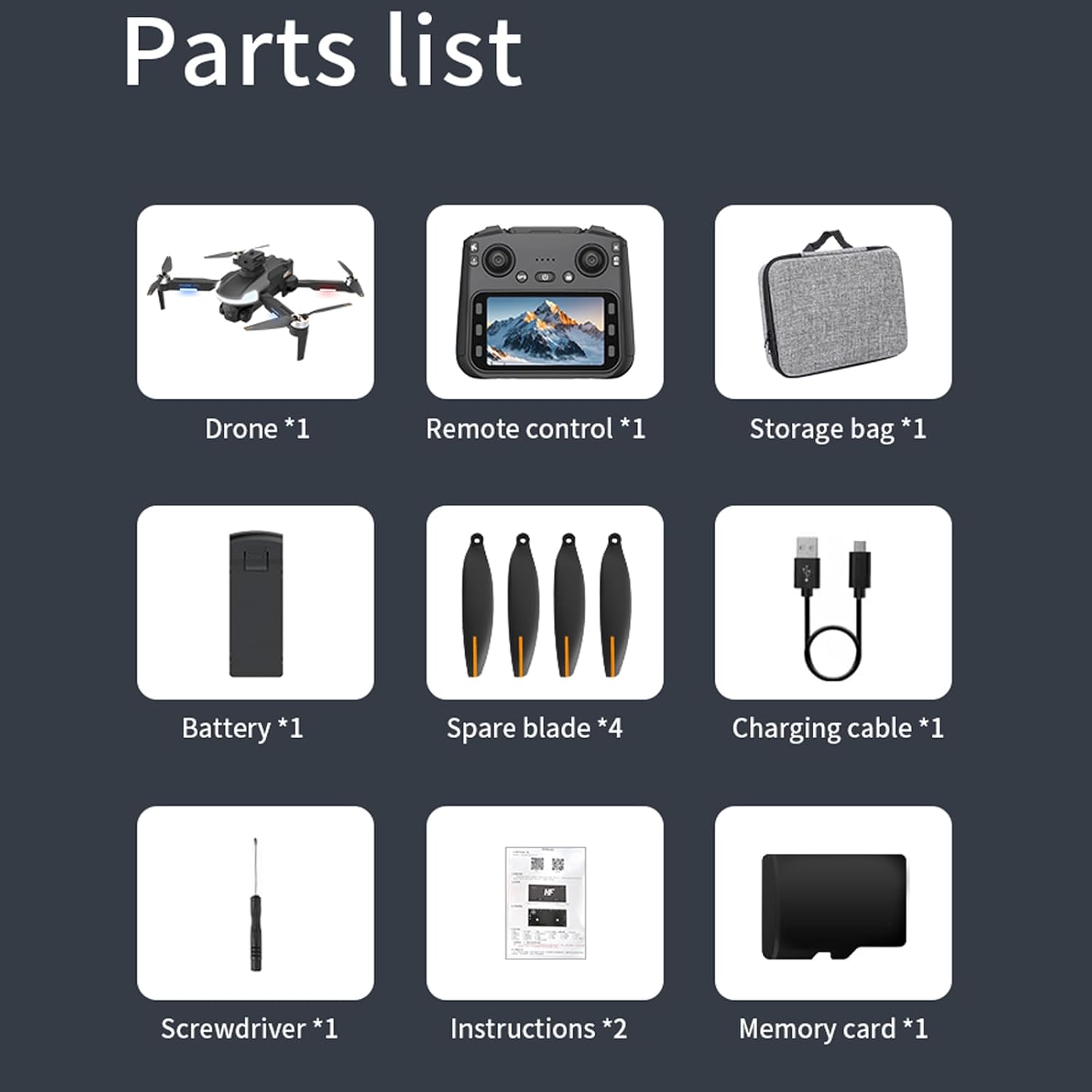
2. Contingut del paquet
Verifiqueu que tots els elements que s'enumeren a continuació s'inclouen al vostre paquet:
CZ20 Drone x 1
Remote Control with Screen x 1
Intelligent Flight Battery x 3
Spare Propellers (4A4B) x 1 set
Cable de càrrega USB x 1
Tornavís x 1
Manual d'usuari x 1
Wi-Fi Manual x 1
Targeta de memòria de 8 GB x 1
Lector de targetes x 1
Imatge 2: Una imatge detallada view of all components included in the JIKEFUN CZ20 Drone package, including the drone, remote, batteries, and tools.
3. Pautes de seguretat
Per garantir un funcionament segur i evitar danys, tingueu en compte el següent:
Restricció d'edat: This product is not intended for users under 16 years old.
Seguretat de la bateria: Always fully charge batteries before use. Low power can lead to loss of control.
Entorn de vol: Voleu en zones obertes, lluny de persones, animals, edificis i obstacles. Eviteu volar amb vents forts o condicions meteorològiques adverses.
Línia de visió: Mantingueu la línia de visió amb el dron en tot moment.
Seguretat de l'hèlix: Mantingueu les mans i la cara allunyades de les hèlixs giratòries.
Privadesa: Respect the privacy of others when using the camera.
4. Configuració
4.1 Càrrega de la bateria
Ensure both the drone's flight battery and the remote control are fully charged before use. A red indicator light signifies charging, and it turns off when charging is complete.
Connect one end of the USB charging cable to the drone battery's charging port.
Connect the other end of the USB cable to a power supply (e.g., USB wall adapter).
Repeat the process for the remote control, connecting the USB cable to its charging port.
Video 1: This video demonstrates the charging process for both the drone battery and the remote control. (Note: This video is a general drone operation tutorial and may not specifically feature the CZ20 model, but the charging steps are applicable.)
4.2 Pre-Flight Preparation
Inseriu la targeta SD: Insert the provided 8GB memory card into the designated slot on the remote control.
Deploy Drone Arms: Desplegueu suaument els braços del dron fins que encaixin en la posició correcta.
Install Drone Battery: Insert the charged flight battery into the drone's battery compartment until it clicks securely.
Engegar el dron: Premeu i manteniu premut el botó d'engegada del dron fins que els llums indicadors s'il·luminin.
Enceneu el comandament a distància: Slide the power switch on the remote control to the 'ON' position.
4.3 Calibració
Perform calibration before each flight for optimal stability and control.
Calibració del giroscopi: With the drone and remote powered on and connected, press the gyro calibration button on the remote. The drone's front arm lights will become steady, and the rear arm lights will blink, indicating successful calibration.
Calibratge geomagnètic: Press and hold the geomagnetic calibration button on the remote. The drone's lights will flash yellow to green. Pick up the drone and rotate it clockwise horizontally until the remote emits a 'drop' sound. Then, turn the drone clockwise vertically until another 'drop' sound is heard. Place the drone back on a level surface.
4.4 GPS Signal Search
For outdoor flight, ensure a strong GPS signal. The drone's yellow lights will turn blue upon successful GPS signal acquisition. Cerca more than 8 stars to fly.
Image 3: The CZ20 Drone with its remote control, highlighting the GPS automatic homing feature.
5. Instruccions de funcionament
Image 4: A detailed diagram of the remote control, indicating the function of each button and joystick.
5.1 Controls bàsics de vol
Enlairament: Press the one-key take-off button to unlock the motors, then push the left rocker up to take off.
Rise/Descend: Push the left rocker up to rise, down to descend.
Rotació: Push the left rocker left for left rotation, right for right rotation.
Advance/Recoil: Push the right rocker up to advance, down to recoil.
Left/Right Fly: Push the right rocker left for left-hand fly, right for right-hand fly.
5.2 Remote Control Screen Functions
The remote control features an integrated screen for enhanced control and viewing.
Obre la pantalla: Press and hold the screen open button (bottom left) to activate the screen.
Foto/vídeo: Press the photo button (top right) to take a picture. Press the record button (bottom right) to start/stop video recording.
Navegació del menú: Press the menu button (bottom left) to enter the menu. Use the up/down buttons to navigate and the OK button to select.
Brillantor de la pantalla: In the menu, select the brightness adjustment function and use the up/down buttons to adjust.
Format de la targeta SD: In the menu, select the format function to format the SD card.
5.3 Ajust de velocitat
The drone has multiple speed gears:
Velocitat baixa: Configuració per defecte.
Velocitat mitjana: Press the speed switch button once (remote emits two 'drop' sounds).
Alta velocitat: Press the speed switch button twice (remote emits three 'drop' sounds).
5.4 Camera Power Control
Power Down Camera: Press the camera power down button.
Power Up Camera: Press the camera power up button.
5.5 Mode d'evitació d'obstacles
To activate the obstacle avoidance mode, press and hold the speed switch button.
Image 5: The CZ20 Drone showcasing its 360-degree omnidirectional obstacle avoidance capability.
5.6 Automatic Return Mode
Long press the return button on the remote control to activate the automatic return mode. The drone will automatically return to its take-off point.
5.7 Indoor Flight Preparation
For indoor flight, where GPS signals may be weak or unavailable:
Turn off GPS: Press the GPS button on the remote control to disable GPS mode.
Calibració del giroscopi: Press the gyro calibration button to calibrate the gyroscope for stable indoor flight using optical flow positioning.
5.8 Instal·lació i connexió de l'aplicació
To use the drone with the mobile application:
Descarrega l’APP: Scan the QR code in the manual or search for the designated APP (e.g., "LW Pro") in your device's app store. Download and install it.
Activa la Wi-Fi: Activa la Wi-Fi al teu telèfon intel·ligent.
Connect to Drone Signal:Cerca the drone's Wi-Fi signal (e.g., "WIFI-GPS-5BA23E") and connect to it.
Open Drone APP: After successful Wi-Fi connection, open the drone APP. (Note: The remote control screen cannot be connected at this time).
Telèfon de muntatge: Open the phone stand on the remote control and securely clip your smartphone into place. You can now view the screen through the APP.
6. Manteniment
6.1 Recanvi de fulla
If a blade is damaged, replace it promptly to maintain flight performance and safety.
Treure la fulla antiga: Use the provided screwdriver to carefully remove the screw securing the damaged blade.
Note Blade Type: Observe the distinction between 'A' and 'B' blades. Ensure you install the correct type.
Instal·leu la nova fulla: Place the corresponding new blade onto the motor shaft and secure it with a screw using the screwdriver.
11.02 cm de llargada x 10.24 cm d'amplada x 3.15 cm d'alçada
Resolució de la càmera
720P HD
Temps de vol
Fins a 23 minuts per bateria (69 minuts en total amb 3 bateries)
Image 6: A visual representation of the drone's key parameters and dimensions.
8. Solució De Problemes
El dron no s'encén: Ensure the battery is fully charged and correctly inserted. Press and hold the power button for a few seconds.
El comandament a distància no es connecta: Ensure both the drone and remote are powered on. Perform gyro calibration. Check battery levels.
Vol inestable: Perform gyro and geomagnetic calibration. Ensure propellers are correctly installed and undamaged. Fly in calm conditions.
Sense senyal GPS: Assegureu-vos que esteu en una zona oberta a l'aire lliure amb una vista clara view of the sky. Wait for the drone to acquire enough satellites (more than 8 stars).
Problemes de connexió amb l'APP: Ensure Wi-Fi is enabled on your phone and connected to the drone's Wi-Fi network. Close and reopen the APP.
L'evitació d'obstacles no funciona: Ensure the obstacle avoidance mode is activated by pressing and holding the speed switch button.
9. Garantia i Suport
For warranty information, technical support, or service inquiries, please refer to the contact information provided with your purchase or visit the official JIKEFUN weblloc web. Conserveu el comprovant de compra per a reclamacions de garantia.
Manual d'instruccions del cotxe de drift d'alta velocitat amb tracció a les quatre rodes a escala 1:43 Manual d'instruccions per al cotxe de drift d'alta velocitat amb tracció a les quatre rodes i proporció completa a escala 1:43, que cobreix la configuració del producte, les precaucions de la bateria, el manteniment, el muntatge, el funcionament, la càrrega, les habilitats de conducció i la resolució de problemes.
Instruccions i guia d'operació de l'avió RC JIKEFUN Instruccions completes i guia operativa per a avions de control remot JIKEFUN RC, que cobreixen la configuració, el vol, la càrrega i la resolució de problemes per a models com FX635, FX620, FX622 i FX623.
Cuori Kitchenware and Cookware Catalog 2024 Explore the comprehensive Cuori catalog featuring a wide range of high-quality kitchenware, cookware, knives, thermoses, barware, and kitchen scales. Discover innovative designs and durable products for every culinary need.