1. Producte acabatview
The GIANTEX Adjustable Height Mobile Printer Stand is designed to provide practical storage and flexible placement for various office and home devices. It features a robust construction and convenient mobility, making it suitable for diverse environments.
- Emmagatzematge pràctic: Ofertes ample space for books, files, printers, indoor plants, and decorative items, contributing to an organized workspace.
- Ajust d'alçada flexible: Equipped with lever devices, this mobile printer stand provides two height options (65 cm and 77 cm) to accommodate different needs and optimize the position of your printer or other office machines.
- Moviment fàcil: Features four universal casters for effortless relocation. Two of these casters are lockable to ensure the stand remains stationary when required.
- Estabilitat fiable: Constructed with thick panels and sturdy metal tubes, ensuring high stability for supporting printers and other items.
- Manteniment fàcil: The surface is designed for easy cleaning and requires minimal upkeep.

Image 1.1: The printer stand demonstrating its two adjustable height settings, 65 cm and 77 cm, to suit different user preferences and device sizes.

Image 1.2: Illustration of the stand's convenient storage options, including a spacious top surface and two open shelves, ideal for books, files, printers, and decorations.
2. Instruccions de configuració
Follow these steps to assemble and set up your GIANTEX Adjustable Height Mobile Printer Stand:
- Desempaquetar components: Carefully remove all parts from the packaging. Verify that all components listed in the packing list (not provided in this manual) are present and undamaged.
- Muntatge del marc: Connect the metal tubes to form the main frame. Ensure all connections are secure.
- Fixar prestatges: Securely attach the thick panels to the frame to create the top surface and two open shelves.
- Instal·leu les rodes: Attach the four universal casters to the base of the stand. Ensure they are firmly screwed in.
- Ajusta l'alçada: Utilize the lever devices on the vertical supports to set the desired height (65 cm or 77 cm). Ensure both sides are adjusted evenly and locked into place for stability.
- Col·locació final: Position the stand in your desired location.

Image 2.1: Detailed product dimensions, useful for planning placement and ensuring compatibility with your space and devices.
3. Instruccions de funcionament
This section details how to effectively use the features of your printer stand:
- Ajust de l'alçada: To change the stand's height, unlock the lever devices on the vertical supports. Carefully raise or lower the top section to the desired position (65 cm or 77 cm). Ensure the levers click securely into place at the chosen height to prevent accidental movement.
- Moure el suport: To relocate the stand, ensure the two lockable casters are in the unlocked position. Gently push the stand to its new location.
- Locking the Stand: Once the stand is in its desired position, engage the brakes on the two lockable casters to prevent unintended movement.
- Placing Devices: Place your printer, fax machine, scanner, or other compatible devices on the top surface. Utilize the two lower shelves for storing paper, files, or other office supplies.
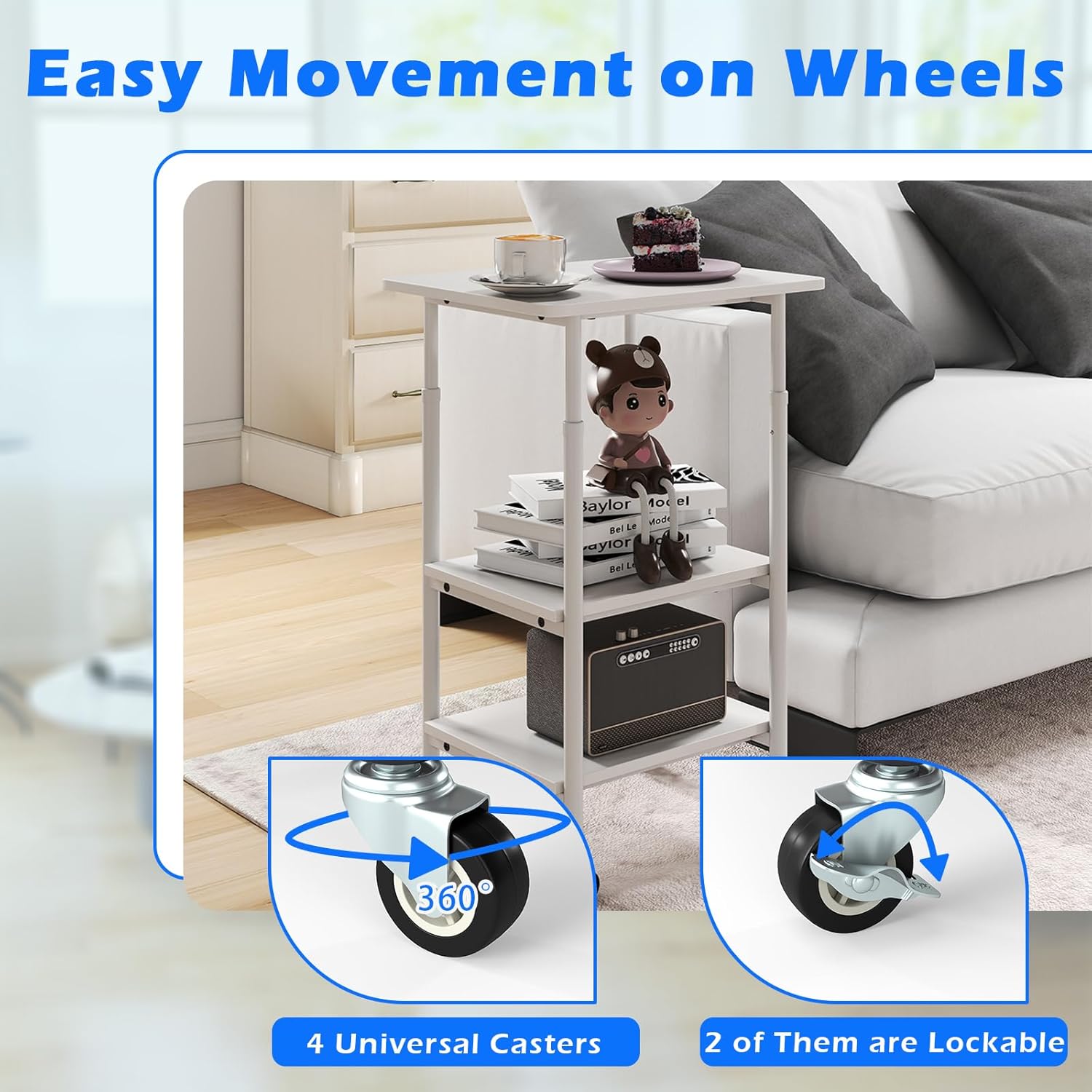
Image 3.1: Detail of the four universal casters, highlighting the two lockable wheels for secure positioning.
4. Manteniment
Proper maintenance ensures the longevity and appearance of your printer stand:
- Neteja: The stand's surface is easy to clean. Use a soft, damp drap per eixugar la pols i els vessaments. Eviteu netejadors abrasius o productes químics agressius que puguin danyar l'acabat.
- Inspecció: Reviseu periòdicament tots els cargols i connexions per assegurar-vos que romanen ajustats. Torneu a apretar-los si cal per mantenir l'estabilitat.
- Cura de les rodes: Keep the casters free of debris (hair, dust, etc.) to ensure smooth movement. If casters become stiff, clean them and apply a small amount of silicone lubricant if needed.

Image 4.1: Visual representation of the stand's construction, emphasizing the easy-to-clean surface, thickened board, and sturdy metal pipes for durability and simple maintenance.
5. Solució De Problemes
Aquesta secció tracta els problemes habituals que podeu trobar:
- El suport és inestable:
- Assegureu-vos que tots els cargols de muntatge estiguin ben apretats.
- Verify that the height adjustment levers are fully engaged and locked on both sides.
- Check that the stand is placed on a flat, even surface.
- Dificultat per moure el suport:
- Ensure the two lockable casters are in the unlocked position.
- Check casters for any trapped debris (e.g., hair, dust) and clean if necessary.
- Height Adjustment Not Working Smoothly:
- Ensure no weight is on the top shelf when attempting to adjust height.
- Check for any obstructions in the adjustment mechanism.
6. Especificacions
| Marca | GIANTEX |
| Model | B0FLT42Q69 |
| Color | Blanc |
| Factor de forma | Suport mòbil |
| Dispositius compatibles | Printer, Fax, Scanner |
| Material | Fusta dissenyada, Metall |
| Alçades ajustables | 65 cm, 77 cm |
| Dimensions totals (L x A x A) | 49 cm x 40 cm x (65 cm or 77 cm) |


